
Dragon Clipboard
Clipboard history, quick paste
Designed for iPhone, iPad
Free · In-app purchases
- Age rating4+
- CategoryProductivity
- DeveloperWEI-HSUN LUNG
- LanguagesEnglish+ 4 more
- Size2.5 MB
Links to the official App Store page
Download.org hosts no file of Dragon Clipboard. The button opens its official App Store page, published by WEI-HSUN LUNG. Listing last checked on Nov 14, 2026.
Screenshots

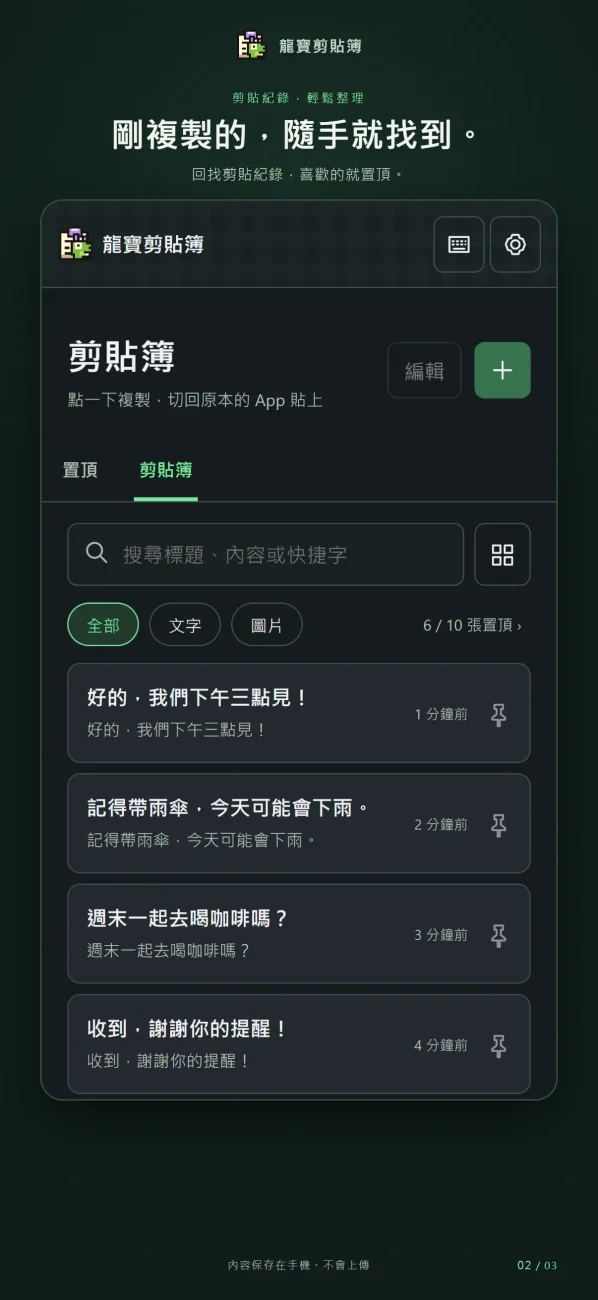
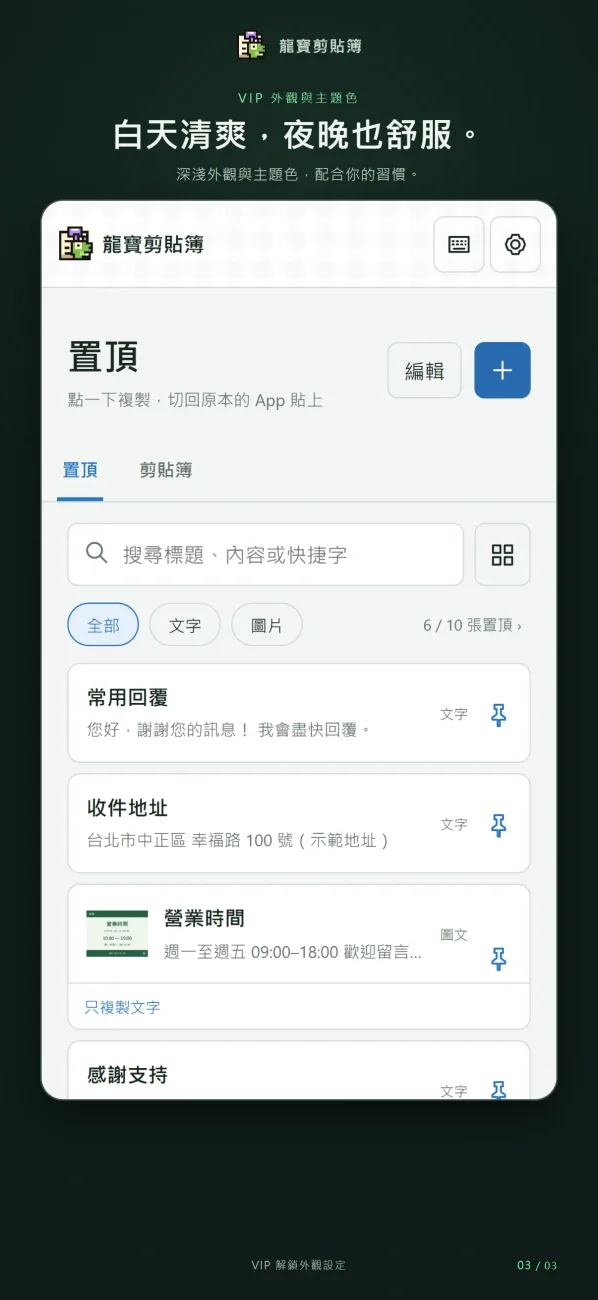
About
Keep your everyday text, images, and clipboard history organized with Dragon Clipboard. Save addresses, work replies, and frequently shared content as cards with clear titles, ready to copy with a tap.
TEXT AND IMAGES, TOGETHER
Create text, image, or combined cards. Add your own titles and pin the ones you want to keep close at hand.
FIND WHAT YOU COPIED
While you use the app or Dragon Clipboard keyboard, automatically detect and save the current clipboard contents. Pin any entry you want to keep for later.
QUICK ACCESS FROM YOUR KEYBOARD
Switch to Dragon Clipboard while typing to access pinned cards and clipboard history. Tap text to insert it directly. For images, copy first, then paste into the destination app.
CARDS OR LISTS, YOUR CHOICE
Switch between card and list views. Use search, content filters, and pin ordering to organize things your way and find what you need.
MAKE IT COMFORTABLE
Choose a dark or light appearance and personalize the app with a selection of accent colors.
YOUR CONTENT STAYS ON YOUR PHONE
Your cards and clipboard history are stored locally on your phone and aren’t uploaded. Dragon Clipboard is ad-free and works without cloud sync.
A few things to know:
• Enable keyboard access and paste permissions in your iPhone’s Settings.
• Support for pasting images and combined text-and-image content varies by app.
Website: https://clipboard.dragonsoao.com/en/
Privacy Policy: https://clipboard.dragonsoao.com/en/privacy/ios/
Terms of Use and Purchase: https://clipboard.dragonsoao.com/en/terms/ios/
What’s new
Version 2.1 · Nov 8, 2026
• Added interface support for Traditional Chinese, Simplified Chinese, English, Japanese, and Korean.
• Choose your language on first launch or change it anytime in Settings.
• The app and Dragon Clipboard keyboard share your language preference, with localized menus, messages, and guides.
• Refined interface text for easier reading and navigation on smaller screens.
App privacy
What WEI-HSUN LUNG declares on the App Store about how this app handles data.
-
Data not collected
The developer does not collect any data from this app.
Privacy practices may vary, for example with the features you use or your age.
Information
- Seller
- WEI-HSUN LUNG
- Category
- Productivity
- Version
- 2.1
- Updated
- Nov 8, 2026
- Released
- Oct 28, 2026
- Size
- 2.5 MB
- Requires
- iOS 17.0 or later
- Age rating
- 4+
- Price
- Free
- In-app purchases
- Yes
- Languages
- English, Japanese, Korean, Simplified Chinese, Traditional Chinese
- Copyright
- © LUNG WEI HSUN
You might also like
-
 社畜倒數器Productivity
-
 Cat Todo:AI & Tasks & ReminderPlanner & To do List, widget
-
 Yating: audio transcriptionConvert speech & voice to text
-
 賣貨便賣家版Productivity
-
 Clipboard - EasyPaste keyboardAuto paste keyboard clipboard
-
 Clipboard - Paste KeyboardAuto Copy and Paste Keyboard
-
 Mouse · Keyboardfor Mac or PC
-
 todo mate: To-Do List, RoutineDaily Planner & Habit Tracker
-
 pCloud - Cloud StorageProductivity
-
 Forms for Google DriveCreate Forms & View Responses