Dual Camera Pro
Two cameras, play + recompose
Designed for iPhone, iPod touch
Free · In-app purchases
- Age rating4+
- CategoryPhoto & Video
- DeveloperShanghai Dazhuo Information Technology Co., Ltd.
- LanguagesEnglish+ 21 more
- Size14.8 MB
Links to the official App Store page
Download.org hosts no file of Dual Camera Pro. The button opens its official App Store page, published by Shanghai Dazhuo Information Technology Co., Ltd. Listing last checked on Nov 16, 2026.
Screenshots


About
Dual Camera Pro is a powerful dual-camera recording tool that lets you record video with both the front and rear cameras simultaneously, composited into a single frame in real time. Whether you're capturing a concert, filming your travels, or creating reaction videos, it's the perfect assistant for you.
Core Features
● Simultaneous Dual Recording
Truly record with both front and rear cameras at the same time, delivering clear and smooth video quality.
● 9 Layout Modes
- Side by Side (adjustable split ratio via slider)
- Top and Bottom (adjustable split ratio via slider)
- Rear Fullscreen + Front Picture-in-Picture (freely drag and resize the PiP window)
- Front Fullscreen + Back Picture-in-Picture
- Mirrored Split Mode
- Single Camera Mode (front or rear only)
- Portrait Cutout + Scene
● Real-time Filters
8 built-in filters: Original, Warm, Cool, Vivid, Black & White, Retro, Brightening, and Smooth. Preview the effect in real time while recording.
● High Quality Recording
- Resolution: 720p / 1080p / 1440p / 3K / 4K
- Frame Rate: 24 / 25 / 30 / 48 / 50 / 60 fps
- Codec: H.264 / HEVC (H.265)
- Bitrate: Low / Standard / High / Highest
● Three Export Modes
- Composited Video (single file)
- Separate Videos (one file for each camera)
- Export All (composited + separate, 3 files total)
● Gesture Controls
- Pinch to zoom the rear camera
- Tap to focus
- Drag the Picture-in-Picture anywhere
- Drag the handle at the bottom-right to resize PiP
- Double-tap to show the grid guide
- Triple-tap to adjust exposure compensation
● More Features
- Countdown Timer (3s / 5s / 10s)
- Pause / Resume Recording
- One-tap mute
- Flashlight control
- Dual-camera snapshot (capture both front and rear views simultaneously)
- Auto-segment long recordings (automatically saves every 5 minutes to prevent data loss)
- Recording library management with preview, sharing, and saving to album
-------------------------------
► Unlimited Access Membership Subscription
● With this subscription, you can access all features of the app without any limitations.
● Subscription is available on a weekly, monthly, or yearly basis, depending on the plan you select.
● Payment will be charged to your iTunes account upon confirmation of purchase.
● You can turn off auto-renewal 24 hours before the current subscription ends, otherwise it will renew automatically.
● The subscription fee will be charged to your account within 24 hours before the current period ends, depending on your selected plan.
Privacy Policy: http://www.dazhuogroup.com/dualcamera/privacy_statement_en.php
Terms of Use: http://www.dazhuogroup.com/dualcamera/terms_of_use_en.php
What’s new
Version 1.2 · Sep 23, 2026
This update brings fun new features, plus canvas and stability improvements:
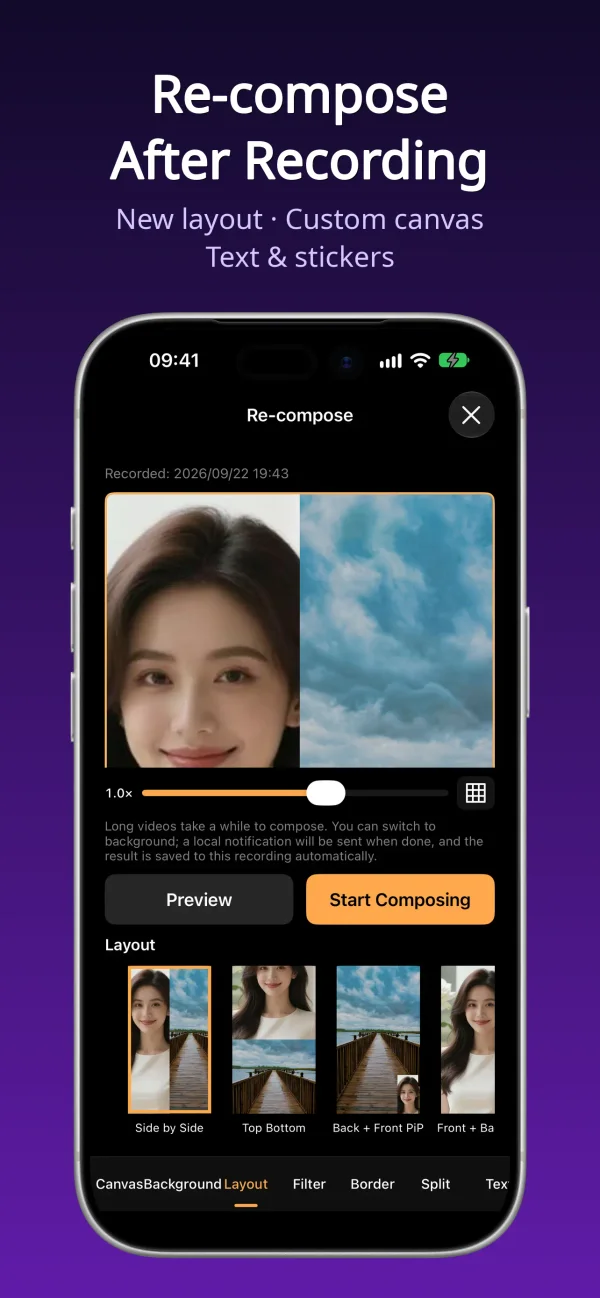
• New "Recompose": edit a recording after you shoot it. Change the layout, canvas, background, filters and borders, then add text, stickers and background music to create a new video — your original stays untouched. Long videos can compose in the background and will notify you when they are done.
• New "Creative Mask": use one picture to split the frame between the front and back cameras. Includes heart, star and ring templates, and you can import a picture made with AI.
• Canvas ratio and background: new 4:5 and 21:9 ratios plus custom sizes, background colours and fullscreen. What you preview is exactly what you get.
• New "Lecture mode": a slide fills the screen while you keep recording yourself — great for lessons, homework explanations and unboxings.
• Tidier recordings: the front, back, composite and recomposed versions of one recording now live on a single page, each with preview, export and delete.
• Fixed rare crashes when starting or stopping a recording.
App privacy
What Shanghai Dazhuo Information Technology Co., Ltd. declares on the App Store about how this app handles data.
-
Data not collected
The developer does not collect any data from this app.
Privacy practices may vary, for example with the features you use or your age.
Information
- Seller
- Shanghai Dazhuo Information Technology Co., Ltd.
- Category
- Photo & Video
- Version
- 1.2
- Updated
- Sep 23, 2026
- Released
- Jul 7, 2026
- Size
- 14.8 MB
- Requires
- iOS 15.0 or later
- Age rating
- 4+
- Price
- Free
- In-app purchases
- Yes
- Languages
- English, Arabic, Danish, Dutch, Finnish, French, German, Indonesian, Italian, Japanese, Korean, Norwegian Bokmål + 10 more
- Copyright
- © 2026 Dazhuo Group
You might also like
-
 Dual Camera・Front BackDual Video, Vlog&Selfie Camera
-
 VIXA Dual CameraFront & Back Camera Capture
-
 Yiwen DualCam - Pro PhotoDual View • Beauty Filters
-
 X2 Dual CameraShoot like a pro, create fast
-
 极简双摄相机Photo & Video
-
 Dual Camera Recorder: DuovidFront + Back · Reaction Video
-
 JourniCam - Dual Camera RecordFront Back PIP & Auto-Split
-
 Double Camera - Front & BackRecord both sides at once
-
 Dual Camera: Front & Rear CamSide by Side & PiP in One Shot
-
 DualCam: Front & Back RecorderDual Camera Recorder