
Duefall: Deadline Countdown
Widgets, milestones & alerts
Designed for iPhone, iPad
Free · In-app purchases
- Age rating4+
- CategoryProductivity
- DeveloperHamza Chaouki
- LanguagesEnglish+ 7 more
- Size37.4 MB
Links to the official App Store page
Download.org hosts no file of Duefall: Deadline Countdown. The button opens its official App Store page, published by Hamza Chaouki. Listing last checked on Nov 18, 2026.
Screenshots
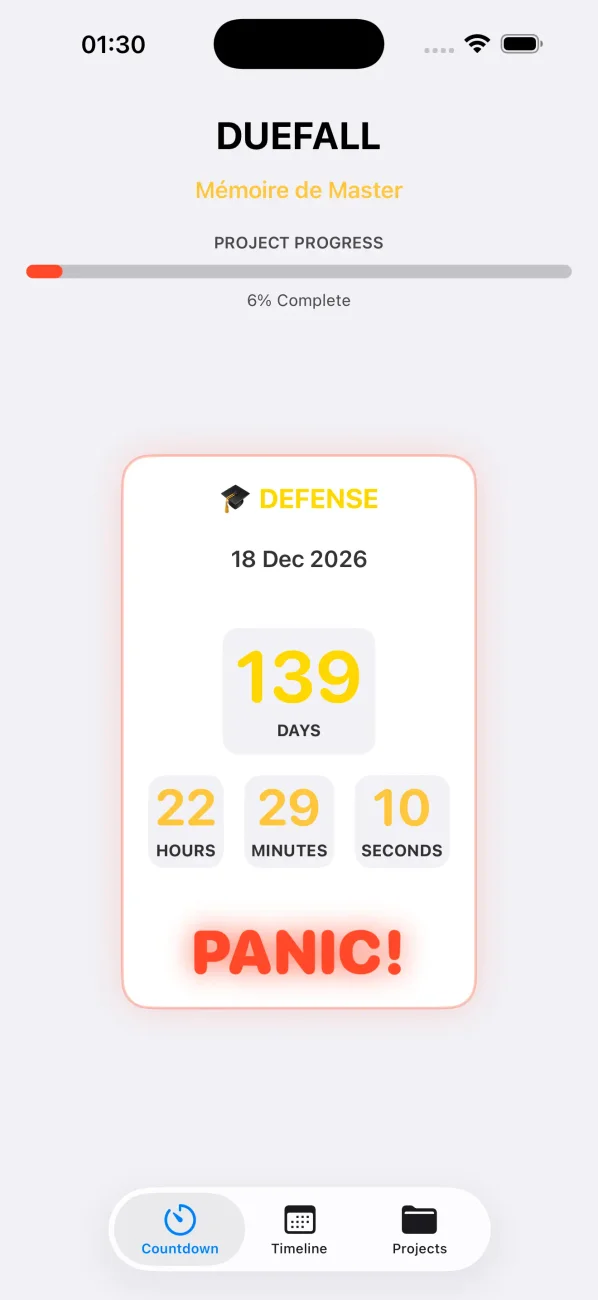
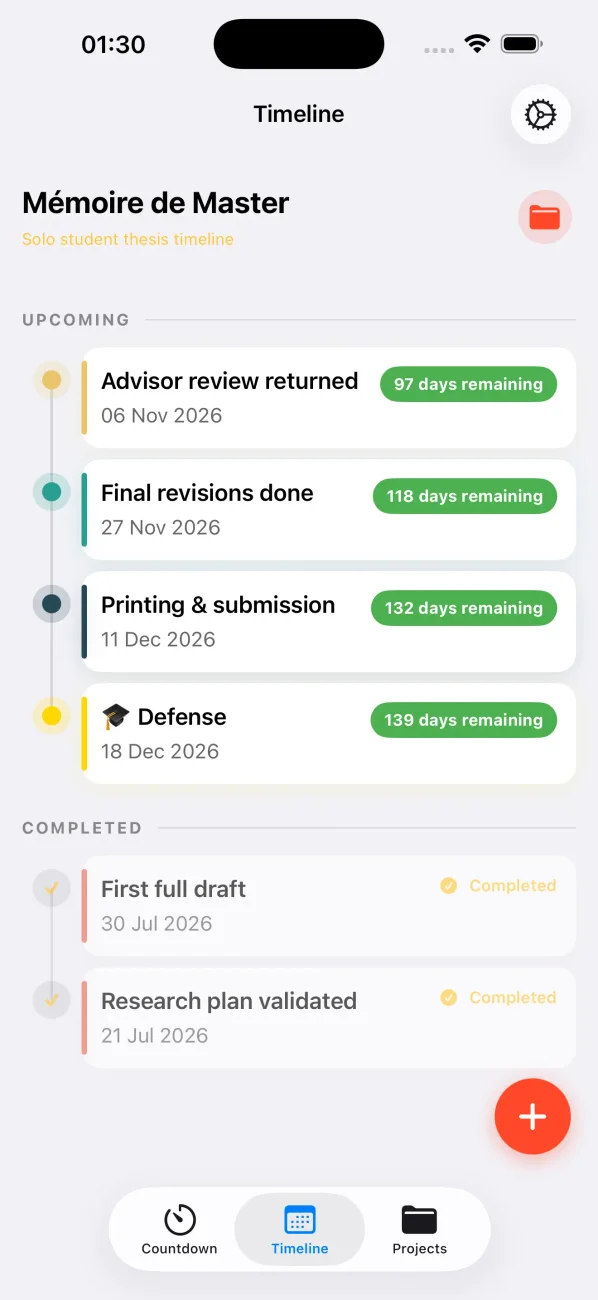

About
Duefall is your deadline and milestone tracking companion. Whether you are managing project deadlines, counting down to important events, or tracking multiple milestones, Duefall keeps you organized and on track across every Apple device you own.
WHY DUEFALL?
- Multi-Project Management - track projects with custom names, descriptions, and colors
- Milestone Tracking - add milestones to each project and monitor progress
- Real-Time Countdowns - see days, hours, minutes, and seconds remaining at a glance
- Guided Onboarding - build your first project and deadline in minutes, right inside the app
- Beautiful Widgets - add countdown widgets to your home screen on iPhone, iPad, Mac, and Apple Vision Pro
- Smart Notifications - get timely reminders for upcoming milestones
- Universal App - works seamlessly on iPhone, iPad, Mac, Apple Watch, and Apple Vision Pro
- Privacy First - all data stored locally on your device, no cloud, no tracking
- Dark Mode and High Contrast - a beautiful interface that adapts to your system appearance and accessibility settings
- Flexible Pricing - go monthly, annual, or lifetime, the choice is yours
- 8 Languages - English, French, Spanish, German, Japanese, Korean, Chinese, and Arabic
KEY FEATURES
PROJECT MANAGEMENT
- Create projects with custom names and descriptions
- Assign unique colors to each project for easy identification
- Set project deadlines and track overall progress
- Mark projects as active to display in widgets
MILESTONE SYSTEM
- Add multiple milestones to each project
- Set specific dates and times for each milestone
- Add descriptions and notes to milestones
- Mark milestones as complete to track progress
- Designate gold milestones for critical deadlines
COUNTDOWN DISPLAY
- Large, easy to read countdown timers
- Shows days, hours, minutes, and seconds remaining
- Progress bars visualize time passing
- Color coded display matches your project theme
GUIDED ONBOARDING
- Build a real project and set a real deadline as you learn the app
- Watch your own countdown come to life before you even reach the main screen
HOME SCREEN WIDGETS (Plus)
- Small and medium widget sizes
- Displays your active project countdown
- Updates automatically throughout the day
- Works on iPhone, iPad, Mac, and Apple Vision Pro
SMART NOTIFICATIONS
- Local notifications for upcoming milestones
- Never miss an important deadline
- All notifications are local to your device
APPLE WATCH SUPPORT
- Quick glance at your active project countdown
- Compact, watch optimized interface
- Digital Crown scrolling
APPLE VISION PRO
- Spatial interface designed for visionOS
- Immersive countdown experience
- Gesture based navigation
ACCESSIBILITY
- High Contrast mode follows your system accessibility setting automatically
- Every screen, from countdowns to settings, responds to it
PRIVACY AND SECURITY
- 100 percent local data storage, no servers, no cloud
- No account required, start using immediately
- No analytics or tracking
- Your data never leaves your device
PERFECT FOR
- Software developers tracking sprints and release dates
- Students managing assignment and exam deadlines
- Project managers coordinating multiple deliverables
- Event planners counting down to important dates
- Anyone juggling multiple time sensitive commitments
PRICING
Free: Up to 2 projects, 5 milestones each, ad supported
Duefall Plus ($0.99/month or $4.99/year - new annual subscribers get a 3-day free trial):
- Unlimited projects and milestones
- Home screen widgets for all your projects
- Ad-free experience
- All platforms: iPhone, iPad, Mac, Apple Watch, Vision Pro
- Priority support
Duefall Plus Lifetime ($19.99, one time purchase):
- Everything in Duefall Plus, forever
- Pay once, no recurring charge
Terms of Service: https://duefall.web.app/terms
Privacy Policy: https://duefall.web.app/privacy
What’s new
Version 1.1 · Aug 8, 2026
WHAT'S NEW
- Introducing Lifetime: unlock every premium feature forever with a single one-time purchase, no subscription required.
- Redesigned paywall: a cleaner plan picker, faster loading, and a clearer view of everything Premium includes.
- Your subscription renewal or expiration date is now visible right in Settings.
- Onboarding got smoother: step back anytime, and watch your first project and deadline come together in real time.
- Various bug fixes and stability improvements.
App privacy
What Hamza Chaouki declares on the App Store about how this app handles data.
-
Data used to track you
May be used to track you across apps and websites owned by other companies.
- Location
- Identifiers
- Usage data
-
Data linked to you
May be collected and linked to your identity.
- Purchases
-
Data not linked to you
May be collected but is not linked to your identity.
- Location
- Identifiers
- Usage data
- Diagnostics
Privacy practices may vary, for example with the features you use or your age.
Information
- Seller
- Hamza Chaouki
- Category
- Productivity
- Version
- 1.1
- Updated
- Aug 8, 2026
- Released
- Mar 19, 2026
- Size
- 37.4 MB
- Requires
- iOS 18.0 or later
- Age rating
- 4+
- Price
- Free
- In-app purchases
- Yes
- Languages
- English, Arabic, French, German, Japanese, Korean, Simplified Chinese, Spanish
- Copyright
- © 2026 HAMZA CHAOUKI
You might also like
-
 Project Tracker: Uni & ThesisUniversity & personal projects
-
 Milestone: Project OrganiserMore than a todo list
-
 Minimalist ProgressTrack your goals with clarity.
-
 GanttMaster - Project ManagerTasks, Deadlines, Risk, Budget
-
 Projectholic: Project PlannerGantt Chart·Kanban·Cost·Stats
-
 Walden - Calendar/ToDo/NotesFor Personal Time Management
-
 ToDoHabit:Awesome Daily Habits
-
 Toodledo (Next Generation) AppPowerful Productivity Tool
-
 Sembly AI Meeting Notes, TodosYour AI Teammate
-
 Lunatask: A Better To-Do ListTasks, Habits, Journal, Notes