Event Days Timer: Countdown
System alarms, lunar & widgets
Designed for iPhone, iPad
Free · In-app purchases
- Age rating4+
- CategoryProductivity
- DeveloperWujie Yibang (fuzhou) Software Technology Co., Ltd
- LanguagesEnglish+ 3 more
- Size6.5 MB
Links to the official App Store page
Download.org hosts no file of Event Days Timer: Countdown. The button opens its official App Store page, published by Wujie Yibang (fuzhou) Software Technology Co., Ltd. Listing last checked on Nov 7, 2026.
Screenshots



About
Event Days Timer keeps every important date in one place: birthdays, anniversaries, credit card bills, holidays, exams, concerts. Add it once and the app counts how long to go, or how long it's been, and reminds you right on time.
HOME AT A GLANCE
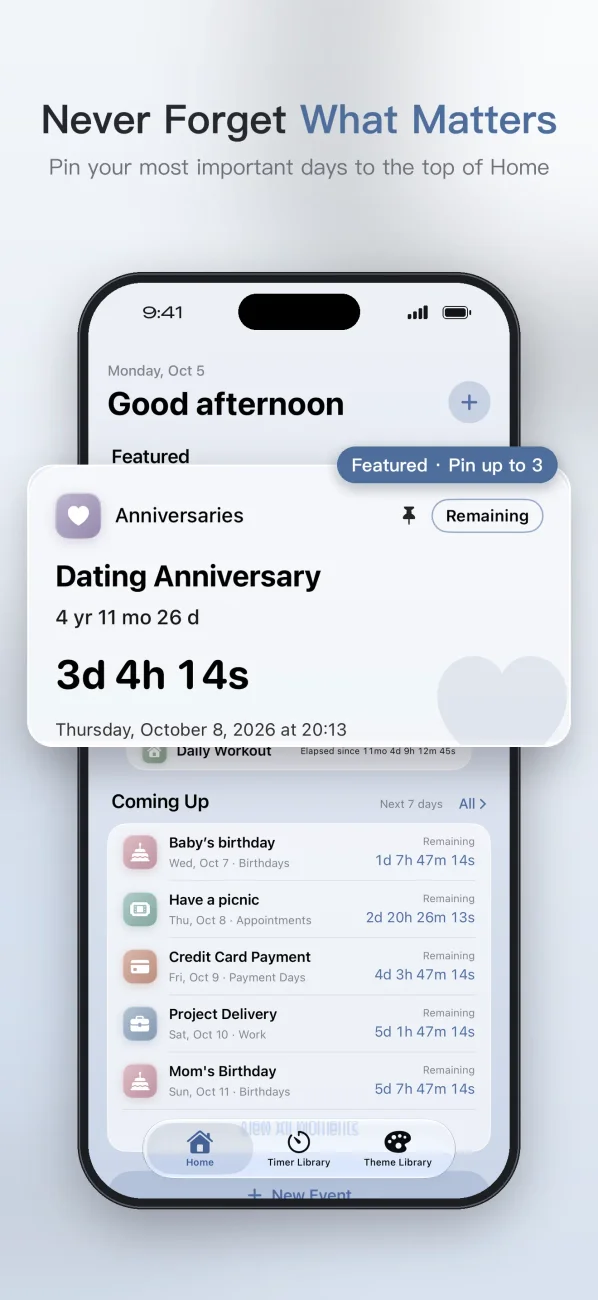
• Featured: pin up to 3 moments to the top of Home
• Overdue: moments that are due but not done yet, with a one-tap Done button
• Coming Up: everything due in the next 7 days, sorted by time
DONE OR NOT, AT A GLANCE
• Cards show Not Done, Overdue, Done Early or Completed; tap Done or Undo to switch
• Finishing early skips this time's notification and alarm; repeating moments start fresh next time
• On by default for Payment Days; set it for any group under Edit Group and apply it to existing cards in one tap
• The app icon shows how many moments are overdue, even before you open the app
JUST TYPE, AUTO-SORTED
• Type "Mom's Birthday", "Rent" or "Christmas" and the group and repeat rule are set for you
• Holiday dates fill in automatically, including lunar holidays like Chinese New Year and Mid-Autumn
• Anything not recognized goes to Life, and you can change it anytime
IMPORT FROM REMINDERS & CALENDAR
• Pick dates you already keep in Reminders or Calendar and import them in one tap, sorted into groups
• Lunar birthdays are imported as lunar dates, so they stay right every year
• Read-only: your original data is never changed, and access is only requested when you tap Import
BIRTHDAYS
• Ages calculated automatically, including traditional Chinese nominal age
• Gregorian and lunar birthdays repeat every year
ANNIVERSARIES
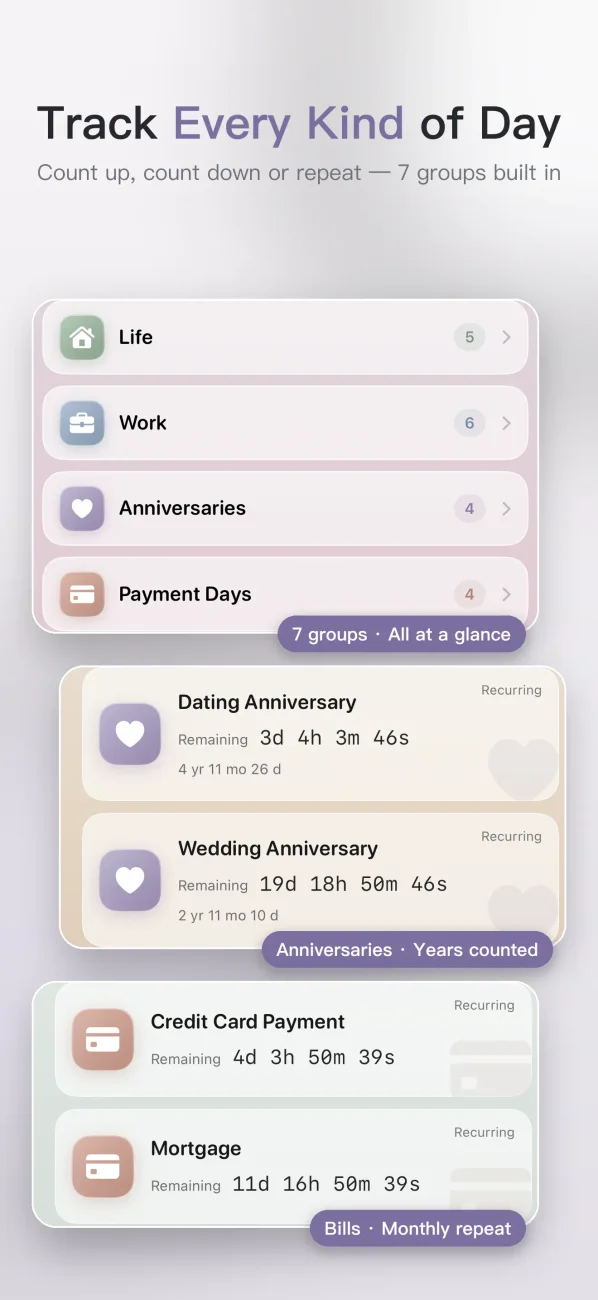
• Dating, wedding, baby's birthday, new home: years, months and days counted for you
• Count up to see how long it's been, or count down to the next one
BILLS, NEVER LATE
• Credit cards, mortgage, car loan: monthly countdowns that repeat on their own
• Daily, weekly, monthly, yearly, or every few days or weeks
REMINDERS THAT REACH YOU
• Notifications days or minutes ahead, showing the date and time; they come through even in Focus
• Real system-level alarms on iOS 26 that ring even on the Lock Screen
• Tap a notification to open that moment
7 GROUPS, ORGANIZED
• Life, Work, Anniversaries, Payment Days, Holidays, Birthdays, Appointments
• Search and Archive; one-time moments archive themselves when they're done
8 THEMES, 7 IN SOFT MUTED TONES
• Fresh Cards, Lotus Pink, Dusty Rose, Caramel Latte, Evening Breeze, Celadon, Misty Blue, Starry Night
• Set an icon and color for each moment, or for a whole group at once
• Home Screen and Lock Screen widgets have their own themes too
YOUR UNITS, YOUR WAY
• Turn years, months, days, hours, minutes, seconds and milliseconds on or off; hours by default
• In the final stretch it switches to hours, minutes and seconds automatically
BATTERY, SYNC & PRIVACY
• Only cards you can see are refreshed; collapsed groups use no power
• Optional iCloud sync to restore on a new phone
• No account needed; your data stays on your device and in your own iCloud
FREE & PREMIUM
• The free version holds up to 10 moments, with every feature included
• A one-time Premium purchase removes the limit (no subscription)
Event Days Timer: never forget the days that matter.
What’s new
Version 2.2.0 · Nov 1, 2026
Version 2.2.0
NEW
• Completion status: cards show Not Done, Overdue, Done Early or Completed. Tap Done or Undo right on the card. Finishing early skips this time's notification and alarm
• New Overdue section on Home for moments that are due but not done
• The app icon shows how many moments are overdue. Turn it off in the Themes tab
• Groups can set whether new cards track completion, and apply it to existing cards in one tap. On by default for Payment Days
• Calendar import keeps lunar birthdays as lunar dates. Items you imported before can be imported again; duplicate titles get a number
CHANGES
• Notifications are now Time Sensitive, so they come through in Focus, and show the moment's date and time
• Coming Up can show or hide short repeats such as daily, every few days or weekly
• Clearer reminder settings: Reminder Time is shared by notifications and the alarm; Advance Notification only applies to notifications
• Group Appearance in the Themes tab is now called Edit Group
FIXES
• Fixed the sample "New Year" moment coming back after you deleted it
• Fixed alarms not ringing again after a moment that already rang was moved to a later date
• Fixed a crash that could happen when opening the app from a notification
If you use iCloud sync on several devices, please update all of them.
App privacy
What Wujie Yibang (fuzhou) Software Technology Co., Ltd declares on the App Store about how this app handles data.
-
Data not collected
The developer does not collect any data from this app.
Privacy practices may vary, for example with the features you use or your age.
Information
- Seller
- Wujie Yibang (fuzhou) Software Technology Co., Ltd
- Category
- Productivity
- Version
- 2.2.0
- Updated
- Nov 1, 2026
- Released
- Jul 16, 2026
- Size
- 6.5 MB
- Requires
- iOS 26.0 or later
- Age rating
- 4+
- Price
- Free
- In-app purchases
- Yes
- Languages
- English, Japanese, Simplified Chinese, Traditional Chinese
- Copyright
- © 2026 Wujie Yibang (Fuzhou) Software Technology Co., Ltd
You might also like
-
 BriefFeedAI summaries, key points first
-
 Lyt WorkShiftThe Lyt! Shift Tracker
-
 EverPass: Expiry ReminderDocument Wallet & Passport Box
-
 WorkplaceLogPrivate incident log & rights
-
 RouteProofGig evidence for 1099 drivers.
-
 OWrite ProDo every little thing well.
-
 Sticky NoteaQuick notes, simply organized
-
 RACI MasterTask planner with RACI roles
-
 Calendar in Motion: DaySpinEvents,Reminders,Schedule
-
 1LensMetacognitive Training