
Expense Tracker Genius
Budget, Travel & AI Scanner
Designed for iPhone, iPad, Mac
Free
- Age rating4+
- CategoryFinance
- DeveloperHussein Juybari
- LanguagesEnglish+ 22 more
- Size34.2 MB
Links to the official App Store page
Download.org hosts no file of Expense Tracker Genius. The button opens its official App Store page, published by Hussein Juybari. Listing last checked on Nov 13, 2026.
Screenshots



About
Take control of your finances with Expense Tracker Genius — the smart, privacy-first expense tracker for iPhone, iPad, and Mac.
SMART EXPENSE TRACKING
- Add income and expenses with categories, tags, and notes
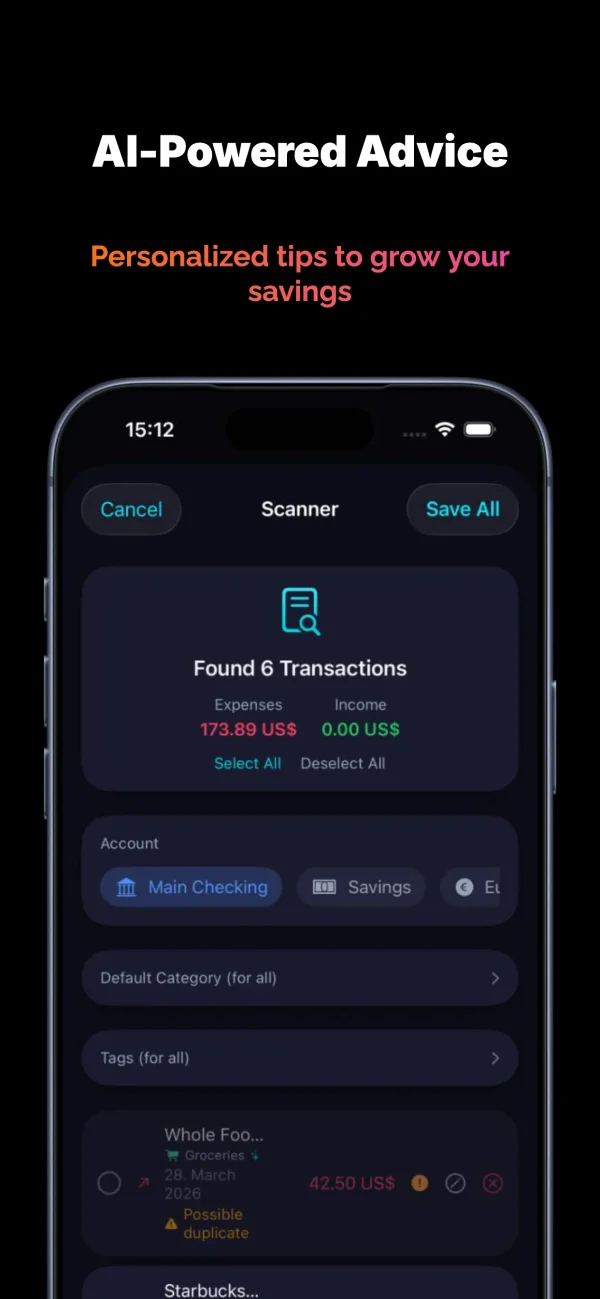
- 3-tier scanning: Apple Intelligence, Vision spatial analysis, then regex
- Scan receipts, bank statements, and payment app screenshots
- Supports 20+ payment apps: PayPay, Suica, nanaco, Coke ON, Venmo, and more
- AI detects multiple transactions from a single image
- Smart category suggestions powered by Apple Intelligence or NLP
- Recurring transactions, receipt attachments
- Share Extension and Quick Actions from Home Screen
AI-POWERED TRAVEL PLANNER
- Plan trips with cost estimation powered by Apple Intelligence
- Compare flights, trains, buses, and car routes with real MapKit data
- Find real hotels via Apple Maps at budget, mid-range, and luxury tiers
- Day-by-day itinerary with breakfast, lunch, dinner, and cafe suggestions
- Track estimated vs actual spending with comparison charts
- Interactive map with route, hotel, and activity pins
- Share trip cards to Instagram, Facebook, or save to Photos
- Link trips to savings goals with per-person budget breakdown
- Weather forecast and metric/imperial support
BUDGETS & SAVINGS GOALS
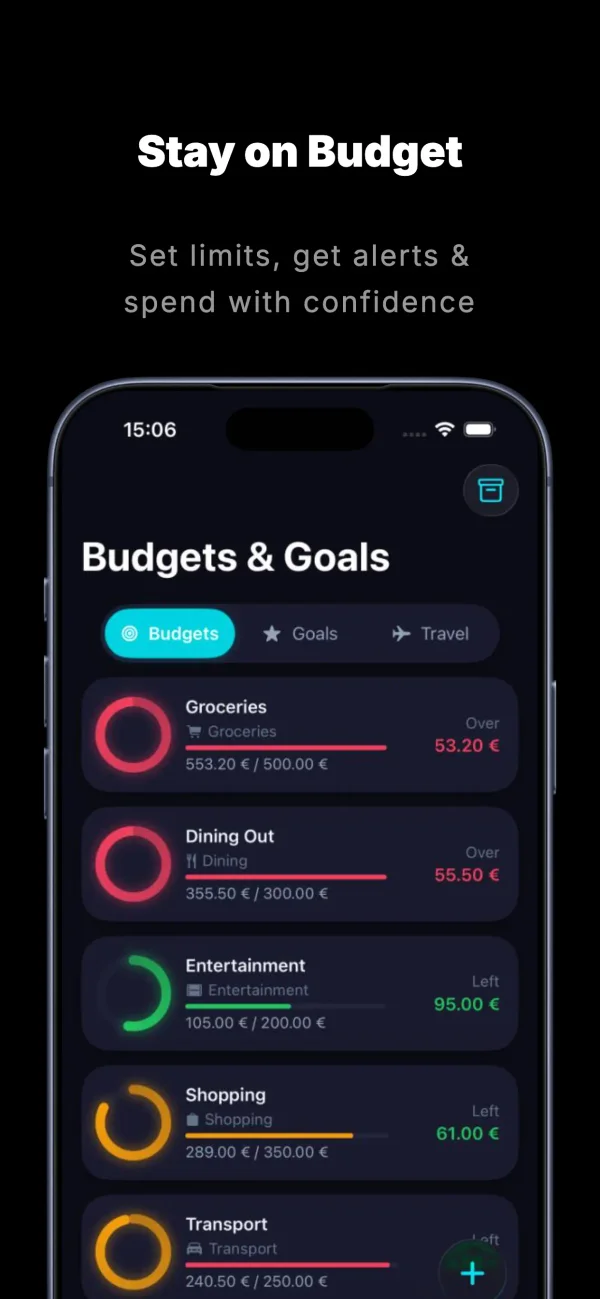
- Category budgets with weekly, monthly, or custom periods
- Visual progress charts and limit notifications
- Pay cycle support — track from payday to payday
- Savings goals with due dates and AI-powered tips
- Addiction goals to cut spending on specific categories
REPORTS & INSIGHTS
- Pie charts, bar charts, radar charts, and line graphs
- Daily, weekly, monthly, and yearly breakdowns
- AI-powered spending analysis and predictions
- Predictions follow your selected account filter
- Export as CSV, PDF, or images
MULTIPLE ACCOUNTS & CURRENCIES
- Cash, bank, credit card accounts with per-account currency
- 60 currencies (30 fiat + 30 crypto) with live rates
- Beautiful stacked card interface
PERFORMANCE
- 63x faster dashboard with single-pass calculations
- Charts cached and only recompute when data changes
- Debounced updates — no lag when switching views
APPLE WATCH & 11 WIDGETS
- Watch: daily summary, add expenses, complications
- Widgets: balance, budget, goals, spending, travel, quotes
- 7 themes: System, Story Card, Editorial, Pop Art, Monochrome Ink, Card Stack, Midnight Sapphire
DESIGNED FOR MAC
- Native Mac Catalyst with keyboard shortcuts
- Resizable window with full feature parity
PRIVACY FIRST
- All data on your device — no servers
- Optional iCloud sync, Face ID/Touch ID/PIN lock
- Privacy mode hides amounts
23 languages. Full accessibility. Siri Shortcuts. Start today!
What’s new
Version 1.7.2 · Sep 20, 2026
Version 1.7.2 — Custom Currencies & Smarter AI
Custom Currencies
Add any currency that isn't built in, with your own exchange rate. Omani Rial (OMR) is now supported out of the box too.
Bring Your Own AI Key, Expanded
Use Claude, Gemini, ChatGPT, or your own AI service instead of Apple Intelligence — now available for receipt scanning too, not just categorization.
Smarter Receipt Scanning
Receipts with handwriting, glare, or non-English text are now read more accurately on supported devices.
Find Transactions with Search & Siri
Your transactions are now searchable from iPhone Search and Siri.
Also Fixed
- New account balances now show correctly right away instead of $0.00 until restart
- Exporting to CSV, PDF, or PNG works reliably every time
- AI category suggestions and bank message parsing now work as intended
- Fixed layout issues on iPad/Mac, including the photo picker and several squeezed-looking screens
App privacy
What Hussein Juybari declares on the App Store about how this app handles data.
-
Data not linked to you
May be collected but is not linked to your identity.
- Identifiers
- Usage data
- Diagnostics
Privacy practices may vary, for example with the features you use or your age.
Information
- Seller
- Hussein Juybari
- Category
- Finance
- Version
- 1.7.2
- Updated
- Sep 20, 2026
- Released
- Mar 20, 2026
- Size
- 34.2 MB
- Requires
- iOS 17.0 or later
- Age rating
- 4+
- Price
- Free
- Languages
- English, Arabic, Czech, Dutch, French, German, Hebrew, Hindi, Hungarian, Italian, Japanese, Korean + 11 more
- Copyright
- © 2026
You might also like
-
 Cashy: Smart Budget & ExpensesAI Expense Tracker & Advisor
-
 SubBot - Subscription ManagerBill Tracker, Cancel Trials
-
 BalanceTrackrBudget & Expense Tracker
-
 Super Investor: SEC FilingsSpot risks before Wall Street
-
 WalletAppYour cards, always with you
-
 Wise money manager - SpendwiseDaily expense manager
-
 Split Pay Calculator: FanumTaxFake Receipt & Aura Tracker
-
 Subscriptions Tracker - SubioTrial & Renewal Reminders
-
 DBHPassword,Location,Tasks,Player
-
 Basil: Budget & Spend TrackerTrack Spending Automatically