
Expra: Receipt Scanner
AI expenses to CSV & tax
Designed for iPhone
In-app purchases
- Age rating4+
- CategoryFinance
- DeveloperJIYULMOM
- LanguagesArabic+ 12 more
- Size11.8 MB
Links to the official App Store page
Download.org hosts no file of Expra: Receipt Scanner. The button opens its official App Store page, published by JIYULMOM. Listing last checked on Nov 12, 2026.
Screenshots


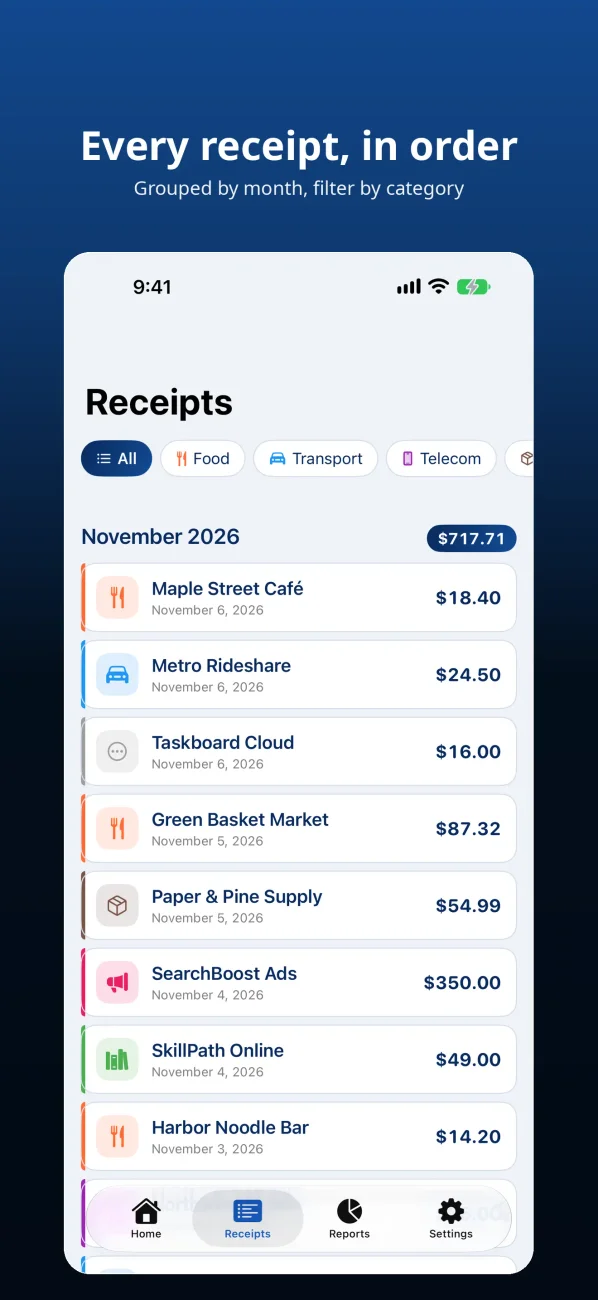

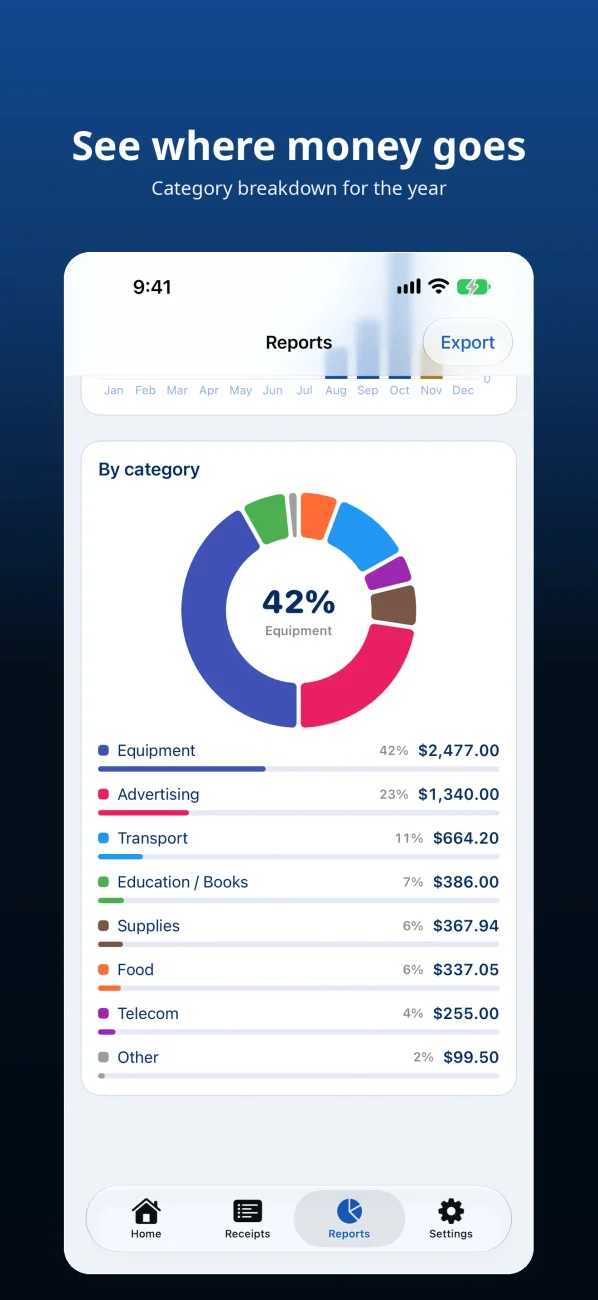
About
Expra turns one receipt photo into vendor, amount and category — tax prep made effortless. No sign-up needed: open the app and start scanning.
▶ Features
• AI receipt scan — reads vendor, date, amount and VAT with Anthropic Claude
• Auto-categorization into 8 categories: Food, Transport, Telecom, Supplies, Advertising, Equipment, Education and Other
• Manual entry any time
• Monthly and annual reports with bar and donut charts
• Home-screen widget with this month's total
• Works without an account — receipts are saved on your iPhone. Connecting Apple, Google or email is optional
• Dark / Light theme · 13 languages
▶ Free
• 10 AI scans per month · manual entry and reports always free
▶ Expra Pro
• Up to 200 AI receipt scans per day
• CSV export — open in Excel or hand straight to your accountant
• Cloud sync across your devices (with a connected account)
▶ Pricing
• $3.99 / month or $29.99 / year (prices may vary by region)
• 7-day free trial, then auto-renews
• Cancel anytime in Settings > Apple ID > Subscriptions
▶ Who it's for
• Freelancers and solopreneurs sorting receipts every month
• Anyone who tracks deductible expenses for year-end tax filing
• Anyone who'd rather hand their accountant one CSV than a shoebox of receipts
Stop organizing receipts by hand. Let Expra collect a year of spending and hand your accountant a single CSV.
- Support : https://ootssu.com/expra/support.html
- Privacy Policy : https://ootssu.com/expra/privacy.html
- Marketing : https://ootssu.com/expra/
Subscriptions auto-renew unless cancelled at least 24 hours before the period ends. Manage or cancel anytime in your Apple ID settings.
Terms of Use: https://ootssu.com/expra/terms.html
Privacy Policy: https://ootssu.com/expra/privacy.html
What’s new
Version 1.2.7 · Nov 6, 2026
Store images refreshed to match the new design. Fixes: amounts on the scan review screen no longer show a stray decimal (e.g. "2760.0"), and the export screen total now uses your receipts' currency instead of always showing won. The monthly chart axis also no longer shows numbers like "6.0E6" for large amounts. On iPhone Duo in laptop posture, receipt details now sit in the top half so the tab bar no longer covers them. Devices set to a language the app doesn't support yet now see English instead of Korean. Also fixed: Reports crashing on devices set to the Islamic calendar, and an overlong year list with the Buddhist calendar.
App privacy
What JIYULMOM declares on the App Store about how this app handles data.
-
Data linked to you
May be collected and linked to your identity.
- Purchases
- Financial info
- Contact info
- User content
- Identifiers
-
Data not linked to you
May be collected but is not linked to your identity.
- Diagnostics
Privacy practices may vary, for example with the features you use or your age.
Information
- Seller
- JIYULMOM
- Category
- Finance
- Version
- 1.2.7
- Updated
- Nov 6, 2026
- Released
- May 4, 2026
- Size
- 11.8 MB
- Requires
- iOS 17.0 or later
- Age rating
- 4+
- In-app purchases
- Yes
- Languages
- Arabic, English, French, Hindi, Indonesian, Japanese, Korean, Polish, Thai, Traditional Chinese, Turkish, Simplified Chinese + 1 more
- Copyright
- © 2026 ootssu.com
You might also like
-
 Profit Margin Calculator: ROIMarkup, Break Even, Sales Tax
-
 Savern: Budget & Track MoneySpending, Bills & Debt Planner
-
 SnapBudget: One-Tap SpendingBudget Widget • Save Smarter
-
 Business Expense Tracker AppDaily Spending & Money Manager
-
 Split Expenses: Share CostsRoommates, trips, no signup
-
 Receipt Scanner & VAT TrackerSole trader expense reports
-
 Profio: Bookkeeping & LedgerTrack sales, expenses & profit
-
 TeamFund: Group ExpenseShared fund & cost tracker
-
 DokfinFinance
-
 Expense AI: Budget & ReceiptsPrivate AI Spending Tracker