
FakeTake2
Automatic Double Tracker AUv3
Designed for iPhone, iPad, Mac, iPod touch
$1.99
- Age rating4+
- CategoryMusic
- DeveloperRob Jackson
- Size12.4 MB
Links to the official App Store page
Download.org hosts no file of FakeTake2. The button opens its official App Store page, published by Rob Jackson. Listing last checked on Nov 15, 2026.
Screenshots

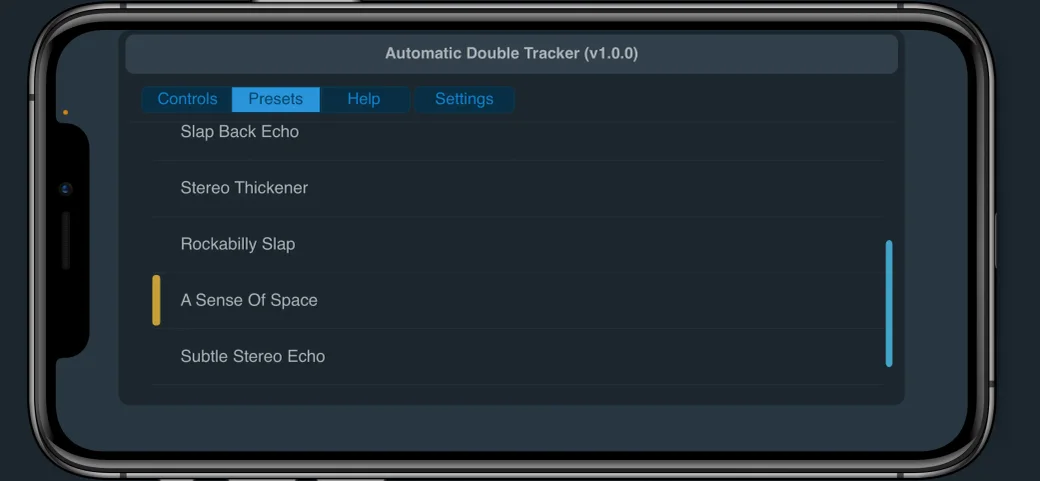

About
FakeTake2 Double Tracker Plugin (AUv3)
FakeTake2 is an audio effect plugin that can run standalone, or in any AU compatible host application such as Logic Pro or GarageBand.
Overview
FakeTake2 is a tribute to the old "automatic double tracker" studio trick. The idea is that ADT creates the illusion of the same part, overdubbed again (a "fake take") which can work great with many instruments, especially guitar and vocals. There are various approaches for achieving this effect, but most use a short delay, a bit of stereo processing and possibly some modulation applied to the delay. FakeTake uses all three!
What's the difference between FakeTake2 and the original FakeTake?
FakeTake2 has some tweaks and additional features:
The delay and modulation range has been increased.
New "Trio" mode which adds an extra "fake take".
A new mix control to balance the dry signal with the fake takes.
FakeTake2 also gets the latest small UI improvements.
If you require a very basic doubler, the original FakeTake might fit the bill and it's FREE. Alternatively, if you already have FakeTake, the additional features in FakeTake2 might be useful - especially on vocal tracks.
Note that FakeTake2 works best when given a mono signal such as vocals or guitars, as it has been designed as a mono to stereo effect. It will handle stereo input just fine though.
Controls
Active - Toggles the effect On or Off.
Mode - Selects between Duo and Trio mode. In Duo mode, you have one generated "fake take" and in Trio mode, you have two. Duo mode corresponds to the original FakeTake.
Delay - Sets the base delay time of the fake take(s). Low settings can be thought of as "tighter", and higher values, "looser", going up to almost a slap-back echo effect.
Drift - Adds a subtle amount of delay time modulation to create a more natural, less predictable effect.
Spread - Varies the stereo width of the ADT effect. At maximum, in Duo mode, the original and delayed signals are panned hard-left and hard-right respectively. At zero, both are dead-centre. Spread can also be used to create space in a mix. For example, apply spread to a guitar track to leave room for vocals in the middle. In Trio mode, the dry signal is untouched, and the two fake takes are panned left and right. Trio mode works especially well with vocals when you need them to be front and centre, but also want to thicken them up and add create a nice stereo image.
Mix - Sets the fake take / dry signal balance, allowing you to blend in a smaller amount of the effect. At zero, you will only hear your dry signal.
For more info and support please visit:
www.waverley-instruments.com/robjackson
What’s new
Version 1.0.1 · Nov 20, 2025
Bug fix for stereo input not being handled correctly.
Sorry about that. -Rob
App privacy
What Rob Jackson declares on the App Store about how this app handles data.
-
Data not collected
The developer does not collect any data from this app.
Privacy practices may vary, for example with the features you use or your age.
Information
- Seller
- Rob Jackson
- Category
- Music
- Version
- 1.0.1
- Updated
- Nov 20, 2025
- Released
- Nov 11, 2025
- Size
- 12.4 MB
- Requires
- iOS 12.0 or later
- Age rating
- 4+
- Price
- $1.99
- Copyright
- © 2025 Rob Jackson
You might also like
-
 XenoVerb - Reverb Suite13 Reverbs App + AUv3
-
 FAC PolyfloCreative Modulation Flow AUv3
-
 SpaceWalk - Chord GeneratorAmbient Chords. Zero Effort.
-
 MFX mottoMulti-Effects chain plugin
-
 SlowMoFXSlow Motion Audio Effects
-
 Parrot - Audio repeaterRepeat after me
-
 CID RIM - The EggEverything’s bettr w/ an egg
-
 FM20FM/VA AUv3 Synthesizer
-
 Dark Park - Cinematic SynthDark Ambient Synthesizer
-
 Toyphonic MicraliserAUv3 Toy Microphone Emulator