
FallGuard - Fall Alerts
Fall Detection & Family Alerts
Designed for iPhone, iPad
Free
- Age rating12+
- CategoryHealth & Fitness
- DeveloperTim Jones
- LanguagesEnglish
- Size4.3 MB
Links to the official App Store page
Download.org hosts no file of FallGuard - Fall Alerts. The button opens its official App Store page, published by Tim Jones. Listing last checked on Nov 24, 2026.
Screenshots
About
FallGuard alerts your family the moment your Apple Watch detects a fall — with the time and location — so someone who cares about you knows right away.
ONE APP, TWO ROLES
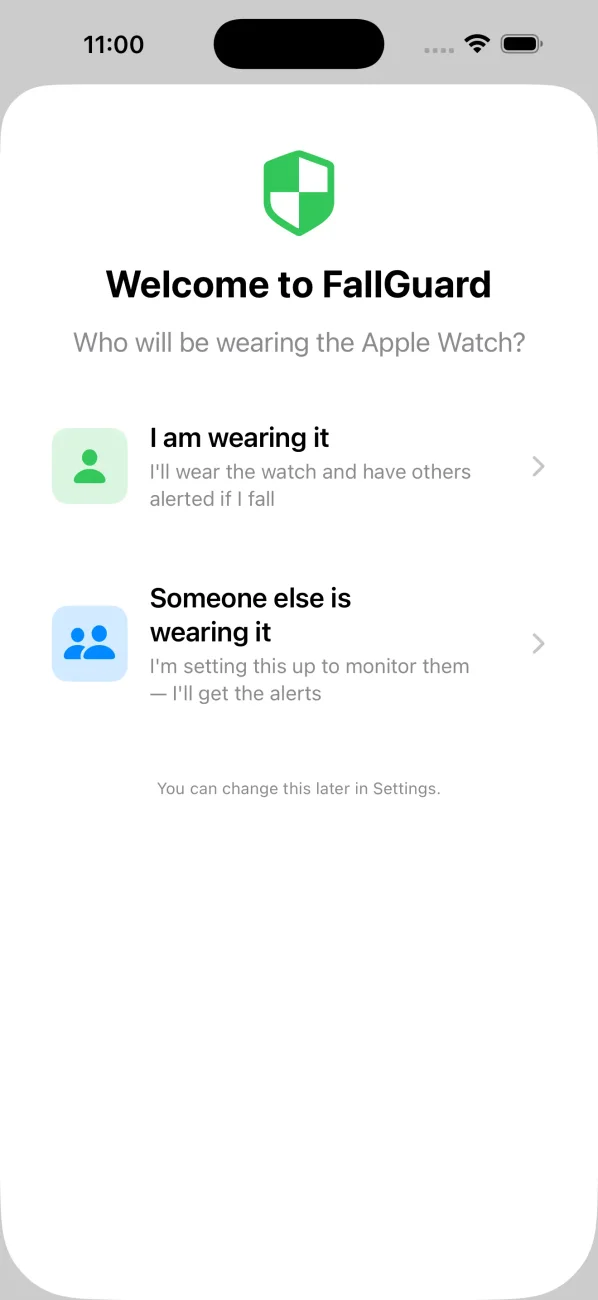
On first launch, choose "I wear the Apple Watch" or "I'm a caregiver or family member". FallGuard shows the right screens for you, remembers your choice, and lets you switch anytime.
FALL ALERTS THAT GET THROUGH
When the wearer's Apple Watch detects a fall, FallGuard sends an urgent notification with the time and location to everyone who joined their family code. Alerts are always sent — even if the wearer taps "I'm OK" — so family can check in. Fall alerts can break through silent mode and Focus; you'll be asked once whether to allow this, and you can turn it off anytime.
SIMPLE SETUP
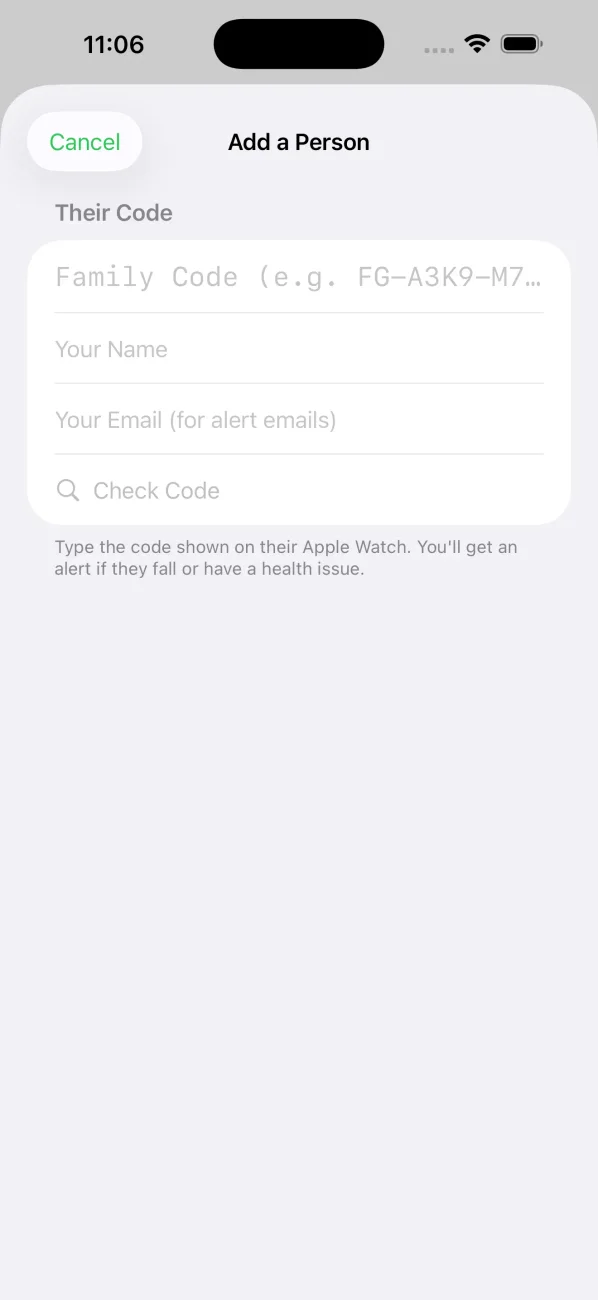
The wearer's watch shows a family code. A family member installs FallGuard, chooses "I'm a caregiver or family member", taps "Add a person", and enters the code. Until someone joins, FallGuard shows a clear warning that no one will be alerted yet, with a one-tap invite.
ONE PERSON, ONE CARD
Caregivers see a card for each person they watch over — name, status, and last update at a glance — and can watch over more than one person.
WHO IT'S FOR
Adult children watching over aging parents, caregivers, and anyone who wants family to know right away if they fall.
IMPORTANT
FallGuard does not call 911 or emergency services. Apple Watch's built-in fall detection and Emergency SOS handle emergency calling; FallGuard adds family awareness on top.
REQUIREMENTS
• Wearer: Apple Watch with watchOS 10 or later, paired with an iPhone
• Caregivers: iPhone with iOS 17 or later
• Notifications permission
We'd love your feedback. Reach us at support@fallguard.me.
What’s new
Version 3.4 · Nov 23, 2026
FallGuard 3.4 makes alerts easier to read and act on. Alert screens now have big buttons, high-contrast text and a Read aloud option. Urgent Critical Alerts are now reserved for confirmed falls and falls with no response. "I'm OK" and "I didn't fall" send a calmer notice. History now shows how each fall ended.
App privacy
What Tim Jones declares on the App Store about how this app handles data.
-
Data linked to you
May be collected and linked to your identity.
- Health and fitness
- Location
- Contact info
- Identifiers
- Usage data
- Diagnostics
Privacy practices may vary, for example with the features you use or your age.
Information
- Seller
- Tim Jones
- Category
- Health & Fitness
- Version
- 3.4
- Updated
- Nov 23, 2026
- Released
- Apr 7, 2026
- Size
- 4.3 MB
- Requires
- iOS 17.0 or later
- Age rating
- 12+
- Price
- Free
- Languages
- English
- Copyright
- © 2026 TJones
You might also like
-
 iFellFall Detection & Heart Rate
-
 FallCall LitePersonal Emergency Assistant
-
 Fall Alert – My Medic WatchAutomatic Fall Detection
-
 FallCall DetectSmart Fall and Crash Detection
-
 BoundaryCare Watch-Based GPSSafety & More – Dementia & IDD
-
 RscMe: Heart SOS & AlertsAutomatic SMS to Your Family
-
 SeizAlarmAlert help request service
-
 EpiCentr: Seizure DetectionSeizure Alerts, Epilepsy Log
-
 GO Club: Steps + WaterStep Counter & Water Reminder
-
 ECG+ | Your Watch ECG ReaderEvidence your doctor can use