
Fasting Notebook
Intermittent fast timer & log
Designed for iPhone, iPad, iPod touch
- Age rating12+
- CategoryHealth & Fitness
- DeveloperHyunjin Jang
- LanguagesKorean+ 2 more
- Size29.2 MB
Links to the official App Store page
Download.org hosts no file of Fasting Notebook. The button opens its official App Store page, published by Hyunjin Jang. Listing last checked on Nov 14, 2026.
Screenshots




About
Tap Start fast, and the timer counts your fasted time from that moment.
Fasting Notebook is a timer and log for intermittent fasting. Set a goal of up to 7 days. When you pass the goal, the timer keeps counting until you end the fast. You do not need an account. Install it and start.
■ Undo a wrong tap
• Started by mistake? Undo it right after you tap Start fast
• Ate a while ago? Choose “Already started” to begin 15 minutes, 30 minutes, 1 hour or 2 hours back
• During a fast, you can change the start time and the goal
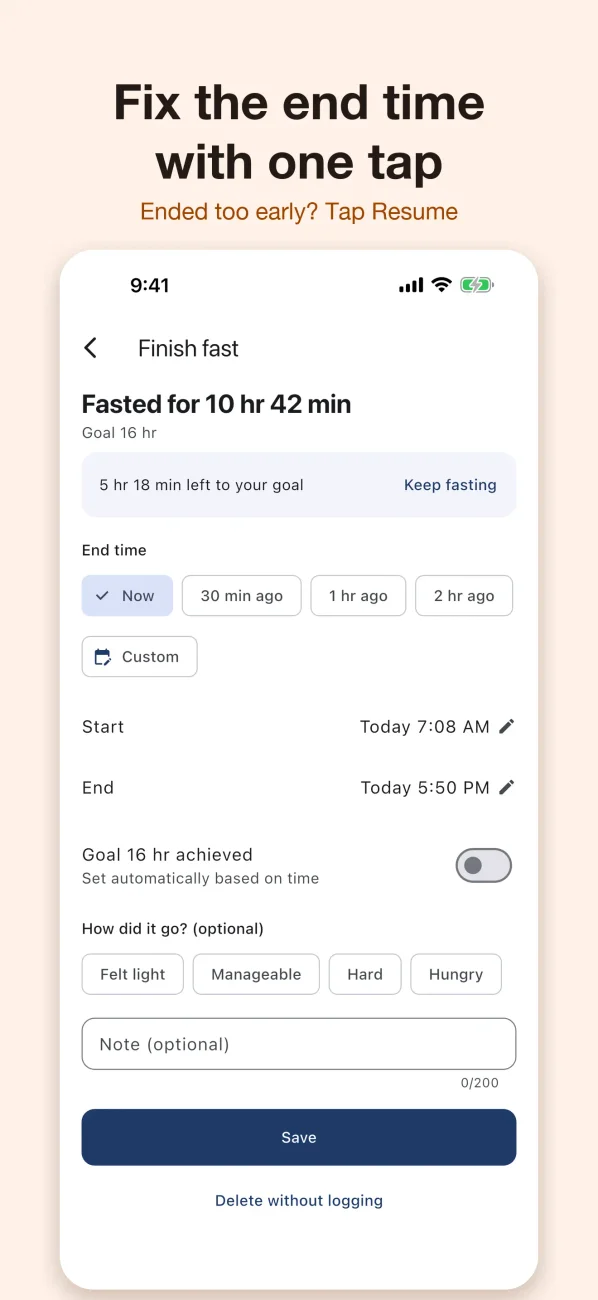
• Forgot to end a fast? Fix the end time afterward
• Delete a fast you started by mistake with “Delete without logging”
• Ended a fast too early? Tap Resume to keep counting the fast you just ended
■ From 12:12 to one meal a day, up to 7 days
• Plans for 12:12, 14:10, 16:8, 18:6, 20:4, one meal a day (23:1), and 36, 48 and 72 hours
• Set your own length, or time a fast without a goal
• New to fasting? Answer two questions to see a recommended plan
• Schedule fasts for every day, certain weekdays or every few days, with reminders for 5:2 days
• Goals longer than 24 hours ask for your confirmation before you start
■ See which hour you are on
• A ring divided into time ranges, with your elapsed time
• Time left to your goal, and time past it
• Each time range has notes to read. They are not medical advice
■ Lock Screen and Home Screen widgets
• The widget shows your elapsed time without opening the app
• During a fast, a Live Activity appears on the Lock Screen and in the Dynamic Island. You can turn it off in Settings
■ Log and stats
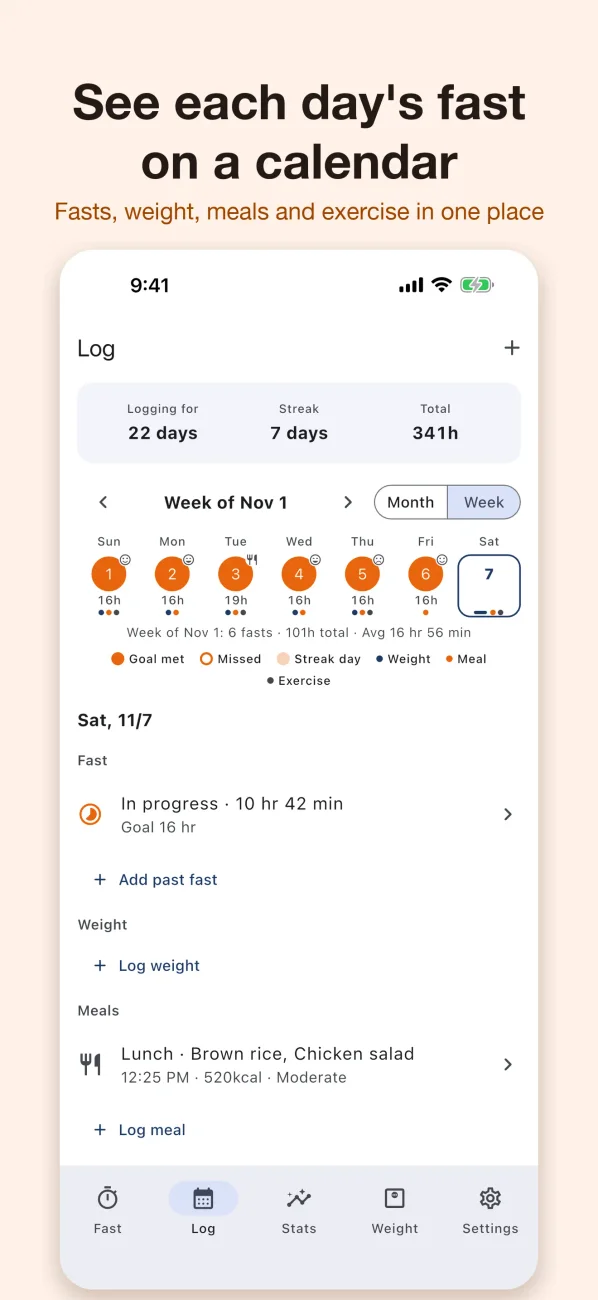
• A calendar of your fasts and your streak
• Stats for 7, 30 and 90 days: average and longest fast, goal completion rate and mood
• Log weight, body fat and muscle mass, with charts
• Body photos collected by date, so you can compare them
• Carry over the days and fasting hours you built in another app
■ Meals, exercise and water
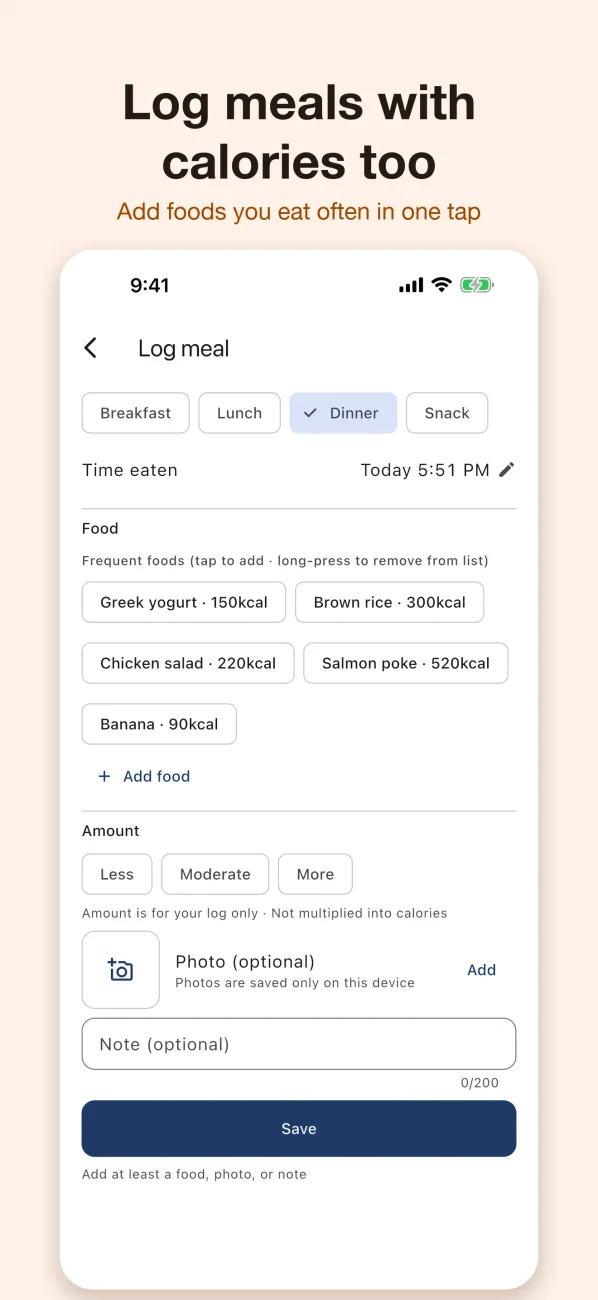
• Log breakfast, lunch, dinner and snacks with calories, carbs, protein, fat and sugars for each food, plus amount, photo and note
• Foods you eat often are remembered, so you can add them with a tap
• Log exercise from 10 types. Calories used are estimated from your weight and the intensity
• Log water, tea, coffee and sparkling water, with a daily water goal you set
• See calories eaten, estimated calories used in exercise and nutrient shares in Stats
• Calories are estimates, worked out from the profile and weight you enter with a standard formula
■ Reminders
• When you reach your goal, 1 hour before it, when a scheduled fast starts, and when you forgot to start
• Reminders to drink water and to log your weight
• “Send test notification” checks that reminders reach you
■ No account. Your logs stay on your device.
• Your fasts, meals, weight and photos are saved only on this device
• Save everything, photos included, to a backup file and restore it on a new device. You can also export CSV for spreadsheets
• Health app sync works only when you turn it on. Weight, water and exercise are exchanged with Apple Health, and permission is requested when you turn it on
• Choose a 12-hour or 24-hour clock
• App lock with a PIN or Face ID
• There are no in-app purchases
■ Please read
The notes in the app are for reference and are not medical advice. Calories are estimates. If you are pregnant or nursing, have a medical condition or take medication, talk to your doctor before you start. The app is not meant for people under 18. If you feel dizzy or notice anything unusual, stop right away. Use it at your own pace.
Contact: fasting@hyunjins.co.kr
What’s new
Version 0.1.13 · Nov 10, 2026
The fasting guide now shows elapsed time.
New Discreet display setting: the Lock Screen, widgets, and notifications show elapsed time without the word “fast”.
Choose which day the calendar week starts on.
The plan finder now asks two questions.
Fixed wording and line breaks.
App privacy
What Hyunjin Jang declares on the App Store about how this app handles data.
-
Data not linked to you
May be collected but is not linked to your identity.
- Identifiers
- Usage data
- Diagnostics
Privacy practices may vary, for example with the features you use or your age.
Information
- Seller
- Hyunjin Jang
- Category
- Health & Fitness
- Version
- 0.1.13
- Updated
- Nov 10, 2026
- Released
- Oct 6, 2026
- Size
- 29.2 MB
- Requires
- iOS 15.5 or later
- Age rating
- 12+
- Languages
- Korean, English, Japanese
- Copyright
- © 2026 현진스
You might also like
-
 Fasting Signal: Phase TimerSee your fasting phase live
-
 두터치 — 공복 타이머·식사 기록Health & Fitness
-
 배꼽시계 - 간헐적 단식 타이머Health & Fitness
-
 Gobogi – Fasting TimerAd-free intermittent fasting
-
 TrueFastIntermittent fasting made easy
-
 Fast Window - Fasting TrackerYour 16:8 clock on Lock Screen
-
 헝그리픽 - 직관적 식사 일기Health & Fitness
-
 단식 타이머Health & Fitness
-
 FastTime - Fasting Timer & LogSimple Fasts & Weight Calendar