- Age rating4+
- CategoryMusic
- DeveloperFender Digital
- LanguagesEnglish+ 5 more
- Size145.8 MB
Links to the official App Store page
Download.org hosts no file of Fender Universal Control. The button opens its official App Store page, published by Fender Digital. Listing last checked on Nov 21, 2026.
Screenshots

About
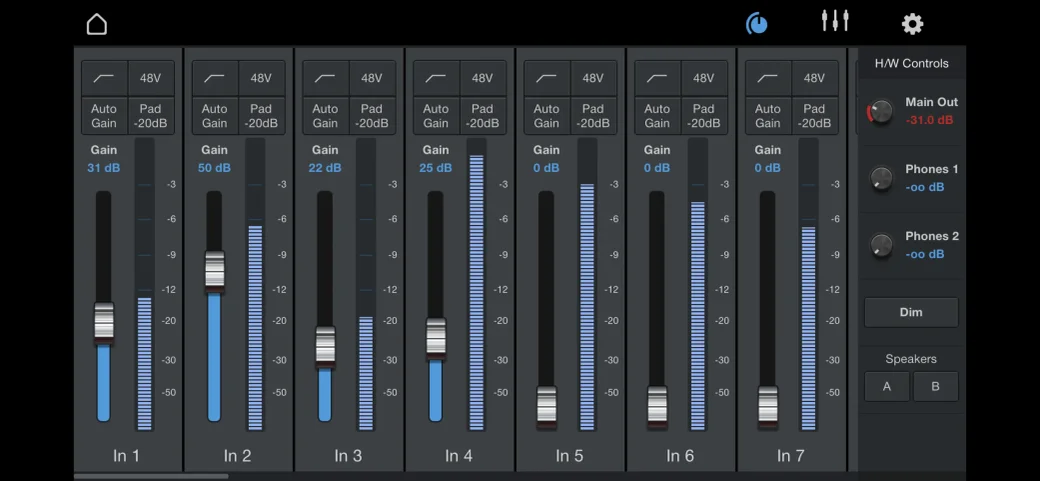
Get the most from your Fender and PreSonus audio interface and mixing products. Fender Universal Control lets you unlock some of your supported product’s most powerful features. Whether you’re dialing in a monitor mix for your Fender Quantum HD or LT audio interface or remotely controlling your PreSonus StudioLive mixer from anywhere in the venue, Fender Universal Control puts flexible mixing and DSP features at your fingertips.
Compatible hardware includes:
● Fender Quantum LT and HD-series interfaces
● PreSonus StudioLive Series III console and rack mixers
● Legacy PreSonus audio interfaces (Quantum ES, Revelator, Studio-series)
As an all-in-one solution, Universal Control’s hardware control options vary by product. Discover what it can do for your supported Fender and PreSonus gear.
Fender Quantum-series interfaces
For Quantum-series interface owners, Universal Control lets you create monitor mixes and control loopback streams. For Quantum HD interfaces, you can also remotely control preamp levels and speaker switching. To use the Universal Control app, you must connect your audio interface to a computer running Universal Control for macOS or Windows and connect your iOS device to the same network as your computer.
StudioLive Series III mixers
Universal Control provides touch-control of your complete mix, plus dynamics, EQ control, effects, monitor mixes, DCA groups, and even AVB networking and routing. You also get control of deeper features like Scenes, Projects, and granular permission control—including max output level limit.
Take control of your StudioLive Series III mix from the audience’s perspective, where it matters most. To use the Universal Control app, you must connect your iOS device to the same wireless network as your StudioLive mixer. Note: Universal Control for StudioLive is optimized for iPad use. A separate app, QMix-UC app, is optimized for iPhone screen sizes.
Legacy PreSonus audio interfaces
For legacy PreSonus audio interfaces (Quantum ES, Revelator, Studio-series), Universal Control Surface offers powerful zero-latency hardware-based monitor control—everything you need to create high-quality monitor mixes and more. To use the Universal Control app, you must connect your audio interface to a computer running Universal Control for macOS or Windows and connect your iOS device to the same network as your computer.
System Requirements
● Compatible with iPad running iOS 15.4 or later
● Control of supported mixers requires that the mobile device be connected to the same wireless network as a StudioLive Series III mixer.
● Control of supported Fender and PreSonus audio interfaces requires that the mobile device be connected to the same wireless network as a computer running Universal Control for macOS and Windows, with the audio interface connected to the computer.
What’s new
Version 5.1 · Jul 14, 2026
Bug fixes
App privacy
What Fender Digital declares on the App Store about how this app handles data.
-
Data not collected
The developer does not collect any data from this app.
Privacy practices may vary, for example with the features you use or your age.
Information
- Seller
- Fender Digital, LLC
- Category
- Music
- Version
- 5.1
- Updated
- Jul 14, 2026
- Released
- Jan 13, 2026
- Size
- 145.8 MB
- Requires
- iOS 15 or later
- Age rating
- 4+
- Price
- Free
- Languages
- English, French, German, Japanese, Simplified Chinese, Spanish
- Copyright
- © 2026 Fender Musical Instruments Corp.