
FinVista
Your money, beautifully clear
Designed for iPhone, iPad
Free · In-app purchases
- Age rating4+
- CategoryFinance
- DeveloperVISTALABS LLC
- LanguagesEnglish
- Size21.1 MB
Links to the official App Store page
Download.org hosts no file of FinVista. The button opens its official App Store page, published by VISTALABS LLC. Listing last checked on Nov 14, 2026.
Screenshots

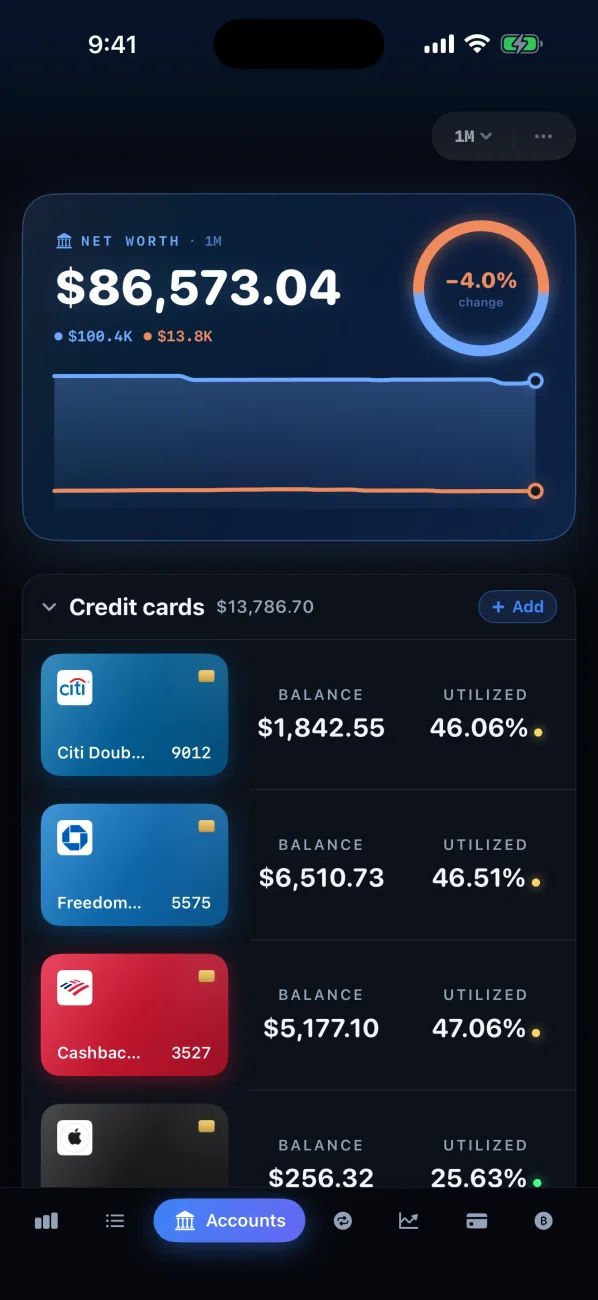


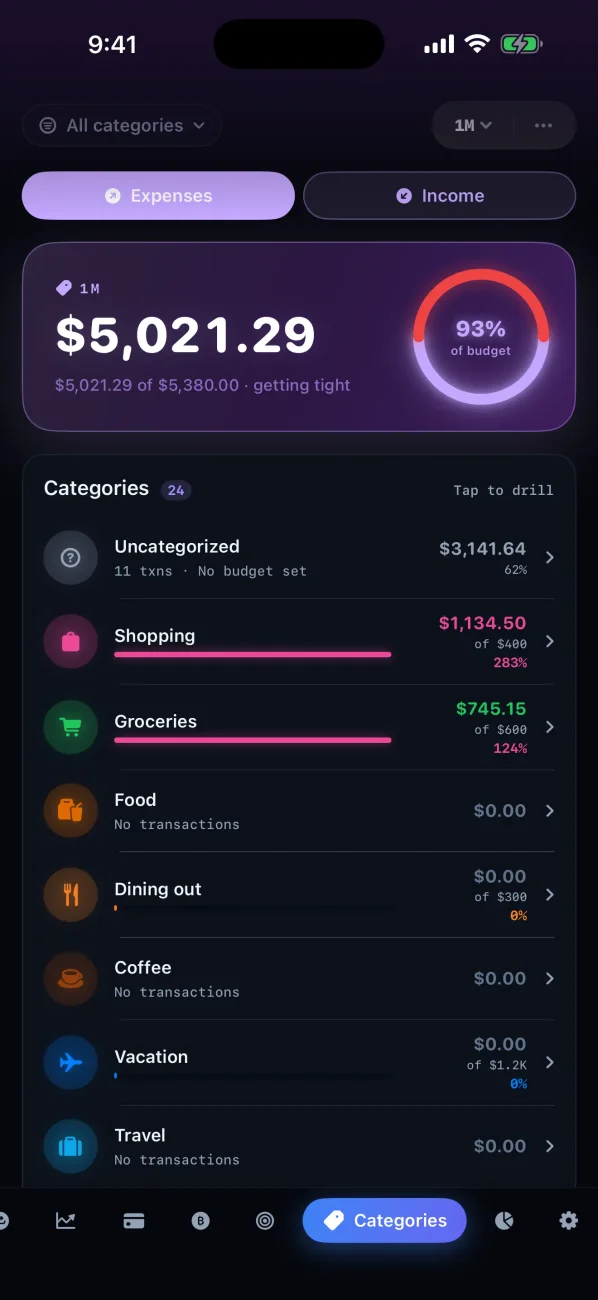
About
FinVista is a clearer way to take control of your money — built for people who outgrew spreadsheets and want more than the average budget app.
Connect every bank, credit card, investment, and crypto wallet in seconds via Plaid's bank-grade secure link. We never see your password — Plaid handles the handoff. From the moment your accounts sync, FinVista shows you what's actually happening with your money: net worth, cash flow, recurring charges, and what's coming next.
THE RUNWAY COUNTDOWN
A visceral number on your dashboard: how many days of cash you have left at your current spending pace. The countdown moves with every charge. Switch the period filter to retune the burn rate (Week / Month / Quarter / Year).
REIMBURSEMENT PAIRING
Cover dinner for friends? Tag the charge as "Waiting for $75 back" and FinVista treats your real out-of-pocket as $25 — across budgets, the forecast, and the runway. Stop letting friend-treating make your numbers lie.
VISTA AI (Elite)
Ask any question about your money in plain English. "How much did I spend on groceries this quarter?" "Can I afford a $400 flight next month?" "What's my biggest recurring charge?" Answers are grounded in a summary of your recent transactions — merchant, amount, date, and category. We never send account numbers, login credentials, or balances.
GEOFENCED SAFE-TO-SPEND (Elite)
Walk into a mall or grocery store and FinVista quietly puts a Live Activity on your lock screen showing exactly how much of today's discretionary budget is left. Answer "can I afford this?" before you even unlock your phone.
TAX-DEDUCTIBLE EXPORT (Elite)
Flag any charge as tax-deductible from its detail sheet. Snap a receipt for the year-end audit trail. At tax time, export a single CSV your accountant will love — every flagged transaction, dates, amounts, categories, receipt-on-file flag.
SUBSCRIPTION SWAP QUEUE (Elite)
Set rules like "only one streaming service at a time." FinVista watches your charges and tells you when to swap — keep your top pick, cancel the rest — when more than the cap are charging.
HOUSEHOLD (Elite)
Built for couples and roommates. Every member sees the same accounts and budgets, with attribution showing who paid for what. The "Who Paid" card on the Dashboard rolls everything up.
ALSO IN EVERY TIER
• Cash-flow forecast with confidence band
• Smart insights — cash crunch alerts, recurring-charge price drift, paycheck-running-late
• Multi-condition rules with backfill
• Unlimited custom categories
• Receipt OCR (5/month on Lite, unlimited on Elite)
• Face ID + TOTP two-factor auth
• Active sessions you can revoke per device
• Bank-level security: TLS 1.3 in transit, AES-256 at rest
PRICING
• Lite — $8.99/mo or $79.99/yr (~26% off)
• Elite — $10.99/mo or $89.99/yr (~32% off)
Start Elite with a 1-month free trial — cancel anytime. Manage your subscription via Settings → Your Name → Subscriptions on iOS. Free version available.
PRIVACY
Your bank credentials never touch FinVista — Plaid handles the secure link. We don't sell your data, ever. Vista AI receives a summary of recent transactions (merchant, amount, date, category) — never account numbers, login credentials, or balances. Voice transcription uses Apple's secure speech recognition; we don't store your audio. Delete your account anytime — full server-side wipe plus on-device data removal in line with App Store Guideline 5.1.1(v).
Terms of Use (EULA): https://www.apple.com/legal/internet-services/itunes/dev/stdeula/
What’s new
Version 2.2 · Aug 11, 2026
What's new
• Now on iPad — universal app with full-screen layouts on every
tab, including the Ask Vista consent gate.
• Full brand refresh across the app: deeper navy background,
cleaner cards, unified splash and sign-in, and a per-tab accent
ring so every tab has its own identity.
• Analytics redesigned: dual-line cash flow you can scrub (income
vs spend), rolling-week Day of Week chart, and cleaner tooltips
that clear when you release.
• Ask Vista: brand diamond in the header, cleaner suggestion tiles,
faster load, and a proper consent gate.
• Recurring: hide or reclassify a charge and it sticks everywhere
— Insights, Transactions, Bill Calendar, notifications, and the
daily brief.
• Push notifications enabled for daily brief and bill reminders.
• Categories: semantic mode picker — Expenses orange, Income green.
• Debt: APR display fixed (was showing the decimal instead of %).
• Sign-in and sign-up polish: bigger diamond, tighter spacing.
• Privacy blur now blocks tap-through when it's active — no more
hitting buttons behind a masked screen.
• Deep audit across auth, sync, charts, and recurring detection —
dozens of correctness fixes, zero known bugs.
App privacy
What VISTALABS LLC declares on the App Store about how this app handles data.
-
Data linked to you
May be collected and linked to your identity.
- Financial info
- Contact info
- User content
- Identifiers
- Usage data
- Diagnostics
Privacy practices may vary, for example with the features you use or your age.
Information
- Seller
- VISTALABS LLC
- Category
- Finance
- Version
- 2.2
- Updated
- Aug 11, 2026
- Released
- Apr 30, 2026
- Size
- 21.1 MB
- Requires
- iOS 17.0 or later
- Age rating
- 4+
- Price
- Free
- In-app purchases
- Yes
- Languages
- English
- Copyright
- © 2026 FinVista
You might also like
-
 CardNeuroBest card at every checkout.
-
 TruvFinance
-
 Arbor: Lower your energy billAutomatically lower your bill
-
 My MealTimeSchool payments
-
 CashloBusiness funding referrals
-
 Wellcare Spendables & RewardsWellcare Spendables
-
 loanDepot MobileMortgage Payments & Balances
-
 doxo: All-in-One Bill PayAll your bills in one place
-
 MRI RentPayment™Finance