
- Age rating4+
- CategoryProductivity
- DeveloperHimanshu Parashar
- LanguagesEnglish
- Size103.6 MB
Links to the official App Store page
Download.org hosts no file of FloatDial: Clock Widget. The button opens its official App Store page, published by Himanshu Parashar. Listing last checked on Nov 15, 2026.
Screenshots
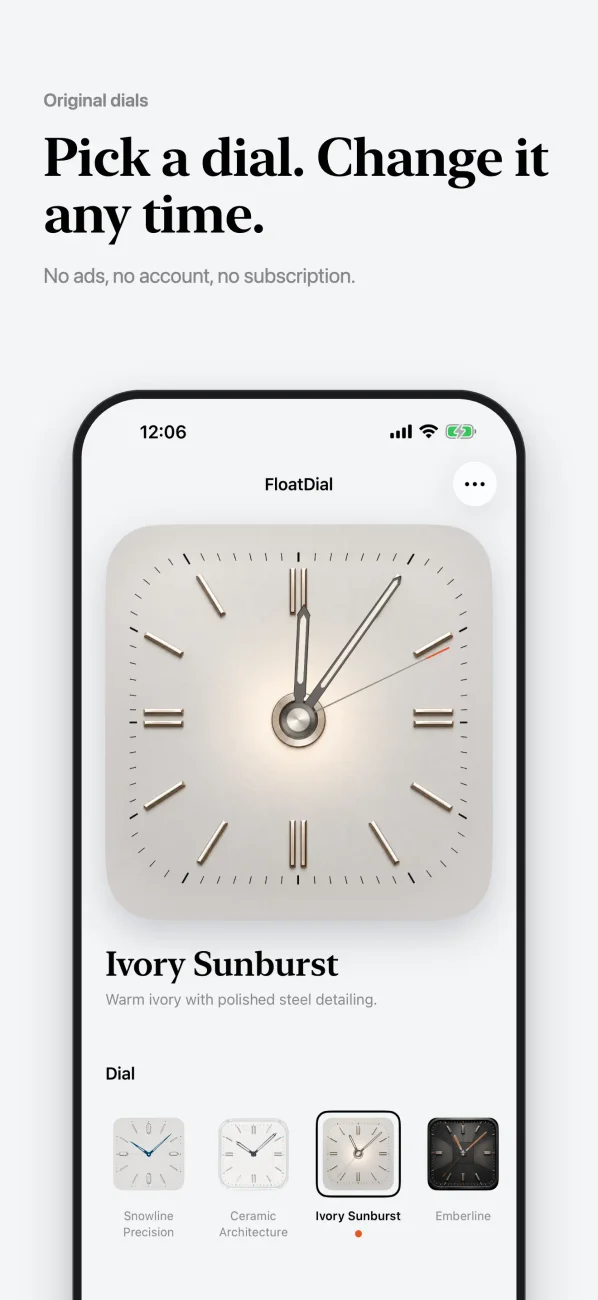


About
Bring a refined analog clock to your iPhone Home Screen.
FloatDial is a focused, time-only widget for people who appreciate clear information and considered design. Choose from five original dial faces—Heritage Blue, Heritage Slate & Gold, Snowline Precision, Quadrant Atelier, and Ivory Sunburst—then select the motion that suits you.
• Quartz: a crisp one-second tick
• Sweep: fluid second-hand motion on iOS 18 and later
Change your face and movement from the FloatDial app. No feeds, accounts, or unnecessary controls—just an expressive clock that stays quietly in view.
What’s new
Version 1.9 · Nov 3, 2026
Bug Fixes
App privacy
What Himanshu Parashar declares on the App Store about how this app handles data.
-
Data not collected
The developer does not collect any data from this app.
Privacy practices may vary, for example with the features you use or your age.
Information
- Seller
- Himanshu Parashar
- Category
- Productivity
- Version
- 1.9
- Updated
- Nov 3, 2026
- Released
- Aug 12, 2026
- Size
- 103.6 MB
- Requires
- iOS 17.0 or later
- Age rating
- 4+
- Price
- Free
- Languages
- English
- Copyright
- © 2025 magicanvas.in
You might also like
-
 CalendearAll your calendars, no doubles
-
 Simple Clock by T&MProductivity
-
 Notebook: Smart NotesProductivity
-
 Widget USCreate a widget andshare it!
-
 Supaplan – AI Calendar PlannerYour AI-powered daily planner
-
 Custom Keyboard - TipedSnippets, Calculator & Themes
-
 Widget Caddy: Custom WidgetsPhotos, Clock, Facts & Quotes
-
 AI Desk ClockImprove efficiency, AI Notice
-
 InstaCal: Menu Bar CalendarReminders, Widgets and Tasks
-
 Focus Timer - Lock InLock In and Focus Timer