
FlowFrame: Frame Interpolation
Smooth 60fps, 120fps & slow-mo
Designed for iPhone
Free · In-app purchases
- Age rating4+
- CategoryPhoto & Video
- DeveloperHiroki Sugiyama
- LanguagesEnglish+ 8 more
- Size47.8 MB
Links to the official App Store page
Download.org hosts no file of FlowFrame: Frame Interpolation. The button opens its official App Store page, published by Hiroki Sugiyama. Listing last checked on Nov 23, 2026.
Screenshots

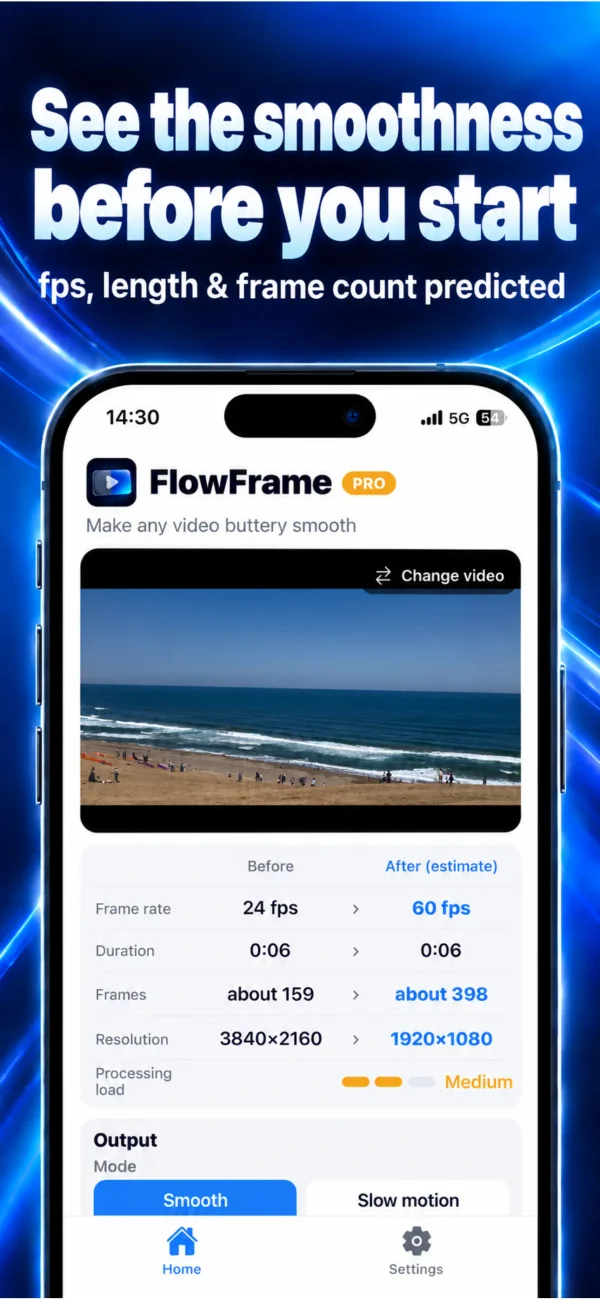


About
Turn choppy video into buttery-smooth motion — with one tap.
FlowFrame uses AI frame interpolation to draw the frames your video is missing, turning it into smooth 60fps / 120fps footage or 2x / 4x slow motion. Everything runs on your iPhone. Your videos are never uploaded.
GREAT FOR
• Choppy gameplay captures and anime clips
• Pets, kids, dance and sports — add slow motion after the fact
• 30fps footage that deserves to look great on a 120Hz display
• A final polish before posting to social media
THREE SIMPLE STEPS
1. Pick a video (Photos or the Files app)
2. Choose 60fps, 120fps or a slow-motion factor — FlowFrame shows the resulting fps, duration and frame count up front
3. Tap "Make it smooth" (progress and time remaining shown; cancel anytime)
Then compare Before / After / Split slider, and save to Photos or share.
WHY FLOWFRAME
• 100% on-device — no uploads, no account, works offline
• On iOS 26 and later, Apple's latest frame-rate conversion technology delivers higher quality and speed
• HDR stays HDR — brightness and color don't shift (converted to SDR on some devices)
• No watermark — not even on the free version
• Your original is never touched — a new video is added to Photos only when you save
• If a video can't be converted, FlowFrame tells you why (unsupported format, low memory, low storage…)
FREE
• Convert the first 10 seconds of any video (longer clips are trimmed so you can try it)
• 60fps output, up to 1080p
• Slow-motion (2x / 4x) preview
• Before/after comparison and saving to Photos
PRO — ONE-TIME PURCHASE, NO SUBSCRIPTION
• No length limit — convert to the very last second
• 120fps output
• Save and share slow motion (2x / 4x)
• Output up to 4K
• High-quality export (more accurate in-between frames + higher bitrate)
Buy once, keep forever. PRO is tied to your Apple ID and can be restored on a new device.
COMPATIBILITY
• iOS 16.4 or later
• Input: videos from Photos or the Files app (MOV / MP4, etc.)
• Output: 60fps / 120fps, 480p–4K, HEVC (H.265)
PLEASE NOTE
• Frame interpolation estimates motion, so fast or complex scenes may show some ghosting or warping
• 4K and long videos take time. Keep the app open and the screen on while converting
Questions or ideas? Use "Contact" in the app.
Terms of Use: https://sh-1101.github.io/flowframe/terms.html
Privacy Policy: https://sh-1101.github.io/flowframe/privacy.html
What’s new
Version 1.0.3 · Nov 17, 2026
• Long videos: tap “Smooth the first 10s free” to try it right away
• If smoothing gets interrupted, you can restart it with one tap
• Added Vietnamese
• Minor improvements
App privacy
What Hiroki Sugiyama declares on the App Store about how this app handles data.
-
Data not linked to you
May be collected but is not linked to your identity.
- Purchases
- Usage data
Privacy practices may vary, for example with the features you use or your age.
Information
- Seller
- Hiroki Sugiyama
- Category
- Photo & Video
- Version
- 1.0.3
- Updated
- Nov 17, 2026
- Released
- Oct 29, 2026
- Size
- 47.8 MB
- Requires
- iOS 16.4 or later
- Age rating
- 4+
- Price
- Free
- In-app purchases
- Yes
- Languages
- English, French, German, Italian, Japanese, Korean, Portuguese, Spanish, Vietnamese
- Copyright
- © 2026 Hiroki Sugiyama
You might also like
-
 FrameFlo: AI Video SmootherFrame Interpolation & Slow-Mo
-
 Video Enhancer - EnhanceVid30>60fps, FHD>4K, Denoise
-
 AI Video Smoother: 120FPSAI Slow Motion & FPS Boost
-
 Smoothie: AI Video Enhancer4K Upscale & 120FPS Boost
-
 Time Cut: Smooth Slow MotionSlo, Video Freeze, Motion Blur
-
 TopzAI: Photo Video EnhancerBlurry Photo Fixer AI
-
 AirVid-AI Video Enhancer 4KUpscale, Repair & Retouch 4K
-
 Presets & Filters - Koloro1000+ Presets Photo Editor
-
 Blurrr-Music video editorProfessional Effect & Animate
-
 Node VideoDesktop-level editing