
Fly2Gether – Flight Controller
Fly From Your Sofa
Designed for iPhone, Mac, iPod touch
$0.99 · In-app purchases
- Age rating4+
- CategoryUtilities
- DeveloperMikhail Krasnorutsky
- LanguagesEnglish+ 26 more
- Size401.5 MB
Links to the official App Store page
Download.org hosts no file of Fly2Gether – Flight Controller. The button opens its official App Store page, published by Mikhail Krasnorutsky. Listing last checked on Nov 24, 2026.
Screenshots


About
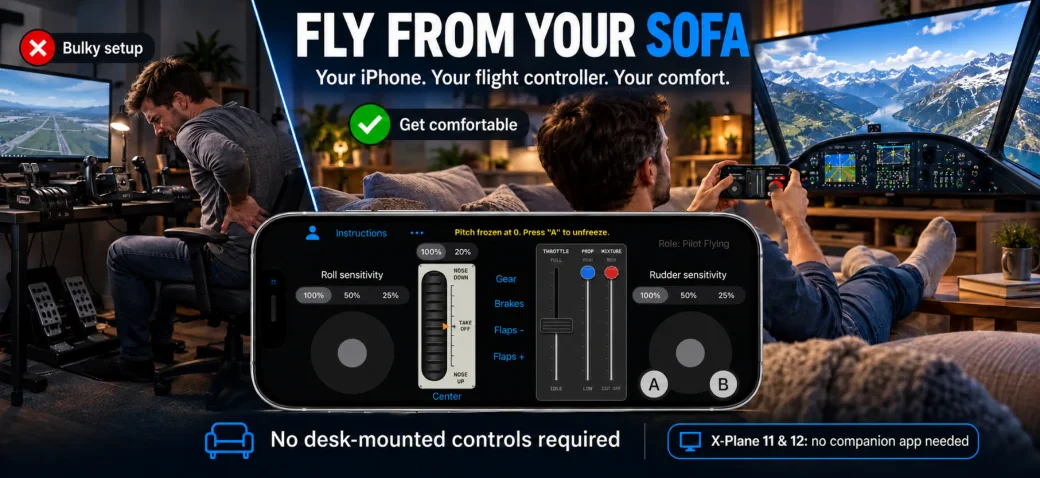
Fly2Gether turns your iPhone into a wireless flight controller for flight simulators on your computer.
Enjoy flying from the comfort of your sofa or bed, without sitting at a desk or making room for bulky flight controls. Your iPhone puts essential aircraft controls in your hands, so you can settle into a comfortable position and enjoy the flight.
Designed specifically for aviation, Fly2Gether provides the controls pilots use most often during flight in a compact, accessible interface.
ESSENTIAL FLIGHT CONTROLS
Fly2Gether focuses on the controls that matter most while flying:
• Pitch control using device motion
• Roll control using the onscreen joystick
• Rudder (yaw) control
• Throttle control
• Elevator trim
• Brakes
• Flaps
By focusing on the controls used continuously throughout a flight, Fly2Gether provides a clean and efficient interface that works naturally on the iPhone's compact screen.
Less frequently used simulator functions remain available through your keyboard, mouse, or the simulator's virtual cockpit.
FLY IN COMFORT
Turn a quiet evening on the sofa into a flight. Fly2Gether lets you enjoy your simulator without a desk-mounted joystick, dedicated flight seat, or a table for your controller.
The pitch-freeze system lets you freeze and release the pitch axis instantly. Adjust your seating position, shift your grip, or change the angle of your iPhone without disturbing the aircraft's pitch input.
Whether you prefer the sofa, an armchair, or relaxing in bed, Fly2Gether makes it easier to get comfortable during long flights.
DESIGNED FOR PRECISE AIRCRAFT CONTROL
Fly2Gether separates flight controls so that each finger handles only one axis at a time. This helps reduce unwanted mixed-axis inputs that can make precise flying difficult.
With device motion for pitch and an onscreen joystick for roll, you can adjust each axis independently.
NO EXPENSIVE FLIGHT HARDWARE REQUIRED
Enjoy flight simulation without investing in bulky simulator equipment. Fly2Gether provides the essential controls needed for normal flight operations using the device already in your pocket.
Ideal for:
• Relaxed flying from your sofa or bed
• Flight simulator enthusiasts
• Travel and portable simulator setups
• Users without dedicated flight hardware
• Pilots looking for an additional control option
DUAL-JOYSTICK SHARED CONTROL
Fly2Gether also supports collaborative flight simulation.
Two pilots can share control of the same aircraft using a built-in control ownership system. To prevent conflicting inputs, only one pilot controls the aircraft at a time.
When the second pilot wants to take over, they simply press the "I have controls" button and control transfers instantly.
Ideal for:
• Flight instruction
• Simulator training
• Shared cockpit flying
• Cooperative simulator sessions
COMPATIBLE WITH WINDOWS, LINUX AND MACOS
Fly2Gether connects over your local Wi-Fi network.
For X-Plane 11 and X-Plane 12, no companion app is required. Connect your iPhone directly to X-Plane and enjoy flying with less setup.
Other flight simulators require companion software running on your computer. On macOS 15 or later, the Fly2Gether companion app provides a virtual joystick for your simulator. Simply open the Mac app and keep it running while flying.
Whether flying solo or together, settle in, get comfortable, and enjoy the flight.
What’s new
Version 1.16 · Nov 23, 2026
Extended controls are now free.
App privacy
What Mikhail Krasnorutsky declares on the App Store about how this app handles data.
-
Data not collected
The developer does not collect any data from this app.
Privacy practices may vary, for example with the features you use or your age.
Information
- Seller
- Mikhail Krasnorutsky
- Category
- Utilities
- Version
- 1.16
- Updated
- Nov 23, 2026
- Released
- Feb 10, 2026
- Size
- 401.5 MB
- Requires
- iOS 15.6 or later
- Age rating
- 4+
- Price
- $0.99
- In-app purchases
- Yes
- Languages
- English, Czech, Danish, Dutch, Finnish, French, German, Greek, Hungarian, Indonesian, Italian, Japanese + 15 more
- Copyright
- © Mikhail Krasnorutsky, 2026
You might also like
-
 Coined ItUtilities
-
 DigsightUtilities
-
 Analog ClockSimple clock
-
 BOEING 737 TRAINING GUIDE LITE737 Systems Trainer
-
 Virtual PAPIA PAPI for every runway
-
 My Fuel PlannerAviation Hold & Deviation Fuel
-
 Cat Finder - Find Lost CatSpecial tool find lost cat
-
 Simulator StationMSFS & X-Plane Live Companion
-
 Remote Yoke - SkyYokeAll-in-one Infinite Flight kit
-
 Hermix NanoUtilities