
- Age rating4+
- CategoryUtilities
- DeveloperBenjamin Faershtein
- LanguagesEnglish
- Size3.2 MB
Links to the official App Store page
Download.org hosts no file of FoxProgrammer. The button opens its official App Store page, published by Benjamin Faershtein. Listing last checked on Nov 12, 2026.
Screenshots

About
FoxProgrammer is a community project for preparing PicoFox settings and audio.
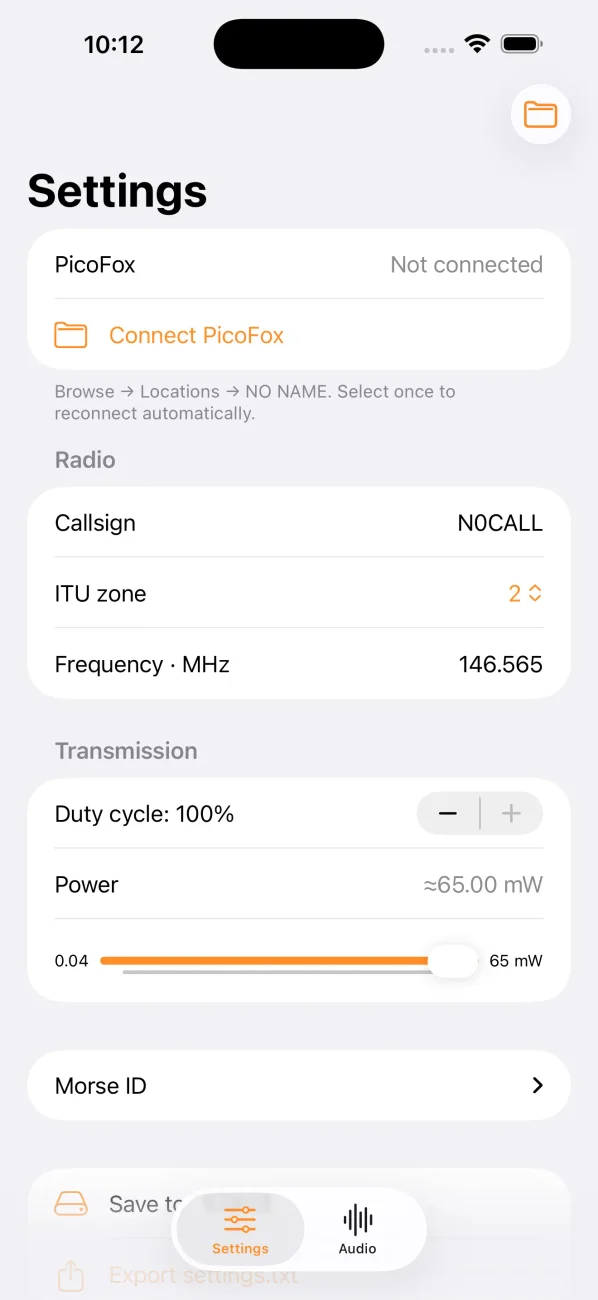
Configure callsign, frequency, duty cycle and power in a compact native interface. Open the PicoFox folder through the system file picker to read settings and save changes.
Create custom tones, generate speech with available system voices, record with the microphone, or import audio. Preview, trim, adjust gain and fades, then export a PicoFox-compatible WAV. Restore the bundled factory recording or use a local backup.
Audio creation and editing work without connected hardware. Connecting a PicoFox requires a compatible cable and a drive visible in Apple's Files app. On first access, select its folder under Browse > Locations. Reconnect the radio's power after saving to apply changes.
No account is required. Editing runs locally, with no advertising or analytics.
PicoFox is an AI6YM product. Hardware names identify compatibility. Original factory audio attribution and license are available in the app.
App privacy
What Benjamin Faershtein declares on the App Store about how this app handles data.
-
Data not collected
The developer does not collect any data from this app.
Privacy practices may vary, for example with the features you use or your age.
Information
- Seller
- Benjamin Faershtein
- Category
- Utilities
- Version
- 1.0.9
- Updated
- Nov 6, 2026
- Released
- Nov 6, 2026
- Size
- 3.2 MB
- Requires
- iOS 17.0 or later
- Age rating
- 4+
- Price
- Free
- Languages
- English
- Copyright
- © 2026 Benjamin Faershtein
You might also like
-
 CS ProgrammerUtilities
-
 XTGatewayConnect All, Control All
-
 Ledart & Flashing Lights AppMake it Big & White Screen Pro
-
 SavefromNet: Video SaverPrivate Web Browser & Saver
-
 Choowy: Finger Picker, ChooserQuick random decision maker
-
 Finger Chooser - Fun DecisionsMake decisions the fun way
-
 BorbaloThe App for Drivers
-
 Service AgencyUtilities
-
 Buzz - Finger ChooserLucky or unlucky?
-
 Auto Clicker - Auto Tapper AppAutomatic Tap, Refresh, Scroll