
Fullcount: AI Inventory
AI Inventory in Seconds
Designed for iPhone
Free · In-app purchases
- Age rating4+
- CategoryBusiness
- DeveloperJames Griggs
- LanguagesEnglish
- Size18.5 MB
Links to the official App Store page
Download.org hosts no file of Fullcount: AI Inventory. The button opens its official App Store page, published by James Griggs. Listing last checked on Nov 14, 2026.
Screenshots



About
Stop counting by hand. Fullcount uses AI to instantly count items in a photo, placing numbered markers on every detected item so you can see exactly what was counted — and correct anything that wasn't.
AI COUNTING WITH NUMBERED MARKERS
Point your camera at a shelf, bin, pallet, or pile and let Fullcount do the work. In seconds, AI detects every item and places a numbered marker on each one — giving you a transparent, reviewable count you can trust.
TAP-TO-EDIT MARKERS
No AI is perfect, and Fullcount doesn't pretend otherwise. Tap any numbered marker to rename the item, adjust its quantity, or remove it entirely. Add markers for anything the AI missed. Every correction is fast, direct, and yours to make on the spot.
ORGANIZED LISTS, CATEGORY CHARTS, AND COMBINED VIEWS
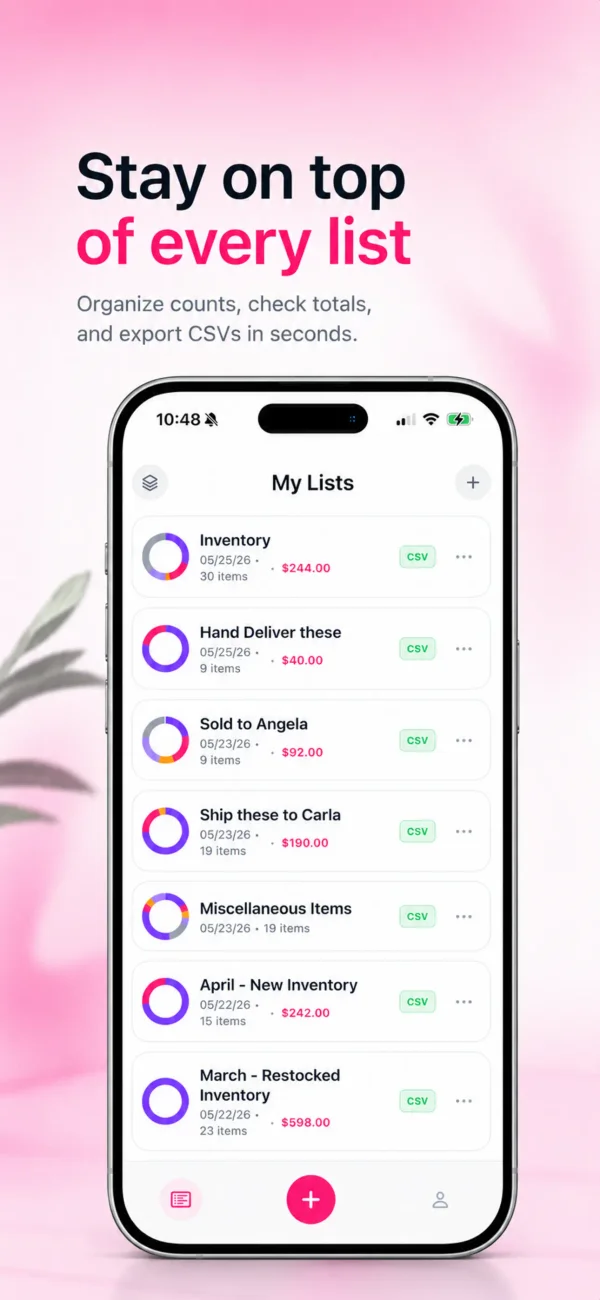
Every count saves to a named list with totals, categories, dates, and a full item breakdown. The inventory dashboard displays a category donut chart so you can see your stock composition at a glance. Combine multiple lists into one consolidated view for a complete picture across locations, sessions, or product groups.
BULK EXPORT AS CSV AND PHOTOS
When it's time to share or file your count, export a ZIP containing CSV files with item names, SKUs, and counts — plus annotated or clean versions of your photos. Hand it off to a spreadsheet, email it to a client, or archive it for audit purposes.
Built for warehouse teams, retail stores, resellers, and estate-sale professionals, Fullcount turns a photo into a professional inventory record in the time it used to take just to find a clipboard.
Download Fullcount and start counting everything, instantly.
Privacy Policy: https://fullcount-legal.pages.dev/privacy
Terms of Use: https://fullcount-legal.pages.dev/terms
What’s new
Version 1.0.3 · Jun 16, 2026
Smarter counting: a new point-based detection mode dramatically improves accuracy on dense, repetitive items. Toggle 'Smart Count' in Settings. Plus stability improvements and bug fixes.
App privacy
What James Griggs declares on the App Store about how this app handles data.
-
Data linked to you
May be collected and linked to your identity.
- Contact info
-
Data not linked to you
May be collected but is not linked to your identity.
- Surroundings
Privacy practices may vary, for example with the features you use or your age.
Information
- Seller
- James Griggs
- Category
- Business
- Version
- 1.0.3
- Updated
- Jun 16, 2026
- Released
- Jun 2, 2026
- Size
- 18.5 MB
- Requires
- iOS 18.0 or later
- Age rating
- 4+
- Price
- Free
- In-app purchases
- Yes
- Languages
- English
- Copyright
- © 2026 III Studio
You might also like
-
 VesnaBusiness
-
 Creator Pipeline: For CreatorsContent Planner & Analytics
-
 Dropt - AI Research AssistantDrop thoughts. Get answers
-
 Retail POS & Inventory ShopappSales, Invoices & Customers
-
 Creator Docs: Release FormsModel & Talent Releases
-
 Simple Task AssignerCreate, assign, and tasks
-
 BlueCollarCamConstruction management
-
 Stack EnableWarehouse Management System
-
 Excel Your RevenueBusiness
-
 Inventory: Track & ManageTrack inventory effortlessly