
Fundeer: Expense Tracker
Budget Planner, Split Expenses
Designed for iPhone, iPad
Free · In-app purchases
- Age rating4+
- CategoryFinance
- DeveloperAndrii Zahreichuk
- LanguagesEnglish+ 9 more
- Size132.6 MB
Links to the official App Store page
Download.org hosts no file of Fundeer: Expense Tracker. The button opens its official App Store page, published by Andrii Zahreichuk. Listing last checked on Nov 28, 2026.
Screenshots

About
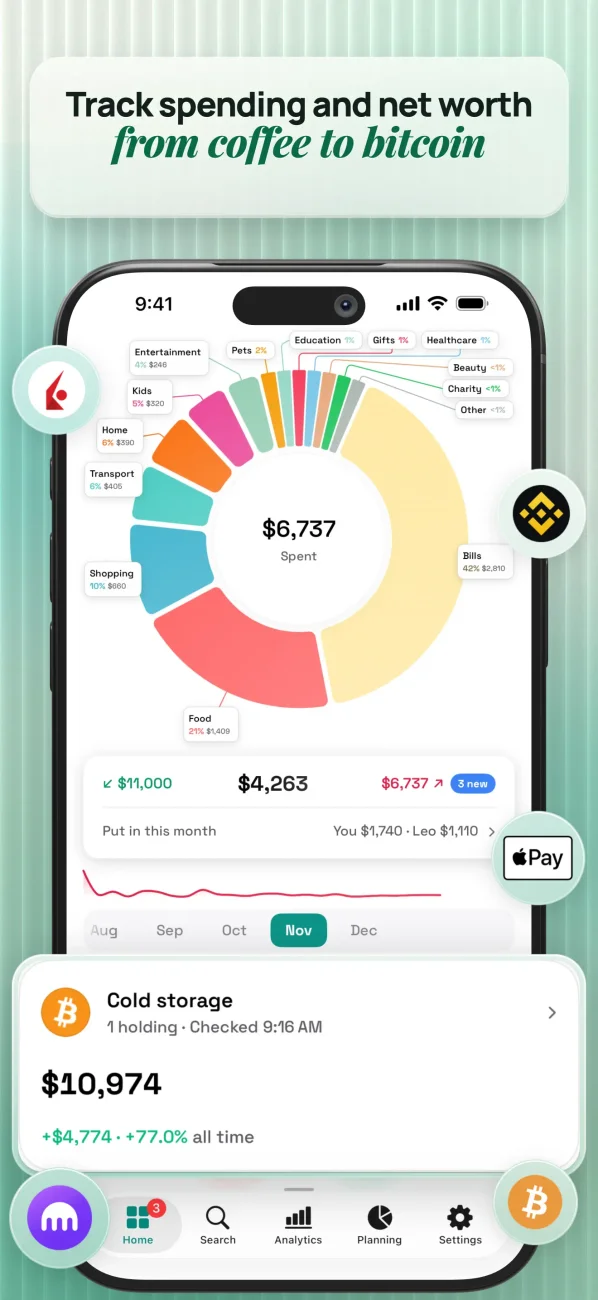
Fundeer tracks spending, splits trip costs and runs shared family budgets. You can start without an account, and tracking works without internet.
Log purchases without typing
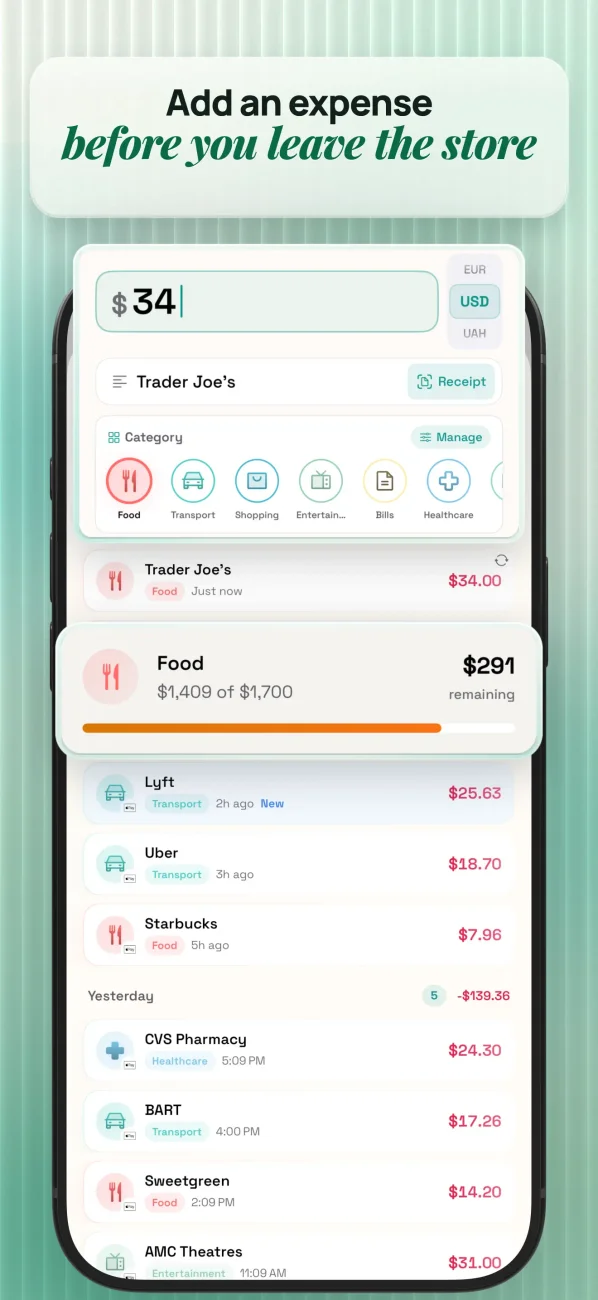
Set up Apple Pay tracking once in Settings. After that, a purchase in a shop is added with the merchant and the currency you paid in. Connect Monobank, the Ukrainian bank, and card spending arrives on its own.
Three other ways to add an expense
Say "coffee, 45" and the entry fills in, ready for you to check. Point your camera at a receipt and Fundeer reads the merchant, the items, and the total. The things you log most stay one tap away on quick-add buttons and shortcuts.
Split trip costs
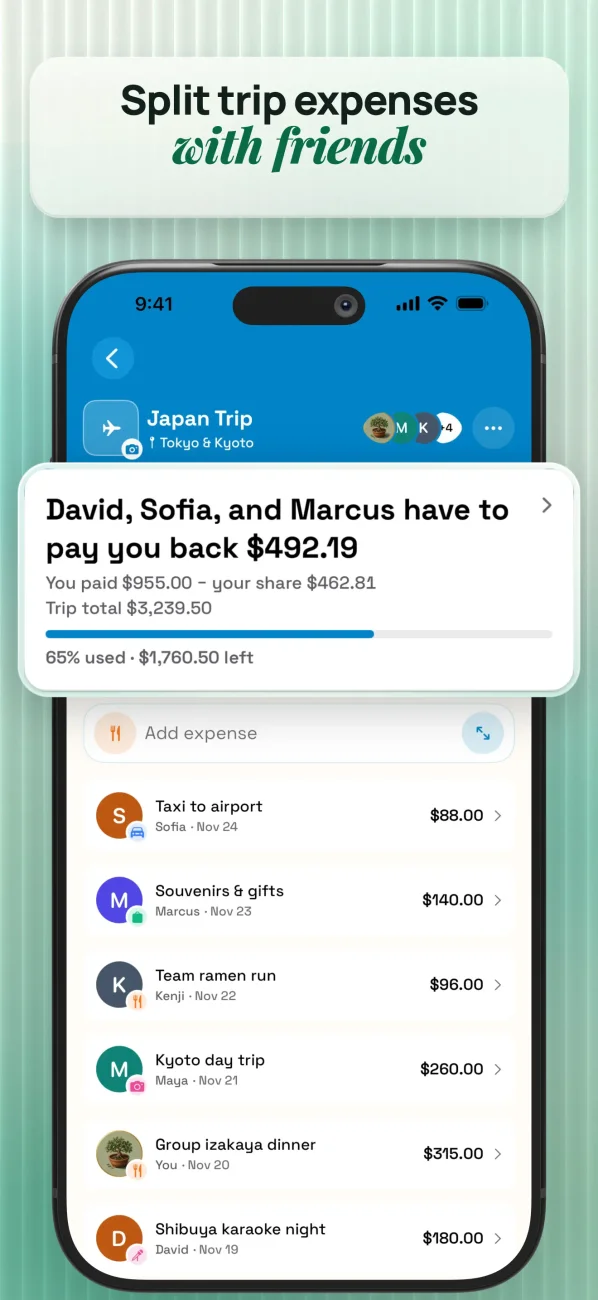
Start a trip, invite the people on it, and everyone logs as they go. At the end, one screen shows who pays whom back. Equal splits, exact amounts, shares, or percentages, in as many currencies as your trip needs.
Trip Mode
Turn on Trip Mode when your trip starts and everything you add goes to that trip. Card purchases wait in a list only you see until you add them. Each trip gets its own report: total spent, daily spending, and where the money went.
Shared family budgets
Share a budget with your family and track everyone's contributions and shared expenses in one place. Each member's role sets what they can change. Balances update live for everyone in the family.
Import from your bank or another app
Import a statement downloaded from your bank. If Fundeer doesn't recognize the file, you choose which column is which. Backups from other budget apps come across too.
Activity
One Activity screen gathers what happened across your trips and shared budgets: new expenses, settlements, invitations and budget warnings.
Analytics
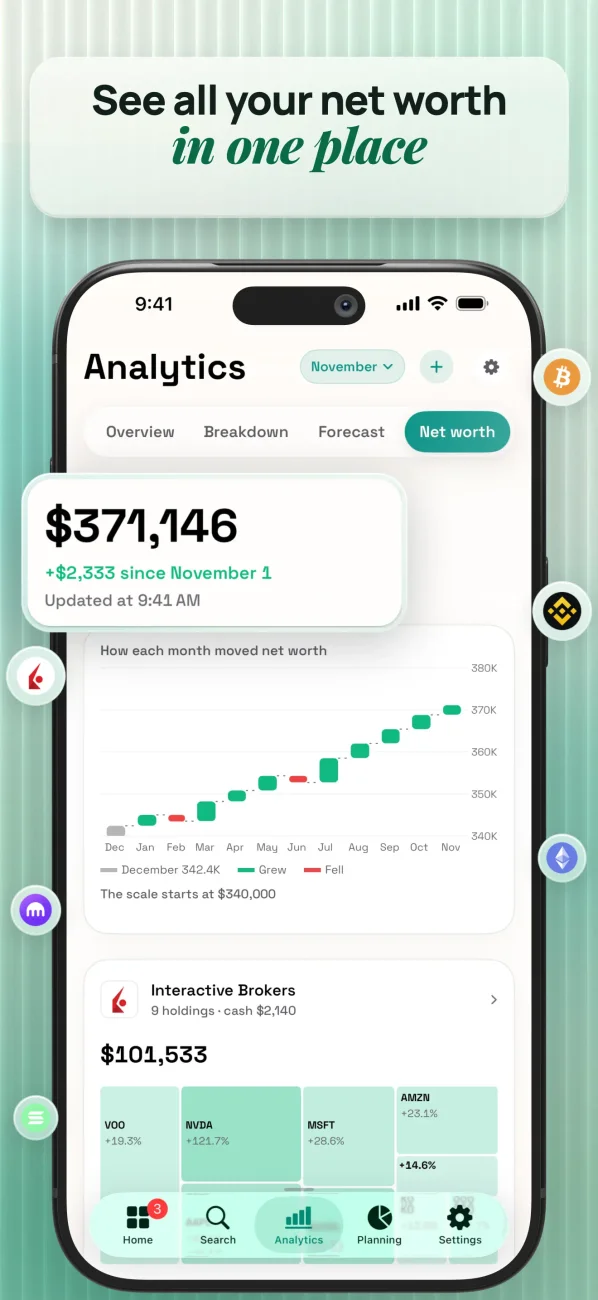
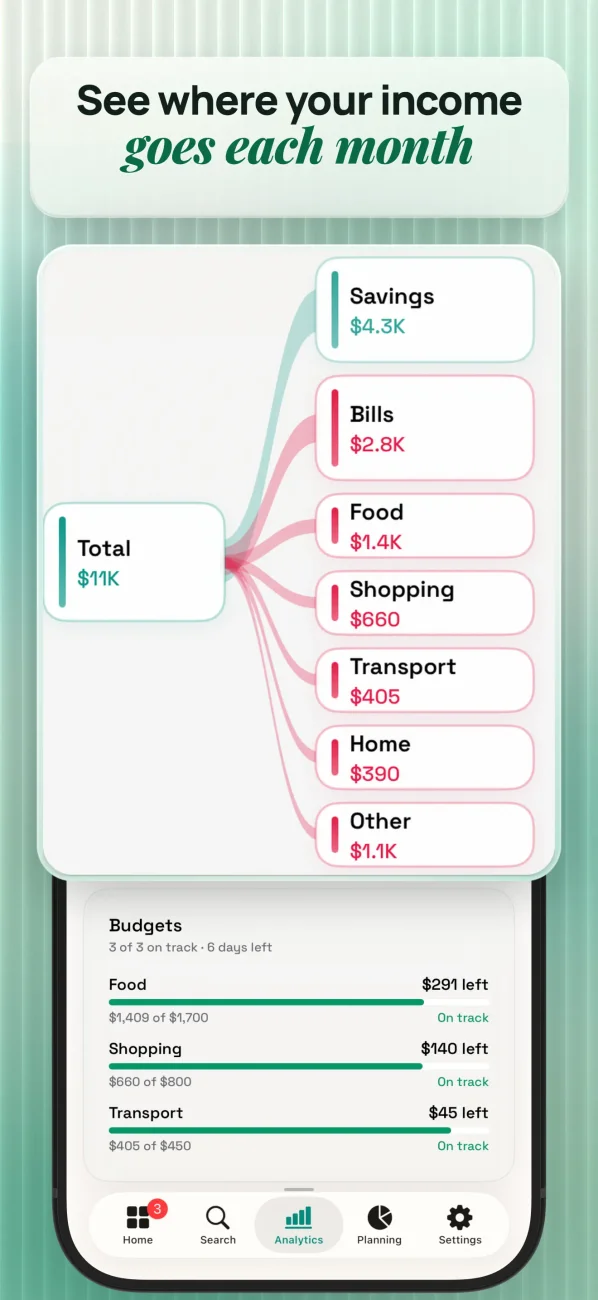
Overview scores your month on savings rate, budget control, consistency, income flow, and balance. Breakdown shows every category and every day. Forecast (Plus) projects how the month ends from your own habits. Rearrange the cards to put what you care about first.
Early retirement planning
Set your target number and retirement age, and see when you could reach financial independence.
Budgets and savings goals
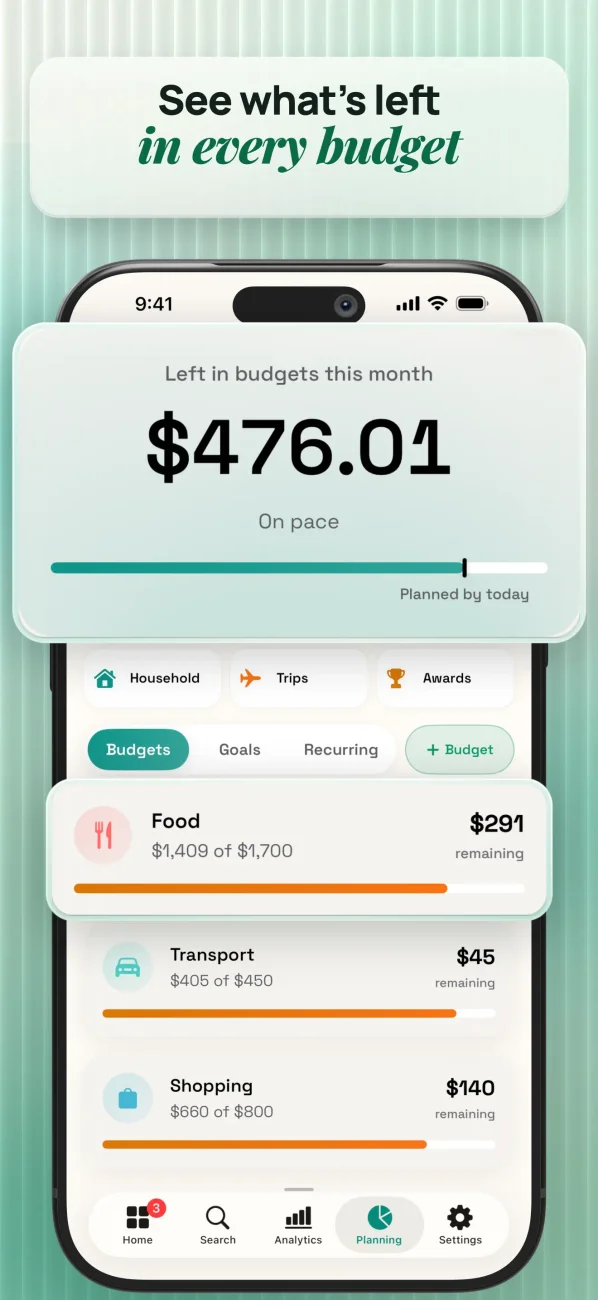
Set a monthly limit and see how much room is left. Create savings goals with a date and see how much to set aside each month.
Privacy
Lock the app with Face ID, Touch ID, or your device passcode. The screen blurs the moment you switch away. You can turn off analytics and crash reports in Settings.
Also included
- Monobank connection; statement import from Monobank, PrivatBank, Wise and others
- Tags and categories on many transactions at once
- Multi-currency: USD, EUR, GBP, UAH, PLN, and more
- Available in 10 languages: English, Ukrainian, German, Polish, Czech, Spanish, French, Dutch, Italian and Portuguese
- Recurring transactions
- Custom categories with your own icons and colors
- Export to CSV and JSON
- Home Screen, Lock Screen, and Control Center widgets
- Streaks, levels, and achievements
- Dark mode
Free and paid
Fundeer is free to download, with no ads. The free version includes 10 receipt scans and 10 voice entries a month, one budget of your own, and sync of your own entries on one device. Logging by hand, Apple Pay, statement import, trips, household budgets and CSV export are free.
Fundeer Plus is an optional subscription, monthly or yearly. It removes the monthly limits on scans and voice entries, allows more budgets, trips and devices, and adds Forecast and PDF and Excel reports.
Payment goes through your Apple Account. The subscription renews automatically unless you cancel at least 24 hours before the end of the period. Manage or cancel it in your App Store account settings.
Terms of Use: https://www.apple.com/legal/internet-services/itunes/dev/stdeula/
Privacy Policy: https://fundeer.app/privacy
What’s new
Version 1.65 · Nov 27, 2026
Budget as a couple or with flatmates. Choose the category of an Apple Pay payment from its notification. Put five Fundeer widgets on your Lock Screen.
The Family section is now called Household. Use it as a family, as a couple or with flatmates. When you add an expense, you can add it to the household. Each month, see what everyone put in. If the money came from a joint account, set Paid by to Joint account, and nobody owes anyone for that expense. You choose which of your categories count in the household, like food or bills. The Home screen can also show the household’s month under your balance: what it spent, or who put in how much.
After you pay with Apple Pay, choose the category right in the Fundeer notification, without opening the app. Set up Apple Pay in Fundeer’s settings to get these notifications. With Plus, the notification can arrive with a category already chosen, like “Filed under Food”, and you keep it or pick another.
Five Fundeer widgets can now go on the Lock Screen: Quick Add, Today’s Spending, Balance, Spending Summary and Left by Month End. Widgets refresh as soon as you add, edit or delete an expense. The Trip Budget widget and the household’s Shared Budget widget also update when other members add expenses.
ALSO NEW
• Financial Health shows why your score is what it is and what would raise it.
• 14 new icons for Fundeer on your Home Screen, like Forest Stag (free) and Copper Fox (Plus).
• In Transactions, keep both or merge bank purchases that look like duplicates.
• Start Over clears transactions, budgets and goals but keeps your account and its trips, households and categories.
• Importing a bank statement skips purchases that already came in from your bank.
• Ask for Revolut, Wise or PrivatBank in Settings → “Bank not listed?” to see where to get statements.
• With Plus, bank purchases don’t add a “Transportation” category next to your “Transport”.
• With Plus, you can move small categories to the bottom of the chart on Home.
• Leave an expense half-edited to answer a message, and your changes are still there when you come back.
FIXED
• Big imports and bulk deletes no longer freeze the app.
• Slow receipt scans no longer stop at 45 seconds, and you can try again.
• Scanned receipts and voice entries no longer go missing from the trip or shared budget you chose.
• On Pro Max, the Apple Pay purchase in the Dynamic Island fits instead of being cut off.
• The Apple Pay receipt stays on your Lock Screen instead of disappearing.
• Having no budgets, or moving money between your own accounts, no longer lowers your Financial Health score.
• Tags keep their capital letters instead of turning lowercase.
• Pressing and holding the Fundeer icon and choosing Add Expense opens Add Expense instead of Home.
App privacy
What Andrii Zahreichuk declares on the App Store about how this app handles data.
-
Data linked to you
May be collected and linked to your identity.
- Purchases
- Financial info
- Location
- Contact info
- User content
- Identifiers
- Usage data
- Diagnostics
Privacy practices may vary, for example with the features you use or your age.
Information
- Seller
- Andrii Zahreichuk
- Category
- Finance
- Version
- 1.65
- Updated
- Nov 27, 2026
- Released
- Feb 11, 2025
- Size
- 132.6 MB
- Requires
- iOS 18.0 or later
- Age rating
- 4+
- Price
- Free
- In-app purchases
- Yes
- Languages
- English, Czech, Dutch, French, German, Italian, Polish, Portuguese, Spanish, Ukrainian
- Copyright
- © 2026 Fundeer
You might also like
-
 DyvoBudget: Budget & MoneyPlan, track & share budgets
-
 Expenny: Family Budget TrackerScan Receipts & Share Expenses
-
 Midni: облік витрат і бюджетFinance
-
 Moneo: Expense Tracker, BudgetPersonal Finance Manage
-
 My Family BudgetFamily Money, Simplified
-
 Clario — Smart Budget TrackerAI budgeting & saving smart
-
 YouSpend: Money SaverBudget, Expenses & Savings
-
 Spender - Budget trackerFinance, Expense & Savings
-
 STATOK: AI Money ManagerExpense Tracker & Budget Coach
-
 Tappel — Private Expense LogSpending tracker & budget app