
- Age rating4+
- CategoryProductivity
- DeveloperPDF SCANNER LLC
- LanguagesEnglish
- Size7.6 MB
Links to the official App Store page
Download.org hosts no file of Gallery Cleaner Swipe. The button opens its official App Store page, published by PDF SCANNER LLC. Listing last checked on Nov 12, 2026.
Screenshots


About
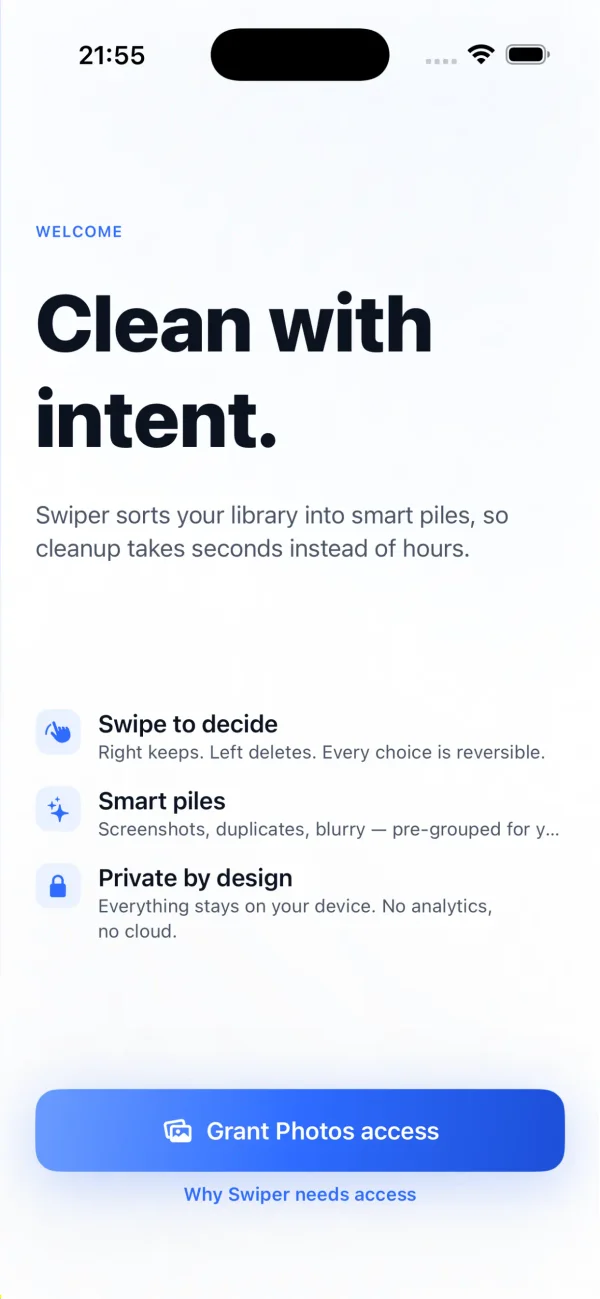
Swiper is the fastest swipe gallery cleaner for iPhone and iPad. Clean up thousands of photos in minutes using one simple gesture. Swipe right to keep a photo, swipe left to delete it, swipe up to favorite. Every decision is reversible.
WHY SWIPER
Your photo library grows by hundreds of shots every month. Screenshots pile up. Duplicates eat your storage. Blurry photos you never meant to keep sit there forever. Scrolling through Photos and tapping delete on each one is painful and slow.
Swiper turns cleanup into a game. Pick a smart pile, swipe through it, and watch your storage come back. No more endless scrolling. No more decision fatigue. Just clean, fast, satisfying photo cleanup.
SWIPE GALLERY CLEANER, BUILT RIGHT
Swipe right: keep the photo
Swipe left: move to delete
Swipe up: mark as favorite
Swipe down: skip for later
Tap undo to reverse any decision
That is it. The entire photo cleaner experience is designed around one gesture that feels fast and confident.
SMART PILES
Swiper analyzes your photo library on device and groups everything into smart piles so you never start from a blank slate.
Screenshots: quick captures you probably do not need anymore
Similar photos: likely duplicates grouped together
Bursts: sequence shots so you can keep the best one
Blurry: low detail frames
Dark and overexposed: out of balance exposure
Large files: photos and videos over 50 MB
Archive: everything older than a year
Live Photos: motion plus still pairs
Screen recordings: long video files that add up fast
Each pile shows the number of photos and the estimated storage you can reclaim before you even start.
PRIVATE BY DESIGN
Everything in Swiper happens on your device. No photos are uploaded. No analytics, no tracking, no accounts. The app does not even need an internet connection. Your library stays yours.
DESIGNED TO FEEL GREAT
Every swipe has a satisfying motion and haptic tuned to make cleanup feel rewarding instead of tedious. The interface is calm, editorial, and respects your content. No popups, no ads, no upsells in the middle of your flow.
FEATURES AT A GLANCE
Swipe gallery cleaner with four gesture directions
Smart photo piles, automatically organized
Real time space saved counter as you swipe
Undo any decision at any time
Review tray to check everything before deleting
Hold to confirm delete, no accidental taps
Works with iCloud Photos and local library
Supports iPhone and iPad
On device analysis, no cloud uploads
No ads, no tracking, no accounts
HOW IT WORKS
1. Open Swiper and grant access to your photos
2. Pick a smart pile you want to clean
3. Swipe through the deck one photo at a time
4. Hold to confirm and free up space in Photos
That is the entire photo cleanup workflow. Most users clean hundreds of photos in their first session.
WHO SWIPER IS FOR
If you run out of iPhone storage and dread the cleanup, this app is for you. If your gallery has thousands of old screenshots, duplicate shots from the same moment, or blurry misfires from a busy day, Swiper will save you hours. If you want a photo organizer that is private, fast, and genuinely fun to use, give Swiper a try.
Reclaim your storage. One swipe at a time.
What’s new
Version 1.1 · Apr 25, 2026
Bugs Fixed!
App privacy
What PDF SCANNER LLC declares on the App Store about how this app handles data.
-
Data used to track you
May be used to track you across apps and websites owned by other companies.
- Identifiers
-
Data linked to you
May be collected and linked to your identity.
- Identifiers
Privacy practices may vary, for example with the features you use or your age.
Information
- Seller
- PDF SCANNER LLC
- Category
- Productivity
- Version
- 1.1
- Updated
- Apr 25, 2026
- Released
- Apr 20, 2026
- Size
- 7.6 MB
- Requires
- iOS 26.2 or later
- Age rating
- 4+
- Price
- Free
- Languages
- English
- Copyright
- © 2026 PDF SCANNER LLC
You might also like
-
 FotokopiaSkaner dokumentów
-
 ScopitTime, clear and simple
-
 MoreBrainSpaceLearn. Think. Do.
-
 Odie: AI Voice NotesVoice notes into clear text
-
 Pallas ChatOffline local AI chat
-
 Resurface: Forget NothingSave anything. Forget nothing.
-
 OneThing - Focus OneProductivity
-
 PDF Studio: PDF Editor & ToolsMerge, Compress, Convert PDFs
-
 Focus Planet: Study TimerADHD & Productivity Pomodoro
-
 Voquill | AI Voice KeyboardType 4x faster with your voice