GearTech OS: Pipefitter
Pipe fitting, welding, layout
Designed for iPhone, iPad
Free · In-app purchases
- Age rating4+
- CategoryUtilities
- DeveloperJosue Ponce
- LanguagesEnglish
- Size4.2 MB
Links to the official App Store page
Download.org hosts no file of GearTech OS: Pipefitter. The button opens its official App Store page, published by Josue Ponce. Listing last checked on Nov 23, 2026.
Screenshots


About
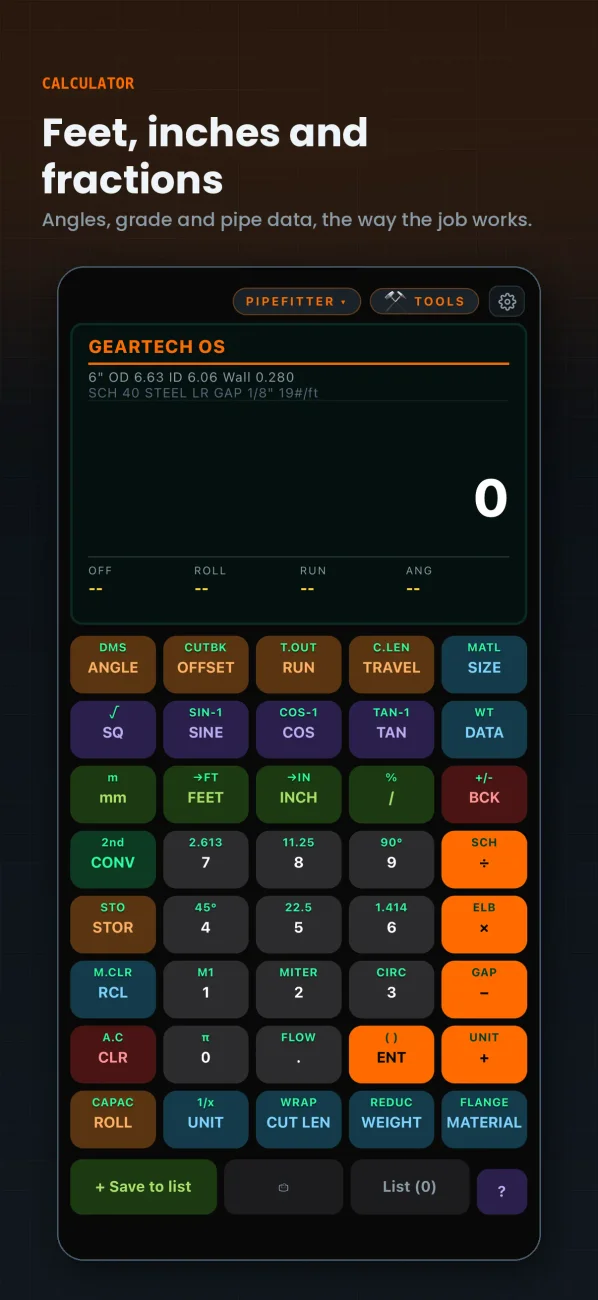
GearTech OS replaces the box of single-purpose calculators in your truck with one app built for the trades — by someone who works them.
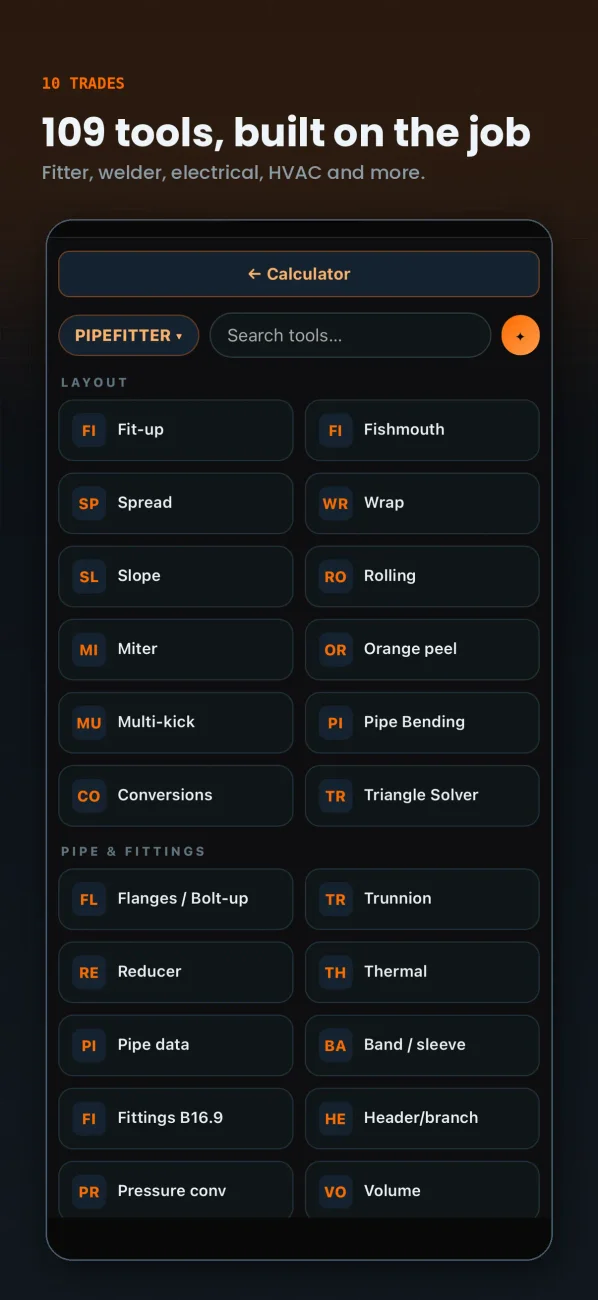
Pick your trade and get tools made for it: pipefitting, welding, electrical, framing, concrete, HVAC, plumbing, machining, solar, sheet metal and automotive. No pipe jargon cluttering the electrician's screen, no electrical keys on the welder's — each trade gets its own tools and its own keypad shortcuts.
FREE, AND PRO.
The calculator is free forever — offsets, cut length, take-off, rolling offset, miter and weld gap — and every trade also keeps some of its own tools open with no subscription. GearTech Pro opens the rest of the tools for your trade, with one month free to try it. No account needed either way.
SPOOL / ISO.
Dictate or type the dimension chain off the drawing and the app echoes back what it understood, draws the isometric with a balloon on every piece, and gives you the cut for each length of pipe and the bill of materials. Save the spool by name and open it again.
EVERY result shows the math.
Tap "Show math" under any answer to see the formula, your numbers plugged in, and the result. Learn it, trust it, and check your work in the field.
REAL diagrams.
Every tool draws what you're building — a 3D rolling offset box, a butt-weld elbow you can cut to a custom degree, a saddle/fishmouth, a reducer cone, roof rafters, conduit fill, ducts, gears and more.
NEW — CRANE HAND SIGNALS IN 3D.
22 ASME B30.5 signals. The signal person gives the signal and the crane performs the motion, with the load always plumb. Spin the camera and watch it from wherever you have to stand.
NEW — FLANGE BOLT-UP.
Target-stress torque by bolt size, material, lubricant and percentage of yield, with the 30/60/100% passes worked out and the tightening order drawn for 4 to 32 bolts.
Built for pipefitters and welders first:
- Pipe offsets, rolling offsets, fishmouth/saddle templates, miters, trunnions, reducers (concentric & eccentric), and ASME B16.9 fittings with custom degrees
- Spread/line banks, slope/grade, thermal expansion
- Crane hand signals in 3D and flange bolt-up torque
- Constants cheat-sheet and a 272-question practice EXAM for the NITC / UA STAR, including crane signal person — every question explained step by step, and the app remembers what you missed
Plus 100+ tools across 10 more trades:
- Electrical: voltage drop, conduit fill (NEC), box fill, ampacity + derating, motor FLC, 3-phase power, stub-up take-up
- Framing: rafters, hip/valley/jack, stairs, pitch, baluster spacing, board feet
- Concrete: slab/footing/column volume, bags, rebar, blocks
- HVAC: tonnage, CFM, duct sizing (round & rect), friction rate, sensible BTU
- Plumbing: drain slope, DFU, fixture units to GPM, pipe sizing, gas pipe
- Machinist, Solar, Welding, Sheet metal, Automotive
Works 100% offline — the 3D included. No account, no ads, no tracking. Your settings, cut lists and memories stay on your phone.
Bilingual: English and Spanish, switch anytime.
We build the world around us. Our tools should be built for us.
— Per Diem Syndicate
Terms of Use (EULA): https://www.apple.com/legal/internet-services/itunes/dev/stdeula/
What’s new
Version 2.2.1 · Nov 21, 2026
Fixed: the subscription screen could not reach the store and blamed your signal. It now tells you what is really happening.
Fixed: five buttons that did nothing — the custom elbow angle in Fittings, the manual face-to-face length in Reducer, erasing exam progress, restoring a backup, and deleting a saved spool. All of them relied on system dialogs that never appeared inside the app.
New: the custom elbow angle now checks that the degrees are between 1 and 179 instead of accepting anything.
Under the hood: groundwork for drawing isometrics piece by piece — a catalog of fittings, branch runs, and dimensions read from the end or the face of a fitting, not only centre to centre.
App privacy
What Josue Ponce declares on the App Store about how this app handles data.
-
Data not linked to you
May be collected but is not linked to your identity.
- User content
- Diagnostics
Privacy practices may vary, for example with the features you use or your age.
Information
- Seller
- Josue Ponce
- Category
- Utilities
- Version
- 2.2.1
- Updated
- Nov 21, 2026
- Released
- Jul 2, 2026
- Size
- 4.2 MB
- Requires
- iOS 16.0 or later
- Age rating
- 4+
- Price
- Free
- In-app purchases
- Yes
- Languages
- English
- Copyright
- © 2026 Per Diem Syndicate
You might also like
-
 Pipe Wiz: Fitter CalculatorRolling offsets & cut lengths
-
 Pipe Calc ElitePipefitter & Piping Calculator
-
 FitterMaster: Pipe Fitter CalcPipe Offset & Flange Torque
-
 FountainLifeUtilities
-
 Signal Scaler4 – 20 mA Scaling Calculator
-
 Pipewright: Pipefitter ToolboxPipefitting calculator & tools
-
 Pipe Offset Calc: SpoolsetPipefitter rolling take-outs
-
 Pipe CraftsmenPipe fitting tools
-
 PipeFit Pro: Pipe CalculatorPipefitter Offset Calculator
-
 Being - HTML as MediumLocal HTML Reader & Archive