
- Age rating4+
- CategoryUtilities
- DeveloperDolwin Fernandes
- Size56.0 MB
Links to the official App Store page
Download.org hosts no file of Ghostlane. The button opens its official App Store page, published by Dolwin Fernandes. Listing last checked on Nov 23, 2026.
Screenshots

About
Count traffic. Know the flow.
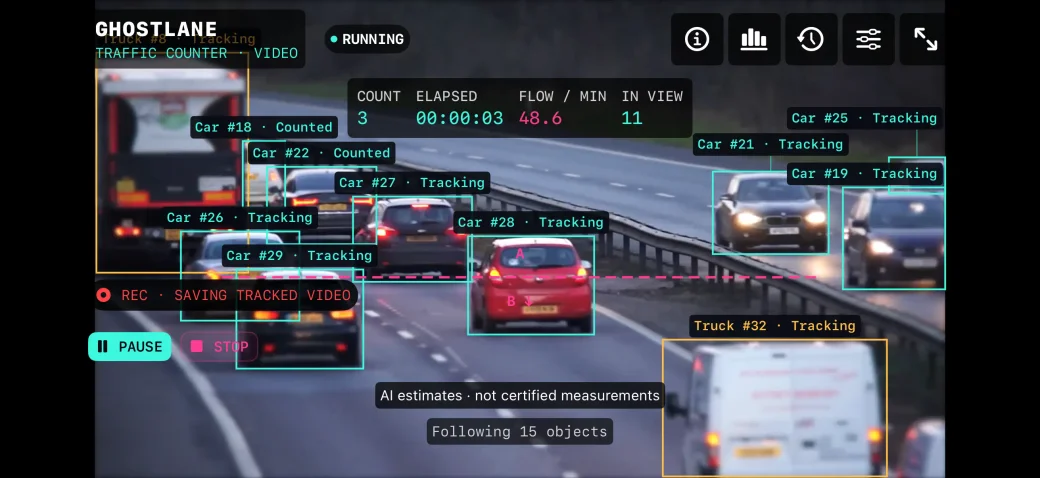
Ghostlane turns your iPhone into a local traffic counter. Set up at a stationary observation point, place a counting line across the traffic path and see how many vehicles pass.
COUNT PASSING TRAFFIC
Follow cars, motorcycles, bicycles, buses, trucks and other selectable object categories. Review totals by category and direction.
KNOW WHERE AND WHEN
Save the filming location with your session. See active duration, crossings per minute and a chart of traffic over time. Compare your observations in exported CSV reports.
USE YOUR CAMERA OR A VIDEO
Analyze a live camera view or import footage from Files. Pause and resume an observation, then open the saved report in history.
KEEP RESULTS ON YOUR IPHONE
Detection, tracking and counting run on device. Reports stay local. Optionally save silent annotated video with boxes, track labels and counts. Maps, place search and address lookup use Apple services and may need internet access.
Counts are estimates and can be affected by visibility, occlusion, camera movement and lost tracks. Keep the phone stationary, observe from a safe position and verify counts independently. A filming pin describes the camera location, not each vehicle. Ghostlane does not measure vehicle speed.
SPEED FEATURE UPDATE
Calibration, automatic calibration and speed estimation are temporarily unavailable in this release. We plan to bring speed estimates back in an upcoming update after accuracy improvements and further testing.
What’s new
Version 1.1 · Nov 11, 2026
Ghostlane now focuses on counting passing traffic by location and time.
- Temporarily removed calibration, automatic calibration and speed estimation.
- Simplified the dashboard and reports around vehicle counts, session duration and traffic flow per minute.
- Updated CSV exports with crossing totals and traffic flow.
- Kept existing session counts, times and locations readable.
We plan to bring speed estimates back in an upcoming update after making accuracy improvements and completing further testing.
App privacy
What Dolwin Fernandes declares on the App Store about how this app handles data.
-
Data not collected
The developer does not collect any data from this app.
Privacy practices may vary, for example with the features you use or your age.
Information
- Seller
- Dolwin Fernandes
- Category
- Utilities
- Version
- 1.1
- Updated
- Nov 11, 2026
- Released
- Nov 2, 2026
- Size
- 56.0 MB
- Requires
- iOS 17.0 or later
- Age rating
- 4+
- Price
- Free
- Copyright
- © 2026 - Dolwin Fernandes