
- Age rating4+
- CategoryMusic
- DeveloperElliott Griffin
- LanguagesEnglish
- Size6.5 MB
Links to the official App Store page
Download.org hosts no file of GoPiano. The button opens its official App Store page, published by Elliott Griffin. Listing last checked on Nov 12, 2026.
Screenshots


About
A piano you can actually play with both hands.
GoPiano opens straight onto the keyboard. No menu, no setup, no account — touch a key and it sounds.
PLAY • Multi-touch keys: hold a chord, slide between notes, play with both hands • How hard a note sounds depends on where you strike the key • A sustain pedal, for letting notes ring • One to three octaves depending on your screen, and shift the range with a tap • Note names on the keys, until you no longer need them
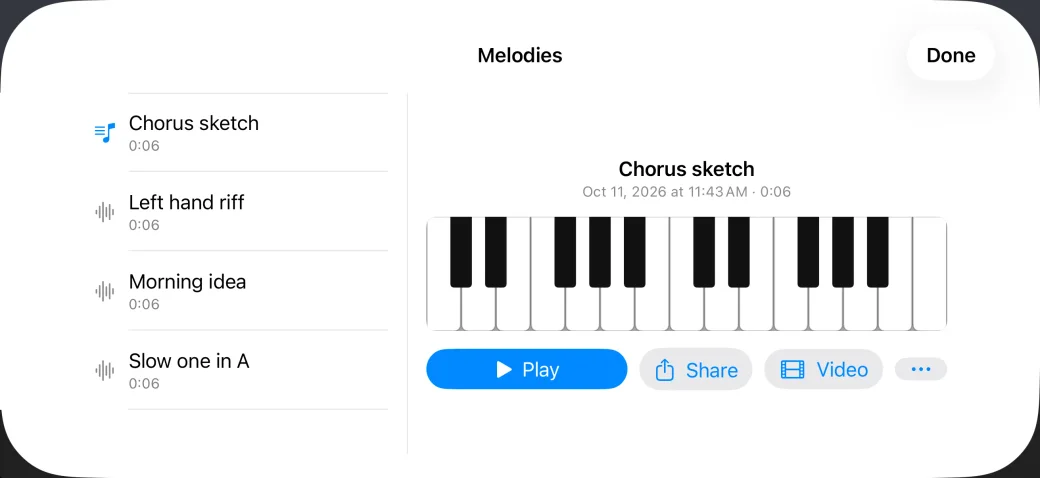
RECORD • Tap record and play. Tap again to stop. • Play it back on the keyboard itself and watch the keys light up exactly as you pressed them • Keep the take or scrub it and go again
KEEP AND SHARE • Saved melodies stay on your device and show up in the Files app, under GoPiano • Share the audio anywhere — Messages, Mail, AirDrop, anything that takes a file • Or export a video of the keyboard playing your melody back, keys lighting up, audio underneath. It is drawn fresh rather than screen-recorded, so there is no status bar, no fingers in the way and nothing to crop.
PRIVATE BY DEFAULT • No account, no sign-in, no tracking, no analytics • No microphone access. GoPiano records its own sound from inside the app, so it never asks to listen to the room. • Nothing you play leaves your device unless you share it yourself
Piano samples from the Piano FF pack by jobro on Freesound, used under CC BY 3.0 and modified.
What’s new
Version 2.0 · Oct 25, 2026
GoPiano has been rebuilt from the ground up.
• A new piano, sampled across the keyboard and tuned to concert pitch • How hard a note sounds now depends on where you strike the key • A sustain pedal • Record a take, then watch it play back on the keyboard with the keys lighting up • Export a melody as a video: the keyboard animating, your audio underneath, nothing screen-recorded • Melodies are saved as ordinary .m4a files — find them in the Files app, share them anywhere • A wider keyboard on iPad • Rebuilt in SwiftUI for current iPhones and iPads • GoPiano no longer asks for microphone access
App privacy
What Elliott Griffin declares on the App Store about how this app handles data.
-
Data not collected
The developer does not collect any data from this app.
Privacy practices may vary, for example with the features you use or your age.
Information
- Seller
- Elliott Griffin
- Category
- Music
- Version
- 2.0
- Updated
- Oct 25, 2026
- Released
- Jan 25, 2019
- Size
- 6.5 MB
- Requires
- iOS 17.0 or later
- Age rating
- 4+
- Price
- Free
- Languages
- English
- Copyright
- © Elliott Griffin
You might also like
-
 K13 PianoPlay a Piano Keyboard Anywhere
-
 Enjoy PianoMusic
-
 Melodic Piano: Piano StudioYour Creative Piano Studio
-
 Carter MetronomeTap the beat and keep time
-
 ArtPiano - Piano simulatorRealistic Piano & Music Art
-
 Pianovera: Falling Note PianoLearn piano with 3D hands
-
 Pianond: Piano Game & KeyboardLearn Songs on Real Piano Keys
-
 Metronome Groove -mastery rythProfessional Rhythm Trainer
-
 Clear Piano: Offline Keyboard88 keys, chords & melodies
-
 MIDI PianoMusic