GPS Relay
Share phone GPS with your EFB
Designed for iPhone, iPad
Free · In-app purchases
- Age rating4+
- CategoryNavigation
- DeveloperSEUNGHA MOON
- LanguagesEnglish
- Size1.4 MB
Links to the official App Store page
Download.org hosts no file of GPS Relay. The button opens its official App Store page, published by SEUNGHA MOON. Listing last checked on Nov 23, 2026.
Screenshots

About
Your Wi‑Fi‑only iPad has no GPS of its own. In flight, without Wi‑Fi, your EFB loses ownship. Your iPhone has a real GPS receiver — GPS Relay sends its position to your iPad over Bluetooth, and your flight app shows it as a GPS device.
NO EXTRA HARDWARE
• No hotspot, no cables, no external GPS box.
• Works in airplane mode, as long as Bluetooth stays on.
• Everything stays on your two devices. Nothing goes over the internet.
WORKS WITH YOUR FLIGHT APP
GPS Relay feeds the iPad like a GDL 90 compatible GPS receiver, on the iPad itself:
• ForeFlight — nothing to set up.
• Jeppesen FliteDeck Pro — switch on its GDL90 Compatible Device input (port 4000).
• Other EFBs that accept a GDL 90 device on UDP port 4000.
SET UP IN TWO MINUTES
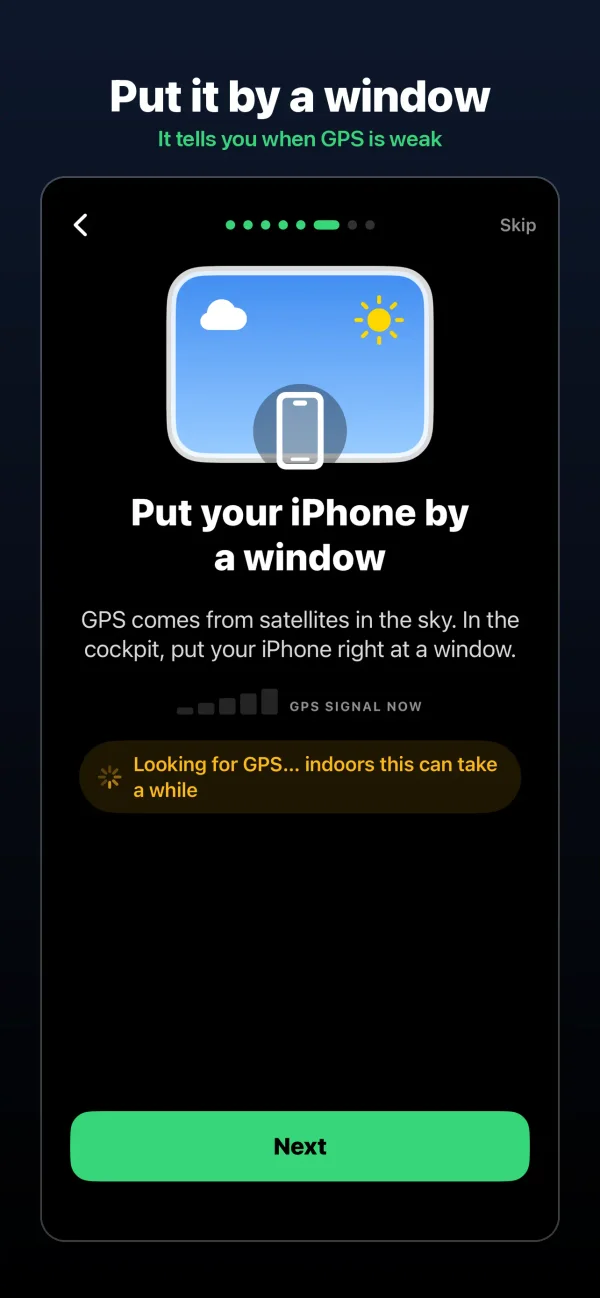
A step-by-step guide on each device: allow Bluetooth and location, tap your iPhone’s 4-letter code on the iPad, put the iPhone at a window. Done.
SET AND FORGET
• The iPhone keeps relaying with the screen locked; the iPad keeps feeding your EFB in the background.
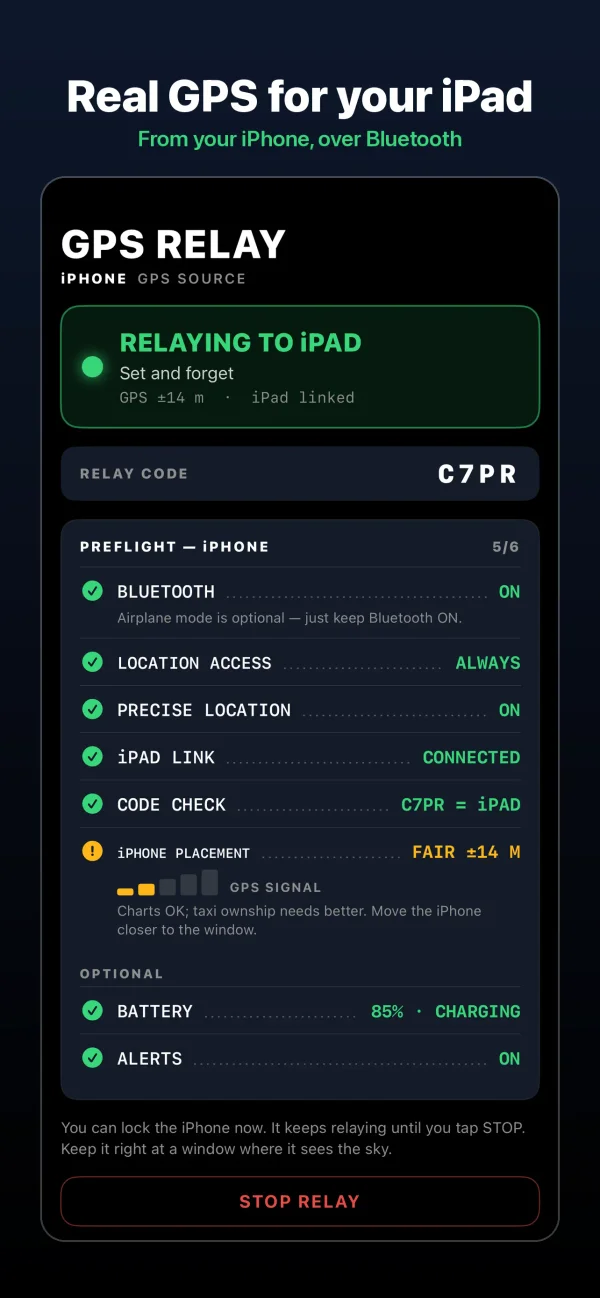
• Preflight checklist on both devices: what's ready turns green.
• Honest accuracy: your EFB gets the iPhone's real accuracy, so it can hide ownship when GPS is too weak.
• Alerts if the link drops or the iPhone loses GPS (for example when it is away from a window).
• STOP switches GPS, Bluetooth and background activity completely off.
FREE TO START
Your first 5 hours of relay time are free, counted only while your iPad actually receives GPS. After that, unlock GPS Relay once with an in‑app purchase — no subscription. One purchase covers your iPhone and iPad (same Apple ID); the iPad side never needs it.
WHAT YOU NEED
• An iPhone (the GPS source) and an iPad, both with GPS Relay installed.
• Bluetooth on both. Keep the iPhone at a window: the airplane's skin blocks GPS.
IMPORTANT
GPS Relay is for situational awareness only. It is not certified and must not be used as a primary means of navigation. Follow your operator's procedures and regulations for portable electronic devices.
ForeFlight is a trademark of ForeFlight LLC. Jeppesen and FliteDeck are trademarks of Jeppesen / The Boeing Company. GPS Relay is not affiliated with or endorsed by them.
What’s new
Version 1.0.2 · Nov 14, 2026
• You choose the pairing: the iPad lists nearby iPhones by their 4-letter code and you tap yours. Another pilot's iPhone next to you can no longer be picked up by mistake.
• Wrong code? Fix it in one tap: PAIRED iPHONE on the iPad's main screen (switch code or Reset pairing).
• Setup works in any order: iPhone first, iPad first, or both at once.
• FliteDeck Pro setup now shows a screenshot for every step.
• Your first 5 hours of relay time are now free (was 2).
• Tip: in flight, leave the iPhone right at a window. The first GPS can take about 5 minutes.
App privacy
What SEUNGHA MOON declares on the App Store about how this app handles data.
-
Data not collected
The developer does not collect any data from this app.
Privacy practices may vary, for example with the features you use or your age.
Information
- Seller
- SEUNGHA MOON
- Category
- Navigation
- Version
- 1.0.2
- Updated
- Nov 14, 2026
- Released
- Nov 7, 2026
- Size
- 1.4 MB
- Requires
- iOS 17.0 or later
- Age rating
- 4+
- Price
- Free
- In-app purchases
- Yes
- Languages
- English
- Copyright
- © 2026 Seungha Moon
You might also like
-
 EZWAY RIDEAccessible Rides Made Easy
-
 EASA FTL 2025Compute max FDP & rest
-
 airnextNavigation
-
 Crew SmartLayover food, sorted for crew
-
 ODA Black Car ServiceODA Transportation LLC
-
 AirframedCollect the planes you see
-
 Abomis Weight and BalanceTravel
-
 SITA Flight Folder PRDNavigation
-
 Divercity RentalTravel
-
 Compass & Altimeter: TrueNorthElevation, GPS & Barometer