
H2R Graphics Mobile
Overlays for your production
Designed for iPhone, iPad, iPod touch
Free
- Age rating4+
- CategoryGraphics & Design
- DeveloperBarker Technologies AB
- LanguagesEnglish
- Size29.9 MB
Links to the official App Store page
Download.org hosts no file of H2R Graphics Mobile. The button opens its official App Store page, published by Barker Technologies AB. Listing last checked on Nov 20, 2026.
Screenshots

About
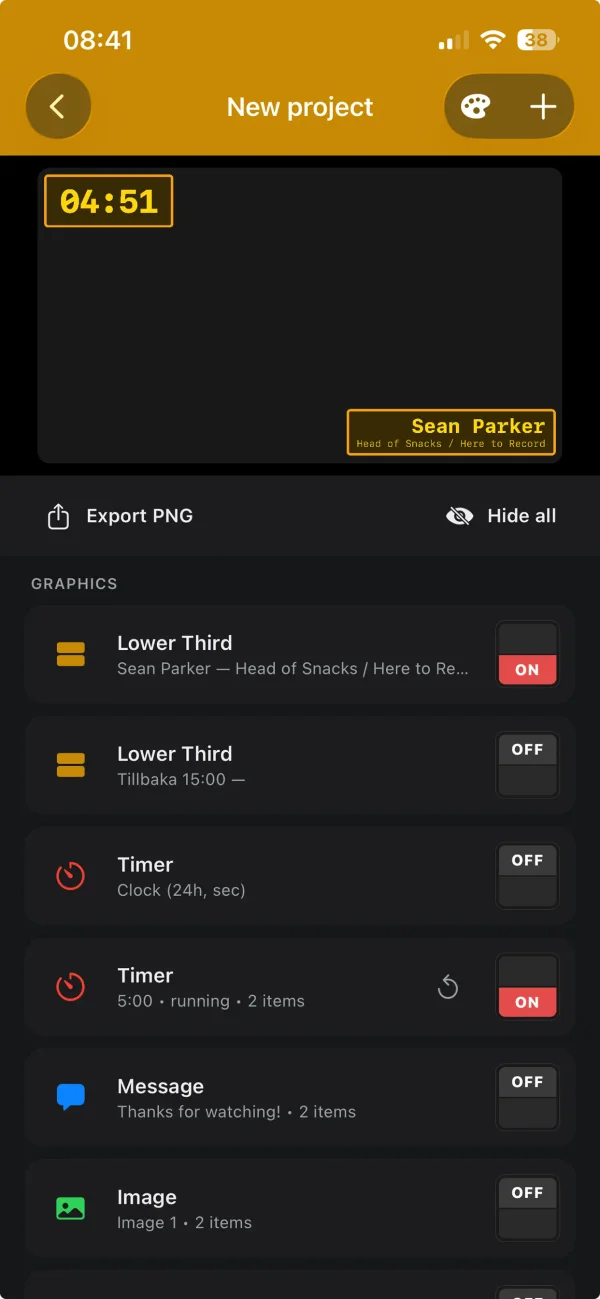
H2R Graphics is a fast, focused tool for building broadcast-style overlays — lower thirds, full-screen messages, countdown timers, clock displays, and images — directly on your iPad or iPhone.
Designed for streamers, podcasters, live event producers, and anyone who needs polished on-screen graphics without a desktop production rig. Drop in a guest name, queue up an "On Break" message, or arm a countdown — then export ready-to-use PNG overlays into your favorite production software.
DESIGNED FOR LIVE WORK
• On-air toggle on every graphic — flip a single button to take it live
• "Hide all" action drops every live graphic at once
• Per-graphic timer controls with start, stop, and reset
• Three timer modes: countdown, count up, and clock
BROADCAST-READY GRAPHICS
• Lower thirds with title and subtitle
• Full-screen message cards
• Countdown, count up, and clock-style timers
• Photo overlays from your library, with fit/fill options
• Configurable accent borders on any side, with adjustable thickness and corner radius
• H1 / H2 typography controls — size, weight, italics, underline
• Per-project themes plus per-graphic overrides
EXPORT AND USE ANYWHERE
• Export any live graphic as a transparent PNG
• Drop the file into OBS, vMix, ATEM Mini, Wirecast, or any production tool
• Files share via the standard iOS / iPadOS share sheet
PROJECTS AND ITEMS
• Group graphics into projects per show, podcast, or event
• Multiple "items" per graphic — pre-load a list of guest names and switch between them with one tap
• Reorder by drag and drop, swipe to delete
Built for live production.
App privacy
What Barker Technologies AB declares on the App Store about how this app handles data.
-
Data not collected
The developer does not collect any data from this app.
Privacy practices may vary, for example with the features you use or your age.
Information
- Seller
- Barker Technologies AB
- Category
- Graphics & Design
- Version
- 1.0
- Updated
- Apr 28, 2026
- Released
- Apr 28, 2026
- Size
- 29.9 MB
- Requires
- iOS 15.1 or later
- Age rating
- 4+
- Price
- Free
- Languages
- English
- Copyright
- © Barker Technologies AB
You might also like
-
 LED Board SimulatorDifferent Animations
-
 AI Clips: Video HighlightsGraphics & Design
-
 Wrap For TeslaCustom Screen Wraps
-
 Designs for Google DocumentsResume, CV, Flyer & Poster
-
 Flowchart Designer 5AI drafts. Pro diagrams on Mac
-
 Khronos glTF ViewerEasily display glTF 3D models
-
 Ad Creative AIAI Ad Generator
-
 Storyboard Creator AIAI Storyboard Generator
-
 DIGEN: AI Video & Image MakerTurn Text or Photos into Video