Happy Color Guide
Japanese colors, real contrast
Designed for iPhone
Free · In-app purchases
- Age rating4+
- CategoryUtilities
- DeveloperNaoyuki Hasegawa
- LanguagesEnglish+ 11 more
- Size5.5 MB
Links to the official App Store page
Download.org hosts no file of Happy Color Guide. The button opens its official App Store page, published by Naoyuki Hasegawa. Listing last checked on Nov 25, 2026.
Screenshots


About
Happy Color Guide helps you choose a text color and a background, then read them as real words.
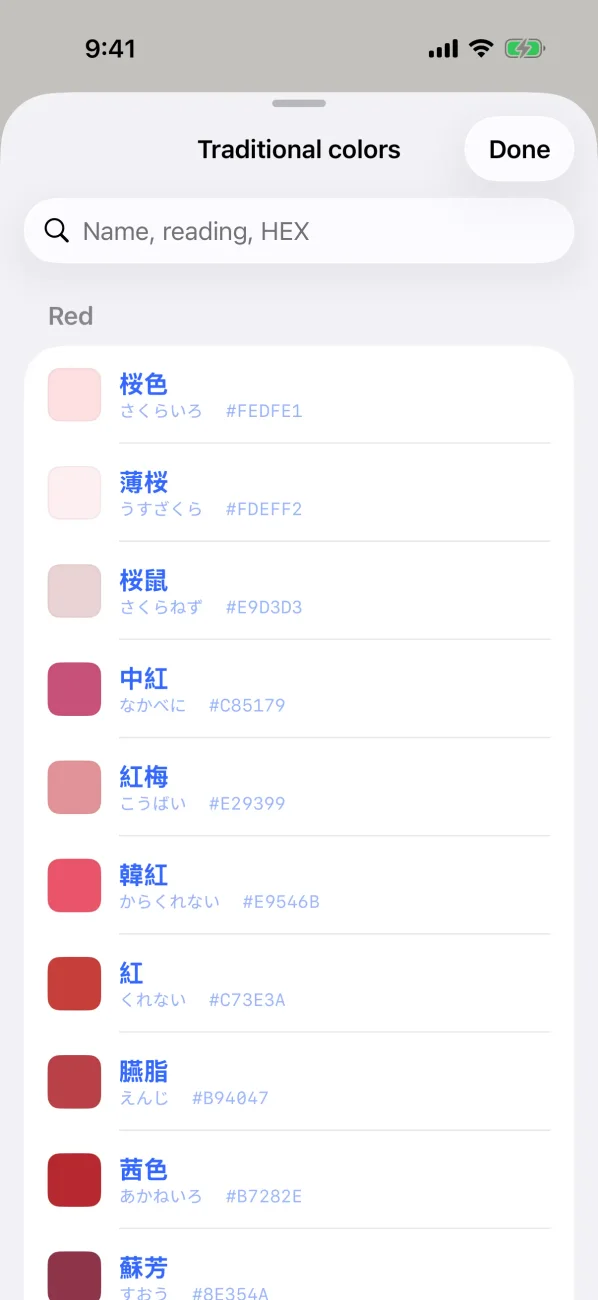
The sample shows a heading, a line of text, and a button in the colors you picked. Swap the two colors, paste a HEX code, or start from a traditional Japanese color. The traditional names stay in Japanese, with their readings.
Contrast is rated with the WCAG 2.1 ratio for body text and large text, on white, on black, and between the two colors you chose.
Generated palettes are named Pattern 1 through Pattern 14. Show, hide, and reorder them in Pattern settings. You can also keep up to five color notes and up to twenty text-and-background pairs on this device.
On iPhone Duo unfolded on its side, the places you pick colors from move to a second column.
Ads are shown at the bottom of the screen. Removing the ads requires an in-app purchase. It is a one-time purchase, not a subscription. Restore purchases is in Pattern settings and in the … menu.
The interface is available in 12 languages: Japanese, English, Simplified Chinese, Traditional Chinese, Korean, German, French, Spanish, Brazilian Portuguese, Italian, Russian, and Vietnamese. The app opens in your device language. Switch language at the bottom of Pattern settings. Saved color notes and palettes stay as they are.
What’s new
Version 2.3.2 · Nov 25, 2026
Now available in 12 languages. Simplified Chinese, Traditional Chinese, Korean, German, French, Spanish, Brazilian Portuguese, Italian, Russian, and Vietnamese join Japanese and English. The app opens in your device language, and you can switch at the bottom of Pattern settings. Contrast ratios use the decimal separator of your region. Saved color notes and palettes stay as they are.
App privacy
What Naoyuki Hasegawa declares on the App Store about how this app handles data.
-
Data not collected
The developer does not collect any data from this app.
Privacy practices may vary, for example with the features you use or your age.
Information
- Seller
- Naoyuki Hasegawa
- Category
- Utilities
- Version
- 2.3.2
- Updated
- Nov 25, 2026
- Released
- Aug 20, 2026
- Size
- 5.5 MB
- Requires
- iOS 17.0 or later
- Age rating
- 4+
- Price
- Free
- In-app purchases
- Yes
- Languages
- English, French, German, Italian, Japanese, Korean, Portuguese, Russian, Simplified Chinese, Spanish, Traditional Chinese, Vietnamese
- Copyright
- © 2026 korechoku