
- Age rating4+
- CategoryProductivity
- DeveloperAltoviento Inc
- Size12.3 MB
Links to the official App Store page
Download.org hosts no file of Here, Gerald!. The button opens its official App Store page, published by Altoviento Inc. Listing last checked on Nov 22, 2026.
Screenshots


About
Capture ideas the moment they happen.
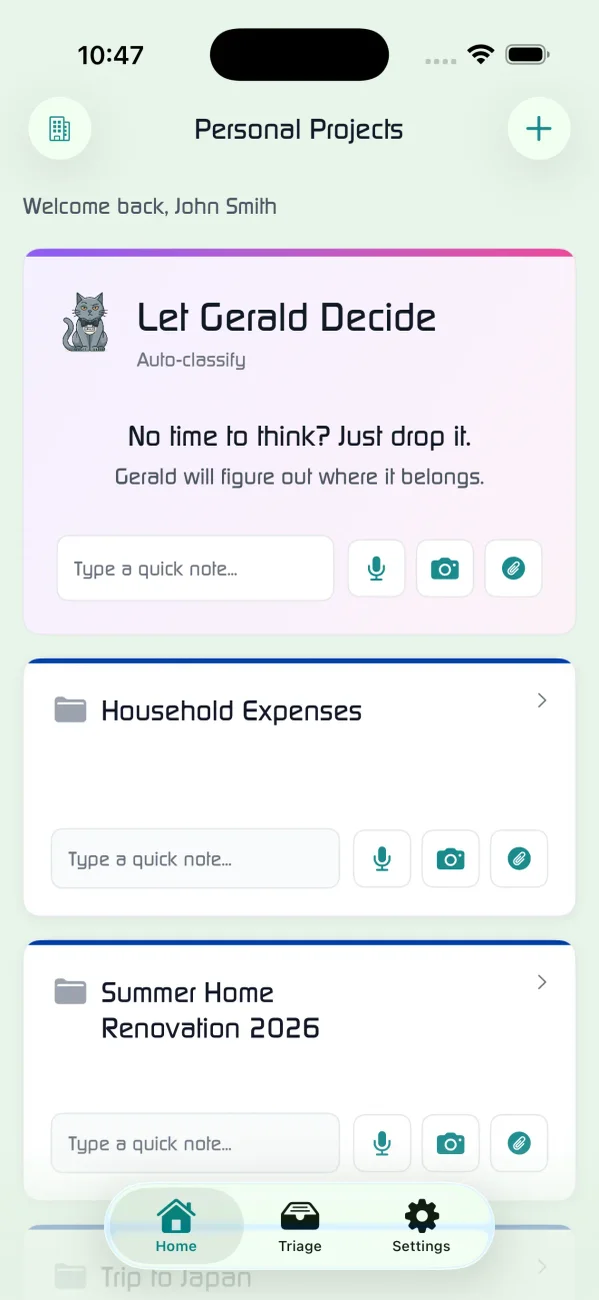
Here, Gerald is your pocket filing assistant. Drop text, voice notes, photos, and files — Gerald classifies
everything into the right place so you can keep moving.
How it works
Tap. Drop. Done. Whether it's a quick thought, a voice memo from your commute, a whiteboard photo, or a PDF you need
to save — just drop it in. Gerald uses AI to figure out where it belongs, or you can file it yourself with one tap.
Four ways to capture
• Text — Type or paste ideas instantly
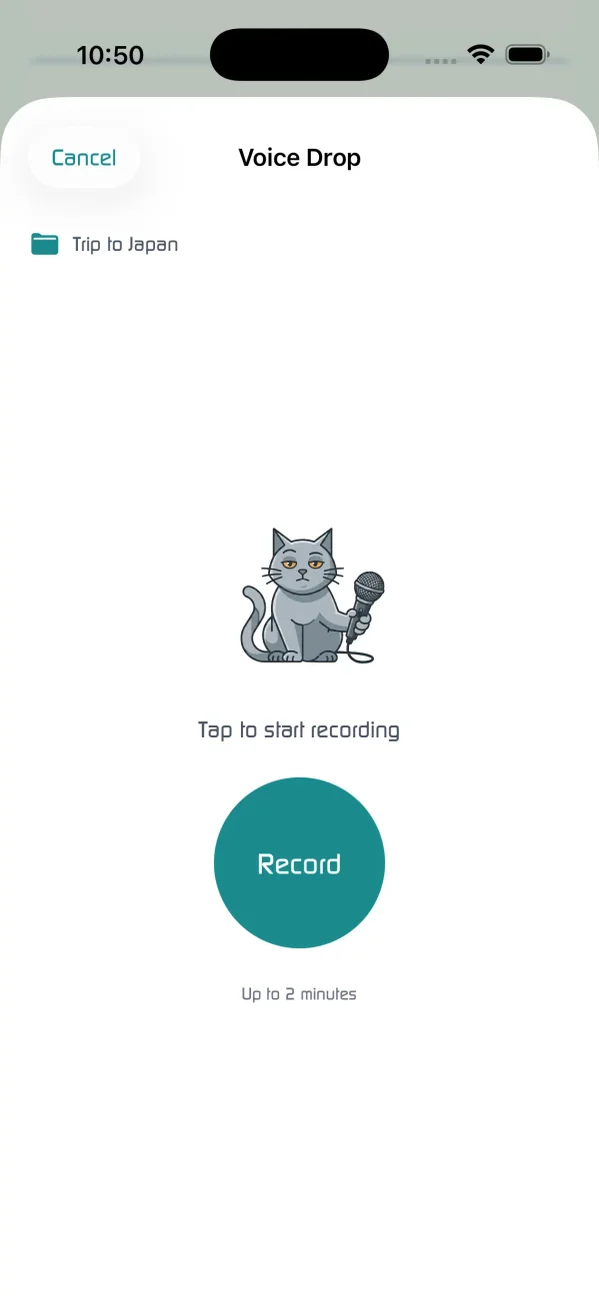
• Voice — Speak your thoughts; Gerald transcribes them
• Photos — Snap whiteboards, screenshots, or anything visual
• Files — Drop PDFs, documents, and more
Smart filing
Let Gerald Decide — our AI classifies your drops into the right initiative automatically. Or pick the initiative
yourself when you know exactly where it goes.
Review with confidence
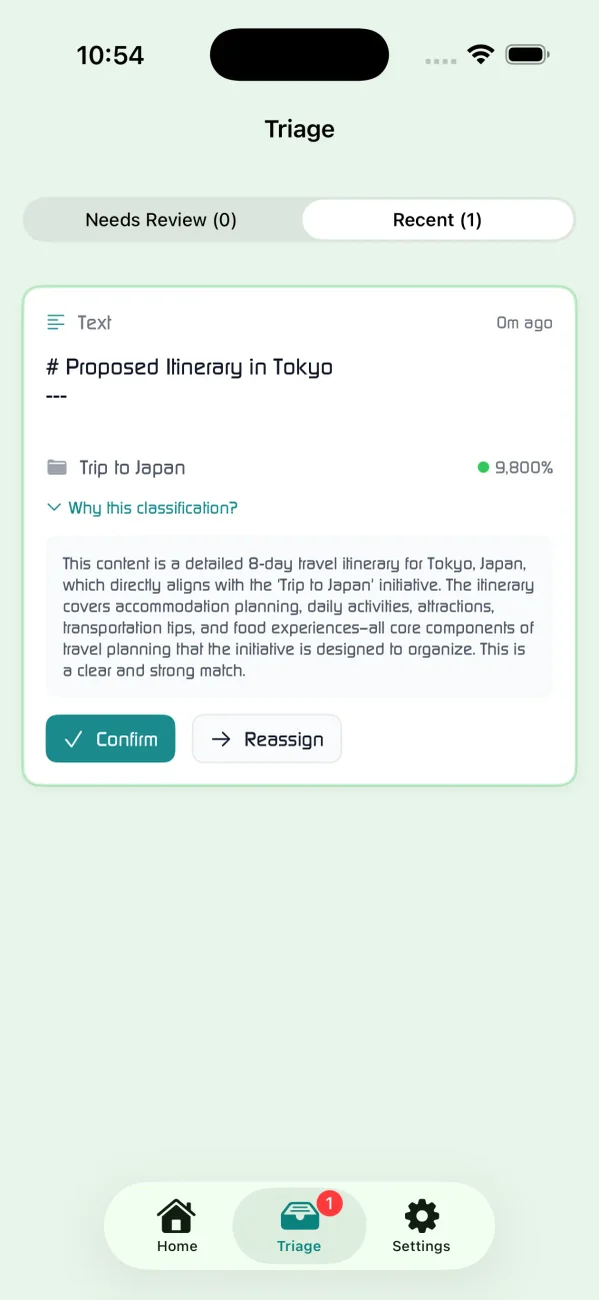
The Triage queue shows you what Gerald filed and why. Confirm, reject, or reassign with a swipe. You stay in control.
Drop from anywhere
Use the Share Extension to send content from Safari, Notes, Mail, or any app directly into Here, Gerald.
Built for your workflow
• Multiple workspaces for work, personal, or team projects
• Create and manage initiatives on the go
• Dark mode that looks great day and night
• Works on iPhone and iPad
Coming soon
Initiative summaries, offline capture, and AI chat — because Gerald is just getting started.
Here, Gerald is a companion to the Here, Gerald web platform. Sign up at heregerald.com to get started.
What’s new
Version 1.0.3 · Sep 19, 2026
Two things work differently now
In the Unsorted Pile, Reject is now Delete — and it's permanent. It removes the drop and everything Gerald learned from it, so it asks you to confirm first. It used to set a drop aside where it could be brought back; it no longer can be.
Links only work between drops in the same basket. The link picker now shows you just that basket's drops.
New
• Gerald can now offer to do things in chat — file a drop, link two drops — and you can accept or decline. Accepted offers tell you what they made.
• Retire a drop you're done with, with a reason, and bring it back later.
• Link two drops by hand without asking Gerald.
• Star a basket to keep it at the top of your list.
• About Me in Settings — your bio and other email addresses.
• Entity pages now show what Gerald actually knows about someone, and say so plainly when a detail isn't in any drop.
• The app now knows your timezone, so reminders and summaries land at the right time.
Fixed
• Linked drops never appeared on either drop — the Links section had never once loaded.
• iPhone HEIC photos and files failed to upload or preview.
• Drop photos were cropped slightly at every edge.
• Basket counts were briefly wrong after adding a photo or file.
• The Unsorted Pile now always tells you which basket a drop is headed for.
• Tapping Confirm or Reject twice no longer acts twice.
• Organizations are asked about as "What is…", not "Who is…".
• In a brand-new chat, cited sources are tappable and the down-vote option works.
• Hand-added relationships read "Added by hand" instead of "Curated".
• Chat suggestions no longer fall back to generic ones, and a stalled reply gives up in seconds rather than minutes.
App privacy
What Altoviento Inc declares on the App Store about how this app handles data.
-
Data linked to you
May be collected and linked to your identity.
- Contact info
- User content
- Identifiers
- Usage data
- Diagnostics
Privacy practices may vary, for example with the features you use or your age.
Information
- Seller
- Altoviento Inc
- Category
- Productivity
- Version
- 1.0.3
- Updated
- Sep 19, 2026
- Released
- Jul 5, 2026
- Size
- 12.3 MB
- Requires
- iOS 26.0 or later
- Age rating
- 4+
- Price
- Free
- Copyright
- © 2026 Altoviento Inc.
You might also like
-
 TimeSee: Visual Timer for ADHDBeat Time Blindness & Focus
-
 Chap: Chores Tracker & ChartHouse Cleaning Schedule
-
 Universal Remote - Control TVsControl All Your Devices TV
-
 Habit — Daily TrackerHabit Tracker, Streaks & Goals
-
 minimalist phone ® Block AppsScreen Time Limit & Focus
-
 Mouse · Keyboardfor Mac or PC
-
 House Chores Cleaning ScheduleHome Chore Tracker & Checklist
-
 Fantastical CalendarReminders & Todo List
-
 iTranscribe - Audio to TextVoice Recorder & Transcribe
-
 Sweepy: Home Cleaning ScheduleSchedule Your House Chores