
- Age rating4+
- CategoryFinance
- DeveloperiCoin Technology, Inc.
- LanguagesEnglish
- Size114.7 MB
Links to the official App Store page
Download.org hosts no file of iCoin Mobile. The button opens its official App Store page, published by iCoin Technology, Inc. Listing last checked on Nov 15, 2026.
Screenshots


About
-- *PLEASE NOTE THE ICOIN MOBILE APP CANNOT FUNCTION UNLESS SYNCED WITH AN ICOIN HARDWARE WALLET. --
iCoin Mobile is the mobile application gateway for the iCoin Hardware Wallet (a standalone hardware device.) Sync your Hardware Wallet addresses to see account balances, create transactions, view NFTs, search account history, monitor your Bitcoin & Ethereum portfolios, and view live prices.
Encrypted Bluetooth & Air Gap security are considered the most secure methods to share information between the iCoin Hardware Wallet (no network connection) and the iCoin Mobile App (network connected.) By utilizing encrypted Bluetooth, and for Air Gap a camera built into the Hardware Wallet, both the Wallet & Mobile App are able to communicate securely.
Since the iCoin Hardware Wallet is a cold device with no Network connectivity, the iCoin Mobile app fetches blockchain data that can only be sourced via a Network connection. All blockchain data is public information, however the iCoin Mobile App encrypts all data within the application to ensure no snooping can occur in order to maintain User privacy.
VIEW ACCOUNTS:
Easily copy your BTC or ETH address onto your clipboard to share your address. A QR code of the address can also be shared in person or over any messaging platform.
Your account balance can be viewed in its Bitcoin, Ethereum, NFT, and ERC-20 value, or in its USD conversion value.
View your Wallet's portfolio breakdown with our pie chart portfolio view.
Transaction history shows all transactions made from that address, including those that are pending. Quickly view a transaction's date, amount, fee, and transaction ID. A 'More Info' button connects to our block explorer and provides you with all the details of the mined transaction.
NFT & ERC TOKENS:
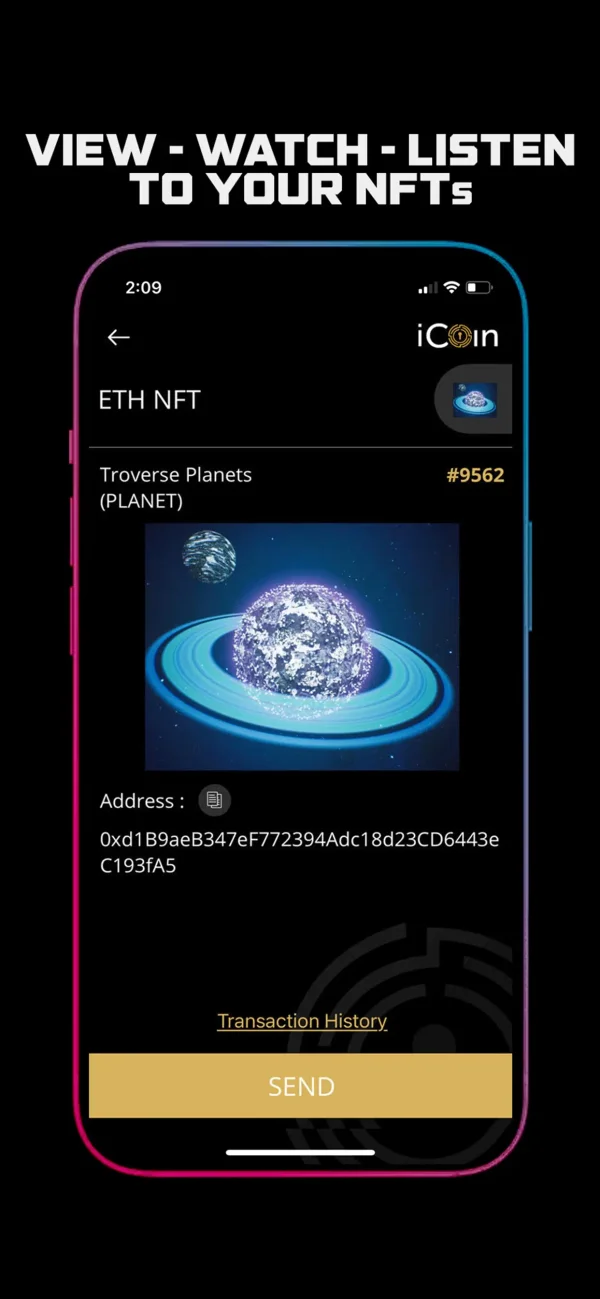
Use the ERC button on your Ethereum account details screen to view all available ERC-721 (NFT) & ERC-20 tokens at that address. View NFT images, watch NFT videos, or listen to NFT audio. Easily transfer your NFT to another Ethereum address by pressing Send and following the instructions. All ERC tokens can be transferred using Bluetooth or Air Gap, depending on your preferred method. Remember, a native Ethereum balance is required to pay the gas fee for any ERC token transaction. These fees will vary based on Ethereum network congestion as well as the complexity of the smart contract functions.
SEND TRANSACTIONS:
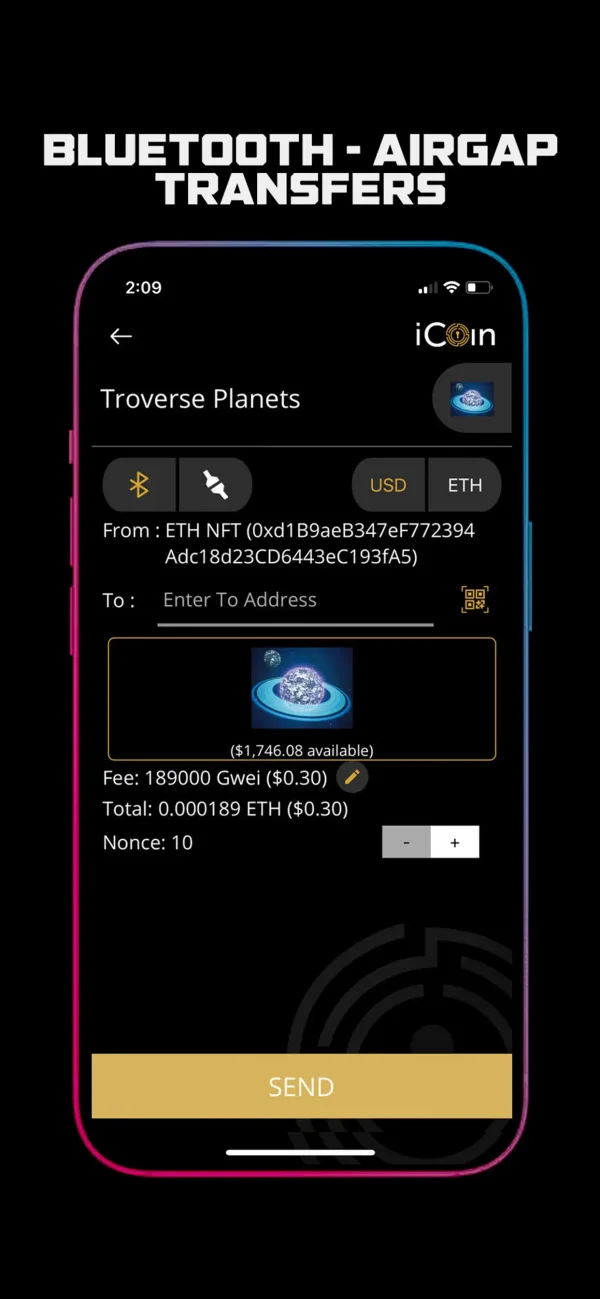
Select one of your synced addresses and easily create a transfer to your desired Bitcoin or Ethereum receive address. Select the amount to send in either Bitcoin, Ethereum, NFT, or ERC-20 and use the USD conversion option for your convenience. When constructing a transaction on the Mobile App, you can toggle between Bluetooth & Air Gap for your preferred method of communication with the Hardware Wallet. Once the transaction data is transferred to the Hardware Wallet, the transaction gets signed by the account's private key. Your private key never leaves the Hardware Wallet when signing a transaction. Once signed, the complete transaction data is sent back to the Mobile App, where it is then sent to the blockchain for processing.
BLUETOOTH & AIR GAP SECURITY:
iCoin now offers encrypted Bluetooth & Air Gap methods for communicating transaction details between the Hardware Wallet and the Mobile Companion App. Easily toggle between Bluetooth & Air Gap in your Mobile App’s settings screen, or while constructing a transaction. Both encrypted Bluetooth and Air Gap methods (QR codes & cameras) maintain your iCoin Hardware Wallet’s cold storage integrity. Your Hardware Wallet never connects to any network, only the iCoin Mobile App connects to our dedicated nodes. Your private keys never leave the Hardware Wallet, so you can rest assured your Bitcoin & Ethereum private keys are safe. All data transferred between the Hardware Wallet & Mobile App is public information stored on the blockchain and visible through any block explorer.
What’s new
Version 1.100 · Nov 26, 2024
Miscellaneous bug fixes and enhancements
App privacy
What iCoin Technology, Inc. declares on the App Store about how this app handles data.
-
Data not linked to you
May be collected but is not linked to your identity.
- Identifiers
- Diagnostics
Privacy practices may vary, for example with the features you use or your age.
Information
- Seller
- iCoin Technology, Inc.
- Category
- Finance
- Version
- 1.100
- Updated
- Nov 26, 2024
- Released
- Feb 15, 2022
- Size
- 114.7 MB
- Requires
- iOS 16.6 or later
- Age rating
- 4+
- Price
- Free
- Languages
- English
- Copyright
- © 2024 iCoin Technology, Inc.
You might also like
-
 Bitcoin OX | Crypto WalletExchange: BTC, LTC, ETH, BCH
-
 Polkadot Vault (Parity Signer)air-gapped transaction signing
-
 HASHWallet ManagerFinance
-
 Mojito walletMojito
-
 Envoy by FoundationFinance
-
 CoinEx Vault: Multi-Sig WalletSafely manage large assets
-
 SecuX MobileSecuX Wallets
-
 RICE: Your Crypto WalletInvesting in DeFi for Everyone
-
 Theya – Bitcoin WalletSimple, secure self-custody
-
 WizzWallet - Bitcoin WalletSupport multiple address types