
Just Quick Search
Faster than anything
Designed for iPhone
Free · In-app purchases
- Age rating17+
- CategoryUtilities
- DeveloperMill White
- LanguagesEnglish+ 1 more
- Size9.2 MB
Links to the official App Store page
Download.org hosts no file of Just Quick Search. The button opens its official App Store page, published by Mill White. Listing last checked on Nov 20, 2026.
Screenshots

About
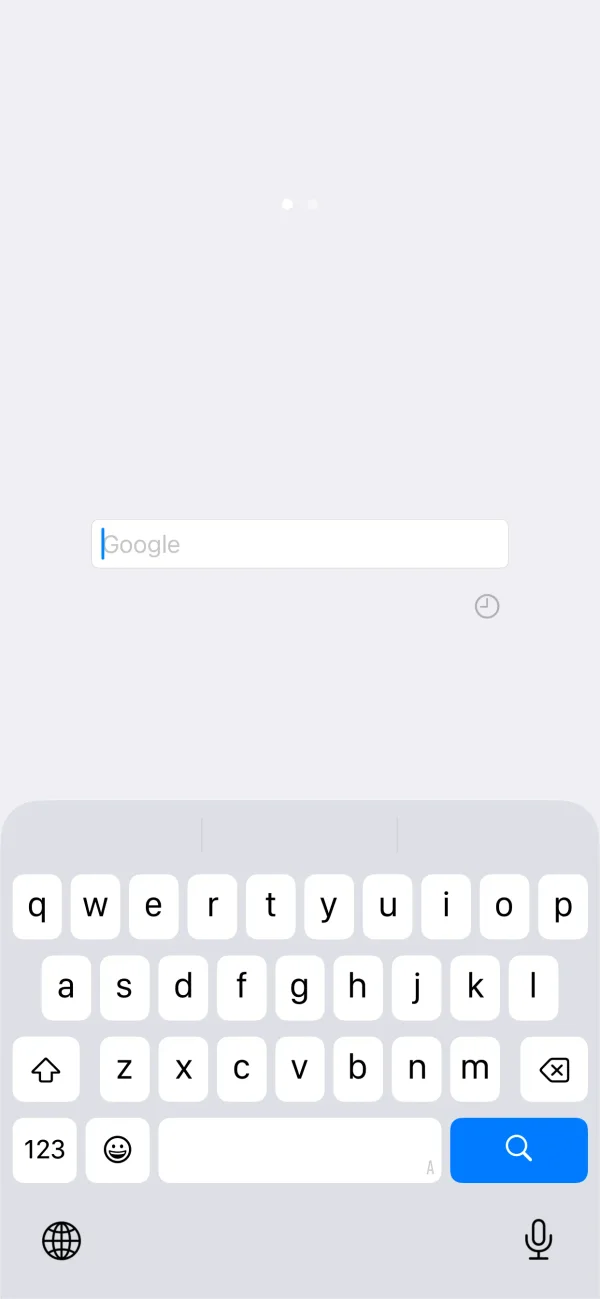
Just Quick Search is helper app to your search very quickly.
# Search Targets
- Google
- Wikipedia
- In addition to the above, you can add search targets.
# You can input quickly
- You don't need to scroll.
- You don't need to tap the text field.
- When application resumed, text field is empty and you can input immediately.
# Save Switch
- ON: When application launch or resume, the search target is you selected last.
- OFF: When application launch or resume, the search target is the top.
# History
- Keywords you enter are recorded.
- Max 300 items.
- Can delete all.
- Can delete selectively.
# Autocomplete
- Input candidates will be displayed in a two-stage.
- Top: from History.
- Bottom: from Web.
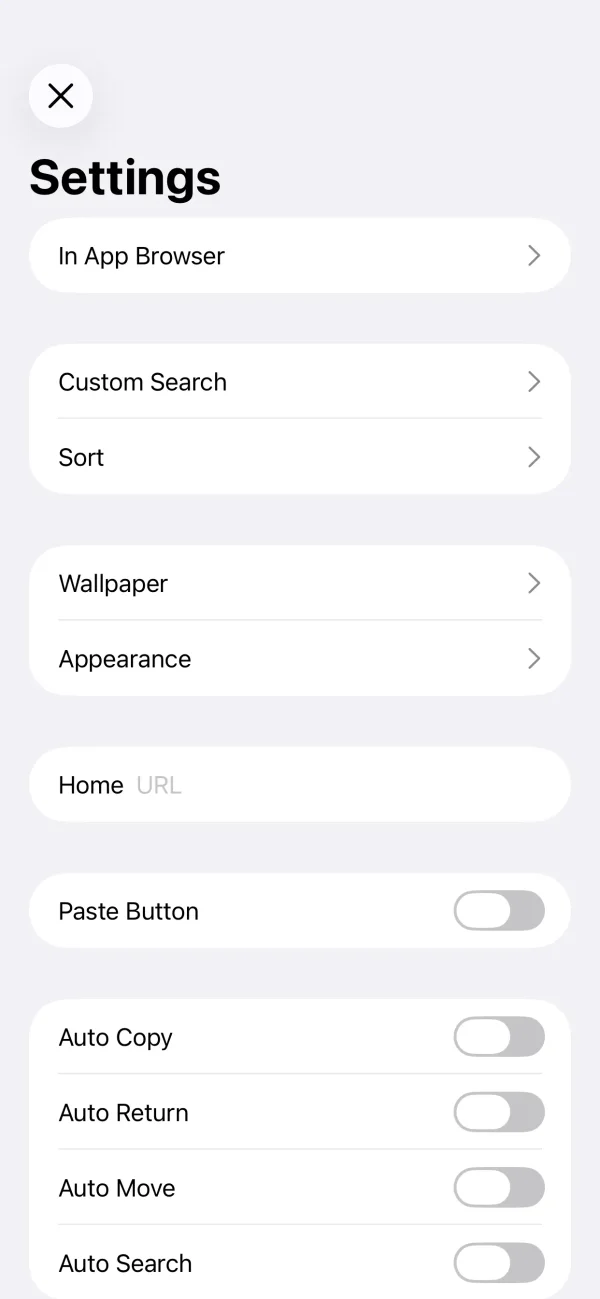
# Settings
- The view shows when you tap the "STAR" button at the bottom of the right screen.
## In App Browser
- You can make settings related to the in app browser.
- In app browser's URL Scheme is "jqs".
## Custom Search
- You can customize the search targets.
- The number of search targets you can add is unlimited.
- For more information, please visit the support page.
## Sort
- You can sort search targets.
## Wallpaper
- You can set the wallpaper.
- Optimal image size is the pixel size of the device.
- Ex) iPhone 16 Pro: 2,622 x 1,206 pixels.
## Appearance
- You can select the appearance, default or light or dark.
## Home
- You can specify the URL of Home page.
- In the search screen, when the text field is empty and you tap the "Search" button, the home page will be displayed.
## Paste Button
- Paste button to the search screen will be displayed.
- When you tap the Paste button on the search screen, the contents of the clipboard will be pasted into the text field.
## Auto Copy
- When execute search, the contents of the text field will be copied to the clipboard.
## Auto Return
- When select the search target, go back to the search screen automatically.
## Auto Move
- Automatically displays the search target selection screen when the application is launched or restarted.
## Auto Search
- When launching from the custom URL scheme or notification center, the search is execute automatically.
## Open URL
- When you execute a search with the URL is entered, open the URL directly.
- For more information, please visit the support page.
## Hide Page Control
- Hide page control in search screen.
## Support
- Jump to the support page of this app.
# Custom URL Scheme
- Custom URL Scheme is "justquicksearch".
## justquicksearch://
- Launch this app.
## justquicksearch://${keyword}
- With the ${keyword} has been entered, this app is launched.
# EULA
- https://www.apple.com/legal/internet-services/itunes/dev/stdeula/
What’s new
Version 4.3 · Nov 14, 2026
Optimized for iOS 27 & iPhone Duo.
App privacy
What Mill White declares on the App Store about how this app handles data.
-
Data used to track you
May be used to track you across apps and websites owned by other companies.
- Location
- Identifiers
-
Data linked to you
May be collected and linked to your identity.
- Location
- Identifiers
- Usage data
-
Data not linked to you
May be collected but is not linked to your identity.
- Diagnostics
Privacy practices may vary, for example with the features you use or your age.
Information
- Seller
- Keisuke Tanaka
- Category
- Utilities
- Version
- 4.3
- Updated
- Nov 14, 2026
- Released
- Feb 16, 2012
- Size
- 9.2 MB
- Requires
- iOS 27.2 or later
- Age rating
- 17+
- Price
- Free
- In-app purchases
- Yes
- Languages
- English, Japanese
- Copyright
- © Keisuke Tanaka
You might also like
-
 stoobit searchA Beautiful Way to Search
-
 BrowseHub: Private BrowserSearch 150+ Engines at once
-
 DogskLightweight Web Browser
-
 Search-itSafely search the web
-
 Bump SearchRevolutionize Your Search
-
 Braver SearchRedirect your default search
-
 Fetch - AI Search EngineLoyal Free Speech AI Search
-
 Ple Browser - Secure SearchUtilities
-
 Ambitious SearchAI answers. Private browsing.
-
 Dual | Search & Ask BrowserBrowse the web, ask Perplexity