
Kairova: AI Planner
AI Calendar, Focus & Pets
Designed for iPhone
Free · In-app purchases
- Age rating12+
- CategoryProductivity
- DeveloperEduardo Castillo
- LanguagesEnglish+ 1 more
- Size66.7 MB
Links to the official App Store page
Download.org hosts no file of Kairova: AI Planner. The button opens its official App Store page, published by Eduardo Castillo. Listing last checked on Nov 17, 2026.
Screenshots








About
Start with one task. Make room for the rest of your life.
Kairova brings tasks, plans, Focus, notes and a growing Companion together. Use the everyday tools first, then explore personalized planning and your Life Studio workspace when you are ready.
EVERYDAY TASKS
Add a task directly from Today or a task list. Choose an optional date and reminder, complete it, and find it again in your history. Free includes 200 active personal tasks across three lists; completed tasks do not use the active allowance. Today, Upcoming and All tasks help you see what needs your attention.
A PLAN THAT FITS YOUR LIFE
Build a personalized schedule around your work, sleep, routines and goals. Kairova supports night shifts and waking days that cross midnight. Review changes before applying them, rescue a crowded day, and keep unfinished work for later. Optional Google Calendar and Apple Calendar connections require your permission.
FOCUS AND PROGRESS
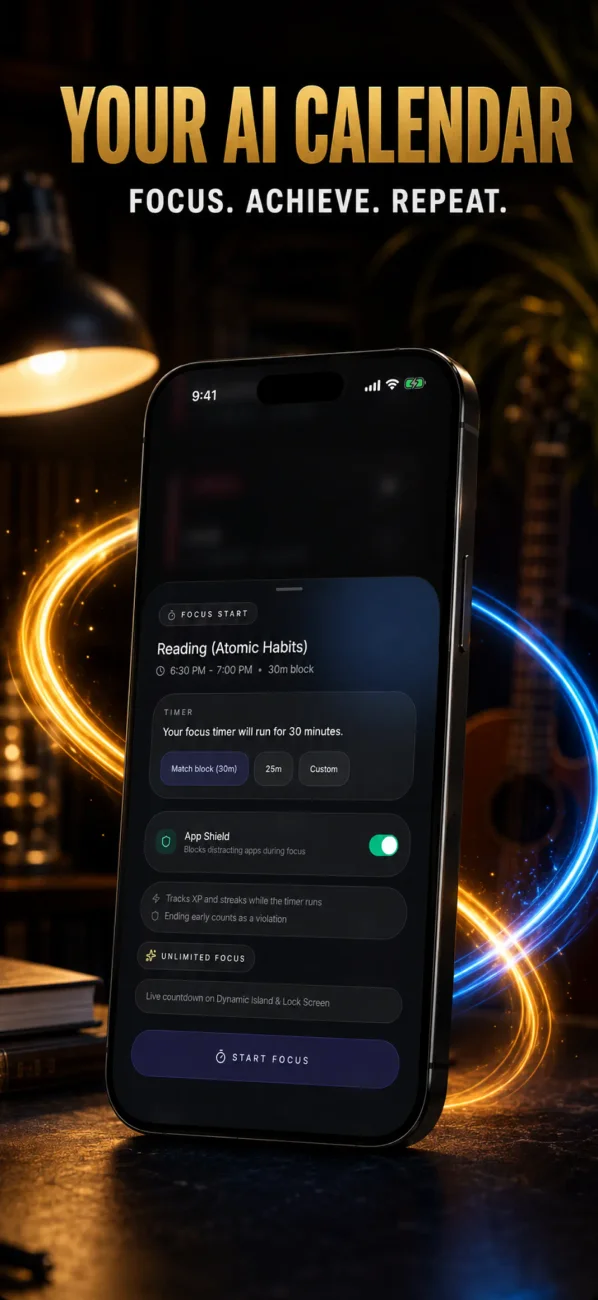
Start a Focus session, keep a useful next step and continue where you left off. Choose optional App Shield controls for distractions on your own device. Follow your routines, recovery and weekly progress while your Companion grows with you.
ROOM FOR YOUR PROJECTS
Life Studio keeps project notes, checklists and related pages together. Connect project tasks to planned sessions, search your personal work, preview Todoist CSV imports and use reusable workflows for everyday changes. Dream helps connect longer-term goals to practical next steps.
MAKE IT YOURS
Use widgets for quick capture and Shortcuts to open Today or start Focus. Set iPhone alarms, link them to planned sessions and choose your own supported alarm audio. Native alarms require iOS 26 or later; imported alarm audio requires iOS 26.1 or later.
Kairova is free to use. Pro and Ultra add AI planning, higher allowances and advanced workspace features. Availability, AI credits and other limits are shown in the app. Some features require a subscription. Monthly and annual subscriptions provide the same benefits for their selected tier. Payment is charged to your Apple ID; subscriptions renew automatically and can be managed or canceled in Settings.
Terms: https://app.kairova.app/terms
Privacy: https://app.kairova.app/privacy
What’s new
Version 2.0 · Nov 4, 2026
Start with one task. Bring your projects, plans and routines together when you are ready.
- Add a task directly from Today or your task list. Dates and reminders are optional, and personalized planning setup can wait.
- Free now includes 200 active personal tasks across three lists. Completed tasks stay accessible without using the active allowance.
- Find your work in Today, Upcoming, All tasks and completed history. Editing, moving, completing and reopening keep the same original task.
- Start with five focused minutes, keep your next step, and continue the same session. Pro now includes unlimited ordinary Focus starts.
- Rescue a crowded day with a reviewed proposal and keep unfinished work available for later plans.
- Adopt workflows for exams, moving and changing shifts, or publish a reviewed reusable workflow with a revocable link.
- Review completed-session timing, choose future Focus preferences and share a private-detail-free Companion postcard.
- Turn project checklist tasks into planned sessions while keeping the original task and its progress together.
- Find notes, project contents, checklist tasks and recent captures from one search.
- Set native iPhone alarms, connect them to planned sessions, choose snooze options and use your own alarm audio.
- Track flexible weekly routine goals, rest days and fresh starts.
- Start shared groceries, chores and trip projects from ready-to-use templates.
- Bring Todoist CSV exports into your workspace with a preview before import.
- Organize collections with filters and sorting, and add calculations to pages.
- Use widgets for quick capture, and Shortcuts to open Today or start Focus.
- Recover interrupted text captures and conflicting edits, and export personal page content.
Includes interface refinements and continued support for overnight schedules and waking days that cross midnight.
Existing plans keep compatibility until you explicitly approve their upgrade. After approval, use Kairova 2.0 or later on every device that edits that plan.
Native alarms require iOS 26 or later; imported alarm audio requires iOS 26.1 or later. Some options require a subscription.
App privacy
What Eduardo Castillo declares on the App Store about how this app handles data.
-
Data linked to you
May be collected and linked to your identity.
- Purchases
- Location
- Contact info
- User content
- Identifiers
- Usage data
- Diagnostics
-
Data not linked to you
May be collected but is not linked to your identity.
- User content
Privacy practices may vary, for example with the features you use or your age.
Information
- Seller
- Eduardo Castillo
- Category
- Productivity
- Version
- 2.0
- Updated
- Nov 4, 2026
- Released
- Jun 17, 2026
- Size
- 66.7 MB
- Requires
- iOS 16.0 or later
- Age rating
- 12+
- Price
- Free
- In-app purchases
- Yes
- Languages
- English, Spanish
- Copyright
- © 2026 Kairova
You might also like
-
 JoJu: AI Executive AssistantTurn Commitments into Outcomes
-
 Task AI AppAI Task Planner & Scheduler
-
 Clari: AI Daily PlannerAI Personal Planning Assistant
-
 THABIT: Organize Your MindFrom chaos to structure, fast!
-
 Arlo: AI Task ManagerFocus on what actually matters
-
 Daylume: AI PlannerAI Planner for Executives
-
 Halled - AI Talk Task ManagerTo-Do With AI Powered
-
 Just Ask DougDaily Chatbot, Voice Assistant
-
 Dueful: Recurring TasksHome Maintenance & Care
-
 Habitwars: Compete w FriendsHabits through competition