
- Age rating4+
- CategoryUtilities
- DeveloperKenta Akimoto
- LanguagesEnglish
- Size627.0 KB
Links to the official App Store page
Download.org hosts no file of KeyCodeCheck. The button opens its official App Store page, published by Kenta Akimoto. Listing last checked on Nov 17, 2026.
Screenshots

About
The new feature is called "Key Grid."
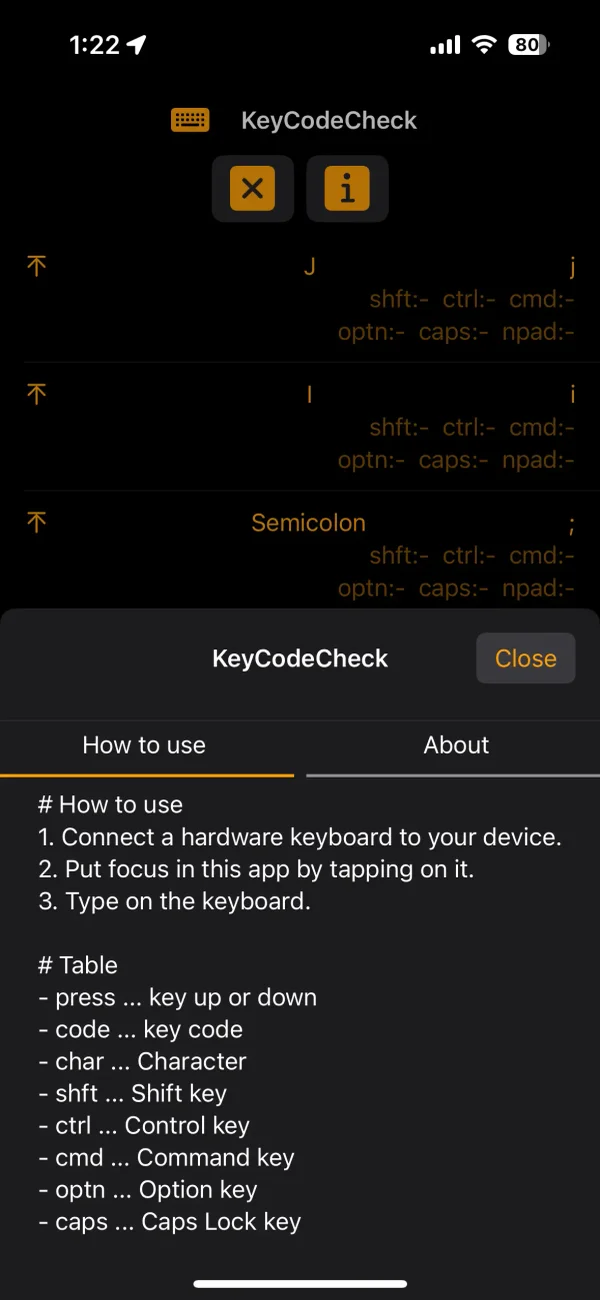
The key codes are displayed in a grid format. It automatically scrolls and highlights according to the keys you type. You can quickly and comprehensively check which keys are correctly recognized or not recognized by your device.
---
"KeyCodeCheck" is an easy-to-use hardware keyboard keycode confirmation app with a simple UI for intuitive operation.
Features:
1. Intuitive UI:
With a straightforward design, navigating the app is effortless. No complicated procedures are required—just open, type a key, and confirm. That's it.
2. Key Typed Confirmation:
Simply type a key, and its corresponding keycode is instantly displayed. This user-friendly app allows you to quickly retrieve the information you need.
3. Compatibility with Various Keyboards:
Compatible with a variety of hardware keyboards, whether USB or Bluetooth connected. No need to worry about the connection method; you can check the keycodes for any keyboard.
4. Support for Special Keys:
Shift key, Command key, Option key, Capslock key, and other special keys are supported. It works seamlessly with the operation of your familiar keyboard.
5. Keydown/Keyup Display:
Displaying both the moment a key is pressed (keydown) and released (keyup), this feature is perfect for those who want to closely examine keyboard behavior.
6. Key Grid
The key codes are displayed in a grid format. It automatically scrolls and highlights according to the keys you type. You can quickly and comprehensively check which keys are correctly recognized or not recognized by your device. Explore and confirm keyboard keycodes effortlessly with "KeyCodeCheck". Quickly identify the keycodes for each key on your device.
Feel free to ask questions or provide feedback. Enjoy the simplicity of KeyCodeCheck.
What’s new
Version 2.1 · Dec 16, 2025
minor bug fix
App privacy
What Kenta Akimoto declares on the App Store about how this app handles data.
-
Data not collected
The developer does not collect any data from this app.
Privacy practices may vary, for example with the features you use or your age.
Information
- Seller
- Kenta Akimoto
- Category
- Utilities
- Version
- 2.1
- Updated
- Dec 16, 2025
- Released
- Dec 1, 2023
- Size
- 627.0 KB
- Requires
- iOS 17.0 or later
- Age rating
- 4+
- Price
- Free
- Languages
- English
- Copyright
- © 2023 Kenta Akimoto.
You might also like
-
 Black Widow Key MachineAmerican Key Supply
-
 Inventory PreloaderUtilities
-
 CallCash: Robocall LogTCPA evidence, demand letters
-
 IsottaUtilities
-
 PhonePad - Game ControllerMake your iPhone a gamepad
-
 CloudMountCloud Storage & Vault
-
 MMhelperHelper app for MotiveMonkey
-
 Encodex: Encoder & DecoderSecure Offline Hashing & Tools
-
 VinlabsKey Codes & Lishi Training
-
 SilentWitnessUser Activity Monitoring