
Kinetic Reader: Private PDF
Fast RSVP & Document Reader
Designed for iPhone, iPad, iPod touch
Free · In-app purchases
- Age rating4+
- CategoryProductivity
- DeveloperRyan Bair
- LanguagesEnglish
- Size19.7 MB
Links to the official App Store page
Download.org hosts no file of Kinetic Reader: Private PDF. The button opens its official App Store page, published by Ryan Bair. Listing last checked on Nov 17, 2026.
Screenshots
About
Read at the speed of thought. Kinetic Reader brings your books, articles, and documents to life word by word. Tune your pace, keep your focus, and actually remember what you read, all stored privately on your device.
Welcome to the massive 2.0 update! We have completely rebuilt the experience with an enlarged reading window, an upgraded codebase, and powerful new customization options. Plus, Kinetic Reader is now free to start.
WHAT IS NEW IN 2.0
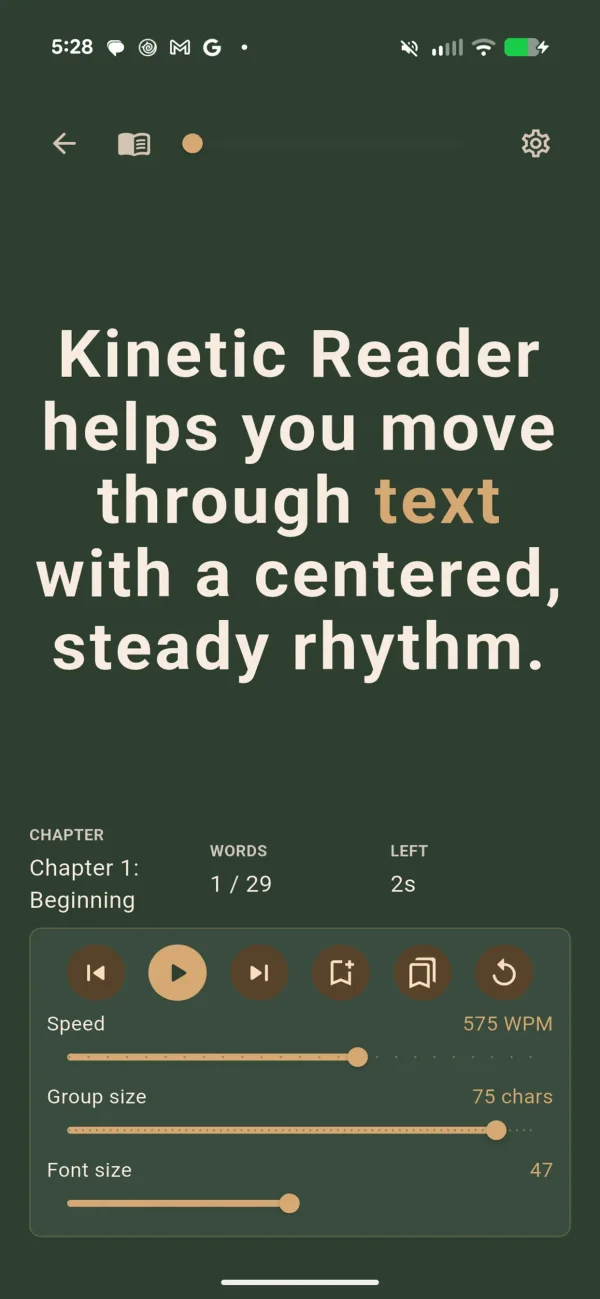
Expanded Reading Window: A larger, cleaner interface designed for absolute focus. Simply tap the reading window to pause or resume playback.
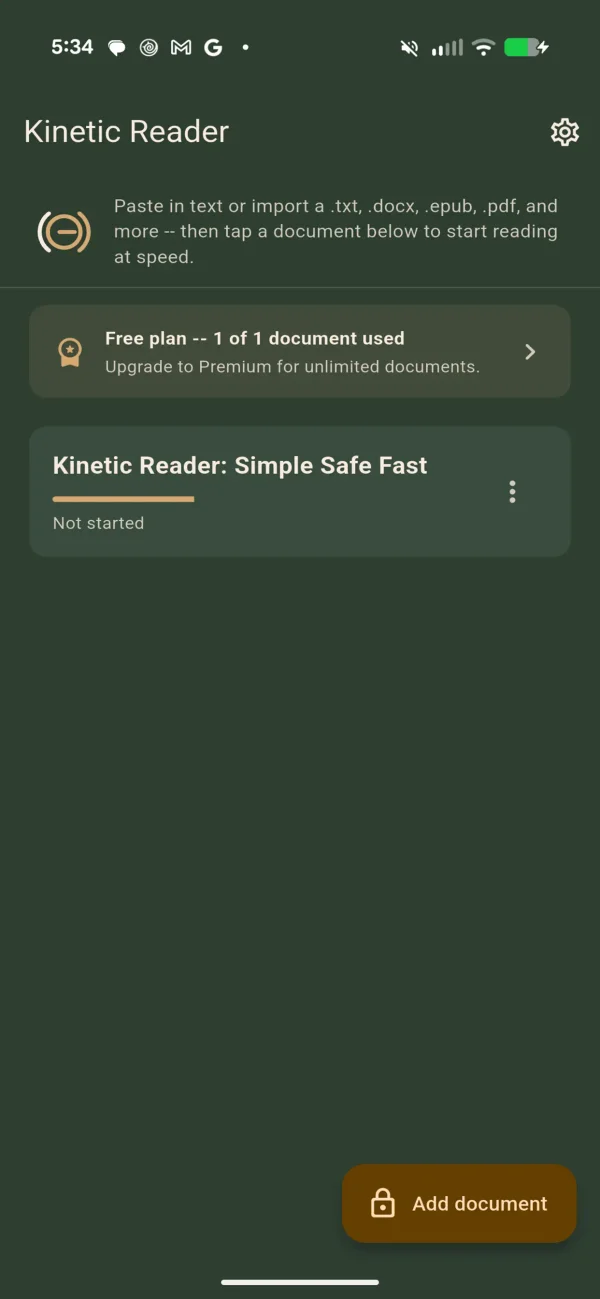
Multiple Document Library: Build your personalized library. Each document retains its own bookmarks and reading position.
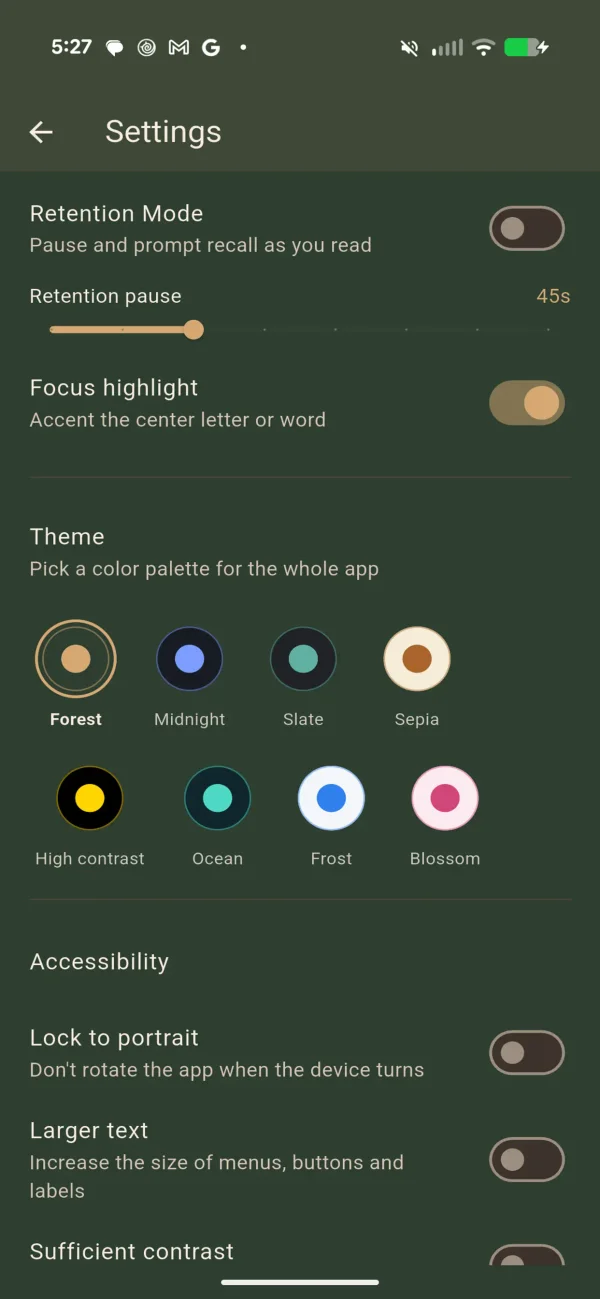
8 Color Themes: Pick the palette that suits your eyes and your environment, from warm sepia to true midnight.
Expanded Chunk Ranges: Group words into larger visual chunks to match your exact processing speed and rhythm.
EVERYTHING YOU NEED TO READ FASTER
Precision Speed Control: Dial in any pace from 200 to 800 WPM. Adjust on the fly mid-session, and the app will remember your preference.
Retention Mode: Reading is only useful if it sticks. Retention Mode pauses playback at set intervals and prompts you to recall what you just covered.
Focus Highlight: Each word appears centered and clean, with an optional focal point highlight to anchor your eyes and eliminate wandering attention.
Smart Navigation: Chapters are auto-detected in your text. Jump forward or back by chapter with a single tap, or scrub to any position.
Instant Bookmarks: Drop a bookmark anywhere mid-read and jump back instantly. Never lose your place.
Accessibility First: Customize font sizes, word spacing, and line spacing. Use full-opacity contrast for secondary text and an optional portrait lock.
WORKS WITH ALL YOUR TEXT
Load any file directly from your device or paste text from your clipboard. Kinetic Reader extracts clean, readable content from:
EPUB
DOCX
TXT
Markdown
HTML
RTF
CSV
JSON
SIMPLE AND FAIR PRICING
Download for free and add your first document at no cost to experience the full power of the reading engine. When you are ready to build out your library, a single one-time Premium purchase unlocks unlimited document storage. No subscriptions, ever.
100% PRIVATE AND OFFLINE
Your reading is yours. Kinetic Reader stores everything locally on your device. There are no accounts to create, no servers to phone home to, no ads, and no data collected about your reading habits. It works completely offline and is exactly as private as a physical paperback.
What’s new
Version 2.0.1 · Oct 3, 2026
Kinetic Reader 2.0.0 is our biggest update yet, completely rebuilt to deliver a smoother, more customizable, and more flexible reading experience.
Here is what is new in version 2.0.0:
Now Free to Start
Kinetic Reader has transitioned to a flexible freemium model. Anyone can now download the app and experience the full speed reading engine with one active document at zero cost. For readers who want to build a complete offline library, a single one-time Premium in-app purchase unlocks unlimited document storage. No recurring subscriptions, ever.
Multiple Document Library (Premium)
Manage your entire reading queue in one place. Add, organize, rename, and delete documents with ease. Every document independently tracks its own reading progress, bookmarks, and settings, so you can switch between a novel, a research paper, and meeting notes without losing your place.
Enlarged Reading Window & Tap-to-Pause
We redesigned the core reading interface. The word display area is significantly larger and cleaner, keeping your eyes locked on the text with zero distractions. The entire reading window now functions as a responsive pause button: simply tap anywhere inside the reading box to instantly pause or resume playback.
8 New Color Themes
Customize your visual environment to match your lighting conditions and personal preference. Choose from eight curated palettes, including high-contrast light, low-glare dark, warm sepia, and true midnight OLED black. You can change themes anytime directly from the Settings menu.
Expanded Reading Chunk Ranges
Fine-tune how your brain processes text. We expanded the word-grouping controls, allowing you to display larger chunks of text per flash. Whether you prefer single-word RSVP speed training or multi-word phrase pacing, you can dial in the exact chunk size that matches your comprehension speed.
Under-the-Hood Codebase Upgrades
We overhauled the underlying codebase for improved performance, faster text parsing, and rock-solid stability. Document parsing for large EPUBs, PDFs, and text files is faster and more reliable than ever.
Core Features Maintained:
100% private and offline: no accounts, no analytics, no network tracking
Broad file support: PDF, EPUB, DOCX, TXT, Markdown, HTML, RTF, CSV, and JSON
Adjustable reading speeds from 200 to 800 WPM
Active Retention Mode prompts to strengthen recall
Optional focal point highlight for eye tracking
Chapter auto-detection and progress scrubbing
Thank you for reading with Kinetic Reader. If you enjoy this release, please consider leaving a review on the store!
App privacy
What Ryan Bair declares on the App Store about how this app handles data.
-
Data not collected
The developer does not collect any data from this app.
Privacy practices may vary, for example with the features you use or your age.
Information
- Seller
- Bair Development LLC
- Category
- Productivity
- Version
- 2.0.1
- Updated
- Oct 3, 2026
- Released
- May 1, 2026
- Size
- 19.7 MB
- Requires
- iOS 15.0 or later
- Age rating
- 4+
- Price
- Free
- In-app purchases
- Yes
- Languages
- English
- Copyright
- © 2026
You might also like
-
 FocusVille: Pomodoro TimerStudy Focus Game for ADHD
-
 GlobalScan Pro: PDF ScannerExport Documents to Word & PDF
-
 Scooch - Room & Floor PlannerPlan a room, see what fits
-
 TidyNotes: Notes, Docs & PDFHandwriting, Planner, Journal
-
 Turtle Race TimerProductivity
-
 NottedTasks Tracking
-
 LinkDockSave and Create Collections
-
 Sit Buddy-Pomodoro focus catStudy work timer, flip to sit
-
 Roast My Resume (AI Roaster)Brutally Honest AI Feedback
-
 Shut Up?!: Talk BalanceSpeaking time & interruptions