
Kitchen Timer|Multiple Timers
Up to 4 cooking timers at once
Designed for iPhone
Free
- Age rating4+
- CategoryFood & Drink
- DeveloperFumiki Hashimoto
- LanguagesEnglish+ 2 more
- Size77.9 MB
Links to the official App Store page
Download.org hosts no file of Kitchen Timer|Multiple Timers. The button opens its official App Store page, published by Fumiki Hashimoto. Listing last checked on Nov 15, 2026.
Screenshots



About
A free kitchen timer app! Run multiple timers at once — a timer made just for the kitchen. Even when simmering, grilling, and steaming overlap, one device keeps track of it all.
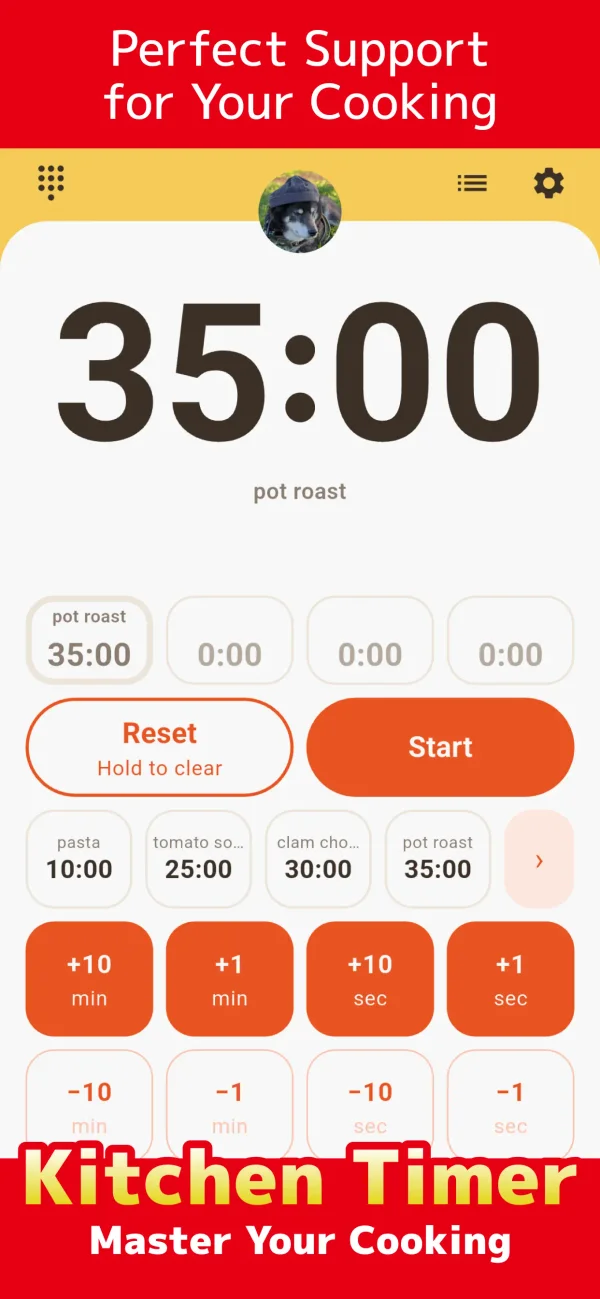
■ Time 4 things at once
There are always 4 timers. No need to add or remove any.
The selected timer is shown in large digits that fill the screen, with the other 3 lined up small below.
Tap one below to show it large. The order never changes.
Give each timer a name so you can tell at a glance which is which.
■ Big digits you can read from a distance
The remaining time uses the full width of the screen, so you can check it from a step or two away from the stove.
You can keep the screen on while timing. Turn this on or off in Settings.
■ Adjust the time while it's running
Need just a little more? Use the + and − buttons to add or subtract time while the timer is running. No need to reset and start over.
Choose from 3 step patterns for + and − (10 min, 1 min, 10 sec, 1 sec, and more).
You can also switch to a number pad. Set up to 99 hours 59 minutes 59 seconds.
■ Save as many favorite times as you like
Save a name and a time together, like "Pasta 8 min." There's no limit on how many you can save.
Your top 4 appear on the main screen — just tap to set one. The rest can be picked from the list screen.
In the list, drag to reorder and swipe left to delete.
Tapping only sets the time; it doesn't start on its own. Check the time, then press Start.
■ Stays quiet in silent mode
While your device is in silent mode, the alarm won't sound either. It simply follows your device settings.
You can also choose to sound the alarm even in silent mode. This works only while the app is open on screen.
You can also use vibration only, with no sound (only while the app is open on screen).
■ Fine-tune how it alerts you
・Choose from 3 alarm sounds
・Adjust the volume and fade-in (works while the app is open on screen)
・Pre-alarm: a heads-up sound 1 minute before the end (off by default)
・Turn feedback for button presses on or off
■ Show your favorite photo
Pick one of your own photos to show in a circle at the top of the screen and in the "done" alert.
Drag and pinch to adjust the photo's position and size.
■ Even when the app is closed
You'll get a notification when time is up. The first time you press Start, the app will ask for permission to send notifications.
■ Pricing
All features are free to use. There are no in-app purchases or paid versions.
Available in Japanese, English, and Portuguese (Brazil). The language follows your device settings.
What’s new
Version 1.1.0 · Oct 5, 2026
New app icon design.
Minor improvements.
App privacy
What Fumiki Hashimoto declares on the App Store about how this app handles data.
-
Data not linked to you
May be collected but is not linked to your identity.
- Identifiers
- Usage data
- Diagnostics
Privacy practices may vary, for example with the features you use or your age.
Information
- Seller
- Fumiki Hashimoto
- Category
- Food & Drink
- Version
- 1.1.0
- Updated
- Oct 5, 2026
- Released
- Sep 9, 2026
- Size
- 77.9 MB
- Requires
- iOS 16.0 or later
- Age rating
- 4+
- Price
- Free
- Languages
- English, Japanese, Portuguese
- Copyright
- © 2026 kumakichi works
You might also like
-
 Kitchen Timer: Multi CookingLoud alarms for pasta rice tea
-
 Only Recipes: Recipe SaverMeal Planner & Grocery List
-
 Ashjar FriendsEvery Sip, More Rewards
-
 ろくの家 公式アプリFood & Drink
-
 Cookmate - My Recipe OrganizerMy personal recipe organizer
-
 FiveStar FanPerksGiving you the Power of Perks!
-
 Deglaze: Recipe ManagerGrocery Lists & Meal Planning
-
 CRISPFood & Drink
-
 Maestro PizzaFood & Drink