
- Age rating4+
- CategoryProductivity
- DeveloperMiguel Furst
- LanguagesEnglish+ 10 more
- Size1.2 MB
Links to the official App Store page
Download.org hosts no file of Klappo. The button opens its official App Store page, published by Miguel Furst. Listing last checked on Nov 18, 2026.
Screenshots


About
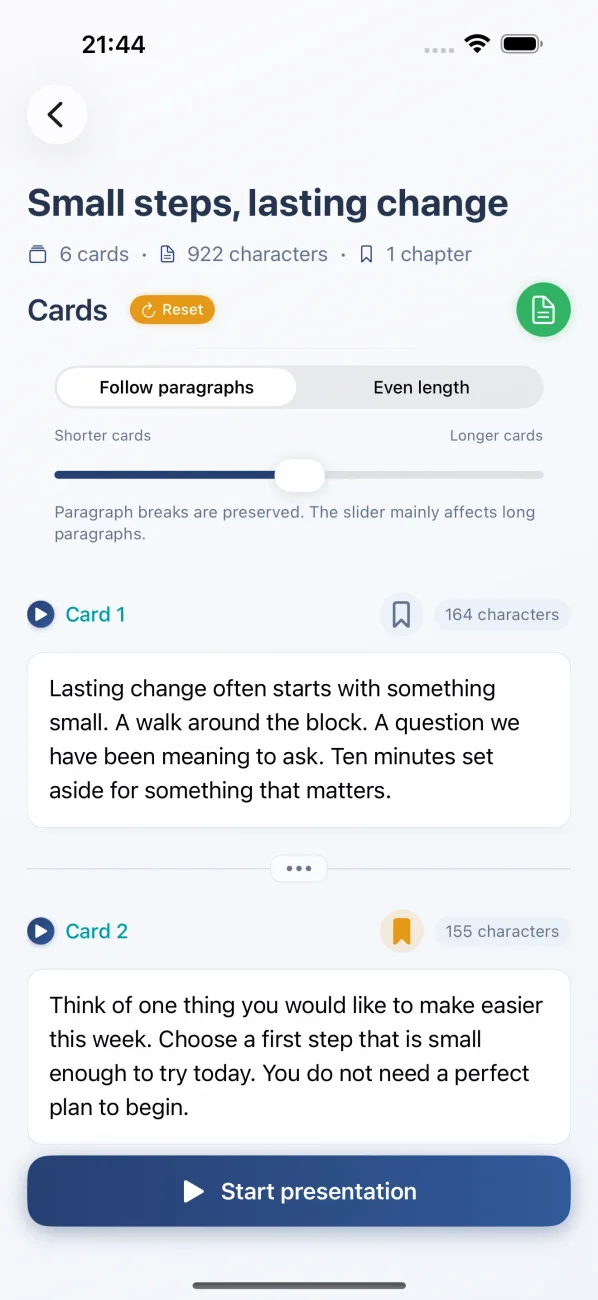
Klappo turns your text into personal cue cards on your iPhone. Prepare and rehearse, then follow your own notes while you speak. The cards are a reading aid for you, whether you are giving a presentation, making a toast or simply following a script.
FROM SCRIPT TO CARDS
Write or paste your text and let Klappo split it into cards. Follow your paragraph breaks or choose a more even card length. Adjust the preferred length with the slider, then drag dividers to fine-tune where each card ends.
FIND YOUR PLACE
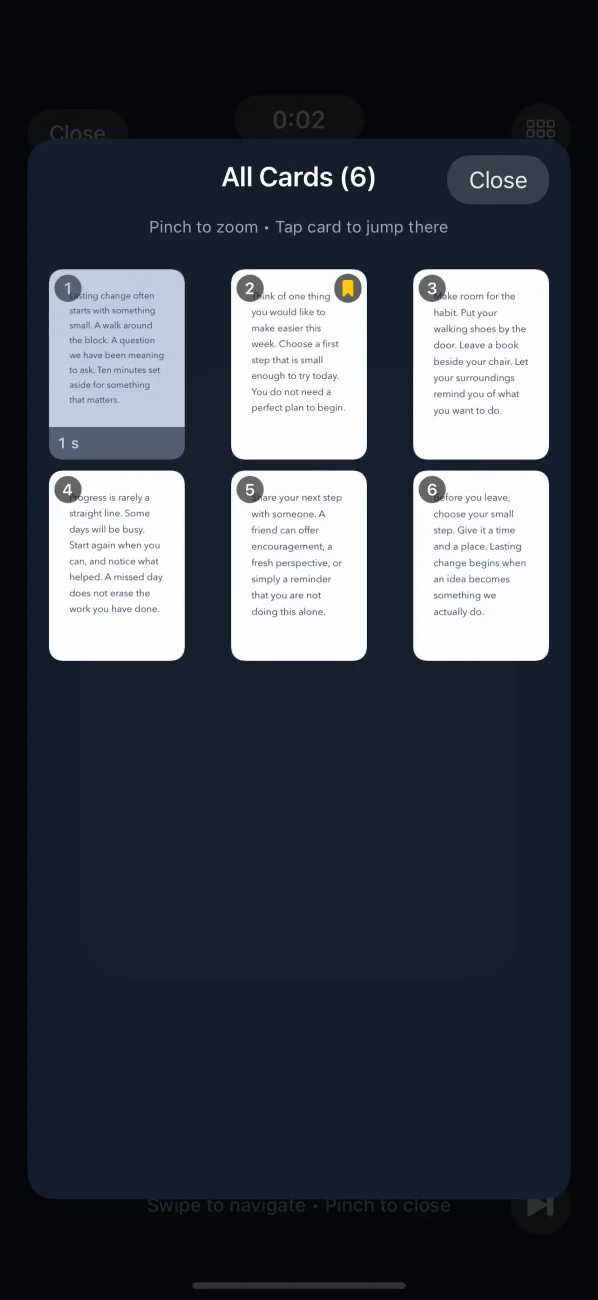
Mark important cards as chapters. Start from any card, swipe forward or back, and open the card overview to jump to another part of your talk. Chapter buttons help you move between key sections.
REHEARSE YOUR DELIVERY
A timer runs while you use your cards. Review the total time and time spent on individual cards from your latest practice to see where your talk needs more attention.
FOLLOW YOUR NOTES AT YOUR OWN PACE
Full-screen cards keep the focus on your words. Long cards can scroll when the text needs more room. Pinch to close the full-screen view and return to editing.
KEEP YOUR PREPARATION TOGETHER
Save multiple talks and duplicate a deck to try a different version. Your decks are stored on your device and can sync through your personal iCloud account. iCloud sync and sending feedback require an internet connection; text splitting runs on your device.
Use Klappo for presentations, meeting notes, pitches, wedding toasts, introductions, scripts or study notes.
Designed for iPhone. Requires iOS 17.6 or later.
What’s new
Version 2.0 · Sep 26, 2026
More control over your cards and your next talk:
- Choose paragraph-based splitting or a more even card length, with more precise manual dividers.
- Mark chapters and jump between them during your presentation.
- Rehearse with a timer and review the time spent on each card.
- Duplicate decks, read long cards more easily, and see clearer messages when saving needs attention.
App privacy
What Miguel Furst declares on the App Store about how this app handles data.
-
Data not linked to you
May be collected but is not linked to your identity.
- User content
- Diagnostics
Privacy practices may vary, for example with the features you use or your age.
Information
- Seller
- Miguel Furst
- Category
- Productivity
- Version
- 2.0
- Updated
- Sep 26, 2026
- Released
- Aug 19, 2025
- Size
- 1.2 MB
- Requires
- iOS 17.6 or later
- Age rating
- 4+
- Price
- $2.99
- Languages
- English, Catalan, Danish, Finnish, French, German, Italian, Norwegian Bokmål, Portuguese, Spanish, Swedish
- Copyright
- © 2025 Lejonapa AB
You might also like
-
 AI Note Taker & Quiz - CapsuleLecture Recorder & Flashcards
-
 NeurosityShift into focus
-
 Coworker AISimplify Work, Amplify Results
-
 Teleprompter For Video RecordScroll Script, Mirror & Cue
-
 Qards - Note CardsEveryday Note Cards
-
 Hedy: AI Meeting Coach & NotesLive transcripts & summaries
-
 Clicker - Presentation RemoteControl your slides wirelessly
-
 IGNITE by Member Minder ProProductivity
-
 Karakeep AppThe Bookmark Everything App
-
 AYOA - Mind MappingNeuro-inclusive productivity