
KOMA: Speech Bubble Maker
Comic Photo Editor & Captions
Designed for iPhone, iPad, iPod touch
Free · In-app purchases
- Age rating4+
- CategoryPhoto & Video
- DeveloperMINERVA K.K.
- LanguagesEnglish+ 1 more
- Size84.7 MB
Links to the official App Store page
Download.org hosts no file of KOMA: Speech Bubble Maker. The button opens its official App Store page, published by MINERVA K.K. Listing last checked on Nov 14, 2026.
Screenshots

About
Turn everyday photos into something worth sharing.
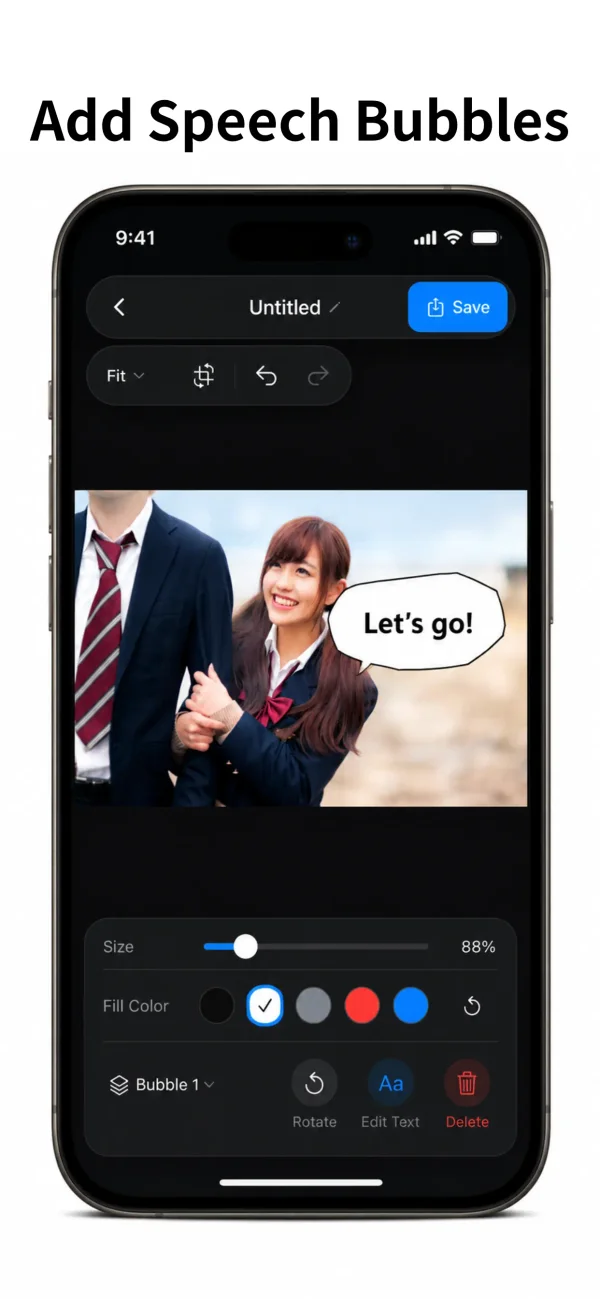
KOMA is a simple speech bubble maker and photo editor that lets you add comic-style dialogue, thoughts, captions, and text to any image in just a few taps. Add a funny line to your pet photo, create a conversation between friends, add a playful quote to a family picture, or make an eye-catching image for social media.
No complicated design tools. Choose a photo, pick a bubble, type your text, adjust the look, and save.
MAKE YOUR PHOTOS TALK
A single speech bubble can completely change the feeling of a photo. Give your dog a voice. Add your cat’s “inner thoughts.” Turn a group photo into a comic scene. Add a reaction, joke, note, or caption that makes people stop scrolling.
KOMA is designed for quick, visual editing, so you can focus on the idea instead of learning a complicated editor.
140+ SPEECH BUBBLE STYLES
Choose from more than 140 bubble designs for different moods and scenes.
• Classic speech bubbles
• Round and soft bubbles
• Thought bubbles
• Jagged shout bubbles
• Angular comic bubbles
• Emphasis and special styles
From cute and casual to bold and dramatic, there is a bubble for almost any photo. Bubble graphics are vector-based, so they stay crisp when resized.
EASY TOUCH CONTROLS
Place each bubble exactly where you want it.
Drag to move. Pinch to resize. Rotate with simple controls. Flip horizontally or vertically to change the tail direction.
Point a bubble toward a person, pet, object, or empty area of the photo without rebuilding your design.
CUSTOMIZE YOUR TEXT
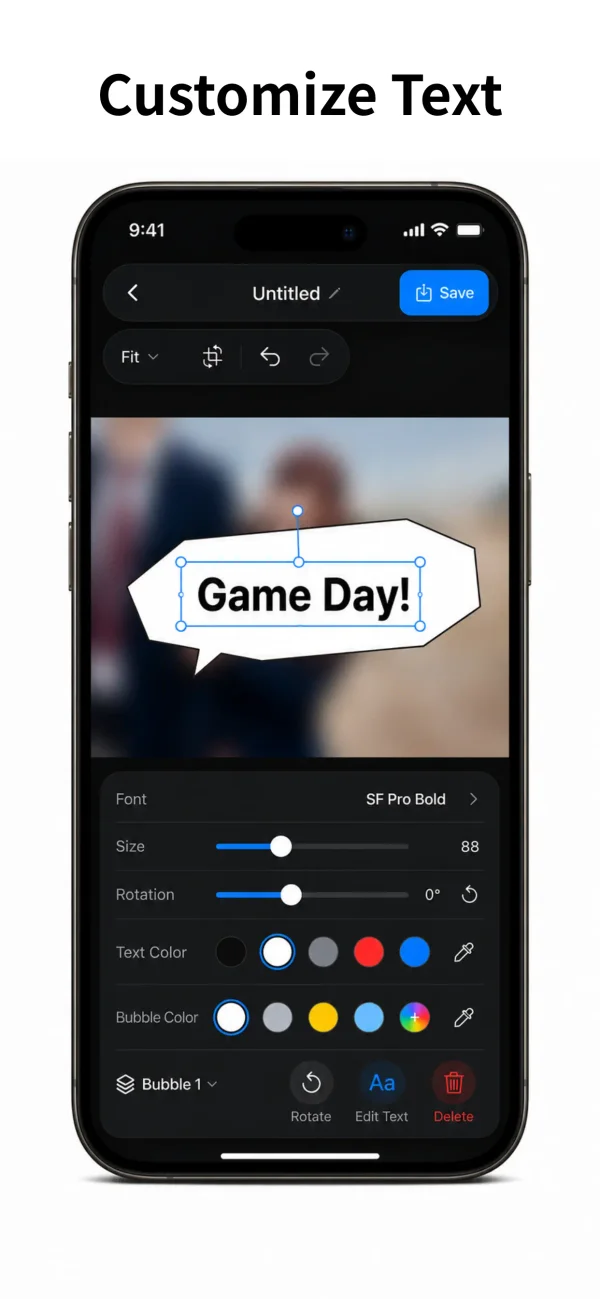
Change fonts, text size, rotation, and color to match the moment. Use bold, clean text for social posts or choose a different typeface to fit the mood.
KOMA supports both horizontal and vertical text, giving you more freedom for multilingual layouts, comic-style composition, and Japanese vertical writing.
COLORS THAT FIT YOUR PHOTO
Customize the speech bubble and text colors separately. Keep it classic with black and white, choose bright colors for a playful post, or use a softer combination that blends naturally with the image.
CROP FOR THE RIGHT FORMAT
Crop and adjust your photo ratio for square layouts and other common formats. Create clean compositions for social media posts, profile images, thumbnails, reaction images, and visual notes.
SAVE PROJECTS AND EDIT AGAIN
Your work does not have to be final when you save it.
KOMA keeps your creations as editable projects, so you can return later to change the words, move a bubble, adjust its size, try another style, or update the colors. Make alternate versions of the same photo without starting over.
GREAT FOR PETS, FRIENDS, FAMILY, AND MORE
Use KOMA to:
• Add funny “thoughts” to pet photos
• Create conversations in friend or family pictures
• Make comic-style social posts
• Add reactions, jokes, quotes, or captions
• Add labels, notes, and visual annotations
• Create simple thumbnails and eye-catching images
• Add vertical or horizontal messages
• Turn everyday snapshots into shareable stories
SIMPLE BY DESIGN
KOMA focuses on the tools you actually need for speech bubble editing. The interface is clean, direct, and easy to understand. Create something fun in seconds, while still having the controls to fine-tune the result.
Whether you want to make your pet look like it is talking, create a mini comic from a photo, add a funny caption for social media, or place a clear note on an image, KOMA keeps the process simple and enjoyable.
PHOTOS ARE BETTER WITH A VOICE
Some photos are cute. Some are funny. Some need just one line to become memorable.
Add the missing words with KOMA.
Choose a photo. Add a bubble. Say what the picture is thinking.
KOMA — make your photos talk.
Terms of Use: (https://minerva.in.net/official/koma-terms/)
Privacy Policy:(https://minerva.in.net/official/privacy-policy/)
What’s new
Version 1.0.1 · Sep 5, 2026
fixed bug
App privacy
What MINERVA K.K. declares on the App Store about how this app handles data.
-
Data used to track you
May be used to track you across apps and websites owned by other companies.
- Location
- Identifiers
- Usage data
- Diagnostics
-
Data linked to you
May be collected and linked to your identity.
- Location
- Identifiers
- Usage data
- Diagnostics
-
Data not linked to you
May be collected but is not linked to your identity.
- Purchases
- Diagnostics
Privacy practices may vary, for example with the features you use or your age.
Information
- Seller
- MINERVA K.K.
- Category
- Photo & Video
- Version
- 1.0.1
- Updated
- Sep 5, 2026
- Released
- Sep 3, 2026
- Size
- 84.7 MB
- Requires
- iOS 15.0 or later
- Age rating
- 4+
- Price
- Free
- In-app purchases
- Yes
- Languages
- English, Japanese
- Copyright
- © Minerva K.K.
You might also like
-
 BubbleSnap - Photo BubblesSpeech bubbles for photos
-
 ドン!! - 漫画吹き出し・擬音・集中線・文字入れPhoto & Video
-
 もふトーク!-可愛いペットの写真に簡単に吹き出しを付けよう-Photo & Video
-
 Q BalloonsPhoto & Video
-
 Newsmaker: Meme GeneratorBreaking News Meme Card Maker
-
 Speech Bubbles Photo EditorMake Text & Caption for Pics
-
 Quick Image And Video CollageLive preview, trim & filters
-
 写真で漫画メーカーPhoto & Video
-
 FotoFunPhoto & Video
-
 Furzy: Talking Pet AI VideosLive voice for dogs & cats