
Kombu Time
Your simple Kombucha Tracker
Designed for iPhone, iPad, iPod touch
Free
- Age rating4+
- CategoryFood & Drink
- DeveloperLammert Westerhoff
- LanguagesEnglish+ 2 more
- Size37.0 MB
Links to the official App Store page
Download.org hosts no file of Kombu Time. The button opens its official App Store page, published by Lammert Westerhoff. Listing last checked on Nov 12, 2026.
Screenshots

About
Brew your kombucha with confidence and ease using Kombu Time, the app designed to keep your brewing process simple and stress-free. Perfect for kombucha enthusiasts who value simplicity, Kombu Time helps you track your fermentations without the clutter of unnecessary features.
Features:
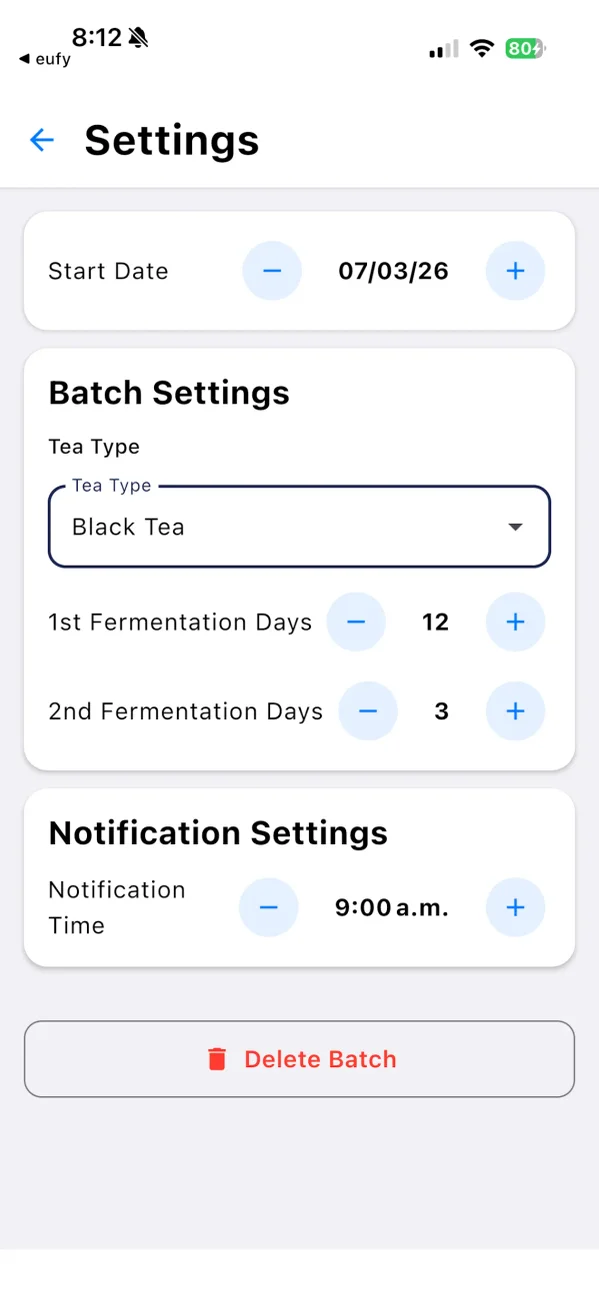
- Straightforward Brew Management: Easily manage your kombucha brews with clear tracking of both first and second fermentations. Add optional flavor notes for second fermentation and tea types for first fermentation to keep track of your experiments.
- Home Screen Widgets: See your active brews at a glance without opening the app. Available in multiple sizes, widgets show fermentation progress, days remaining, and which brews need attention—right from your home screen.
- Timely Notifications: Receive notifications exactly when you need them—when it's time to bottle after the first fermentation, and when your kombucha is ready to enjoy after the second. Quick actions let you complete a brew or extend fermentation by 1 day right from the notification—no need to open the app.
- At-a-Glance Brew Overview: See the status of all your brews in one clean, uncluttered view. Clear visual indicators show when brews are ready, in progress, or overdue. Know exactly when to start a new brew or when to bottle, without any distractions.
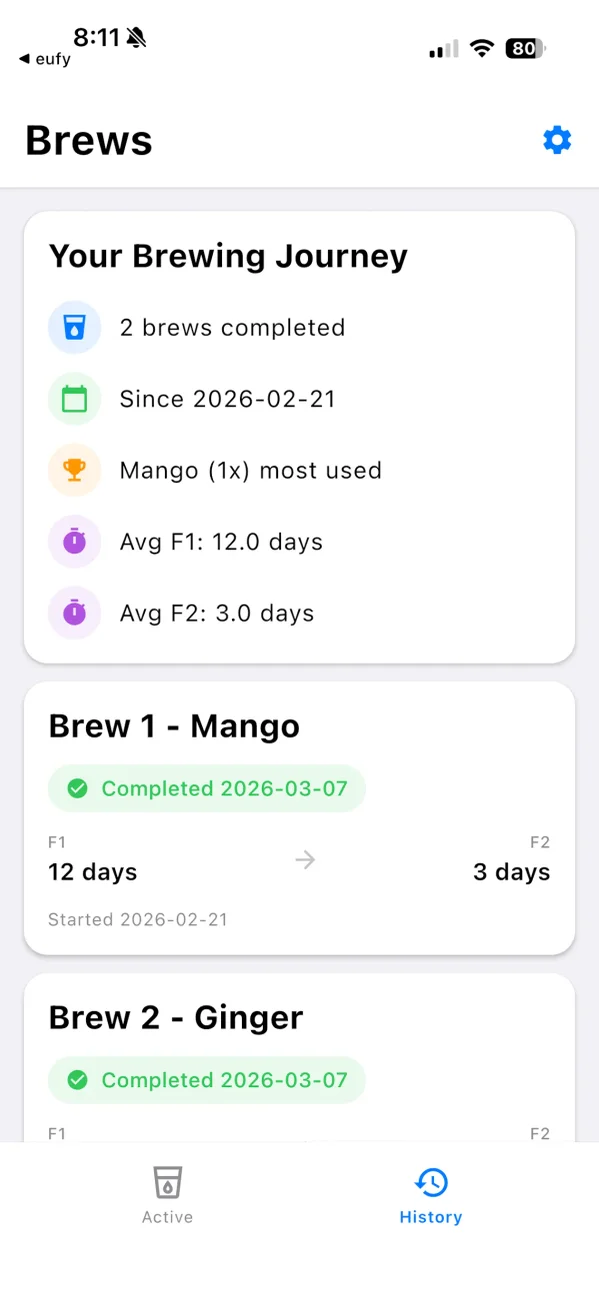
- Brew History: Track your kombucha journey with automatic history logging. View statistics including total brews completed, average fermentation times, and most-used flavors. Export your brewing data as CSV or JSON for your own analysis.
- Flavor & Tea Type Tracking: Keep track of which flavors you use for second fermentation and which tea varieties for first fermentation. Choose from pre-populated favorites or add your own. Completely optional—skip it if you prefer to keep things simpler.
Why Kombu Time?
Kombu Time was born out of the need for a no-fuss, straightforward kombucha brewing app. If you're tired of apps overloaded with features you don't need, Kombu Time is the perfect solution. It does exactly what you need—nothing more, nothing less.
All features are designed to enhance your brewing without adding complexity. History tracking, flavor notes, and tea types are completely optional. Use what helps you, ignore what doesn't.
Start Brewing with Ease!
Download Kombu Time today and simplify your kombucha brewing process. Focus on the joy of brewing, not on managing complicated tools.
What’s new
Version 2.0.0 · Mar 12, 2026
HOME SCREEN WIDGETS
View your active brews at a glance without opening the app! Add widgets to your home screen to see fermentation progress, days remaining, and which brews need attention. Available in small, medium, and large sizes.
BREW HISTORY
Track your kombucha journey! All completed brews are automatically saved to your history. View statistics including total brews, average fermentation times, and most-used flavors. Export your data as CSV or JSON for your own analysis.
FLAVOR TRACKING
Add optional flavor notes when bottling for second fermentation. Choose from pre-populated favorites (Blueberry, Ginger, Lemon, Mango, and more) or add your own custom flavors. Manage your flavor list in the new App Settings.
TEA TYPE TRACKING
Track which tea you use for first fermentation! Similar to flavor tracking, you can optionally specify your tea type (Black, Green, Oolong, etc.) when starting a new brew. Fully customizable with your own tea varieties.
QUICK ACTIONS FROM NOTIFICATIONS
Handle your brews without opening the app! When you receive a notification that a fermentation stage is complete, you can now tap "Complete" to advance to the next stage or "Extend 1 Day" to give it more time—all from the notification itself.
VISUAL IMPROVEMENTS
- Enhanced dark mode support with better contrast and readability
- Clear visual indicators showing when brews are ready, in progress, or overdue
- Friendly empty state messages when you're just getting started
- Improved Material Design 3 styling throughout
FULL LOCALIZATION
Complete translations in English, Dutch (Nederlands), and German (Deutsch) for all new features.
BETTER SETTINGS ORGANIZATION
Settings have been reorganized with dedicated screens for:
- App Settings (Flavors & Tea Types management)
- Brew Settings (Per-brew fermentation times and notification preferences)
- History Settings (Export, clear history, toggle saving)
TECHNICAL IMPROVEMENTS
- Modernized to latest Kotlin Multiplatform and Compose Multiplatform
- Migrated to Material Design 3
- Better performance and stability
- Improved notification system with action handling
- Enhanced data persistence and widget updates
App privacy
What Lammert Westerhoff declares on the App Store about how this app handles data.
-
Data not collected
The developer does not collect any data from this app.
Privacy practices may vary, for example with the features you use or your age.
Information
- Seller
- Lammert Westerhoff
- Category
- Food & Drink
- Version
- 2.0.0
- Updated
- Mar 12, 2026
- Released
- Aug 19, 2024
- Size
- 37.0 MB
- Requires
- iOS 15.3 or later
- Age rating
- 4+
- Price
- Free
- Languages
- English, Dutch, German
- Copyright
- © Paoapps
You might also like
-
 Kombucha KeeperTrack your brews
-
 Fermento - Brewing & CulturingGut Health & Recipe Tracker
-
 Kombucha Brew TrackerFermentation Timer & Batch Log
-
 FermentMe - Recipes & trackerFollow & improve your ferments
-
 Fermento: Fermentation JournalFerment tracker, timer, recipe
-
 KombuVaultKombucha Brew Tracker
-
 BrewfatherTools for your brewing needs
-
 Brewer's FriendHomebrew Recipe Builder & Calc
-
 Best Brew Guide: Filtru CoffeeEspresso, AeroPress, Chemex
-
 Loaflo: Sourdough StarterTracker, Recipes & Bread Log