
- Age rating4+
- CategoryUtilities
- DeveloperKyber Systems LLC
- LanguagesEnglish
- Size2.1 MB
Links to the official App Store page
Download.org hosts no file of KyberGateAgent. The button opens its official App Store page, published by Kyber Systems LLC. Listing last checked on Nov 20, 2026.
Screenshots
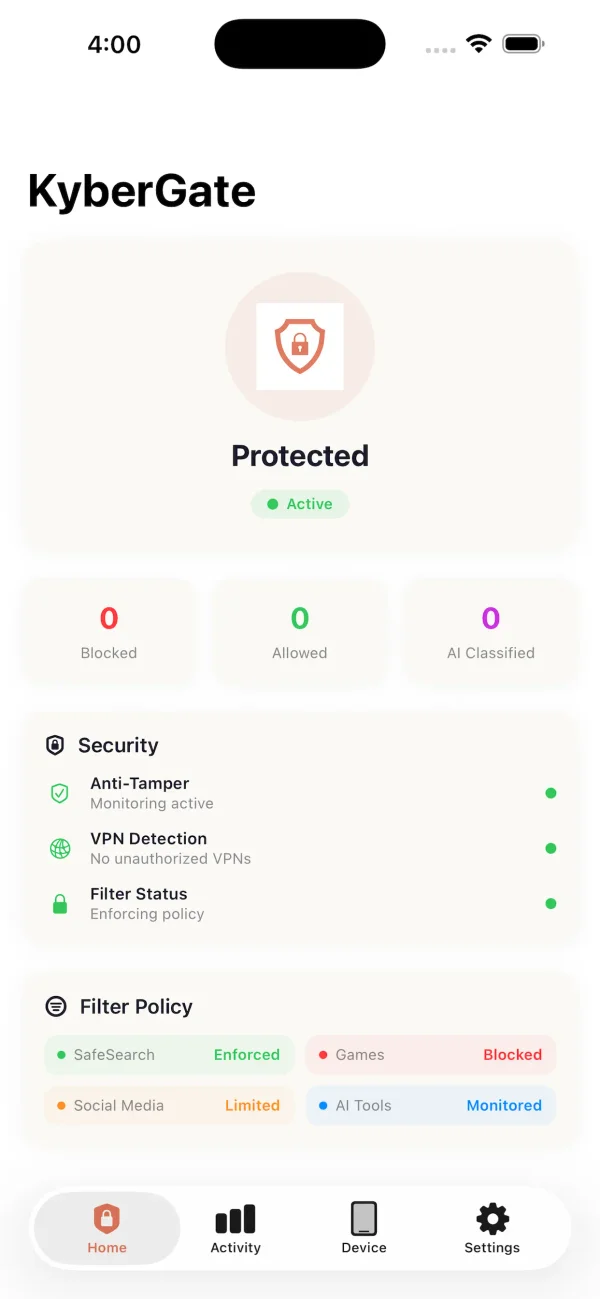
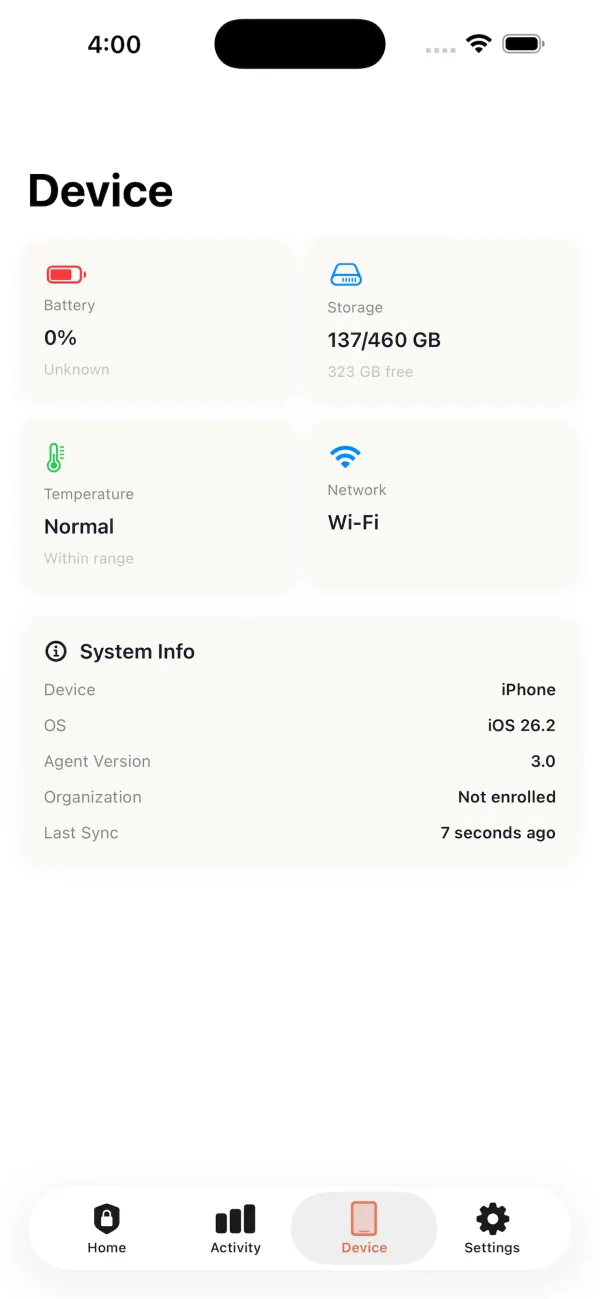

About
KyberGate Agent is the companion app for school-managed devices. Installed by your IT administrator, it works quietly in the background to keep devices secure, enforce school policies, and provide real-time visibility to your IT team.
FOR STUDENTS
KyberGate Agent runs silently — no configuration needed. Once enrolled by your school, the agent connects automatically and stays out of your way. You can view your device's protection status, see basic activity stats, and check device health anytime.
HOW IT WORKS
Your school's IT team deploys KyberGate Agent alongside a web filtering profile. Together, they provide:
• Web Filtering — Enforces your school's browsing policies through a cloud proxy. Inappropriate content, gaming sites, and distractions are blocked automatically.
• SafeSearch — Google, Bing, YouTube, and DuckDuckGo searches are kept safe with enforced SafeSearch across all browsers.
• Device Telemetry — Battery level, storage, OS version, and connectivity status are reported to your IT team so they can keep devices running smoothly.
• Remote Management — Your IT admin can send messages, push URLs for classroom activities, and manage device settings remotely.
• Student Safety — Works with KyberPulse to help schools identify students who may need support, meeting CIPA compliance requirements.
WHAT YOU'LL SEE
• Home — Protection status and security overview
• Activity — Basic stats on allowed and blocked requests
• Device — Battery, storage, network, and system information
• Settings — Enrollment status, proxy info, and connection details
ENROLLMENT
Your IT administrator will enroll this device using one of two methods:
1. MDM Deployment — The agent is automatically configured when your school pushes it through Jamf, Mosyle, or another MDM solution. No action required.
2. QR Code — Open the app, scan the QR code provided by your IT team, and you're connected in seconds.
PRIVACY
KyberGate Agent only collects data necessary for school device management and student safety. All data is scoped to your school's organization and is only visible to authorized administrators. KyberGate does not collect personal data, passwords, or content from messaging apps.
DESIGNED FOR EDUCATION
KyberGate is purpose-built for K-12 schools. It meets CIPA compliance requirements for E-Rate eligibility and is designed to work within the policies and workflows that schools already use.
REQUIREMENTS
• iOS 16.0 or later
• iPad or iPhone
• Active KyberGate organization (set up by your school's IT department)
• Internet connection
This app is intended for use on school-managed devices. Contact your school's IT administrator for enrollment.
Learn more at kybergate.com
What’s new
Version 3.6.0 · Jul 17, 2026
Security and reliability improvements, including enhanced device authentication and bug fixes.
App privacy
What Kyber Systems LLC declares on the App Store about how this app handles data.
-
Data not collected
The developer does not collect any data from this app.
Privacy practices may vary, for example with the features you use or your age.
Information
- Seller
- Kyber Systems LLC
- Category
- Utilities
- Version
- 3.6.0
- Updated
- Jul 17, 2026
- Released
- Mar 6, 2026
- Size
- 2.1 MB
- Requires
- iOS 16.0 or later
- Age rating
- 4+
- Price
- Free
- Languages
- English
- Copyright
- © Kyber Systems LLC
You might also like
-
 Stels VPNVPN service
-
 Hillstone SSLVPN ClientUtilities
-
 VPN Connect World-Fast SecureFast, Secure, Unlimited
-
 Kryon VPN: Fast & SecureSafe WiFi, Unlimited Proxy
-
 Appvia VPN: Secure Fast ProxyFast & Secure VPN Access
-
 ScreenSpy: See PC/Mac ScreenChild PC Monitor & Tracker
-
 WrtHub-OpenWrt ManagerOpenWrt & ImmortalWrt Manager
-
 Jamf SetupUtilities
-
 Text to Voice: AI Speech MakerVideo Dubbing for Short Clips
-
 Hi Height: Measure Height ToolMeasure child height fast