
Lago: Expense Tracker
Expense, Money & Savings App
Designed for iPhone, iPad
Free · In-app purchases
- Age rating4+
- CategoryUtilities
- DeveloperWalter Sasam
- LanguagesEnglish+ 4 more
- Size81.2 MB
Links to the official App Store page
Download.org hosts no file of Lago: Expense Tracker. The button opens its official App Store page, published by Walter Sasam. Listing last checked on Nov 26, 2026.
Screenshots
About
Where does your money actually go each month? Lago shows you—clearly, instantly, and without the spreadsheets.
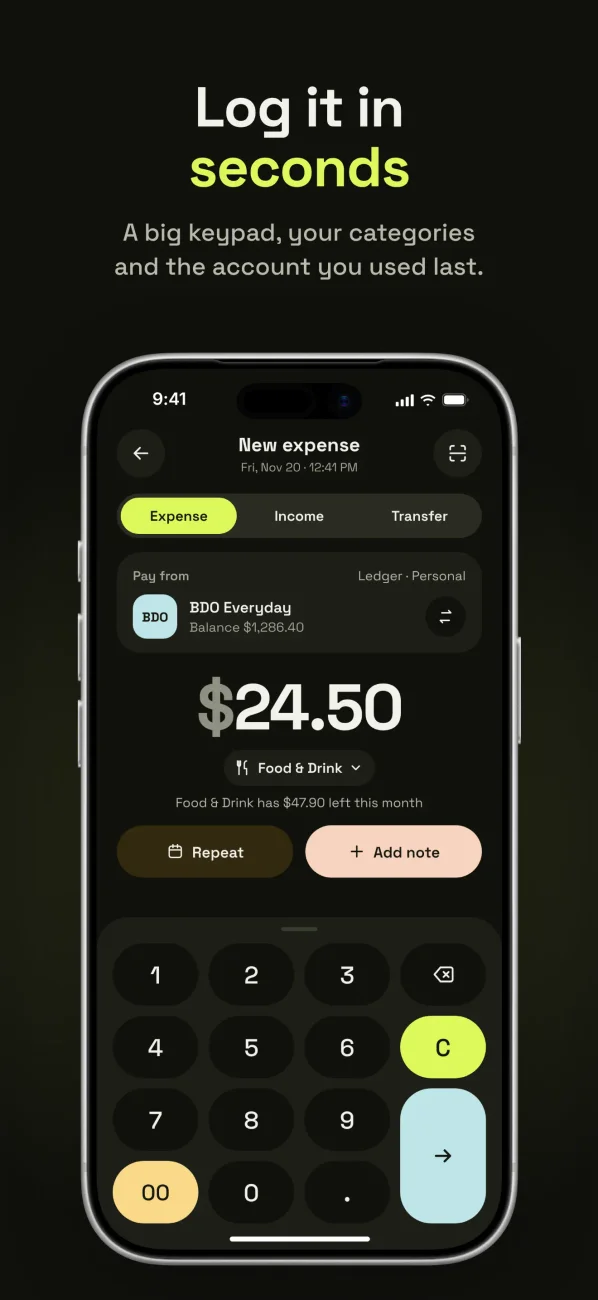
Lago is a simple budgeting app for everyday spending. Keep track of cash, e-wallets, bank accounts, credit cards, and more in one place. Log an expense in seconds, create a budget you can actually follow, and watch your savings grow.
The name says it all—lago, to grow. Small, steady habits can turn into meaningful savings.
WHAT YOU CAN DO
• Track income, expenses, and transfers in just a few taps
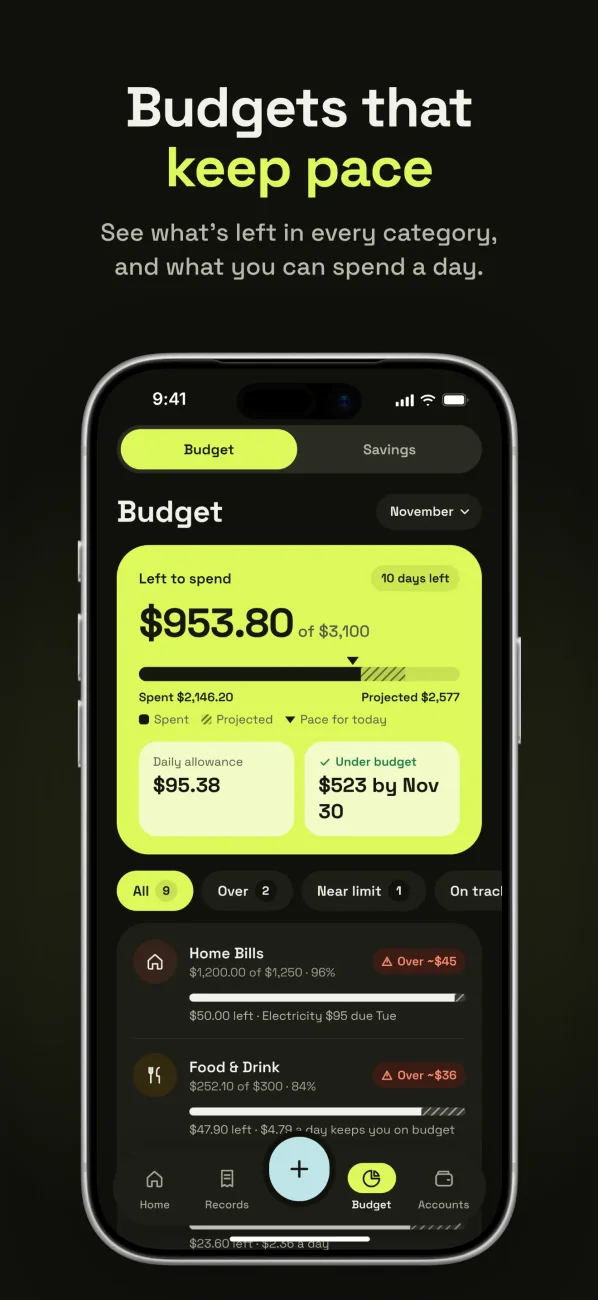
• Set monthly budgets by category and monitor your progress
• Create savings goals and stay motivated as your money grows
• Explore spending trends and financial Insights across multiple time periods
• Track money in different currencies—ideal for travel, freelancing, and life abroad
• Keep cash, e-wallets, bank accounts, credit cards, and other accounts in one view
• Schedule recurring transactions and receive reminders for upcoming bills
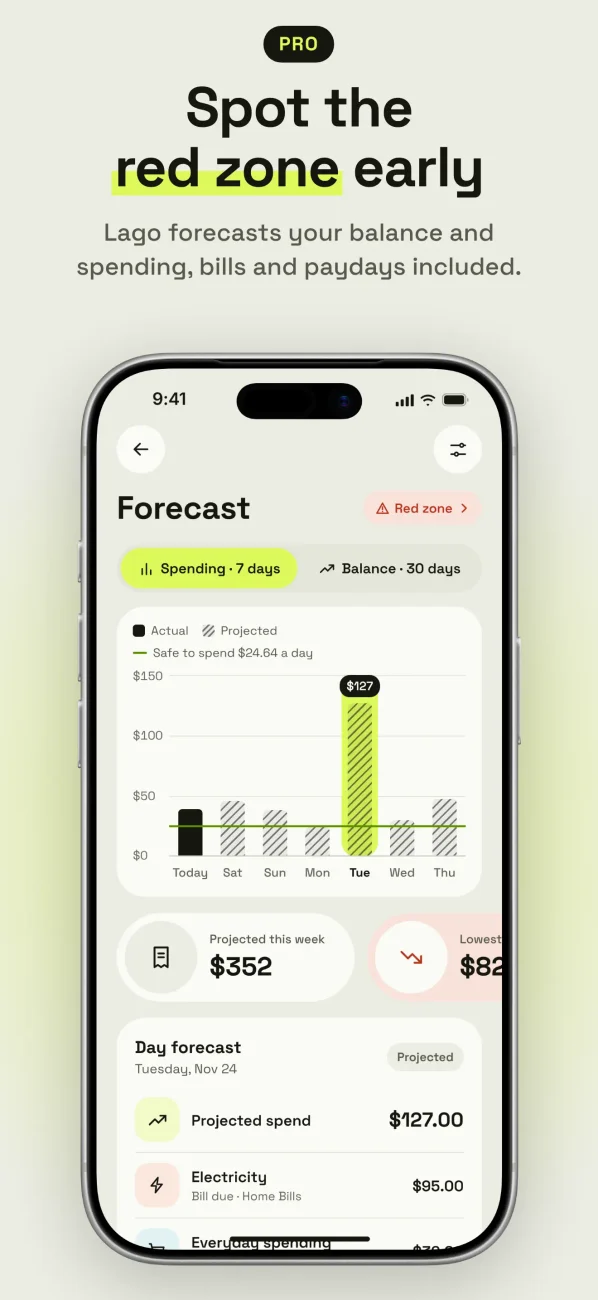
• Use clear charts to understand your spending habits and financial progress
• Continue using Lago offline whenever you need it
• Choose how your data is stored and synchronized
SYNC ON YOUR TERMS
Lago gives you control over synchronization:
• Keep your data stored locally on your device
• Use Apple Devices Sync through iCloud for supported Apple devices
• Enable optional All Devices Sync to keep your Lago data aligned across supported iPhone, iPad, and Android devices
All Devices Sync requires a Lago account and securely stores your synchronized data using Google Firebase services. You can manage your synchronization preference from Lago’s settings.
INSIGHTS THAT HELP YOU GROW
See how your income and spending change over time. Compare months, explore category breakdowns, follow your savings rate, review budget performance, and identify your biggest financial changes.
Optional Apple Intelligence features are available on supported devices. Lago’s charts, totals, budgets, and standard Insights continue to work without them.
WHOEVER YOU ARE
Whether you are building an emergency fund, living on a tight budget, managing multiple currencies, or sending support to family abroad, Lago helps keep your finances clear and under your control.
Small expenses can easily go unnoticed. See where your money goes, make a plan, and start growing your savings—one step at a time.
Download Lago and take control of your finances today.
Terms of Use (EULA):
https://www.apple.com/legal/internet-services/itunes/dev/stdeula/
Privacy Policy:
https://mobileledger.wartle.app/privacy.html
What’s new
Version 3.0 · Nov 25, 2026
Lago 3.0 is our biggest update yet: a fresh new look, a smarter Home, and new ways to see where your money is headed.
A WHOLE NEW LOOK
• Lago is rebuilt in Lime & sage: calmer colors, bigger numbers and simple cards that are easier to scan, in light and dark.
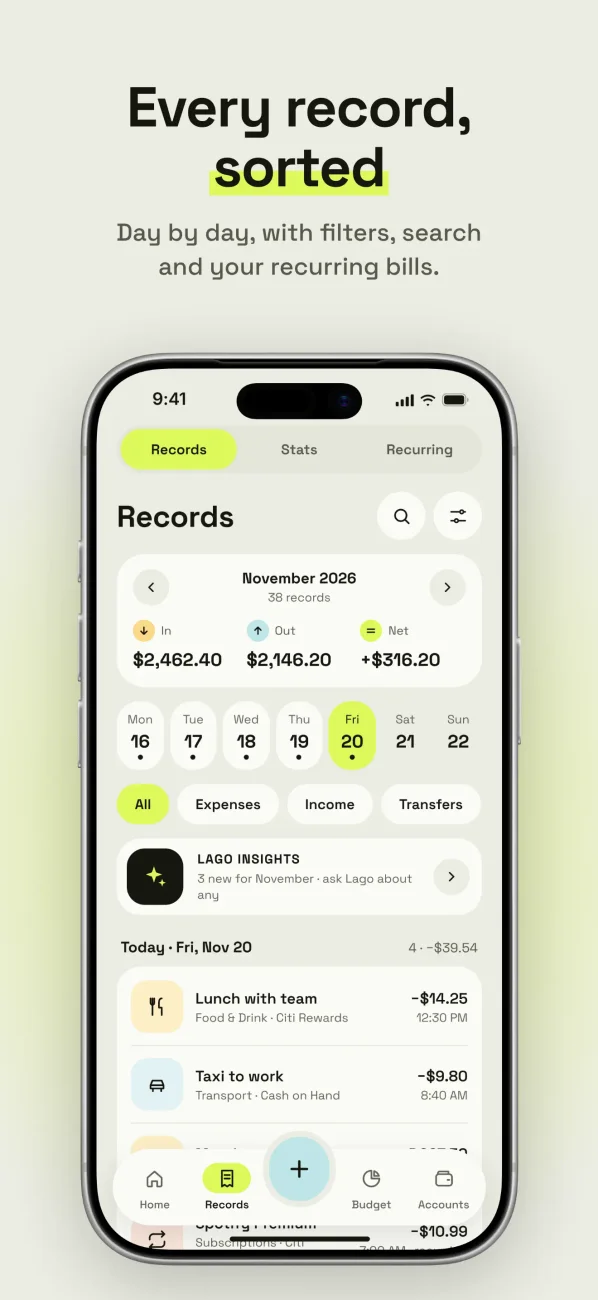
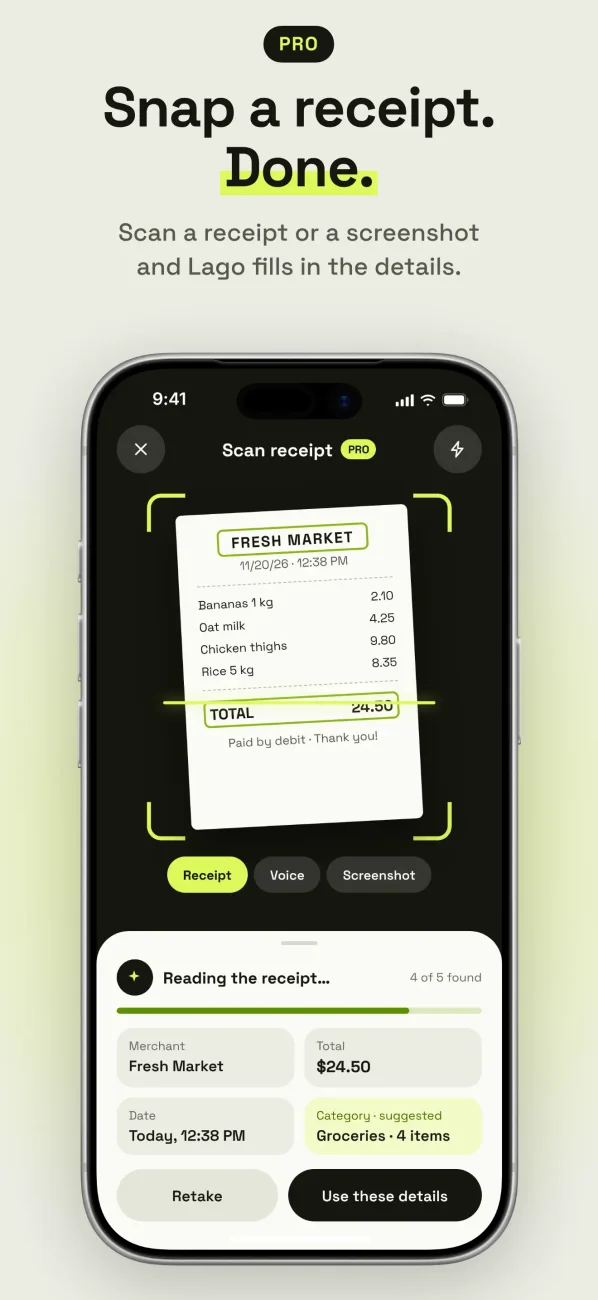
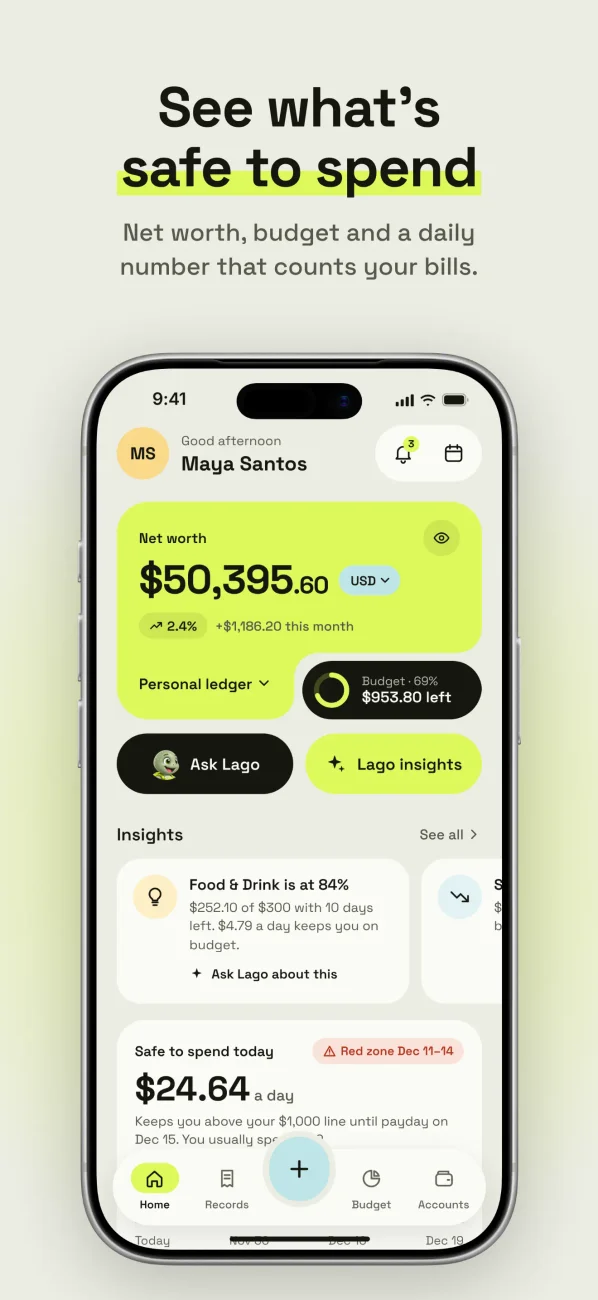
• A new dock keeps Home, Records, Budget and Accounts one tap away, with + in the middle. Hold + for Scan receipt, Voice and Ask Lago.
• Settings now opens from your photo on Home.
SEE WHAT'S AHEAD
• Forecast shows where your spending accounts are headed over the next 30 days, with recurring bills, paydays and card payments counted in.
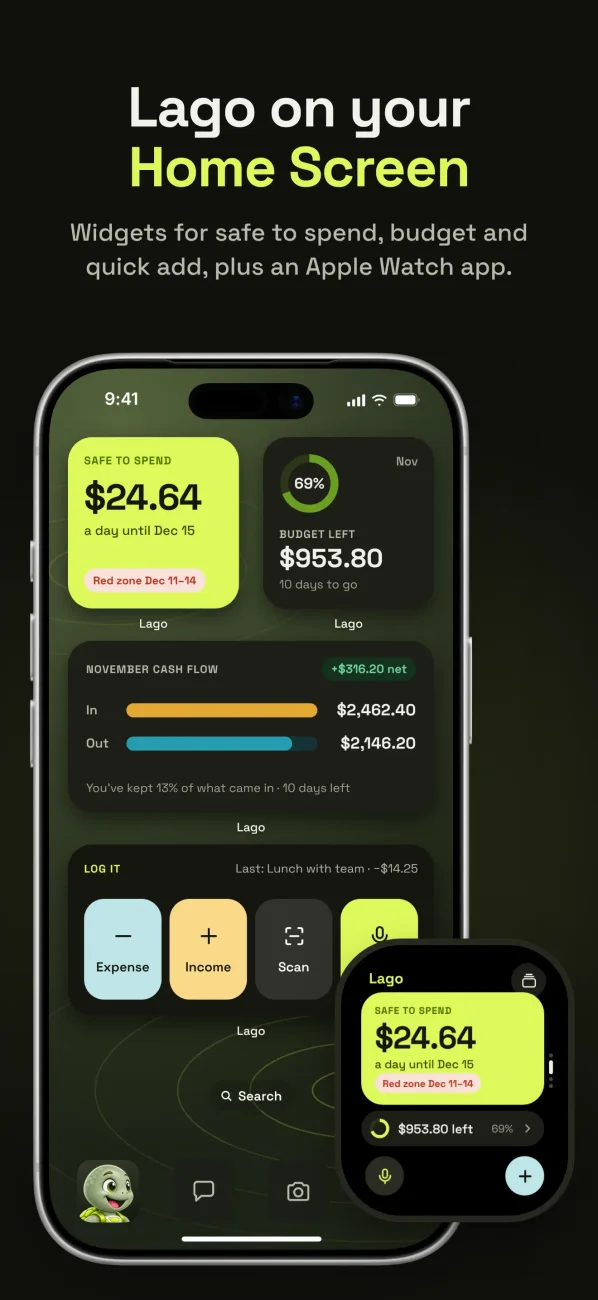
• Safe to spend on Home shows the most you can spend each day and stay above your line. It turns green, yellow or red so you know where you stand at a glance.
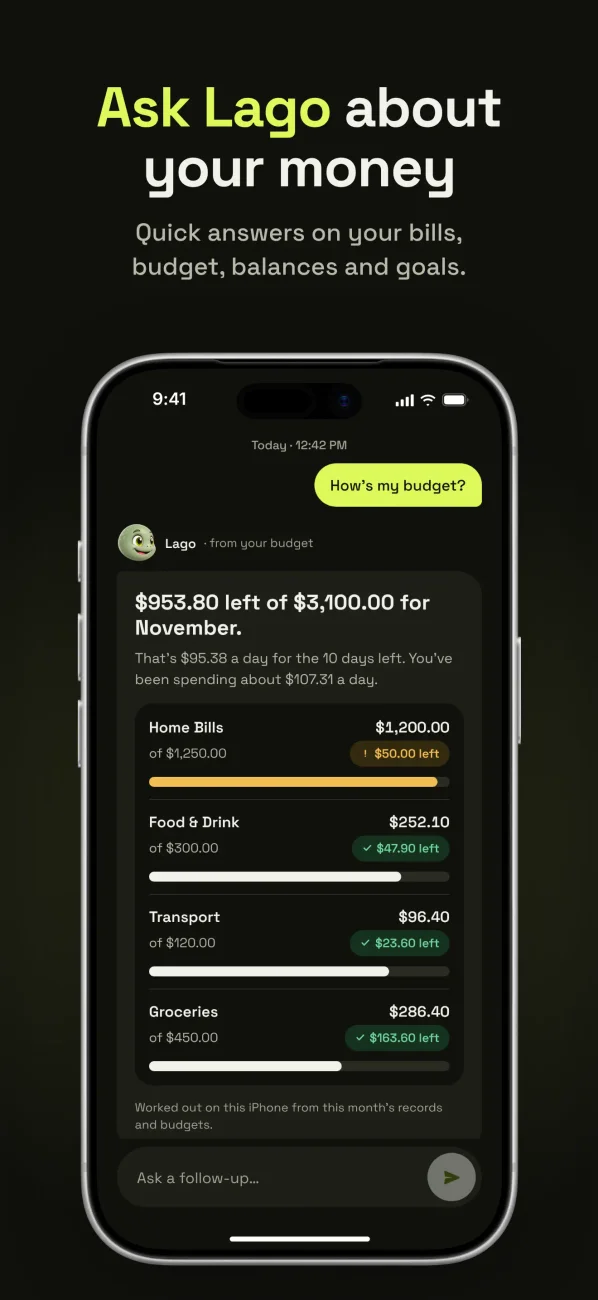
• Ask Lago answers questions about your bills, budgets, balances and goals straight from your ledger. With PRO, ask anything in your own words.
• Lago insights puts a look back at your spending and a look ahead side by side.
FASTER EVERY DAY
• One keypad everywhere, a category grid that shows what's left in each budget, and Repeat right in the form.
• Split an expense with friends: your record keeps your share, and each person's share is tracked for you.
• Convert between currencies: enter the rate your bank gave you and Lago records the move between your accounts.
• Scan receipt and Voice input are redesigned and quicker to use.
• Notifications are grouped by day, with filters and a button that takes you straight to what they're about.
BUDGET, SAVINGS AND TRENDS
• Pace bars show whether each budget is on track, and every savings goal gets its own page.
• Budget trends is redesigned: each month against your budget, where your money went, and which budgets keep slipping.
ACCOUNTS AND PEOPLE
• See your accounts as a list, grid or deck, with totals by currency and new card art.
• Each account opens in its own color or card art, with a balance chart and its latest records.
• Money you've lent or borrowed opens as a person, with what's owed, what's been paid back and a friendly reminder you can send.
• Paid off a loan? Reloan starts a new one with your previous settings.
STREAKS, MEDALS AND LEVELS
• Earn XP and level up from weekly missions, medals and every day you log something.
• Your streak, medals and level each have their own page.
WIDGETS AND APPLE WATCH
• Home Screen and Lock Screen widgets take the new look, including rebuilt Net Worth and Trends widgets.
• The Apple Watch app is redesigned: Safe to spend, your budget, today's records and a stack of your accounts, right on your wrist.
ALSO IMPROVED
• On iPad and other wide screens, Home and Budget spread across two columns.
• Changing the date of a card installment purchase now moves its monthly postings too.
GOOD TO KNOW
• Lago now has a single color theme. If you used Moonlight, Classic or Monochrome, you'll see the new look.
• Lago is in English for now.
• The Monthly and Weekly Calendar widgets have been retired. Records and Coming up cover what they showed.
• New records start from today. To back-date them, turn on Allow past dates in Settings › Advanced.
App privacy
What Walter Sasam declares on the App Store about how this app handles data.
-
Data linked to you
May be collected and linked to your identity.
- Financial info
- Contact info
- User content
- Identifiers
- Usage data
- Diagnostics
Privacy practices may vary, for example with the features you use or your age.
Information
- Seller
- Walter Sasam
- Category
- Utilities
- Version
- 3.0
- Updated
- Nov 25, 2026
- Released
- Apr 9, 2026
- Size
- 81.2 MB
- Requires
- iOS 26.0 or later
- Age rating
- 4+
- Price
- Free
- In-app purchases
- Yes
- Languages
- English, Filipino, Hindi, Japanese, Korean
- Copyright
- © 2026 Walter S.
You might also like
-
 Receipt Scanner & OrganizerTrack Monthly Expenses
-
 RawMonServer & Uptime Monitor
-
 Brimly: OBD2 Car Scanner & MPGAI mechanic & maintenance log
-
 Pulse - Website Uptime MonitorKeep sites running smoothly
-
 Typing Speed CheckCheck typing speed in mobile
-
 hbd: Birthday CountdownReminders, widgets, cards
-
 Primus LaundryUtilities
-
 DaycoFind your part
-
 PDF to Word Converter & DocxWord to PDF, PDF to Word
-
 OBD2 Scanner + Engine SoundELM327 live gauges, no sub