
LAN Screen Control
Local VNC Remote Desktop
Designed for iPhone, iPad
In-app purchases
- Age rating4+
- CategoryUtilities
- Developer洋 周
- LanguagesEnglish+ 1 more
- Size2.9 MB
Links to the official App Store page
Download.org hosts no file of LAN Screen Control. The button opens its official App Store page, published by 洋 周. Listing last checked on Nov 13, 2026.
Screenshots
About
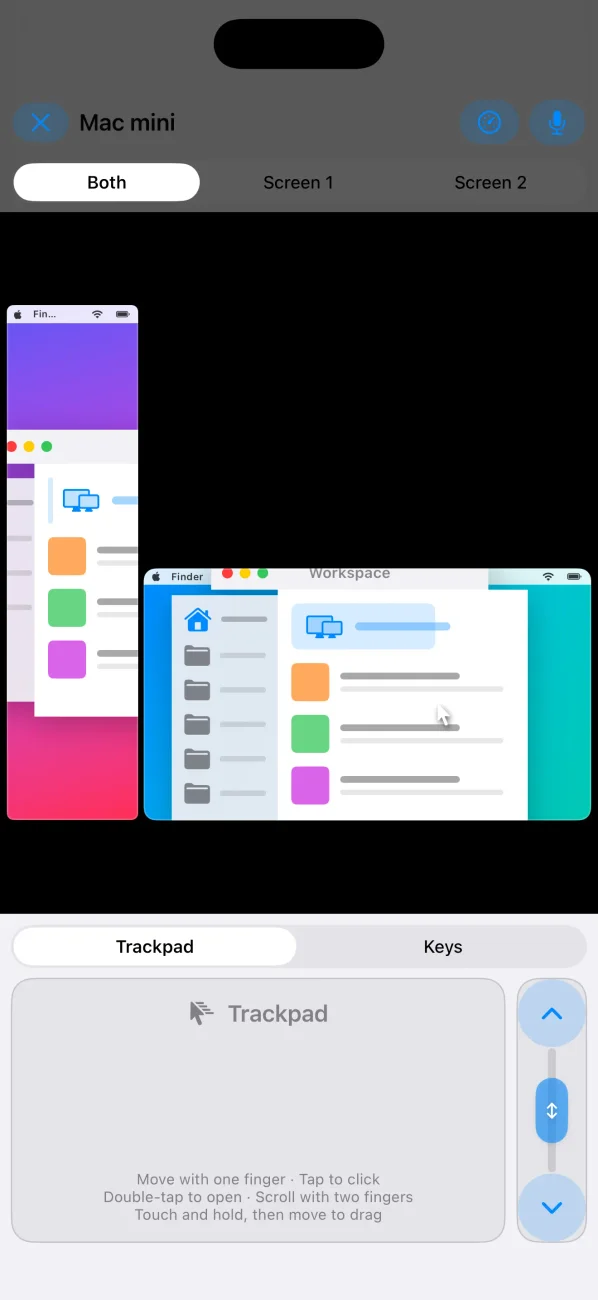
LAN Screen Control is a local-network VNC client built for iPhone and iPad. It connects directly to Screen Sharing or Remote Management built into macOS, without a companion app on the Mac or a developer-operated cloud relay.
FEATURES
- Discover Macs on the same network, or enter a host name, IP address, and port manually
- Sign in with a Mac user account or VNC password
- View all displays or choose one screen, with manual dual-display calibration when needed
- Precision trackpad with click, double-click, right-click, drag, two-finger scroll, and a vertical scroll strip
- Remote keyboard with Esc, Tab, Delete, arrow keys, Command, and other common controls
- Compose text locally or use system keyboard dictation, review it, then send it to the Mac
- Ultra Smooth, Balanced, and High Quality performance profiles
- Optional per-Mac clipboard sync, off by default
- Bonjour discovery and automatic reconnection
Saved computer details and preferences remain on this device. Usernames and passwords are stored in the system Keychain and are not synced through iCloud. The app contains no advertising or analytics SDKs and does not collect or upload connection details.
Before connecting, turn on Screen Sharing or Remote Management in System Settings > General > Sharing on your Mac, and keep both devices on the same trusted local network.
A VNC session should not be treated as end-to-end encrypted. Do not expose the VNC port directly to the internet. LAN Screen Control does not provide a public relay, audio, or file transfer.
What’s new
Version 1.1.0 · Aug 25, 2026
Adds a 7-day full-feature trial and a one-time lifetime unlock. Existing 1.0 users keep lifetime access. New users can try every feature for 7 days, then unlock permanently with one purchase. Also adds purchase restoration and access status.
App privacy
What 洋 周 declares on the App Store about how this app handles data.
-
Data not collected
The developer does not collect any data from this app.
Privacy practices may vary, for example with the features you use or your age.
Information
- Seller
- 洋 周
- Category
- Utilities
- Version
- 1.1.0
- Updated
- Aug 25, 2026
- Released
- Aug 13, 2026
- Size
- 2.9 MB
- Requires
- iOS 17.0 or later
- Age rating
- 4+
- In-app purchases
- Yes
- Languages
- English, Simplified Chinese
- Copyright
- © 2026 yang zhou
You might also like
-
 SmsLLM - LLM SMS BlockerPrivate, on-device filtering
-
 Simple SSHTerminal & SFTP Client
-
 Hush - Minimal content blockerBlock ads. Keep the web quiet.
-
 Glassy Desk: Remote DesktopScreen Sharing for Mac & VNC
-
 Rumskrot RemoteRemote desktop for your Mac
-
 CTRL MicroRemote for Desktop & AI Agents
-
 Timer tickFull-screen timer
-
 Orvyniq: VNC Remote DesktopAccess PCs, Macs & Servers
-
 Chrono PumpkinSimple timer and alarm