- Age rating4+
- CategoryEducation
- DeveloperRogers Center for Learning
- LanguagesEnglish
- Size585.6 MB
Links to the official App Store page
Download.org hosts no file of Learn to ReadWriteSpell Lite. The button opens its official App Store page, published by Rogers Center for Learning. Listing last checked on Nov 12, 2026.
Screenshots
About
"Learn to Read, Write and Spell" app is designed for the IOS platform iPad Users and made for "Made For Ages 5 and Above". This iPAD app teaches advanced reading and spelling skills to adults, adolescents and children, who
* Are non-readers, or are reading below their expected level
* Know many sight words but cannot decode or encode new words
* Are learning disabled - LD
* Have an attention deficit disorder - ADD/HD
This iPAD app is Recommended for:
* Public/private schools (resource rooms, special education classes, ESL programs)
* Libraries /literacy centers
* Home computers - Home schooling
* Correctional, rehabilitation, youth detention centers and vocational facilities
* Community colleges (LD resource centers)
This multisensory reading, spelling and penmanship program builds an association between symbols and sounds in the English language through self-paced repetition. It utilizes the close association of visual, auditory and kinesthetic elements to help students improve their language skills.
The beginning of the iPAD app assumes the student does not know the letters of the alphabet. The app then proceeds to teach all the skills one needs to read on a sixth grade level.
This INTERACTIVE iPAD app uses graphics as a vehicle to teach:
The sound & key word for each letter of the alphabet
* Blending letters to form words
* Reading Lessons
* Writing Lessons
* Spelling Skills
* Language Skills
* Dictionary Skills
Extensive practice in reading, spelling and penmanship throughout the app
Specific language skills taught include suffixes, prefixes, the six syllable types, consonant digraphs and blends, diphthongs, singular and plural nouns, apostrophe and contractions, punctuation, exceptional words (words to be memorized), sentence and paragraph structure, etc.
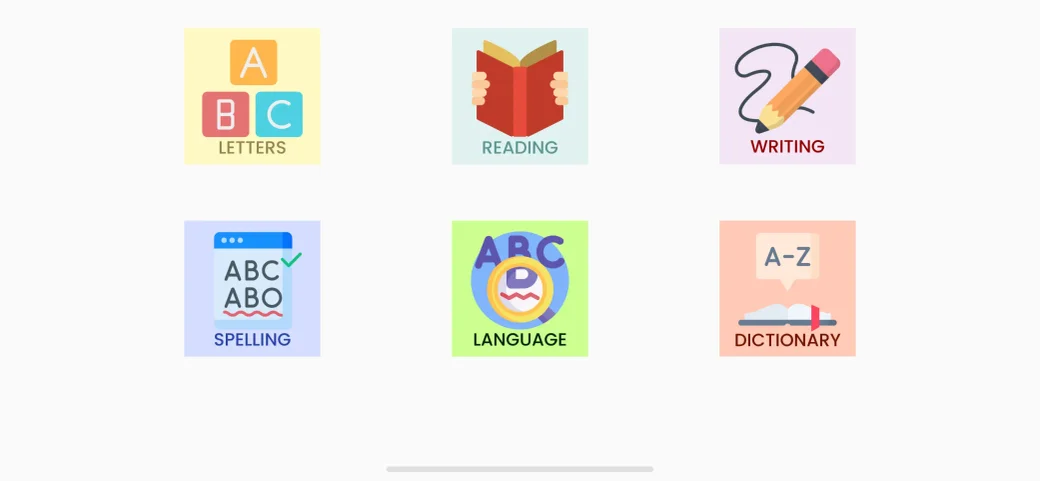
Students and teachers can move to different lessons/modules in the program by utilizing the progress report. They can click on the "DOWN ARROW" after the short introduction. This will take them to a progress report. The names of the modules, in the program, are located on the left side of the screen (letter, reading, spelling, writing, language and dictionary lessons). When you "click" them, the voice will identify the name of the module. Next to each module are numbered buttons. These numbers correspond to the numbered lessons in the table of contents in the manual. One may click on the numbered button and go right to the lesson of their choice. Teachers can decide if they wish to have a student follow the sequence, as it is presented on the program, or may decide to use the program to reinforce a particular reading skill which was just introduced in class.
The FREE version of "Learn to Read, Write and Spell" iPAD app contains the Introduction, History of English and First Lesson of each module.
What’s new
Version 1.0.3 · Jul 17, 2026
- Bug fix and Improvements
App privacy
What Rogers Center for Learning declares on the App Store about how this app handles data.
-
Data not collected
The developer does not collect any data from this app.
Privacy practices may vary, for example with the features you use or your age.
Information
- Seller
- Rogers Center for Learning
- Category
- Education
- Version
- 1.0.3
- Updated
- Jul 17, 2026
- Released
- Apr 25, 2021
- Size
- 585.6 MB
- Requires
- iOS 13.0 or later
- Age rating
- 4+
- Price
- Free
- Languages
- English
- Copyright
- Copyright © 2016, The Rogers Center for Learning | All Rights Reserved
You might also like
-
 Lexy: Dyslexia Reading TutorLearn to Read: Phonics Games
-
 Phonogram SoundsEducation
-
 Starfall I'm ReadingLearn-to-Read Series, Step 4
-
 Bookshare ReaderRead and listen to books
-
 Readability - Learn to ReadReading Apps for Kids - AI
-
 Spell It: Spelling Bee GamesPractice Tests & Word Quizzes
-
 Starfall Learn to ReadLearn-to-Read Series, Step 2
-
 Spelling: Spelling GamesWord Reference - ABC Bee Games
-
 Math: Teach Monster NumbersMath learning games for kids
-
 Sight Words - Pre-k to 3rdSight Word Games For Kids