- Age rating4+
- CategoryPhoto & Video
- DeveloperCarabala Pte. Ltd.
- LanguagesEnglish
- Size36.8 MB
Links to the official App Store page
Download.org hosts no file of Light Meter Classic. The button opens its official App Store page, published by Carabala Pte. Ltd. Listing last checked on Nov 14, 2026.
Screenshots



About
A reflected-light meter for film photography. It uses the phone camera as its sensor, lets you choose exactly which part of the frame to measure, and works out the ISO / aperture / shutter combination to set on your camera — restricted to the values that camera actually has.
It exists for the situations a film camera's own meter gets wrong: a face against a bright window, a subject lit from behind, a stage. Those are exactly the cases where averaging the whole frame throws the exposure away, and where being able to say "measure here, not there" fixes it.
MEASURE WHERE YOU WANT
• SPOT — a small area, for a face or a shadow
• CENTRE — weighted three-to-one towards the middle
• AVG — the whole frame
• BOX — drag to move it, drag the corner to resize it
The preview is a 3:2 window: the frame a 35mm camera gets, whatever the shape of your screen.
SOLVES FOR THE SETTING YOU NEED
One setting is computed, the other two you set by hand. Each of the three tiles carries its own AUTO switch — tap AUTO on aperture and the app finds the aperture; tap it on shutter and it finds the shutter. One button hands both to the app at once.
Every value the app returns is one your camera has. Settings holds three ranges — shutter, aperture, film speed — each with its own step size (full, half or third stops), a bulb switch, and the speed below which to warn you about camera shake. That covers any body and lens without a library of them.
FREEZE
Hold a reading so you can recompose without it changing. The value turns blue and the label reads FROZEN.
MULTI-SPOT AND ZONES
Store several readings with + SPOT and the app places the scene midway between its extremes, rather than letting any one reading pull the exposure to middle grey. Each stored reading is shown as a zone against the chosen exposure.
CALIBRATION
A phone differs from a reference meter by a fixed amount. Measure it once — fill the frame with an evenly lit surface, dial in what a camera you trust says, and save the point. Check at a few light levels and add a point where it is out; the app interpolates between them.
Calibration is keyed to the phone and lens, so it stays true across sessions, and exports to JSON so it can be backed up or moved to another phone. The readout shows CAL +0.42 when an offset is being applied, or NO CAL when there is none — so you always know which you are looking at.
No offsets are shipped for devices that have not been measured. An invented number is worse than none, because it looks like a measurement.
RECIPROCITY AND FILM
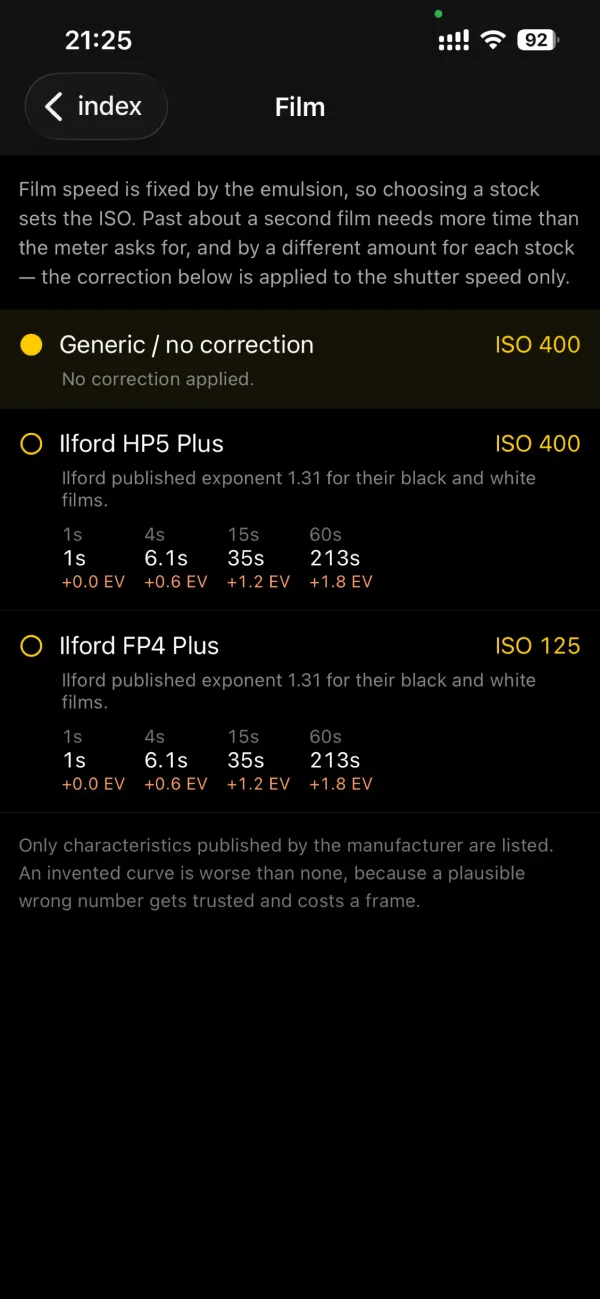
Long exposures need more time than the maths alone says. Where a manufacturer publishes the figure for a film, the app applies it; where none is published, it applies nothing rather than guessing.
SHOT LOG
Keep what you metered and what you set, so a roll can be read back later.
NO ACCOUNT, NO NETWORK, NO TRACKING
Nothing is uploaded. The camera is used to meter light and nothing else — no photo is captured, stored or sent.
App privacy
What Carabala Pte. Ltd. declares on the App Store about how this app handles data.
-
Data not collected
The developer does not collect any data from this app.
Privacy practices may vary, for example with the features you use or your age.
Information
- Seller
- Carabala Pte. Ltd.
- Category
- Photo & Video
- Version
- 1.0
- Updated
- Aug 3, 2026
- Released
- Aug 3, 2026
- Size
- 36.8 MB
- Requires
- iOS 16.4 or later
- Age rating
- 4+
- Price
- Free
- Languages
- English
- Copyright
- © 2026 Thinh Nguyen
You might also like
-
 Lume - Light MeterSpot & cine light meter
-
 Light Meter: Film PhotographyExposure, incident & spot EV
-
 Lumora: AstrophotographyMilky Way & Golden Hour
-
 Easy Light MeterMeasure light exposure
-
 Film Light Meter: ExposureLightmeter, DOF & Viewfinder
-
 Luma · Light MeterLight meter for film cameras
-
 GlassMeter: Film Light MeterSpot & Zone Exposure for Film
-
 LightMeter - Pro Light MeterPhoto & Video
-
 Filmeter: Film Light MeterExposure Aperture Photography
-
 Evios: Light Meter for FilmSpot Metering & Reciprocity