
- Age rating4+
- CategoryTravel
- DeveloperOsipyan Sergey
- LanguagesEnglish
- Size17.5 MB
Links to the official App Store page
Download.org hosts no file of Live Webcam. The button opens its official App Store page, published by Osipyan Sergey. Listing last checked on Nov 12, 2026.
Screenshots


About
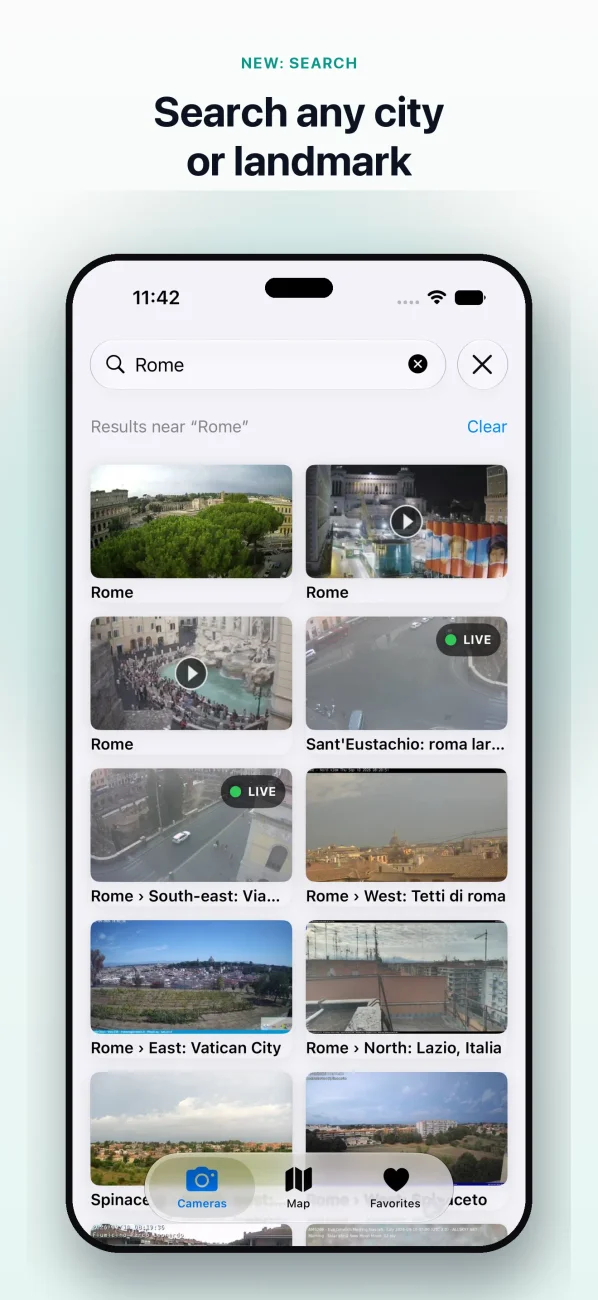
Live Webcam puts over 70,000 live and recorded cameras from around the world in your pocket — city streets, mountain passes, beaches, ski resorts, and famous landmarks, all in one app.
NEW: Search any city or landmark by name and jump straight to the webcams nearest to it.
BROWSE YOUR WAY
• Popular — the most-watched cameras right now
• Newest — recently added webcams
• Live — cameras currently streaming live video
• Nearby — webcams closest to your location
EXPLORE ON THE MAP
Every camera plotted on an interactive map. Tap a pin for a live preview, or zoom out and browse by region.
WATCH LIVE, OR REWIND THE DAY
Many cameras stream live. For the rest, scrub through a day, month, or year of recorded snapshots to see how a place changes with the seasons, the weather, or the time of day.
SAVE YOUR FAVORITES
Found a view you love? Save it to your Favorites for one-tap access next time.
LEARN MORE
Open the linked Wikipedia article for context on where you're looking, or get turn-by-turn directions with Apple Maps.
YOUR PRIVACY
Live Webcam collects no personal data. Nothing to sign up for, nothing to track — just point, watch, and explore.
Whether you're checking the surf before a trip, watching snow pile up at a ski resort, or just curious what a street in Tokyo looks like right now — Live Webcam gives you a live window on the world.
What’s new
Version 2.1.1 · Oct 7, 2026
Favorites now sync through iCloud. Your list stays the same on your iPhone and iPad, and comes back automatically if you reinstall the app or move to a new phone.
Sort your favorites your way. Tap Sort on the Favorites tab, drag the cameras into the order you like, then tap Done.
Choose which tab the app opens on (Cameras, Map or Favorites) from the info screen.
Fixed the Favorites tab sometimes showing up empty. If a saved camera is no longer available, it now appears with a remove button instead of hiding the whole list, and a clear message appears if your favorites can't be loaded.
Fixed the Appearance setting not switching back to System right away.
Fixed a notification badge that could stay on the app icon.
General bug fixes and stability improvements.
App privacy
What Osipyan Sergey declares on the App Store about how this app handles data.
-
Data not collected
The developer does not collect any data from this app.
Privacy practices may vary, for example with the features you use or your age.
Information
- Seller
- Osipyan Sergey
- Category
- Travel
- Version
- 2.1.1
- Updated
- Oct 7, 2026
- Released
- May 22, 2019
- Size
- 17.5 MB
- Requires
- iOS 16.0 or later
- Age rating
- 4+
- Price
- Free
- Languages
- English
- Copyright
- © 2019–2026 Sergey Osipyan
You might also like
-
 Overview: Live World WebcamsBeach, Ski, Weather & Traffic
-
 Planet Cam: Live World MapExplore Earth & Coast Cameras
-
 Webcams World View: DiscoveryLive earthcam for travel world
-
 TrafficLand Live Cameras20,000+ cameras all across USA
-
 Live Earth Camera: Street ViewExplore with live earth camera
-
 Webcams – EarthCamTravel
-
 Live Webcam HDPreview known places.
-
 Live Earth Map - Live CameraLive Street Navigation View
-
 Traffic Cam+Tracking global traffic
-
 LiveCam : Live Earth CameraLive Cameras