Lock Status
U.S. River Lock & Dam Status
Designed for iPhone, iPad
Free · In-app purchases
- Age rating4+
- CategoryNavigation
- DeveloperAndrew Thom
- LanguagesEnglish+ 7 more
- Size16.7 MB
Links to the official App Store page
Download.org hosts no file of Lock Status. The button opens its official App Store page, published by Andrew Thom. Listing last checked on Nov 20, 2026.
Screenshots




About
Canoeing down the Mississippi? Pushing a tow up the Ohio? Crossing Florida on the Okeechobee Waterway, or spending a year on the Great Loop? Sooner or later you'll reach a lock. Lock Status shows what's happening at every U.S. Army Corps of Engineers navigation lock, so you know what's ahead before you get there.
SEE EVERY LOCK
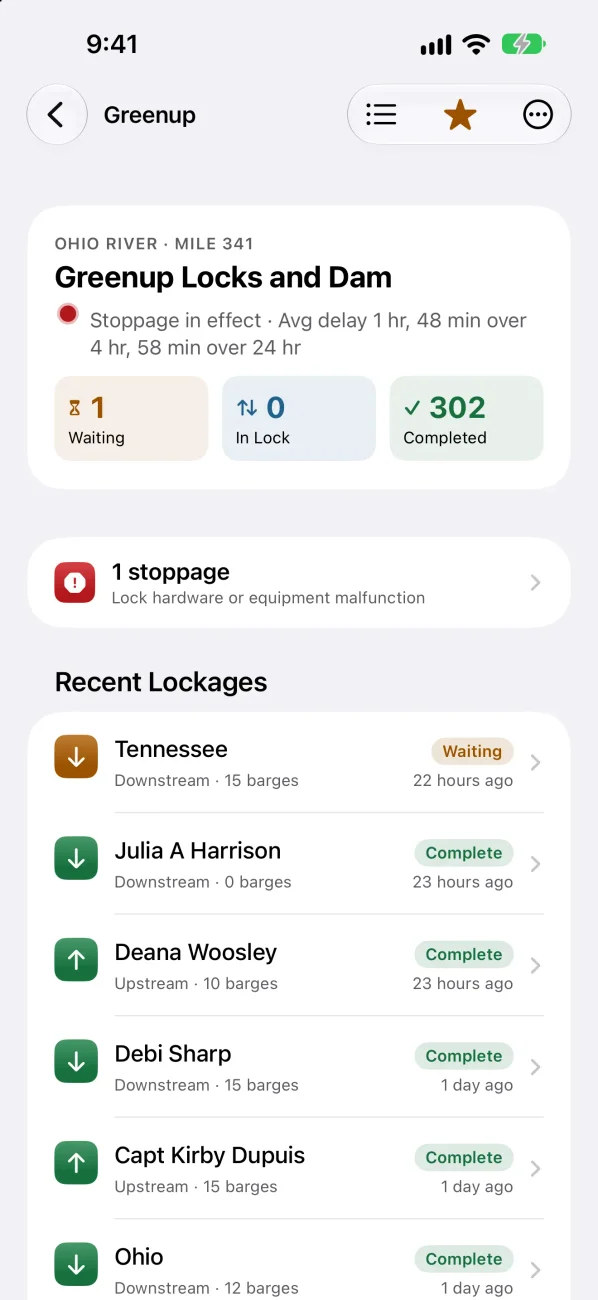
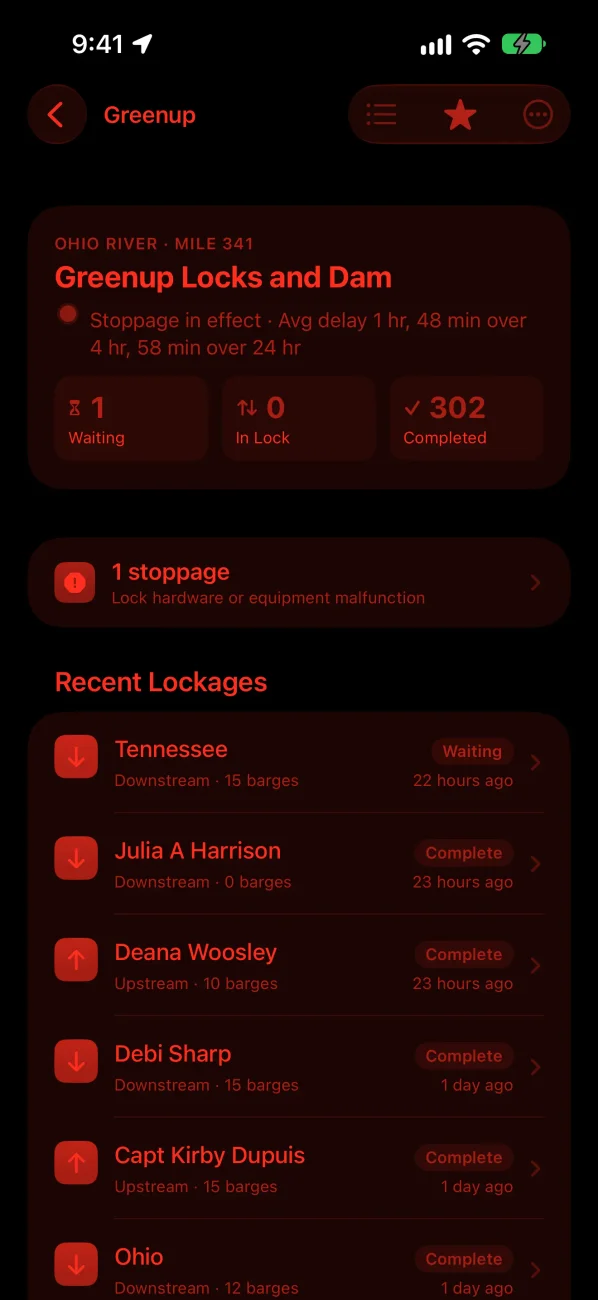
• Delays, stoppages and the vessels waiting and locking through, colored by how busy each lock is
• Pool and tailwater levels, chamber sizes, lock hours and navigation notices
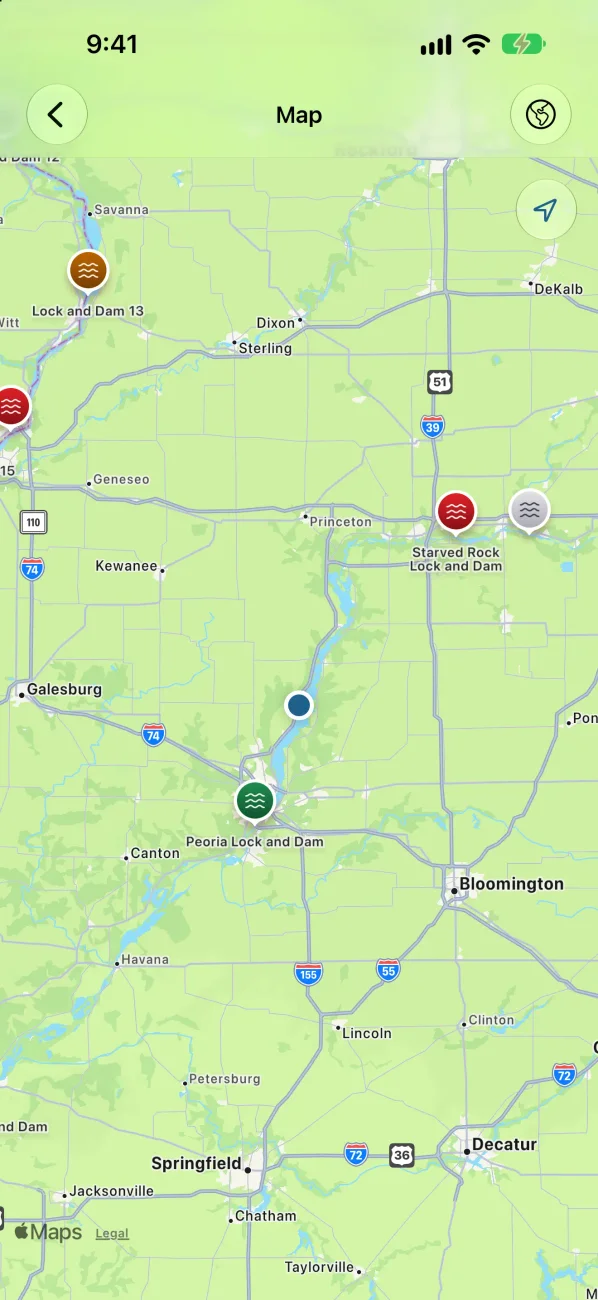
• Browse by river, search by name, find the locks closest to you, or use the map
• Favorite the locks you pass most often
HAIL THE LOCK
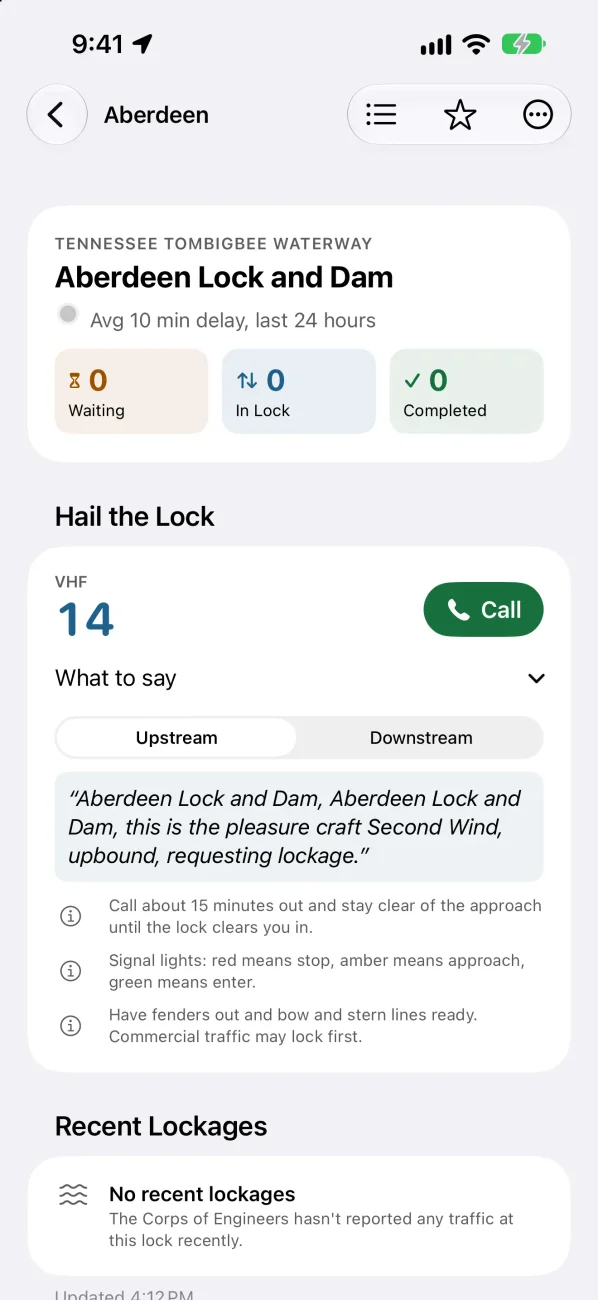
• Each lock's VHF channel and phone number, one tap to call
• Towboats: see whether the tow fits the chamber, or how many cuts it needs
• Pleasure boaters: what to say on the radio, plus tips for locking through
PLAN YOUR TRIP
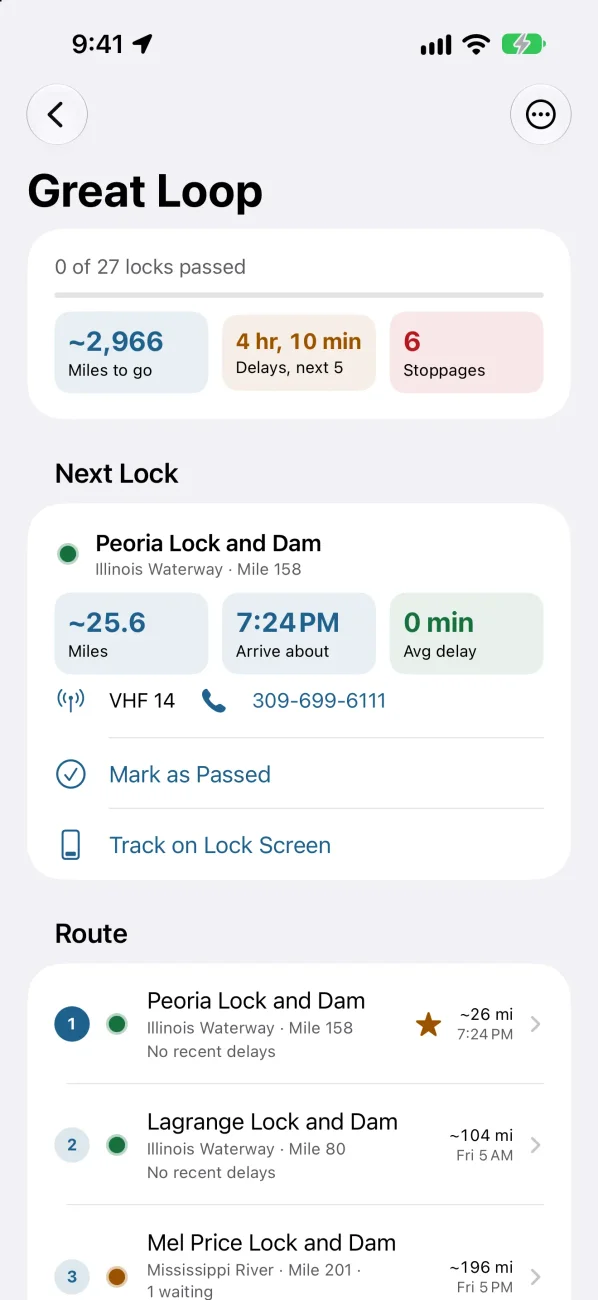
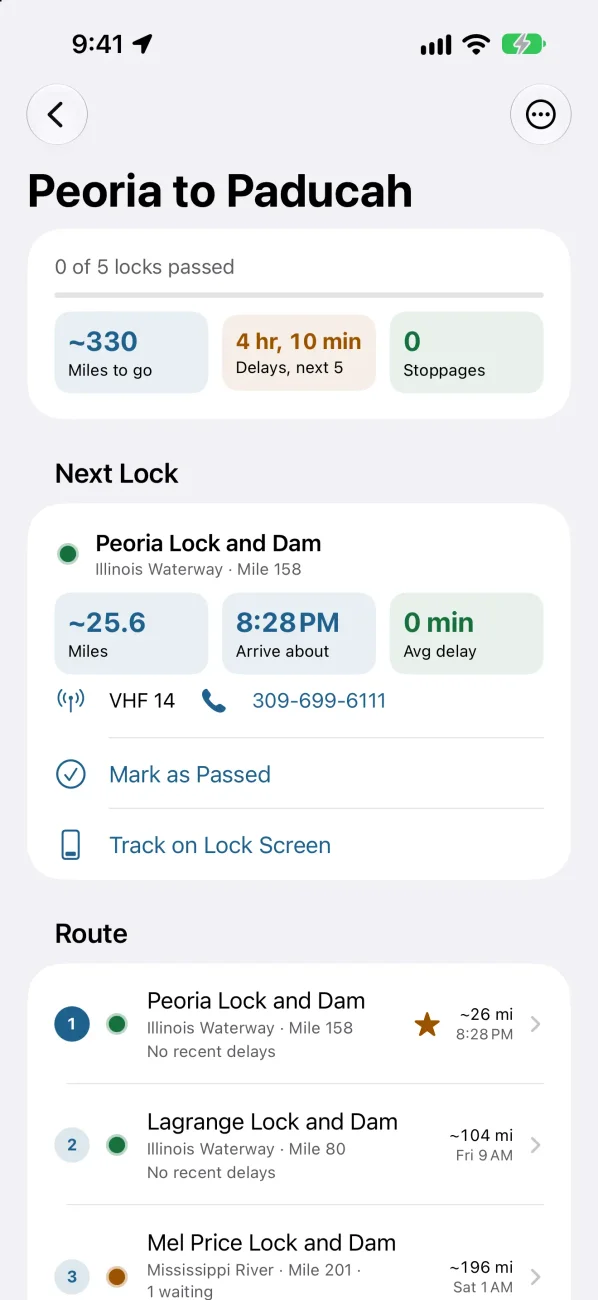
• Build a route lock by lock, and see the next lock, how far it is and what's waiting there
• Great Loop planning, with the Loop's route choices
MADE FOR THE WATER
• Night mode in red on black protects your night vision in the pilothouse; Sun mode adds contrast for bright days
• In a dead spot, the app shows the last data it loaded and when it's from, and refreshes when you're back in range
• Widgets for your Home Screen, Lock Screen, Mac desktop and menu bar
• In English, Spanish, French, Russian, Chinese, Vietnamese, Filipino and Haitian Creole
• Full VoiceOver support and larger text sizes
LOCK STATUS PREMIUM
Free: lock status, delays, stoppages, queues, the map, VHF channels and phone numbers, what to say on the radio, one trip, widgets, and Night and Sun modes.
Premium adds:
• Alerts when a stoppage starts or clears, a delay passes your limit, or a navigation notice is posted, even when the app is closed
• Live Activities that keep a lock updated on your Lock Screen and in the Dynamic Island
• The full trip planner: more than one trip, Great Loop planning, arrival times and the delays ahead
• 30 days of traffic and monthly cargo tonnage at every lock
Premium is $1.99 a month or $9.99 a year, with a free first week. It's billed to your Apple Account and renews automatically unless you cancel at least 24 hours before the end of the current period. Manage or cancel it anytime in your Apple Account settings.
Lock information comes from the U.S. Army Corps of Engineers' public Lock Performance Monitoring System and is provided on a best-effort basis. Lock Status isn't affiliated with the Corps of Engineers. Always follow the lockmaster's instructions.
Terms of Use: https://lockstatus.ajthom.dev/terms/
Privacy Policy: https://lockstatus.ajthom.dev/privacy/
What’s new
Version 2.1.0 · Oct 20, 2026
Lock Status 2.1 helps you plan the whole day on the water: lock hours, river levels, weather, bridges, notices and new canals.
Free for everyone
• Choose your features: turn individual features on or off in Settings › Features. Lock Status starts with sensible choices for commercial tows or pleasure boats, and everything you already use stays on.
• Lock hours: each lock's published hours and season, with a red flag on any trip lock that's closed on the day you travel.
• Trips to ports and your own places: add ports, landmarks and spots you save in My Places as stops, and the locks on the way are added for you. New trips start on your river from the nearest lock, and you can hide rivers and canals you never use.
• Navigation notices: the Corps' notices in full, with details and links, on lock screens and along your trip, plus Coast Guard notices near locks.
• Tows, fit and the queue: lockage estimates for your tow at each lock with closed chambers left out, your boat's size and draft checked against published limits, and the vessels waiting at a lock.
• River levels: stage and NWS forecasts at the gauges boaters quote, on locks, rivers and trips, with a chart for each gauge.
• Weather warnings along your route.
• Bridges and air draft: every charted bridge on your river and your trip, checked against your air draft, when opening bridges open, and the live clearance under bridges with a NOAA sensor.
• New canals: the Erie, Champlain, Oswego and Cayuga-Seneca canals, the Trent-Severn Waterway and the Rideau Canal.
• Ready without signal: save a trip before you lose signal. Every status shows when it was observed, so old data never looks live.
• Before you lock through: how to ask for a lockage and what to have ready, from official sources.
• Follow your trip on the Lock Screen (iPhone and iPad): the next lock's status and distance, moving on as you pass each lock, with Passed and Undo.
• Share Trip: send your float plan to family as a text.
• Stoppages now name the chamber by its size.
Lock Status Premium
• Arrival windows at every stop, which locks will be closed when you get there, and where your day ends, with places to stop before then.
• Your trip on the Lock Screen keeps itself up to date, with arrival times.
• Call-in reminders as you near the next lock (iPhone and iPad).
• Hour-by-hour wind on your route, checked against your boat's wind limit.
• River level alerts at the gauges you choose.
• Navigation notice alerts now include updated and cancelled notices, and cover every remaining lock on your trip.
• A live trip link family can follow in a web browser.
• Great Loop planning now shows the Erie, Oswego and Trent-Severn seasons.
Lock Status now sends anonymous counts of the features you use and crash reports, never your location or anything you type. To turn this off, go to Settings › Privacy › Share usage and crash data.
App privacy
What Andrew Thom declares on the App Store about how this app handles data.
-
Data not linked to you
May be collected but is not linked to your identity.
- Purchases
- Location
- Identifiers
- Usage data
- Diagnostics
- Other data
Privacy practices may vary, for example with the features you use or your age.
Information
- Seller
- Andrew Thom
- Category
- Navigation
- Version
- 2.1.0
- Updated
- Oct 20, 2026
- Released
- Jul 9, 2021
- Size
- 16.7 MB
- Requires
- iOS 18.0 or later
- Age rating
- 4+
- Price
- Free
- In-app purchases
- Yes
- Languages
- English, Filipino, French, Haitian, Russian, Simplified Chinese, Spanish, Vietnamese
- Copyright
- © 2026 Andrew J. Thom
You might also like
-
 AGLCAAmerica's Great Loop Cruisers'
-
 Loop CaptainPlan & cruise the Great Loop
-
 GaugeStage: Water LevelsRiver Levels & Flood Alerts
-
 BridgeClear MobileBridge Clearance for Pilots
-
 Pumpout NavMarina Pumpout Finder
-
 Nebo - Boat Logging Made Easy.Auto Boat Log, Connect & Share
-
 Anchor Alarm & Remote: HookedGPS Anchor Watch & Drift Alert
-
 Coastal ExplorerCruise planning and navigation
-
 Waterway GuideTrusted Boating Resource
-
 Ditch: Boat NavigationMarine GPS, Boat Charts, Maps