
Locked-In
Get off your phone and Lock-In
Designed for iPhone
Free · In-app purchases
- Age rating4+
- CategoryProductivity
- DeveloperDarrell Justice
- LanguagesEnglish
- Size6.1 MB
Links to the official App Store page
Download.org hosts no file of Locked-In. The button opens its official App Store page, published by Darrell Justice. Listing last checked on Nov 12, 2026.
Screenshots

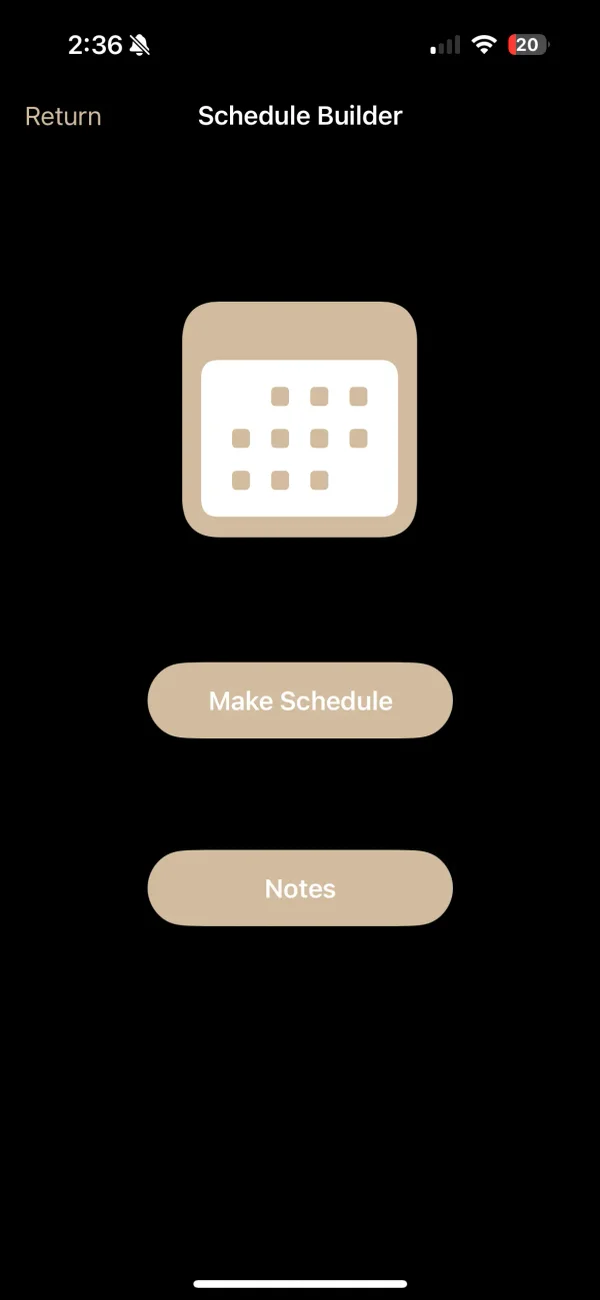
About
Lock-In and boost your productivity! Locked-In is a ScreenTime app that is designed to help you lock-in on what matters. Whether you are a student that needs to study, or someone that has phone addiction, Locked-In can help you get off of your phone, and back into the world.
Terms and Conditions, Privacy Policy, and EULA can be found on our website: www.lockedindustries.com.
What’s new
Version 1.1.4 · May 21, 2026
Updated schedule builder and analytics.
Deadbolt: New feature that blocks apps, and opens when the timer ends. Can end sessions prematurely by typing a phrase.
Can now turn on and off safe mode in the app.
App privacy
What Darrell Justice declares on the App Store about how this app handles data.
-
Data not collected
The developer does not collect any data from this app.
Privacy practices may vary, for example with the features you use or your age.
Information
- Seller
- Locked Industries LLC
- Category
- Productivity
- Version
- 1.1.4
- Updated
- May 21, 2026
- Released
- Oct 15, 2024
- Size
- 6.1 MB
- Requires
- iOS 17.6 or later
- Age rating
- 4+
- Price
- Free
- In-app purchases
- Yes
- Languages
- English
- Copyright
- © 2024 Locked Industries LLC
You might also like
-
 Lock In - Stop ProcrastinatingReduce your Screentime
-
 Lock In: Focus Timer & BlockerOne tap: timer on, apps off
-
 Locked In: Daily Tasks TrackerGet Things Done
-
 Locked In - Gain MomentumStart your winter arc
-
 The Lock InDiscipline Made Simple
-
 Get Off Your Phone - App BlockScreen Time - Focus and Limits
-
 Refocus: App Blocker & LockBlock Websites, Social Media
-
 Habitica: Gamified TaskmanagerStay motivated and organized
-
 Unrot: Earn your Screen TimeComplete habits, then scroll
-
 Habit Tracker - HabitKitStreaks & Accountability