
Longlight: Retirement Planner
FIRE & Monte Carlo calculator
Designed for iPhone, iPad
Free · In-app purchases
- Age rating4+
- CategoryFinance
- DeveloperSadettin Koseoglu
- LanguagesEnglish
- Size17.2 MB
Links to the official App Store page
Download.org hosts no file of Longlight: Retirement Planner. The button opens its official App Store page, published by Sadettin Koseoglu. Listing last checked on Nov 23, 2026.
Screenshots

About
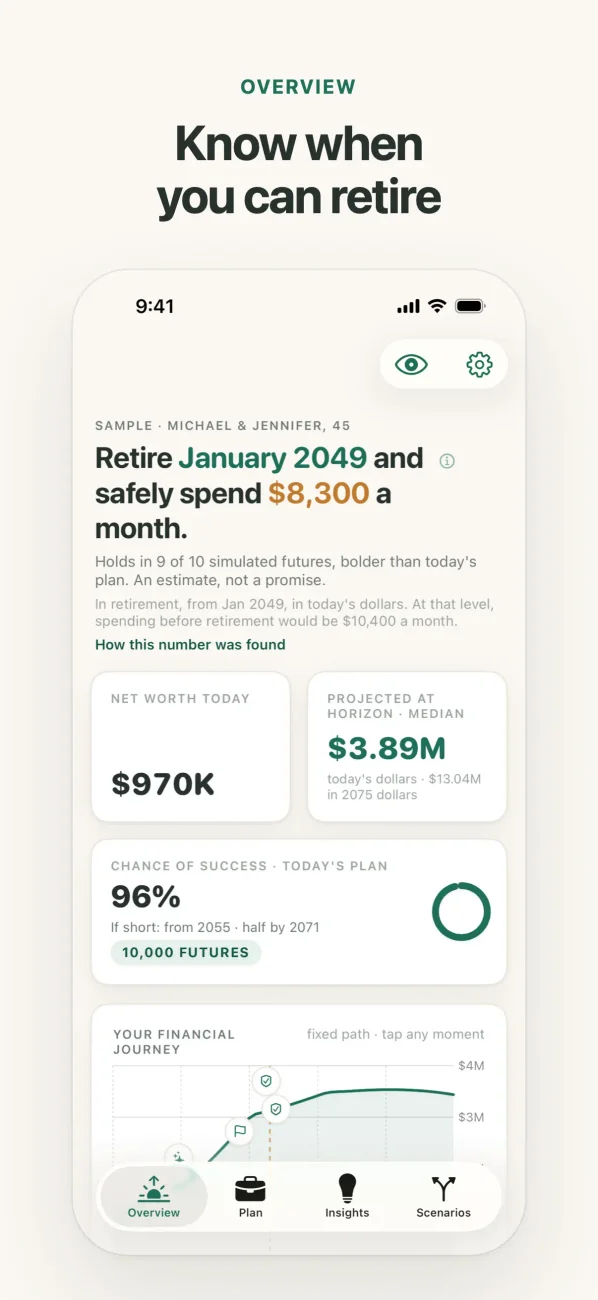
Know when you can retire and how much you can safely spend. Longlight is a retirement planner and calculator that runs your household's money month by month to the end of the plan, works out every year's federal and state taxes, and tests the result against 10,000 simulated market futures.
Ask "When can I retire?" and Longlight looks for the earliest month that holds in 9 of 10 simulated futures.
Built for US households, for early retirement and FIRE as much as for retiring in your sixties. A few plain questions make a first plan in about 15 minutes, and a sample household lets you look around first.
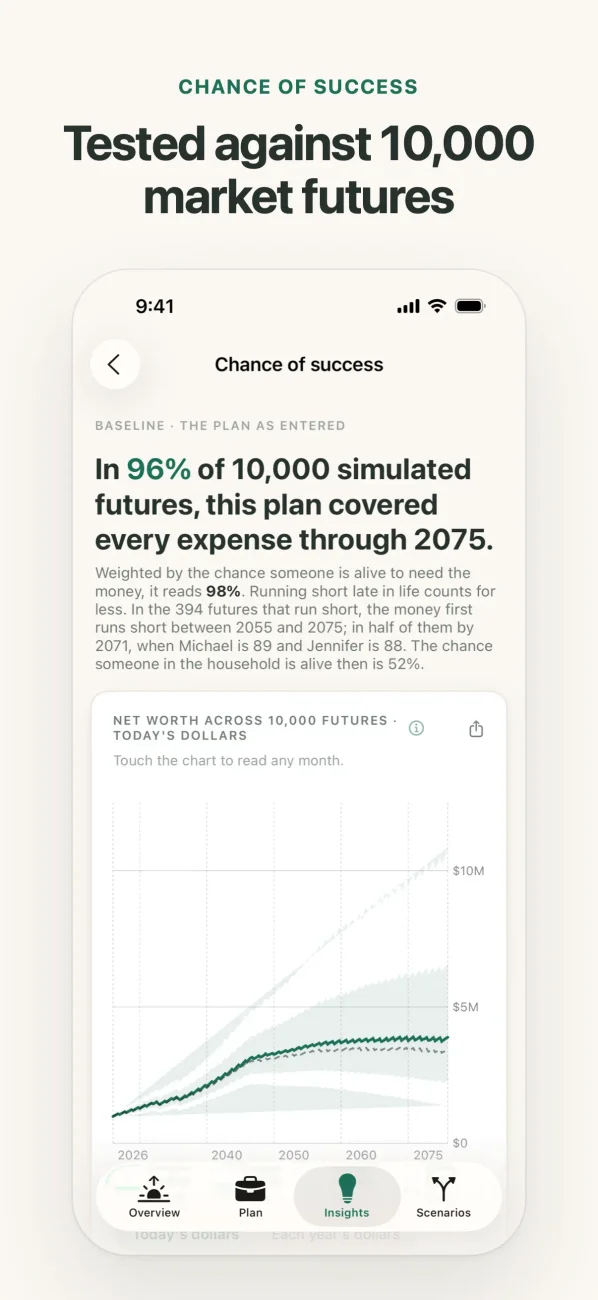
Chance of success
A Monte Carlo simulation of your plan. Longlight counts how many of 10,000 simulated futures cover every expense to the end, and for those that fall short, shows the years the money would run out.
• The range of outcomes year by year, in today's dollars
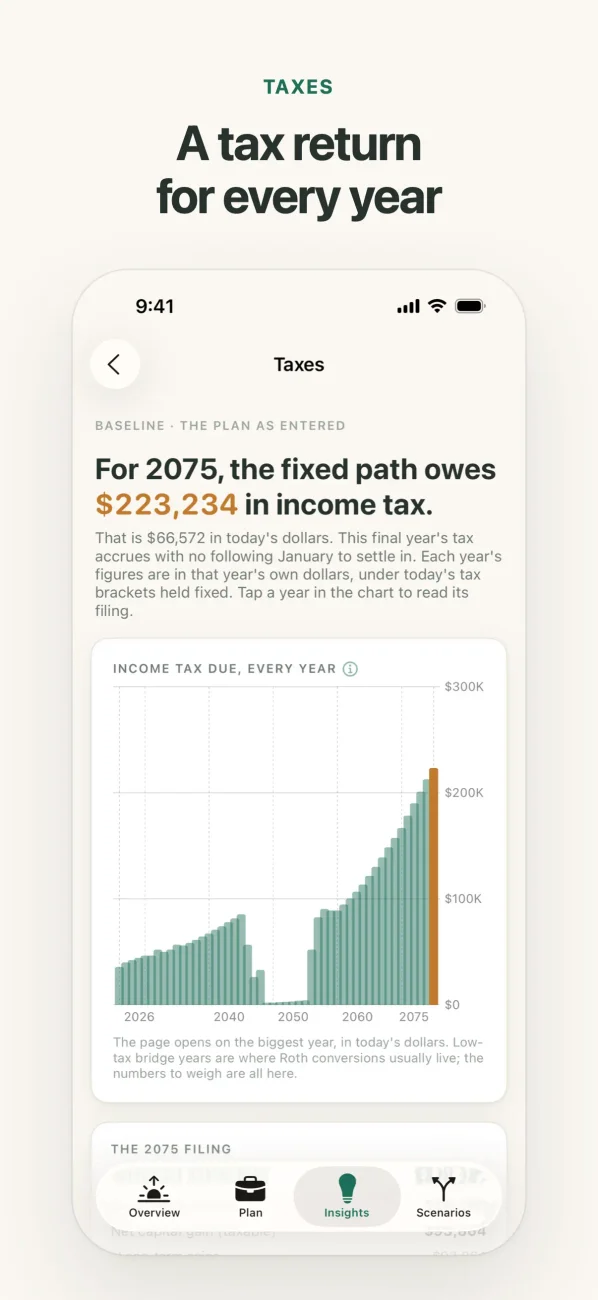
Taxes, filing by filing (Pro)
A federal return, line by line, for every year of the plan, plus your state's. Free or Pro, every result counts the same taxes. Pro opens the returns themselves.
• Brackets, deductions and thresholds from the IRS's 2026 figures
• All 50 states and the District of Columbia, under each state's rules for tax year 2025
• Required minimum distributions, Roth conversions, Social Security taxation and the Medicare surcharge
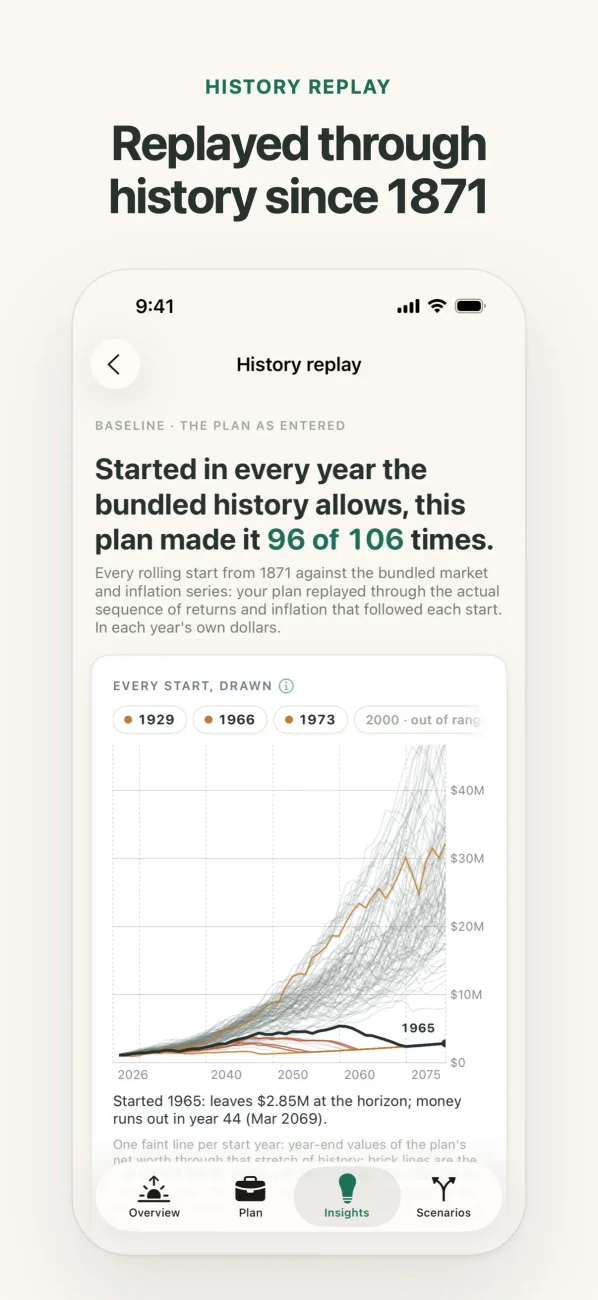
History replay (Pro)
Your plan replayed through the markets and inflation of every start year since 1871 with enough history to reach its end. See which start years held and which ran short.
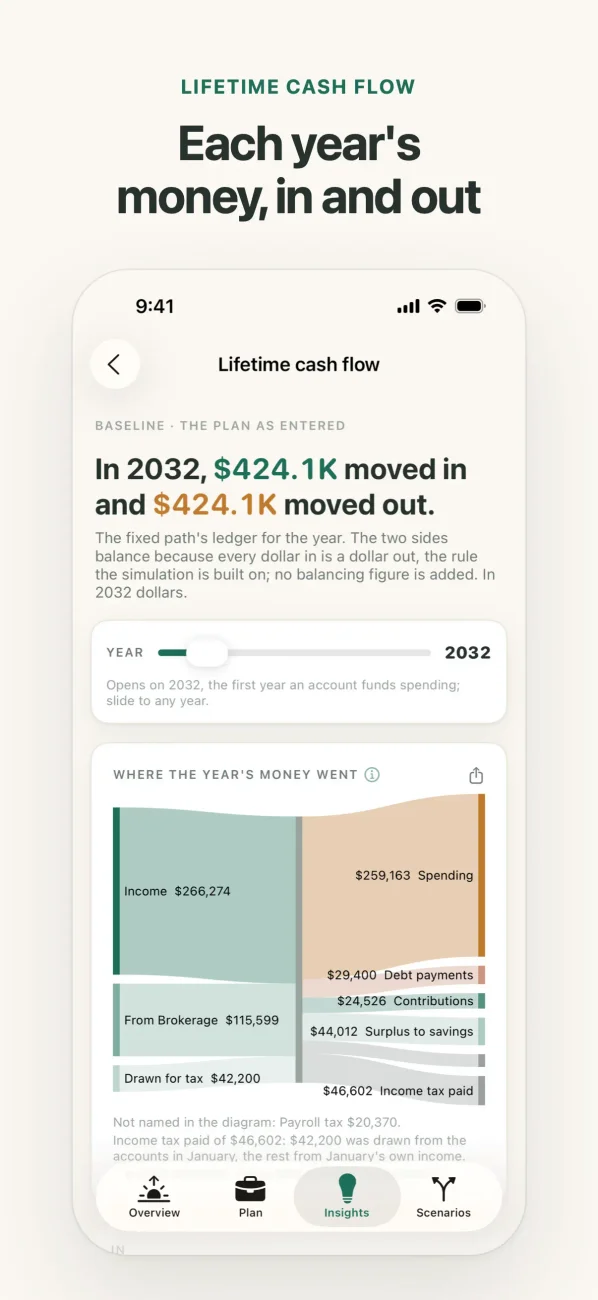
Lifetime cash flow
Pick any year: income and withdrawals on one side, spending, debt, savings and taxes on the other.
Tools to decide what to do next (Pro)
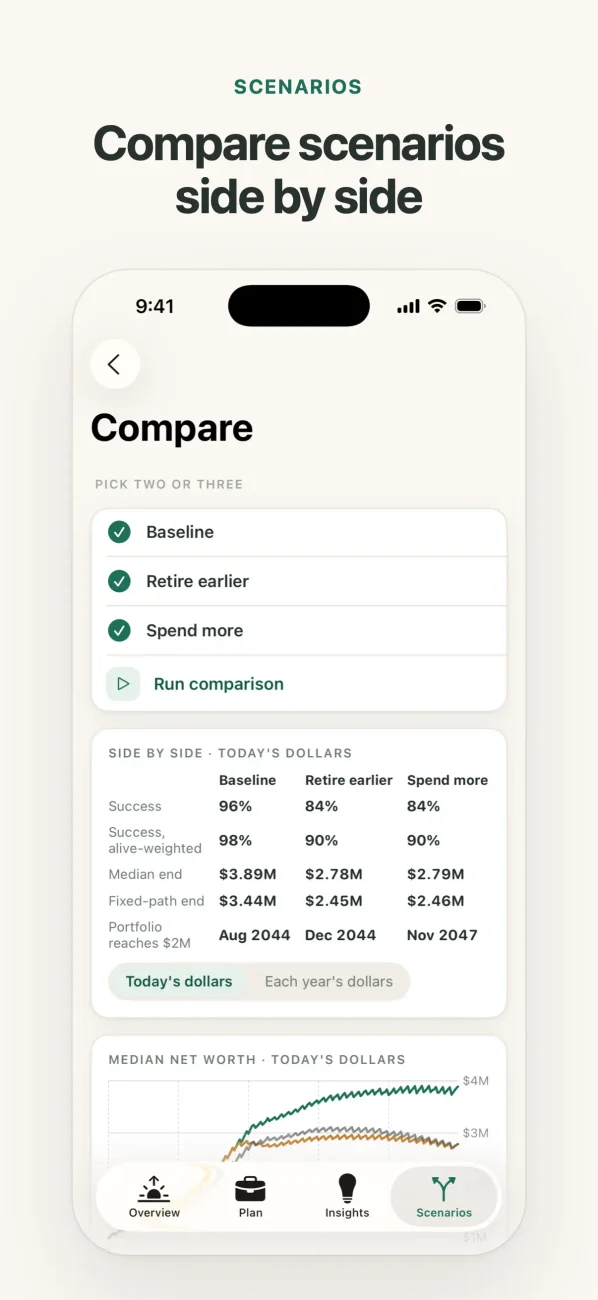
• Scenarios side by side
• Every Social Security claiming age
• The Roth window, Medicare cliffs included
• Withdrawals and RMDs
• What's left for your heirs
• The long-term care study
• Year by year, as numbers
• Check-ins against the plan
• The worksheets behind key figures, and the PDF report
What a plan can hold
• 401(k), IRA, Roth, HSA, 529, taxable and inherited accounts
• Social Security with spousal and survivor benefits, pensions and annuities
• Rental property, self-employment with a SEP-IRA or solo 401(k), RSUs and purchase-plan shares
• Marketplace coverage and its premium tax credit, Medicare premiums, long-term care
• Spending rules: guardrails, variable percentage withdrawal, the Guyton-Klinger rules or a percentage of the portfolio
Why you can trust the numbers
Every tax and benefit rule is transcribed from a named document, such as IRS publications, Social Security's regulations and each state's own tax booklet. Each rule's tests reproduce the worked examples its source prints. How Longlight works, in the app, explains each computation.
Your plan stays on your devices
• No sign-up and no account
• No analytics, ads or tracking
• iCloud sync if you want it, with amounts in encrypted fields
• A Face ID or Touch ID lock, and a switch that hides amounts
• Export the whole plan as a file at any time
iPhone, iPad and Mac
One purchase covers iPhone, iPad and a Mac with Apple silicon, and a widget on the Home Screen or Lock Screen shows what's safe to spend.
Free and Pro
The numbers are the same on both. Free runs your whole plan, taxes included, and shows your retirement month, safe monthly spending, Chance of success, Net worth and Lifetime cash flow. Longlight Pro opens the pages and tools marked Pro, yearly, monthly or once, with a free week on the yearly plan for first-time subscribers and Family Sharing on all three.
Subscriptions renew automatically unless cancelled at least 24 hours before the end of the current period, and are managed in your Apple Account settings.
Terms of Use: https://www.apple.com/legal/internet-services/itunes/dev/stdeula/
Privacy Policy: https://longlight.app/privacy
Longlight is an educational planning tool, not financial, investment, tax, or legal advice.
What’s new
Version 1.0.1 · Nov 22, 2026
Taxes and number entry, most of all for self-employed households.
• The search for when you can retire moves the last month of a business, as it moves a salary's
• SEP-IRA and solo 401(k) contributions under the rules of Massachusetts, New Jersey and Pennsylvania
• The catch-up contribution from age 50 and a Roth IRA beside the plan, as the IRS publications figure them
• The interview's Marketplace premium in today's dollars, rising with inflation until Medicare
• Percentages keep the decimals you type, and a tapped figure is replaced by what you type
App privacy
What Sadettin Koseoglu declares on the App Store about how this app handles data.
-
Data not collected
The developer does not collect any data from this app.
Privacy practices may vary, for example with the features you use or your age.
Information
- Seller
- Sadettin Koseoglu
- Category
- Finance
- Version
- 1.0.1
- Updated
- Nov 22, 2026
- Released
- Nov 7, 2026
- Size
- 17.2 MB
- Requires
- iOS 26.0 or later
- Age rating
- 4+
- Price
- Free
- In-app purchases
- Yes
- Languages
- English
- Copyright
- © 2026 Sadettin Koseoglu
You might also like
-
 Everglen: Retirement PlannerWill your 401K last?
-
 Smart Retirement PlannerKnow When You Can Retire
-
 RetireSpan: Retirement PlannerDrawdown & Withdrawal Planner
-
 GenolithThe Data Investment Platform
-
 Freedom Clock: Retire FasterSee When Work Becomes Optional
-
 Analytick AI Stock AnalysisAI-Powered Market Research
-
 Divora: Dividend TrackerPortfolio Yield & Income
-
 Yieldly: Dividend TrackerFind and track dividend stocks
-
 Lone Oak BankFinance
-
 Numichart OrderflowReal-time orderflow