
Low Poly Synth
Experimental melodic sounds
Designed for iPhone, iPad, iPod touch
$1.99
- Age rating4+
- CategoryMusic
- DeveloperAlexander Zolotov
- LanguagesEnglish
- Size6.3 MB
Links to the official App Store page
Download.org hosts no file of Low Poly Synth. The button opens its official App Store page, published by Alexander Zolotov. Listing last checked on Nov 15, 2026.
Screenshots

About
Low Poly Synth is a generator of melodic atmospheric sounds with billions of unique timbres.
The app is built on modified synthesis algorithms from Fractal Bits, Relic Waves, and Relic Flow, with the addition of pure tone generation code.
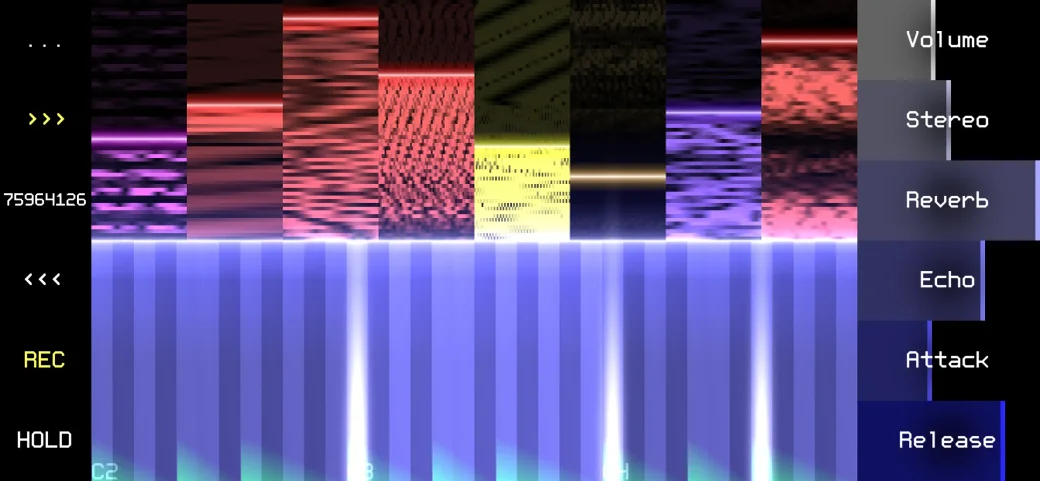
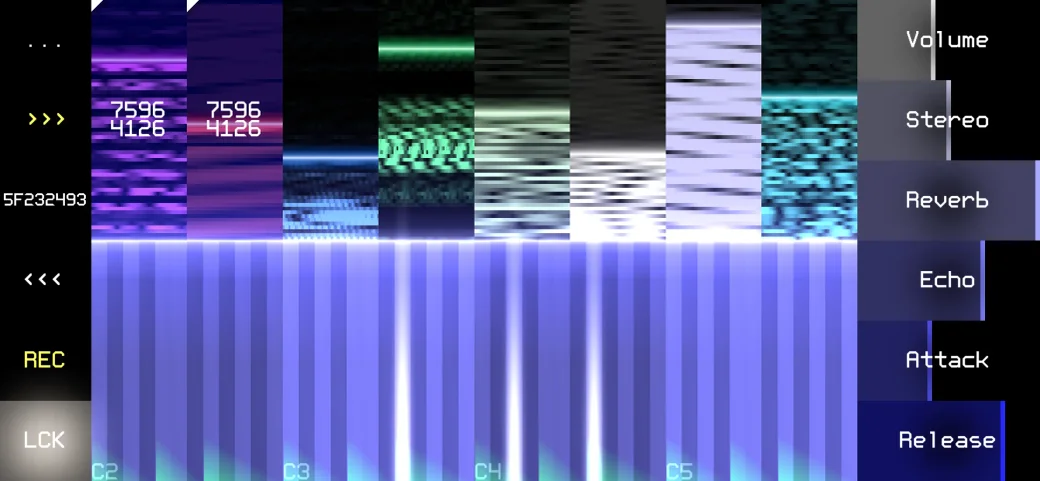
The sound space is divided into 4294967296 presets, each corresponding to a set of 8 sample textures. The volume of an individual sample can be adjusted in the top panel or via MIDI (Settings -> MIDI Mapping). The bottom panel is a classic musical keyboard that sets the note for the sounds in the set. Each note triggers all 8 samples at once - together they form a complex harmonic pattern that almost never repeats over time due to the different lengths of the looped fragments.
Features:
* search for new sounds with three buttons: next random set, edit code, previous set; each set of 8 sounds corresponds to a code of 8 characters (you can save/copy/paste it as plain text);
* three types of keyboards for live performing: on-screen, PC keyboard, MIDI input; for the on-screen keyboard, you can set the number of displayed octaves and scale;
* 20+ parameters can be controlled via MIDI or directly through the app interface: Settings -> MIDI Mapping;
* real-time audio recording to WAV (32-bit);
* export to: WAV (one file or a set), SunVox (samples + effects in one file), text clipboard;
* the LCK button freezes individual samples - they will not change during the search for new sets;
* Audio Unit Extension (AUv3), Wi-Fi export/import.
Double clicking on a parameter opens a window for setting the exact value.
If you enable the Hold option, the notes will play endlessly, without reacting to key release (noteOff) events; turning the note on again works like turning it off; there are two ways to enable this option:
1) using the Hold parameter in the "MIDI Mapping" window;
2) by pressing the HOLD button, which appears in place of LCK while playing the musical keyboard: press HOLD, release the desired notes - then the released notes will continue to play.
App privacy
What Alexander Zolotov declares on the App Store about how this app handles data.
-
Data not collected
The developer does not collect any data from this app.
Privacy practices may vary, for example with the features you use or your age.
Information
- Seller
- Alexander Zolotov
- Category
- Music
- Version
- 1.0
- Updated
- Dec 14, 2025
- Released
- Dec 14, 2025
- Size
- 6.3 MB
- Requires
- iOS 12.0 or later
- Age rating
- 4+
- Price
- $1.99
- Languages
- English
- Copyright
- © Alexander Zolotov
You might also like
-
 Battlestation GrooveboxDAW-less EDM Jamming
-
 Outgrowth - Sample InstrumentIntuitive sample instrument
-
 ExoSphereEndless Ambient Drift
-
 Fauve : flawed reconstructorMusic
-
 Transit 2 - Baby AudioMotion FX Playground (AUv3)
-
 Descent GranulatorReal-Time Granular Effect
-
 SampleScapeEvolving Soundscapes
-
 GORILLA SYNTHAnalog-style subtractive synth
-
 TAPESCAMLo-fi Drive and Tape Simulator
-
 Musyc2 - Physics Music MakerGenerative Instrument Sandbox