
Lucky Invoice
Invoices, Estimates & PDFs
Designed for iPhone, iPad
Free · In-app purchases
- Age rating4+
- CategoryBusiness
- DeveloperPouya Khansaryan
- LanguagesEnglish+ 1 more
- Size27.3 MB
Links to the official App Store page
Download.org hosts no file of Lucky Invoice. The button opens its official App Store page, published by Pouya Khansaryan. Listing last checked on Nov 18, 2026.
Screenshots



About
Lucky Invoice helps freelancers, contractors, and small businesses create professional invoices and estimates on iPhone and iPad.
INVOICES & ESTIMATES
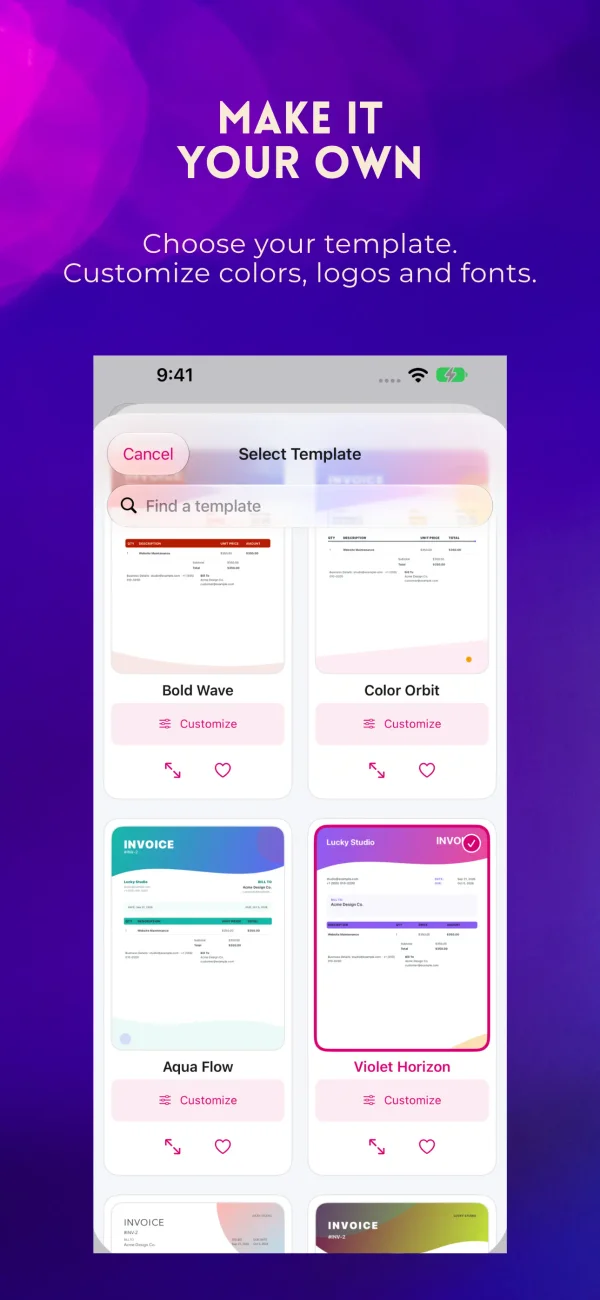
• Create PDFs with customizable templates, your logo, taxes, discounts, and payment terms.
• Preview documents before sharing and choose the PDF language and paper size.
• Convert estimates to invoices and capture signatures on your device.
• Track document status and record full or partial invoice payments.
BACKUP & RESTORE — PRO
• Save a backup of the records on your device, including payment history, schedules, photos and signatures.
• Review a backup before restoring it into a separate local library. Your original library and iCloud data are kept.
• Switch between libraries after closing and reopening the app. Restored libraries stay local; recurring schedules are view-only and reminders are not scheduled automatically.
DEPOSITS & PAYMENT SCHEDULES
• Request a deposit and divide an invoice into 2–12 dated payments using percentages or fixed amounts.
• Include the schedule on PDFs and prepare reminders for the next unpaid stage.
• Record money when you receive it. Requests do not collect money or count as income.
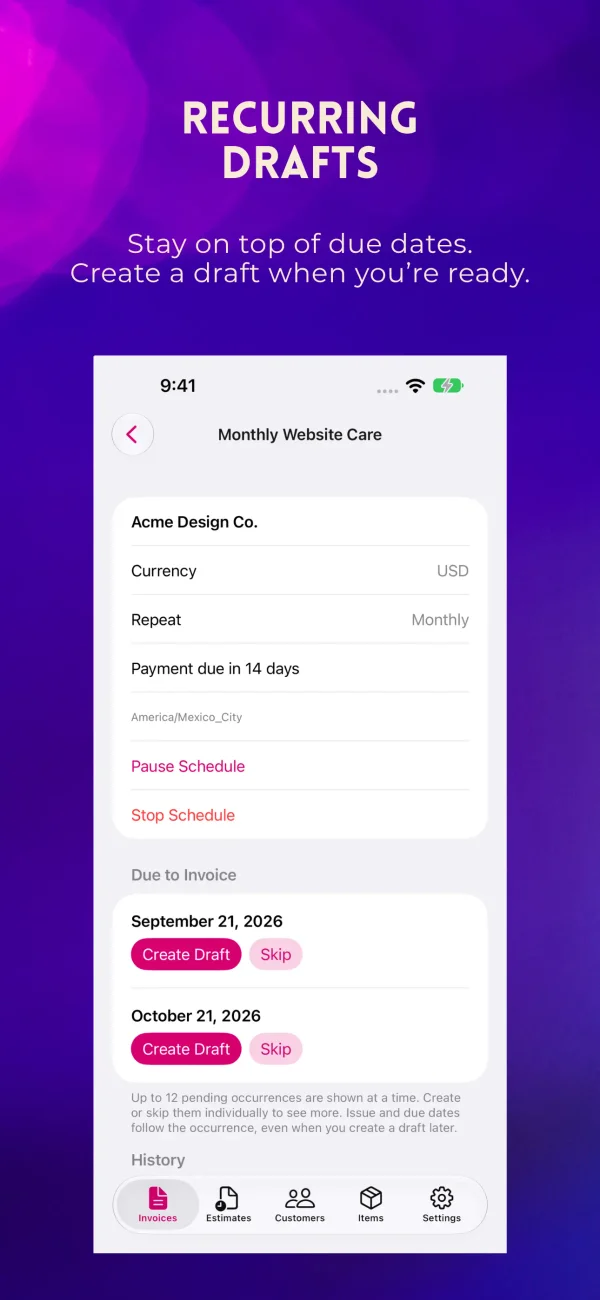
RECURRING DRAFTS
• Set weekly or monthly schedules from saved invoices for regular work.
• Review Due to Invoice, then create or skip each draft on the device that created the schedule. Nothing is created or sent automatically.
• Pause or stop a schedule and review its history. Other synced devices can view schedules and open created invoices.
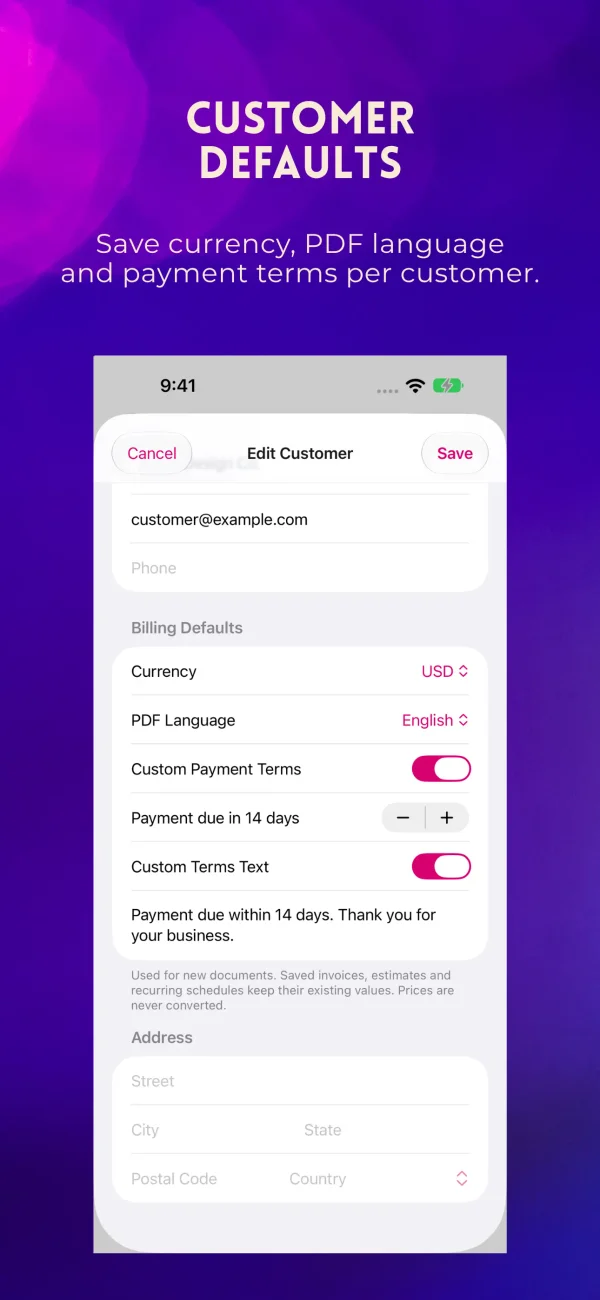
CUSTOMER BILLING DEFAULTS
• Save a customer's currency, PDF language, payment due days, and terms for new invoices and estimates.
• Keep existing documents unchanged when customer preferences change.
SAVED BUNDLES
• Save groups of items with quantities and prices for your regular jobs.
• Add a bundle to an invoice or estimate in the same currency, then adjust the copied items for that job.
• Choose whether to include reusable notes and terms. Existing documents stay unchanged when you edit a bundle.
PAYMENT FOLLOW-UP
• Review due and overdue invoices and prepare editable payment reminders.
• Record customer contact and set local follow-up reminders. Nothing is sent automatically.
CUSTOMER HISTORY & STATEMENTS
• View each customer’s invoices, estimates, recent payments, and balances by currency.
• Preview and share PDF statements of current outstanding invoices and credits.
CUSTOMERS & ITEMS
• Save customer details and import contacts.
• Scan business cards to help fill customer information.
• Reuse products and services from your catalog.
• Attach before-and-after photos to document your work.
BUSINESS INSIGHTS
• Review revenue, outstanding invoices, and aging reports.
• See invoice results and the estimate pipeline with clear currency and date filters.
• Export records to CSV.
PAYMENT DETAILS
Add payment information and supported PayPal or Venmo links, including QR codes, to your PDFs.
LUCKY INVOICE PRO
Unlock unlimited documents, business insights, advanced template customization, custom fields, branding removal, iCloud sync, and backup and restore.
Enable iCloud sync with Pro to share invoices, estimates, customers, catalog items, saved bundles, recurring schedules, payment schedules, customer billing defaults, business details, signatures, and photos across devices signed into the same iCloud account. Template appearance and app preferences remain on each device.
Lucky Invoice offers optional auto-renewable Pro subscriptions. Subscriptions renew unless canceled.
Support: support@pouyaapps.com
Terms of Use: https://pouyaapps.com/terms/lucky-invoice
Privacy Policy: https://pouyaapps.com/privacy/lucky-invoice
What’s new
Version 1.8 · Nov 7, 2026
- New with Pro: create backups of saved invoices, estimates, customers, items, payment history, schedules, photos and signatures.
- Review a backup before restoring it into a separate local library. Your original data and iCloud library are kept.
- Switch between your original and restored libraries after closing and reopening the app. Restored libraries stay on the device.
- Recurring schedules in restored libraries are view-only, and reminders are not scheduled automatically.
- Existing restored data and library switching remain available after Pro expires.
- Requires iOS or iPadOS 17.2 or later.
App privacy
What Pouya Khansaryan declares on the App Store about how this app handles data.
-
Data linked to you
May be collected and linked to your identity.
- Purchases
- Location
- Identifiers
- Usage data
- Diagnostics
- Other data
Privacy practices may vary, for example with the features you use or your age.
Information
- Seller
- Pouya Khansaryan
- Category
- Business
- Version
- 1.8
- Updated
- Nov 7, 2026
- Released
- Jan 15, 2026
- Size
- 27.3 MB
- Requires
- iOS 17.2 or later
- Age rating
- 4+
- Price
- Free
- In-app purchases
- Yes
- Languages
- English, Spanish
- Copyright
- © Pouya Khansaryan
You might also like
-
 CuantoCobro: Quotes, EstimatesHourly rates & iCloud sync
-
 Bullet InvoicesCreate Invoices in Seconds
-
 Arqevio: Jobs & Invoice MakerEstimates & Work Orders
-
 Invoice Maker - Easy creationEstimate, Bills, 10+ Templates
-
 Invoice Maker - Bill & TrackReceipt Maker & PDF Scanner
-
 Easy Invoice MobileBusiness
-
 Estimate Maker+Create & Send PDF Quotes
-
 Margin Finder: Sale CalculatorDecide Profit, Price, and Cost
-
 Invoice Maker Estimate ◆ QuoteReceipt & Bill PDF Generator
-
 HaroFinance