LumenPass Password Manager
Your Privacy Password Manager
Designed for iPhone, iPad, iPod touch
Free · In-app purchases
- Age rating4+
- CategoryUtilities
- DeveloperTran Tuan
- LanguagesEnglish
- Size85.4 MB
Links to the official App Store page
Download.org hosts no file of LumenPass Password Manager. The button opens its official App Store page, published by Tran Tuan. Listing last checked on Nov 18, 2026.
Screenshots


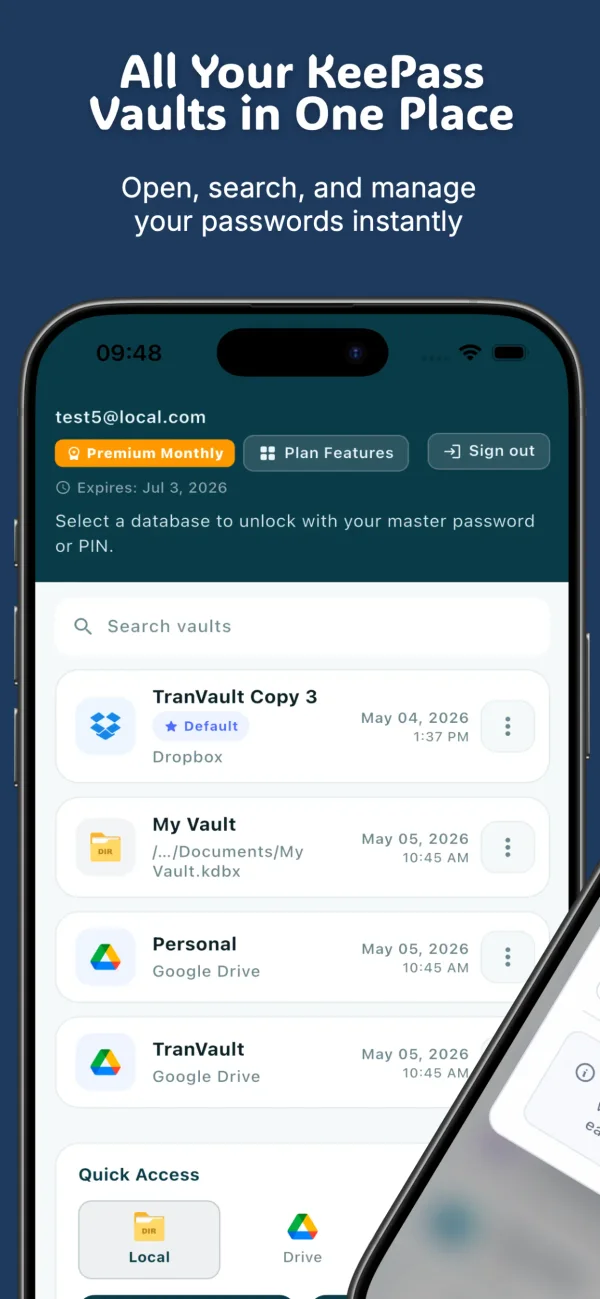
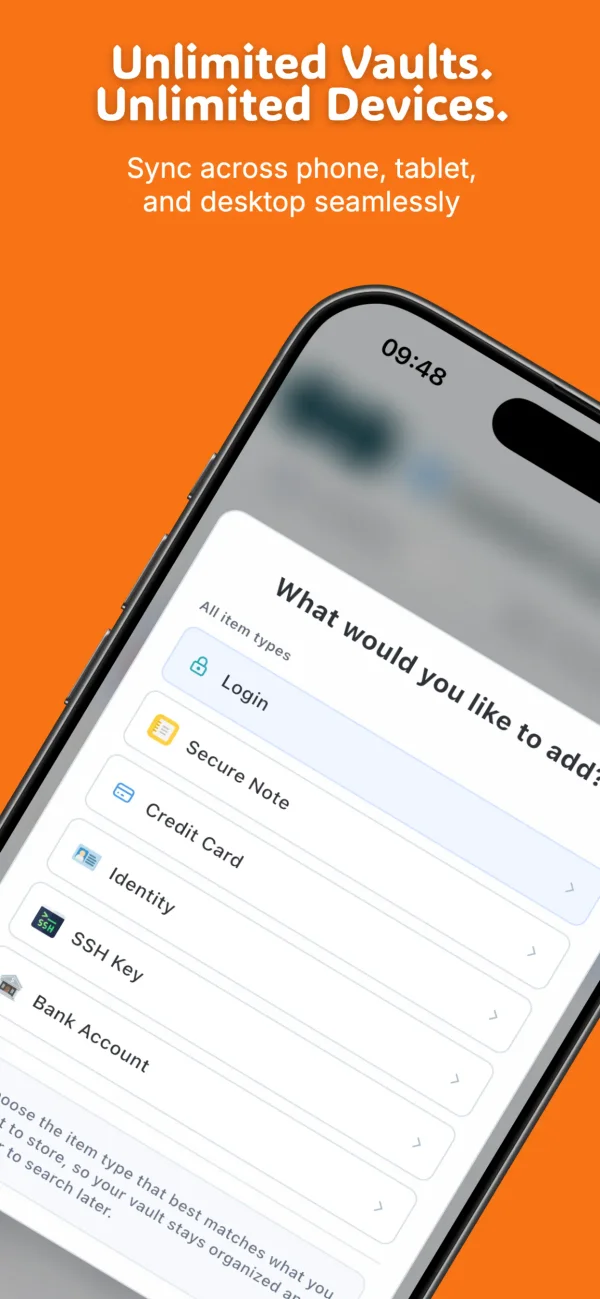


About
LumenPass — Secure access, simplified.
LumenPass is a premium password manager that keeps your logins, passkeys, credit cards, secure notes, and TOTP codes inside one encrypted vault you control. Save once, sign in anywhere — with one-tap AutoFill, Face ID, and end-to-end encryption that puts privacy first.
Built on the open KDBX standard (compatible with KeePass and KeePassXC), LumenPass gives you a beautifully designed, modern interface without locking you into a proprietary format. Your data stays yours.
WHY LUMENPASS
• Zero-knowledge by design — your vault is encrypted on your device before it’s ever synced. Only you hold the key.
• Open format, no lock-in — works with the industry-standard KDBX 4 file format.
• Premium experience — a clean, fast, thoughtfully designed interface inspired by the best.
• Cross-platform — your vault travels with you between iPhone, iPad, Mac, Windows, Linux, and your browser.
SECURITY YOU CAN TRUST
• Master password protection with optional Key File for two-factor vault access
• Face ID and Touch ID unlock
• AES-256 / ChaCha20 encryption with Argon2 key derivation
• Auto-lock with configurable timeout
• Automatic clipboard clearing after copy
• Screenshot blocking to keep your secrets off screen recorders
• Secrets stored in the iOS Keychain — never in plain text
ONE-TAP AUTOFILL
LumenPass plugs directly into iOS AutoFill so your saved logins and passkeys appear right above the keyboard in Safari and your favorite apps. Sign in instantly without ever leaving the screen you’re on.
• Native iOS Credential Provider Extension
• Passkey assertion support
• Secure communication via App Group and Keychain Sharing
EVERYTHING IN ONE VAULT
LumenPass goes far beyond passwords. Store any kind of sensitive information with purpose-built item types:
• Logins (with passkeys & TOTP)
• Secure Notes
• Credit Cards
• Identities
• Passports
• Bank Accounts
• Wi-Fi Passwords
• API Credentials
• Servers & SSH Keys
• Documents
BUILT-IN TOTP AUTHENTICATOR
Stop juggling apps. LumenPass generates time-based one-time codes right next to the login they belong to. Scan a QR code with your camera, and you’re done.
PASSWORD GENERATOR
Create strong, unique passwords for every account with a powerful built-in generator. Customize length, character sets, and complexity to match each site’s rules.
SYNC YOUR WAY — PRIVATELY
Choose how you sync. LumenPass uploads your vault as a single encrypted KDBX file to the cloud provider you already trust:
• Google Drive
• Dropbox
• OneDrive
• WebDav
• SFTP
• S3
• ... and more will be supported soon.
Because the file is encrypted before it leaves your device, even your cloud provider can’t read it. Or skip the cloud entirely and keep everything local.
SMART, FAST, BEAUTIFUL
• Lightning-fast search across your entire vault
• Smart auto-classification when importing existing KeePass entries
• Customizable appearance — fonts, text size, and themes
• Local backups with configurable retention
• Designed for both light and dark mode
WORKS EVERYWHERE YOU DO
LumenPass is part of a complete suite — pair the iOS app with our macOS, Windows, and Linux desktop clients, plus browser extensions for Chrome, Edge, and Firefox. Your vault, everywhere you need it.
PRIVACY PROMISE
• We can’t read your vault — ever.
• Your master password never leaves your device.
• Cloud sync is optional and always end-to-end encrypted.
• No tracking. No ads. No selling your data.
Download LumenPass today and take control of your digital life — securely, simply, and beautifully.
Subscription required for premium features. Subscriptions auto-renew unless canceled at least 24 hours before the end of the current period. Manage or cancel anytime in your account settings page.
By using LumenPass, you agree to our Terms of Service (https://www.lumenpass.app/terms)
and Privacy Policy (https://www.lumenpass.app/policy).
What’s new
Version 1.0.7 · Jul 26, 2026
- Fixed autofill search results: searching from browser autofill now finds matching vault items more reliably.
- New mobile credential import support: added support for importing credentials through iOS credential exchange flows.
- Improved iOS vault handling: vault access is more reliable between the main app and autofill extension.
- Persistent secure unlock improvements: vault unlock behavior is smoother while keeping security settings respected.
- Better locked-vault experience: improved screens and prompts when a vault needs to be unlocked.
- More reliable cloud startup: cloud status checks now wait for initialization, reducing false errors or loading issues.
- Refreshed mobile design: updated glass-style surfaces, search bar, home screen, account status area, and vault list styling.
- Smoother vault navigation: vault picker, add-vault flow, vault settings, item list, and item detail screens received usability refinements.
- Improved mobile import stability: added parsing and validation coverage for the new credential import flow.
App privacy
What Tran Tuan declares on the App Store about how this app handles data.
-
Data not collected
The developer does not collect any data from this app.
Privacy practices may vary, for example with the features you use or your age.
Information
- Seller
- Tran Tuan
- Category
- Utilities
- Version
- 1.0.7
- Updated
- Jul 26, 2026
- Released
- May 15, 2026
- Size
- 85.4 MB
- Requires
- iOS 15.5 or later
- Age rating
- 4+
- Price
- Free
- In-app purchases
- Yes
- Languages
- English
- Copyright
- © 2026 LumenPass. All rights reserved.
You might also like
-
 P.S. VaultYour final message, delivered.
-
 Passmaster Password ManagerProtected passwords and logins
-
 AltPassLocal-first password manager
-
 Kakuremi - KeePass ManagerKeePass vault · free YubiKey
-
 MyPi CompanionPi-hole aggregator dashboard
-
 QuackifyDuck Address Email Converter
-
 Pi BlockManage your Pi-Hole server
-
 Moonlit: Dark Mode for SafariDark mode for every website
-
 Password Manager & Secure SafePassword Generator & Autofill
-
 Dark Mode for WebsitesNight theme for Safari pages