
MagicPhoto - Card Magic Tool
The Card Changes in the Photo
Designed for iPhone
Free · In-app purchases
- Age rating4+
- CategoryEntertainment
- DeveloperMINORI ONUKI
- LanguagesEnglish+ 1 more
- Size12.7 MB
Links to the official App Store page
Download.org hosts no file of MagicPhoto - Card Magic Tool. The button opens its official App Store page, published by MINORI ONUKI. Listing last checked on Nov 25, 2026.
Screenshots



About
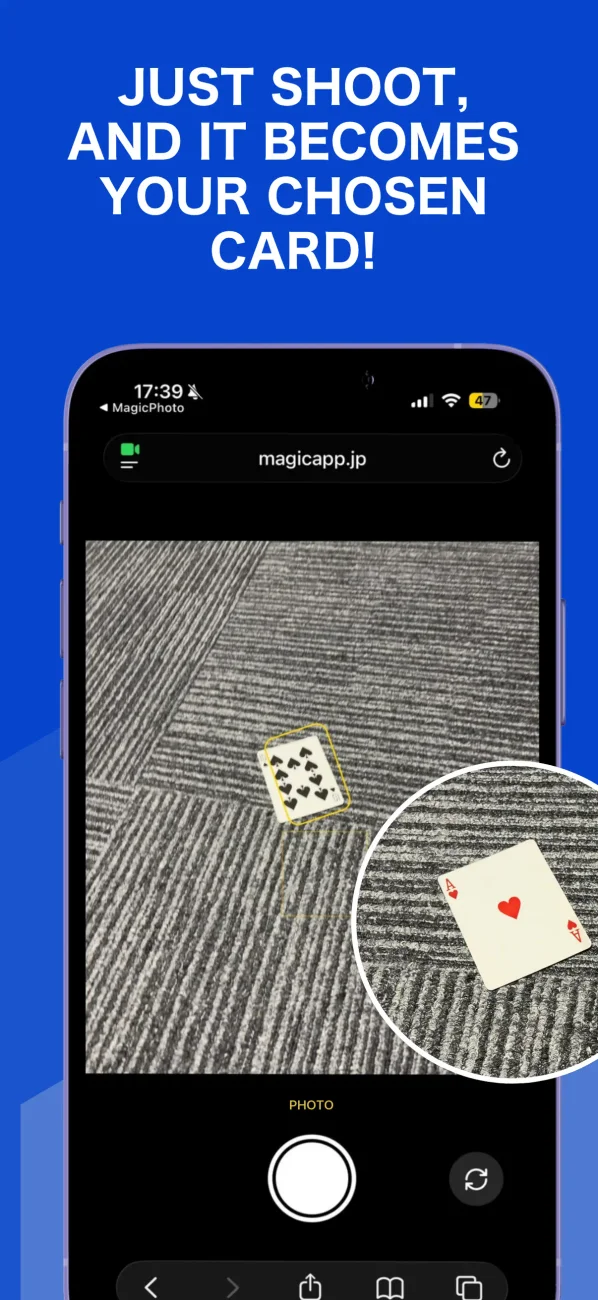
A spectator holds a blank card and takes a photo.
When they look at the saved photo, the card has changed into the one you chose.
MagicPhoto is an app for magicians and performers to perform a trick where a playing card changes inside a photo.
■ Shoot on the spectator's phone
When the spectator opens your link, their browser turns into a camera. They don't need to install anything.
Write the link to an NFC tag and they just tap their phone on it. On phones without NFC, they can type a short address.
■ Just choose the card
Pick a suit and tap a card. Your choice is reflected on the spectator's link right away.
■ Realistic results
The card is blended in to match its angle, lighting, and blur, and the fingers holding it stay in front.
It works not only with blank cards but also with regular playing cards (A–10).
■ Settings for your presentation
・Play the shutter sound when shooting or when saving
・Tap the text on the camera screen to play only the shutter sound (to match your patter)
・A review screen that shows the photo large before saving (with retake)
・The spectator page appears in Japanese or English, depending on the phone's language
■ Shoot with this iPhone, too
With "Shoot with This iPhone," you can shoot on your own iPhone. Photos are saved to your camera roll with the card already changed.
■ MagicPhoto Pro (one-time purchase)
・Shoot on the spectator's phone (link / NFC): the free version is a trial, and photos get a "Trial" mark
・All 52 cards
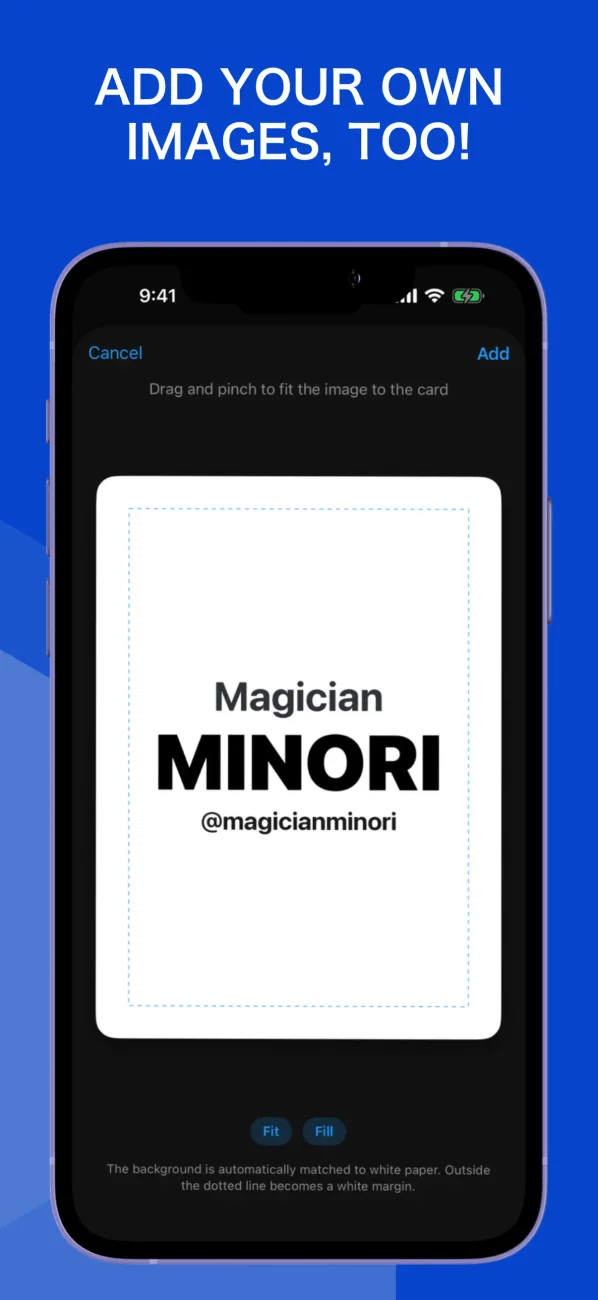
・Custom images: choose an image such as a logo from Photos and make it your own card. Add as many as you like; they work on spectators' phones too
The free version includes the 4 aces, with no usage limit.
■ Tips for best results
・Ask the spectator to hold the card so their fingers don't cover the number and suit
・Shoot in a bright place
・When using regular playing cards, A–10 work best (face cards can be changed too, but results are not as clean)
Photos are processed on the spectator's phone or your iPhone and are never sent anywhere.
What’s new
Version 1.1 · Nov 23, 2026
• Now available in English. The app appears in English when your iPhone's language is set to English.
• My Cards: tap + and choose "Change the Whole Card" or "Add Writing Only".
Change the Whole Card: register handwriting on a blank card, or layer it over any card you choose, such as the 2 of Hearts.
Add Writing Only: the printing on the card your spectator photographs stays as it is, and only your handwritten message appears. Works with any card.
• Added a light button to the camera screen and the spectator page, so you can shoot the card brightly even in dark places.
• Fixed an issue where traces of the original pips could remain under warm, dim lighting.
• Minor bug fixes.
App privacy
What MINORI ONUKI declares on the App Store about how this app handles data.
-
Data not linked to you
May be collected but is not linked to your identity.
- User content
Privacy practices may vary, for example with the features you use or your age.
Information
- Seller
- MINORI ONUKI
- Category
- Entertainment
- Version
- 1.1
- Updated
- Nov 23, 2026
- Released
- Nov 13, 2026
- Size
- 12.7 MB
- Requires
- iOS 16.0 or later
- Age rating
- 4+
- Price
- Free
- In-app purchases
- Yes
- Languages
- English, Japanese
- Copyright
- © 2026 MINORI
You might also like
-
 Miracle | 電卓の答えを好きな文字や数字にEntertainment
-
 DigitalCard - card appearanceEntertainment
-
 FORCE CALCULATOR: MagicCalculator Magic for Magicians
-
 VideoPuzzles: Jigsaw GameBrain Teaser & Logic Fun
-
 Wi-FiTALK - Offline IntercomDirect P2P voice chat
-
 こりっちチケット!- 舞台の予約・電子チケットアプリEntertainment
-
 DesuyoDesuyo's app
-
 普通じゃないよ | 価値観診断アプリEntertainment
-
 MTmembersEntertainment
-
 打線くむくむEntertainment