
MapFrame: Travel Map Cards
Turn trip photos into routes
Designed for iPhone
In-app purchases
- Age rating4+
- CategoryPhoto & Video
- DeveloperLightShift Co., Ltd.
- LanguagesEnglish+ 1 more
- Size10.3 MB
Links to the official App Store page
Download.org hosts no file of MapFrame: Travel Map Cards. The button opens its official App Store page, published by LightShift Co., Ltd. Listing last checked on Nov 13, 2026.
Screenshots





About
Your trip photos, ready to post.
Map, dates, and distance—added automatically.
Trip photos tend to pile up in your camera roll. Where you took them, how you got around—the story of the trip doesn't come through in photos alone.
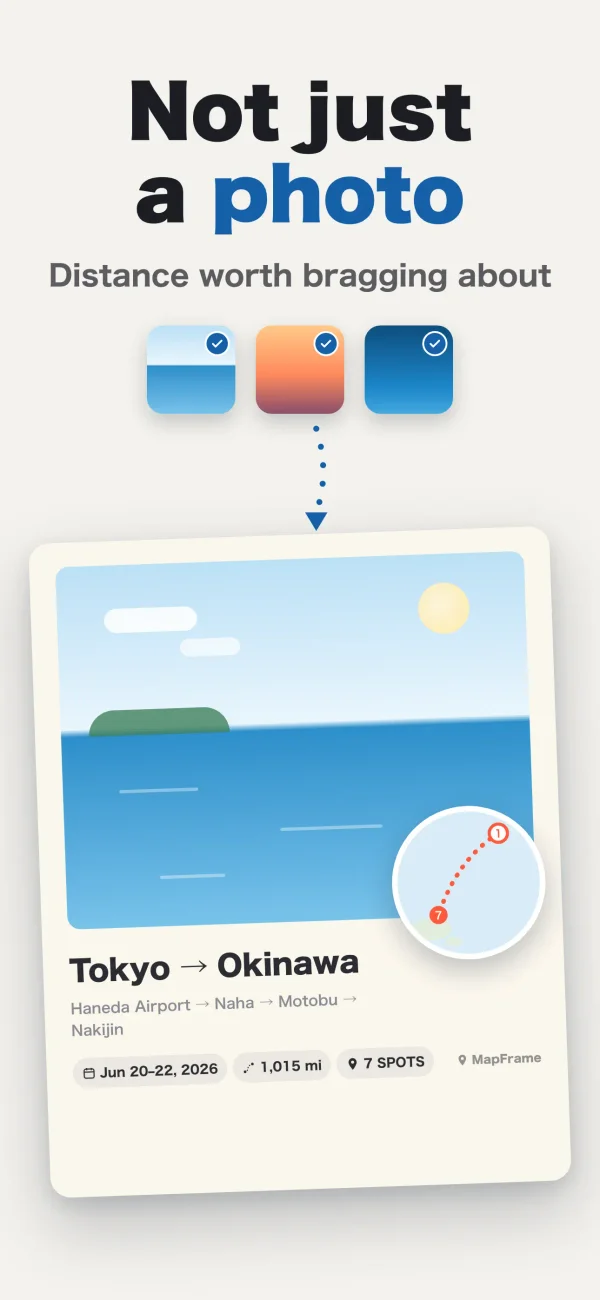
With MapFrame, you just pick the photos. It reads where and when they were taken and turns them into a share-ready travel card with a map and route lines.
■ Pick photos, get a travel card
Choose up to 12 trip photos. MapFrame reads the capture location and time, then builds a 4:5 card with a mini map, route lines, city names, dates, and total distance.
■ A 15-second reel from the same photos
Export a vertical 9:16 reel, too. Your photos and the map move gracefully, following the template.
■ Routes are inferred automatically
Walking, driving, trains, flights, and ferries are detected from distance and speed. Flight and ferry legs curve gently across the map.
■ Fix anything afterwards
Rename places, reorder stops, change transport modes, pick from 6 route-line colors, toggle dates and distance, and zoom or reposition the main photo.
■ 15 templates to match the mood
Journal, Glass, and Ticket are among the 5 free basics. Pro unlocks Film, Magazine, Minimal, Midnight, Sakura, Summer, Wrapped, and more.
■ Processed entirely on your device
MapFrame never asks for photo library read permission—it only receives the photos you pick and builds your card on the device. Your photos are never sent to our servers. No ads, no tracking.
— Made for —
• People who post trip, outing, and event photos to social media
• Anyone who wants "where it was taken" to be part of the story
• Keeping travel memories in a form you'll want to revisit
• Anyone careful about how their photos and location data are handled
— Pricing —
Free to download, with 3 free exports every month (5 basic templates).
MapFrame Pro unlocks unlimited exports, no watermark, and all 15 templates.
$3.99/month, $29.99/year ($2.49 per month), or a $69.99 one-time lifetime purchase. The yearly plan starts with a 7-day free trial.
Travel memories belong with a map. Make posts that show where you've been, with MapFrame.
— Terms & Privacy —
Privacy Policy: https://light-shift.net/apps/mapframe/privacy-en
Terms of Use (EULA): https://www.apple.com/legal/internet-services/itunes/dev/stdeula/
Pro (monthly/yearly) is an auto-renewing subscription. Payment is charged to your Apple ID at purchase confirmation, and the subscription renews automatically unless auto-renew is turned off at least 24 hours before the end of the current period. You can manage or cancel anytime in your App Store account settings.
App privacy
What LightShift Co., Ltd. declares on the App Store about how this app handles data.
-
Data not linked to you
May be collected but is not linked to your identity.
- Purchases
- Identifiers
- Usage data
Privacy practices may vary, for example with the features you use or your age.
Information
- Seller
- LightShift Co., Ltd.
- Category
- Photo & Video
- Version
- 1.0
- Updated
- Aug 4, 2026
- Released
- Aug 4, 2026
- Size
- 10.3 MB
- Requires
- iOS 26.0 or later
- Age rating
- 4+
- In-app purchases
- Yes
- Languages
- English, Japanese
- Copyright
- © 2026 LightShift Co., Ltd.
You might also like
-
 solocGeotagging for Sony Alpha
-
 PinSnap: GPS for Alpha CamsBluetooth Geotag Sync Tool
-
 LocationAlphaGeotagging for Sony cameras
-
 Alpha GPS: Camera GeotaggingLocation Sync & Remote Shutter
-
 Unleashed - Camera RemoteTimelapse,Long Exp.,Geotagging
-
 Sun Surveyor (Sun & Moon)Your Personal Sun & Moon Guide
-
 1998 Cam - Vintage CameraPhoto & Video Film Filters
-
 Image SizeResize your photo! Resizer App
-
 WataameCameraColorful Fluffy Photo App
-
 AI Mirror: AI Photo EditorAnime Art, Videos & Filters