MapMe: Map Maker for DnD 5e
Dungeons & Dragons Map Creator
Designed for iPad, Mac
Free · In-app purchases
- Age rating12+
- CategoryRoleplaying
- DeveloperFerdinand Werner
- LanguagesEnglish+ 6 more
- Size333.9 MB
Links to the official App Store page
Download.org hosts no file of MapMe: Map Maker for DnD 5e. The button opens its official App Store page, published by Ferdinand Werner. Listing last checked on Nov 20, 2026.
Screenshots

About
Create Stunning DnD Battle Maps with MapMe – The Ultimate DnD Map Maker
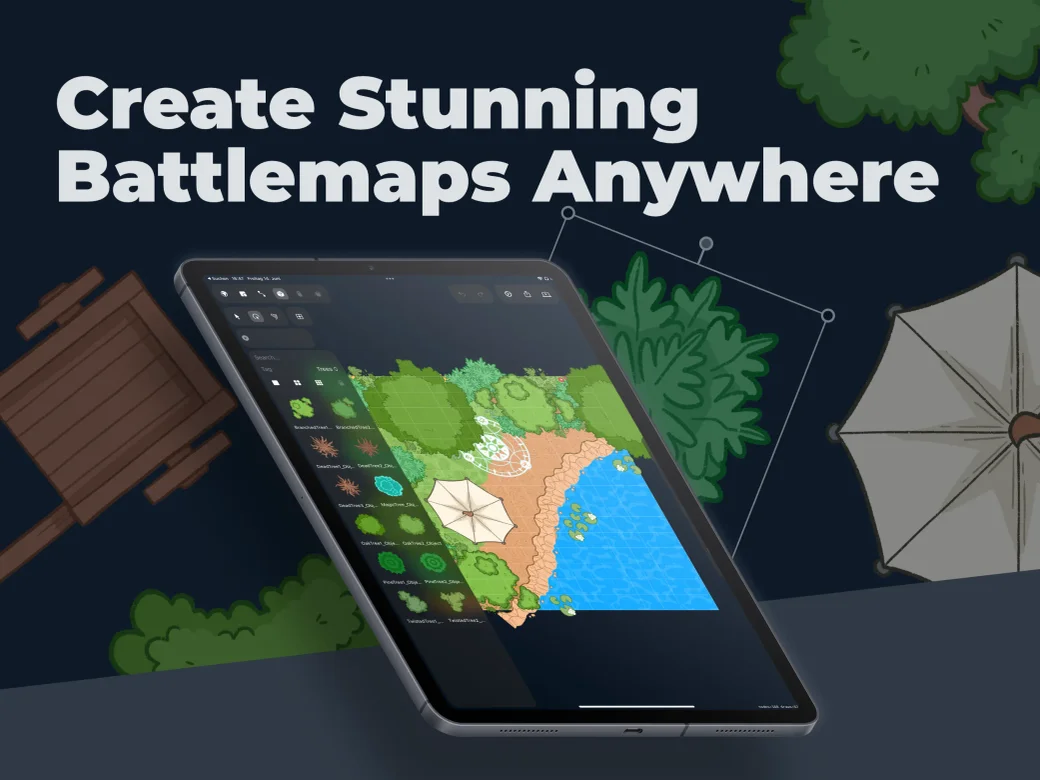
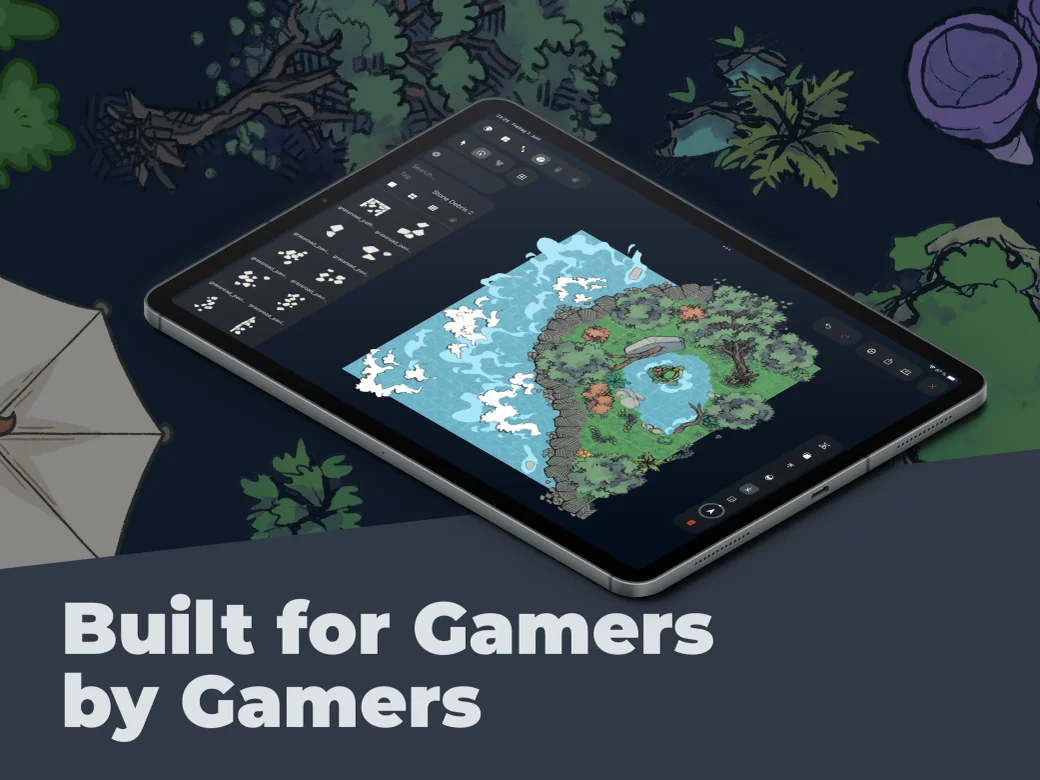
MapMe is the perfect DnD map maker for Dungeon Masters and Game Masters who want to build immersive Dungeons & Dragons battle maps with ease. Whether you’re designing a battlemap for your next session or crafting detailed worlds, MapMe gives you the tools to bring your vision to life.
Why Choose MapMe?
- Powerful DnD Map Maker – Create custom battle maps effortlessly.
- Designed for Dungeon Masters & Game Masters – Build Dungeons & Dragons worlds your way.
- Optimized for iPad – Smooth, intuitive experience with Apple Pencil support.
- Import Dungeondraft Assets – Use your favorite mapmaker resources.
- User-Friendly Interface – Fast, efficient, and easy-to-use map maker tools.
- Offline Mode – Design battle maps anytime, anywhere.
- Regular Updates – New features based on user feedback.
- Interactive Roadmap – Vote for the features you want next.
Built for RPG Players & Dungeon Masters
As a passionate Dungeon Master, I created MapMe to make DnD map making simple, powerful, and fun. Whether you’re building an epic battlemap or designing a new Dungeons & Dragons setting, MapMe is your go-to map maker.
Download MapMe today and start crafting DnD battle maps that bring your adventures to life!
What’s new
Version 2.2 · Nov 16, 2026
# New in this Version
## New Feature
- Shapes Brush
- Toolbar Drawers for more space while you work on your maps
- Objects now get Contact Shadows (Enable it in the Map Settings ;) )
- Contact Shadows can be tweaked per Object (double tap resets)
- Path Browser: tap "Paths" under the Outline list and see all path textures at once
- Fills and Objects get the same big sheet (Objects can show 3 to 9 columns)
- Fill a whole terrain layer in one go (tap the active terrain again, or press and drag it onto the map)
- Favorite, Rename, and Delete on the Prefab sheet bar (they change the prefab you tapped)
- Objects now have Magnetic Snap (centers, rooms, and the line you started on)
- Magnet snapping now works on shapes, lights, labels, and the reference image
- Magnet now pulls onto a 45° line through where you started
- Shape corners now snap onto other corners while placing and editing
- Curve and Draw anchors now snap, and magnet catches wall midpoints and other visible layers
- "Apple Pencil Only" now tells you when it ignores your finger (Tap the notice to jump to the switch)
## Improvements
- Battery Usage and overall Performance is significantly improved (it will no longer zap your battery empty in an instant ;) )
- Subtract Shapes now show up as red dashed shapes when editing (Clearer Visual)
- Every shape can now be Merge, Distinct, Subtract or Overlay on its own
- Shapes can now be filled with Terrain textures
- New shapes keep the floor, wall and texture direction you used last
- Brush Size now shows on the map while you brush and spray
- Outline and Fill lists jump to the texture of the selected shape
- Map Settings now say Contact Shadows
- Export DPI is free now (150 and 256 too)
- Prefabs now open in the same big sheet as Objects (tap Prefabs under the list)
- Objects, Fills, and Paths now use the same search and filter bar
## Bugfixes
- Crash when adding a light layer in a large map is fixed
- Removed accidental Gray outline from Subtract Shapes
- Tapping an object without moving your finger selects it again
- Grouped objects no longer show their outlines again after an autosave
- A half drawn lasso no longer comes back when you reopen the map
- The "why did you cancel" survey no longer shows up when you didn't cancel Plus
App privacy
What Ferdinand Werner declares on the App Store about how this app handles data.
-
Data used to track you
May be used to track you across apps and websites owned by other companies.
- Purchases
- Identifiers
- Usage data
-
Data not linked to you
May be collected but is not linked to your identity.
- Purchases
- Identifiers
- Usage data
Privacy practices may vary, for example with the features you use or your age.
Information
- Seller
- Ferdinand Werner
- Category
- Roleplaying
- Version
- 2.2
- Updated
- Nov 16, 2026
- Released
- Jun 20, 2024
- Size
- 333.9 MB
- Requires
- iOS 17.0 or later
- Age rating
- 12+
- Price
- Free
- In-app purchases
- Yes
- Languages
- English, French, German, Italian, Polish, Russian, Spanish
- Copyright
- © 2026, Ferdinand Werner
You might also like
-
 Mirrorscape: Tabletop AR MapsD&D 5e, Starfinder, Pathfinder
-
 Dungeon Roller - RPG GeneratorCampaign Tools & Generators
-
 Tales of FablecraftCo-op RPG with Friends Online
-
 PrismScroll 5e Character SheetDnD Spellbook & Dice for 5.5e
-
 Summon Worlds: AI RPG WorldsFantasy Writing & RPGs
-
 PrismScrollDMDnD 5E DM Resource
-
 Idle Championsof the Forgotten Realms
-
 AI Game Master - Dungeon RPGDnD Story adventure Fable TRPG
-
 Roll for InitiativeThe Ultimate Combat Tracker
-
 Neverwinter NightsEnhanced Edition