
Margin: Homeschool Planner
Plan your whole year.
Designed for iPhone, iPad
Free · In-app purchases
- Age rating4+
- CategoryEducation
- DeveloperMargin Planner LLC
- LanguagesEnglish
- Size20.8 MB
Links to the official App Store page
Download.org hosts no file of Margin: Homeschool Planner. The button opens its official App Store page, published by Margin Planner LLC. Listing last checked on Nov 21, 2026.
Screenshots


About
I tried a paper planner every single year.
Every August I would sit down with the curriculum, a calendar and a pencil, and count lessons until it all fit. It was lovely. It was also wrong by October, because somebody always gets the stomach bug. And then I felt behind, which is silly when you think about it, because being able to move things is the whole reason I love homeschooling.
So I gave up on planning the year and did a week at a time. That quieted the guilt and broke something else. I could not see the year anymore. Every Christmas I was back at the kitchen table counting days, working out whether we would finish by May.
Margin exists so I never have to do that again. It plans the whole year for you, and when life happens it re-plans it.
How it works
You put in your children, the books they are using, how many lessons each book has, and the days you teach. Margin lays out the whole year before your first Monday. Most curricula are already in a shared list, so the lesson count is usually filled in for you. Co-op days, field trips, piano and your days off go on the same calendar.
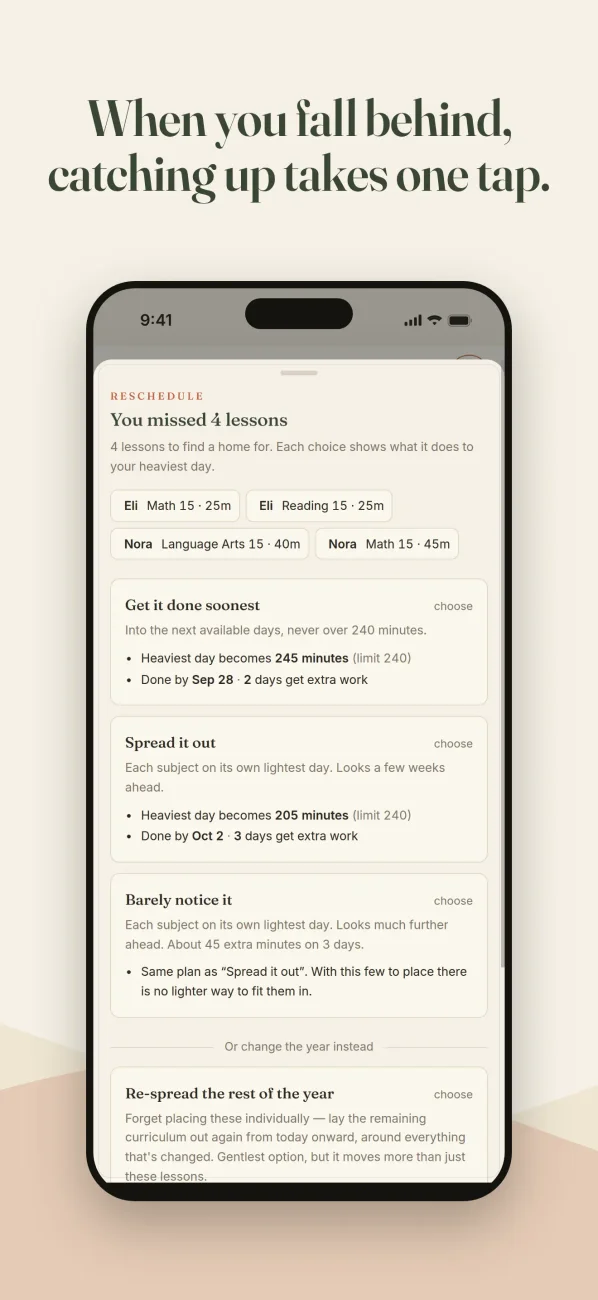
Then a week goes sideways. You tell Margin what happened and it redoes the rest of the year, not just one lesson. You choose how to absorb it: spread the missed work across the weeks ahead so you barely feel it, double up on the days that can take it and keep your end date, or push the year out and finish a little later. It takes about a second.
Anything you already checked off stays exactly where it was. Margin only moves what is still ahead of you.
What is in it
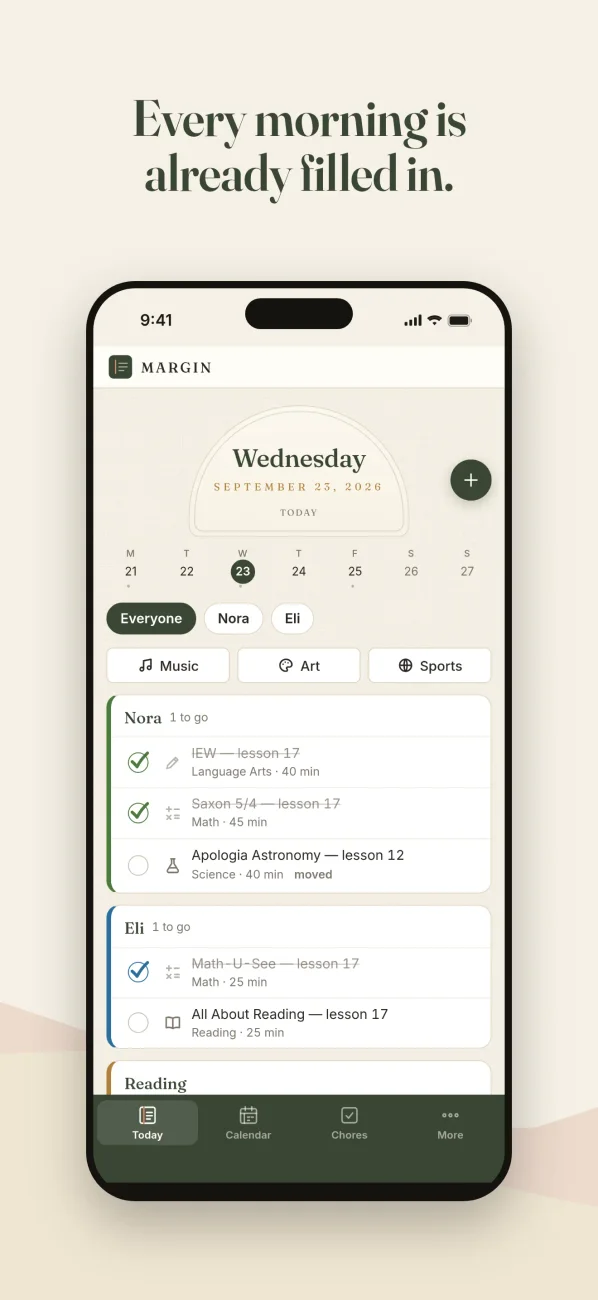
Today: each child's lessons for the day, ready to check off.
Calendar: the whole year on one screen, or one child at a time.
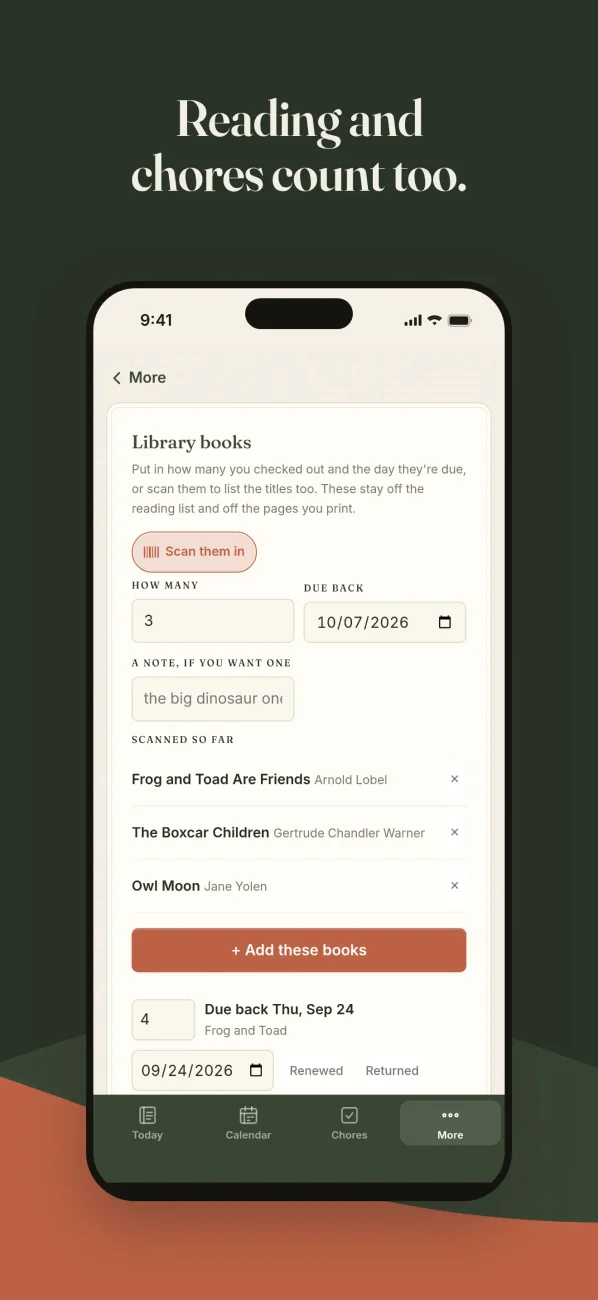
Books: scan a library book with your camera and get a reminder the evening before it goes back.
Chores: a chart for each child.
My list: your own to-do list for any day.
Reminders that come from your phone itself, so they still arrive with no signal. No child's name ever shows on your lock screen.
Grades, if you want them. They stay off until you turn them on, and then you get a simple A to F scale and a report card that prints.
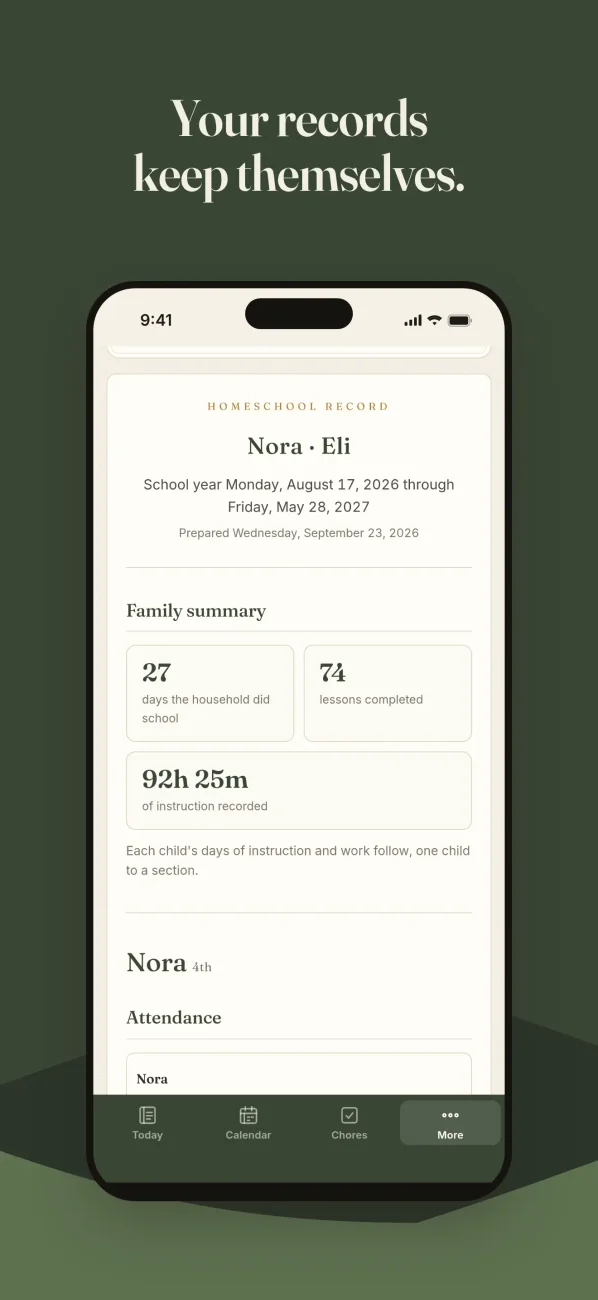
Records you can print anytime, including a monthly packet with a calendar page, a page for each week, and chores.
A login for a second parent.
Talk to it on iPhone. Say "put math lesson 12 on Friday" and Margin repeats back what it heard. Nothing changes until you say yes. Apple turns your words into text, so the audio does leave your phone. Margin tells you that before it ever listens, and the microphone stays off unless you turn it on.
Send checked events to your own calendar app. Off until you turn it on.
About your children
Your children's schedule is not a product. It is never sold, never shared, and never handed to an AI to learn from. That was decided before a line of code was written.
No ads and no ad trackers. Your children never have accounts of their own, and a first name or a nickname is all Margin ever needs. It does not ask for a last name, a birthday, an address or a photo. A scanned barcode is read on your phone and the picture stays there. Delete your account from inside the app and your planner goes with it.
Getting started
Margin is $8 a month or $80 a year for your whole family, however many children you have. Both plans are the same Margin.
Your first fourteen days are free. Nothing is charged until they are up, so you can stop before then and pay nothing. After that it renews on its own until you cancel, and you cancel in Settings on your phone.
If you already subscribe to Margin, sign in here with the same email and everything is where you left it.
Made by a homeschool family, for families in the United States.
If something is wrong or you just have a question, write to hello@marginplanner.com. A person answers.
Terms of Use: https://www.apple.com/legal/internet-services/itunes/dev/stdeula/
Privacy Policy: https://marginplanner.com/privacy
What’s new
Version 1.3 · Nov 18, 2026
Today now tells you how long the day came to. The total sits under the date, each child's own time sits beside their name, and a card at the end of the day splits it into lessons, activities, and practice. The music, art, and sports time you log at home counts toward it.
Removing a mastery book now takes its lessons off the calendar. They used to stay there, and checking them off one by one was the only way to clear them. Anything you had already finished stays in your record.
When you add curriculum, Margin says curriculum instead of book. Plenty of programs are online and are not books at all.
And Margin no longer calls your child "she." It says "the child."
App privacy
What Margin Planner LLC declares on the App Store about how this app handles data.
-
Data linked to you
May be collected and linked to your identity.
- Purchases
- Contact info
- User content
- Identifiers
-
Data not linked to you
May be collected but is not linked to your identity.
- Diagnostics
Privacy practices may vary, for example with the features you use or your age.
Information
- Seller
- Margin Planner LLC
- Category
- Education
- Version
- 1.3
- Updated
- Nov 18, 2026
- Released
- Oct 30, 2026
- Size
- 20.8 MB
- Requires
- iOS 17.0 or later
- Age rating
- 4+
- Price
- Free
- In-app purchases
- Yes
- Languages
- English
- Copyright
- © 2026 Margin Planner LLC
You might also like
-
 Homepen: Homeschool PlannerLessons, Hours & Transcripts
-
 Homeschool Planner: CurriculumAI Lesson Plans & Year Tracker
-
 Spark Your SchoolSchool updates for families
-
 Throughline Homeschool PlannerHomeschool Planner & Tracker
-
 Homeschoolio: Homeschool LogTracker, planner & records
-
 Cotter AL AbacusEducation
-
 TeachMe: 3rd GradeMath, reading, & spelling
-
 kings’ ChurchEducation
-
 TeachMe: 2nd GradeMath, reading, & spelling
-
 Pebble Homeschool TrackerTrack progress. Print reports.